





realies
Members
-
Joined
-
Last visited
Everything posted by realies
-
You're welcome - https://docs.docker.com/storage/bind-mounts/.
-
@zandrsn, maybe you should read more about the high-level abstract of how Docker and Docker volumes work or at least try it the brute-force way before asking questions of this type.
-
With a few extra steps, it is possible without hosting a bot middleware: https://github.com/limetech/webgui/pull/425
-
Happy to do a Telegram bot integration if @limetech is happy with the idea. Microservice hosting such as now.sh could do for hosting the bot router, but might need a subdomain CNAME that would go in the webGui source.
-
My understanding is that different outputs are different rails coming out of the power supply. You can use Corsair Link to figure this out better. As mentioned above, type "corsairmi" in the terminal of Unraid to see all output options and more.
-
The "GPU Load" label is hardcoded to say that and it outputs the "output0 watts" value that the "corsairmi" command responds with (type "corsairmi" in the terminal for more). The name is hardcoded to say that only because this was my use-case at the time I wrote the plugin and configuration with other systems might differ. If there is demand, future versions might allow for custom labels. "PSU Load" is the "total watts" value from the same "corsairmi" command.
-
@steve1977, sorry for the lack of communication, I did not receive any notification for posts in this thread. I'll make sure I'm subscribed to it. It seems that your Corsair PSU shows up as 1b1c:1c0d. Interestingly, while I was able to source the device IDs for the rest of the Corsair smart PSU lineup by decompiling the Windows client, I did not have any confirmation about the device ID of the RM1000i until now (only an assumption). With this information, I have updated the plugin, which now supports RM1000i and displays meaningful errors on any potential failure (instead of "null").
-
@MrPotter, https://github.com/realies/soulseek-docker/issues/1
-
You can now also change the resolution of the container with the environment variable `-e resolution=1280x720`.
-
@ridge, please update to the latest version of the image.
-
You mean to upload to you?
-
@ridge, I can't replicate. Sharing a Tiësto song indexes it, although it shows up as Ti?sto in the browse list. How do you get the errors from the first screenshot?
-
Noticed the ping fluctuation here as well. Other devices on the network don't seem to experience the same, could it be a bug with speedtest-cli?
-
Perhaps if you change `location /` to `location /subdir/` and leave the websockets to be at `location /websockify` it might work.
-
@ridge, feel free to modify this, ssl.conf and proxy.conf are part of linuxserver.io's letsencrypt nginx server, but it should run fine without them, the key thing is the /websockify connection upgrade. upstream soulseek { server 192.168.1.100:6080; } server { server_name _; listen 80; return 301 https://$host$request_uri; } server { server_name _; listen 443 ssl; access_log /config/log/nginx/soulseek_access.log; error_log /config/log/nginx/soulseek_error.log; include /config/nginx/ssl.conf; client_max_body_size 0; location / { include /config/nginx/proxy.conf; proxy_pass http://soulseek/; } location /websockify { include /config/nginx/proxy.conf; proxy_set_header Upgrade $http_upgrade; proxy_set_header Connection "upgrade"; proxy_pass http://soulseek/; } }
-
Just pushed the latest version of Soulseek (2018.01) that works through a browser here.
-
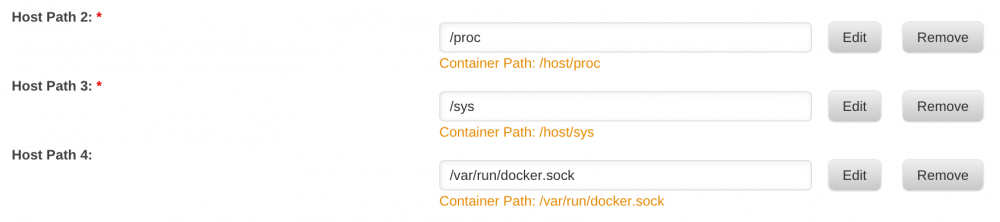
@roland, can we have the `/var/run/docker.sock` read-only mapping in the XML template please? @SirBindy, your folder mapping is bad. Make it
-
You should be able to see the name of the containers.
-
Not true. @L0rdRaiden, map the container `/var/run/docker.sock` file to the host. Read-only would suffice.
-
As previously stated, this currently only works with Corsair RMi and HXi. The i stands for "intelligent" which is their digital control and monitoring feature over USB.
-
Prolly not. Assuming there isn't much Corsair RMi/HXi unRAID users out there, but who knows...
-
In the spirit of badly written things, here is a plugin that reads Corsair power supply statistics and displays them in the dashboard. GPU load is the value from the output0 PSU lane. It is a wrapper for the corsairmi binary which reads out monitoring information for Corsair RMi and HXi power supplies. Works cool in conjunction with an UPS plugin. To install, go to Plugins > Install Plugin and paste https://raw.githubusercontent.com/realies/corsairpsu-unraid/master/corsairpsu.plg
-
Upon a graphics card crash, the system halted and had to be physically rebooted. After the reboot, the webGui is showing "Array Stopped - stale configuration" and the array devices are all unassigned with the cache drive the only populated device in the Main page. It seems that this is a bug, considering other people have faced it, although not sure how to reproduce without risking the data. Speaking of which, what is the recommended way of reassigning all devices and starting the array in this situation? Contents of disk.cfg here. Update: The super.dat file is NOT zero bytes, there's also a super.dat.CA_BACKUP. A filename called DISK_ASSIGNMENTS.txt contains the device order in details. One of the previously unassigned drives is missing from the system. Update2: Missing drive became available on next power cycle. Checking "parity is valid" and re-assigning disks according to old records seems to have brought the array online without losing data.
-
Why is `/var/run/docker.sock` suggested to be mounted with write access?
-
Updated to the latest. Nominal Power is empty and UPS Load is `-` with an Eaton 5E 650i.


