Rick Gillyon
Members
-
Joined
-
Last visited
Everything posted by Rick Gillyon
-
Wiping cache seems to have got me further. I don't use the cronjob.sh, I run from user scripts and the first command in that file runs a script: docker exec -t xteve_guide2go /guide2go/sdGrabber sdGrabber file is below: #!/bin/bash set -x cd /guide2go guide2go -config free.yaml guide2go -config sky.yaml wget -O simply.xml "https://tinyurl.com/xxxxx" If I run this sdGrabber script from terminal, it now runs okay and I get my files, but the script never returns control. Any idea why this would happen? It's run all the script, and I get the same even if I comment the wget or add an exit as last line.
-
Anyone having problems with xteve_guide2go? I'm using this with SD, and since Friday it's been hanging up on every run. I realised it was recently updated, so installed the master branch, but same issue. I run two lineups from a script, but after the first lineup it just hangs: 2024/03/18 09:46:51 [URL ] https://json.schedulesdirect.org/20141201/metadata/programs^M 2024/03/18 09:46:53 [G2G ] Create XMLTV File [freenew.xml]^M 2024/03/18 09:47:23 [G2G ] Clean up Cache [free_cache.json]^M 2024/03/18 09:47:23 [G2G ] Deleted Program Informations: 3239^M 2024/03/18 09:47:24 Listening on: :8080^M 2024/03/18 09:47:24 Using images/ folder as image path Any ideas?
-
These dockers are really just a port of the official releases, so probably best to ask the question on the emby forums.
-
sdb1 is an array disk, not a UD disk. I'll run a check on it, thanks.
-
Thanks @dlandon, this data has reappeared on the drive again after another reboot, so probably not worth wasting time on it. Really appreciate your efforts in any case. 🙌
-
unraidpvr-diagnostics-20230416-2020.zip
-
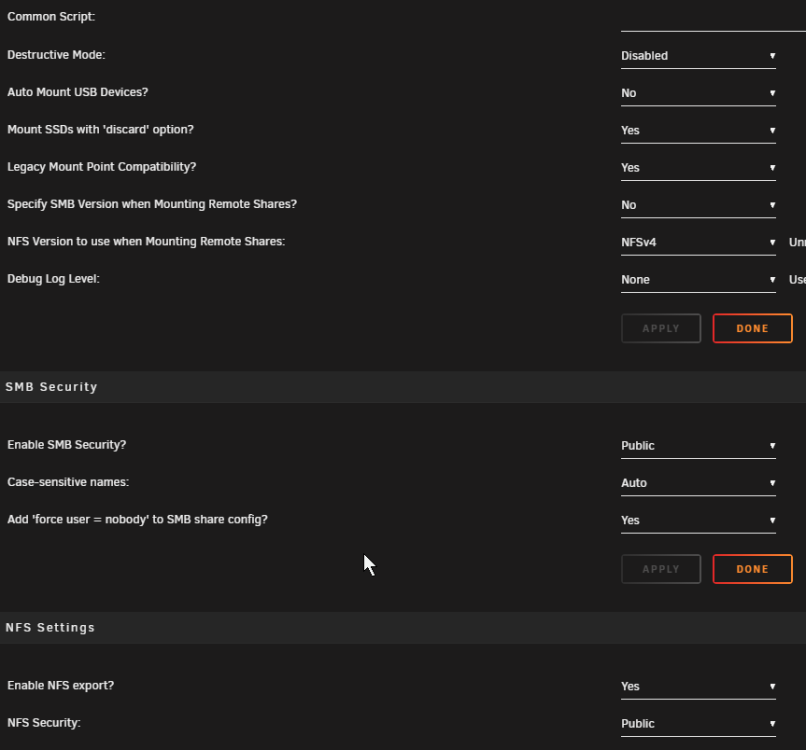
I have a problem since the latest update. My SMB Security had been reset to No, so I had no shared drive on the network. I've now changed this to Public: And the share is showing as mounted: The share shows on my PC, and I can get to it in /mnt/disks/LiveBackup from a shell, but in both places the disk shows as empty, 0 files. If I connect the disk directly to my PC it has content. This also happens when listing files in the folder: root@unRAIDpvr:/mnt/disks/LiveBackup# ls -al /bin/ls: reading directory '.': Input/output error total 0 Any ideas where the problem is? Thanks!

-
Plex will (or at least used to) happily import an empty file and lose all your data. So I have g2g run first to an interim file (e.g. lineup1_temp.xml), then my script checks the size. If the size is good, I copy lineup1_temp.xml to lineup1.xml, which xteve will import. If not good I leave yesterday's lineup1.xml in place for xteve. SD is pretty flakey these days for me, probably fails once a week.
-
Might be better posting in General Support with diagnostics.
-
Yep, just from terminal. You have the "extra parameters" on the docker template?
-
Working here. How did you try to enable it? In 6.9.1 just run "touch /boot/config/modprobe.d/i915.conf" from shell, remove old lines for this gpu from your go file, and reboot. The usual extra parameters should be in your Emby docker config.
-
Working on 6.9.1 here.
-
Me too. As soon as playback stops, the folder is empty.
-
Thanks for that. It worked with the xteve buffer with that vlc user agent, so I changed back to the xTeVe user agent and it's still working. Looks like they fixed it overnight. Thanks anyway!
-
vlc seems to be working fine but throws a lot of errors, e.g. 2020-12-09 02:32:54 [xTeVe] Streaming Status: Receive data from VLC 2020-12-09 02:32:54 [xTeVe] VLC log: [0000563efd486500] main interface error: no suitable interface module 2020-12-09 02:32:54 [xTeVe] VLC log: [0000563efd487c20] main interface error: no suitable interface module 2020-12-09 02:32:54 [xTeVe] VLC log: [0000563efd487c20] dummy interface: using the dummy interface module... 2020-12-09 02:32:55 [xTeVe] Streaming Status: Buffering data from VLC And why use? My ipTV service has recently changed something, and as a result it errors out when using the xTeVe buffer with Emby: 2020-12-09 00:00:10 [xTeVe] Buffer: true [xteve] 2020-12-09 00:00:10 [xTeVe] Buffer Size: 1024 KB 2020-12-09 00:00:10 [xTeVe] Channel Name: 5USAB 2020-12-09 00:00:10 [xTeVe] Client User-Agent: 2020-12-09 00:00:10 [xTeVe] Streaming Status: Playlist: ipTV - Tuner: 1 / 3 2020-12-09 00:00:10 [xTeVe] Streaming Type: [TS] 2020-12-09 00:00:10 [xTeVe] Streaming URL: http://url.url.net:80/USER/PASS/4766 2020-12-09 00:00:11 [xTeVe] Streaming Status: HTTP Response Status [200] OK 2020-12-09 00:00:11 [xTeVe] Content Type: 2020-12-09 00:00:11 [xTeVe] Content Type: 2020-12-09 00:00:11 [xTeVe] [ERROR] Streaming error (Server sends an incompatible content-type) - EC: 4003 vlc is the only thing that works for it. They say they only changed dns, but it's broken the service for Emby (all my other clients work fine, Emby is the only one using xteve).
-
Hi @alturismo, when I launch a shell in this docker, the /usr/cvlc is 2.5 years old. I'm not sure if that's coming from this docker or if it's from elsewhere, can you advise how to update if it's not here? Thanks for the great docker btw.
-
Same problem here in England.
-
I just grab the log from user scripts. As I say, it's not very helpful. You can also run the line in the console and grab the output. The problem will be SD returning crap data and causing g2g to fail, but unless they admit it we're stumped. Btw, you should change your grabber script to only overwrite your XML file if the new XML file is big enough. That way, even if it fails you'll have a week or so of data.
-
Currently SD say they have no problem and the error message: [ERROR] json: cannot unmarshal number into Go struct field SDSchedule.stationID of type string means nothing to them, not enough to go on. I've sent the full log. FWIW.
-
Raise a ticket with SD, when stuff like this happens they normally need to restart their services.
-
Not a clue, you'd have to try it for yourself.
-
I just have everything ticked. Nothing gets unticked when the docker restarts.
-
In Extra Parameters for the docker: --device /dev/dri:/dev/dri In go: #!/bin/bash # GPU modprobe i915 chmod -R 777 /dev/dri # Start the Management Utility /usr/local/sbin/emhttp & No idea VAAPI vs QuickSync, probably wasn't available when I set this up.
-
Dashboard will tell you if it's transcoding. Mine uses VAAPI hardware transcoding with an Intel chipset. You can also check if Premiere is enabled, just click "Emby Premiere" at the left of the dashboard.