






Spazhead
Members
-
Joined
-
Last visited
Everything posted by Spazhead
-
you have to use the original chia program to withdraw to another wallet
-
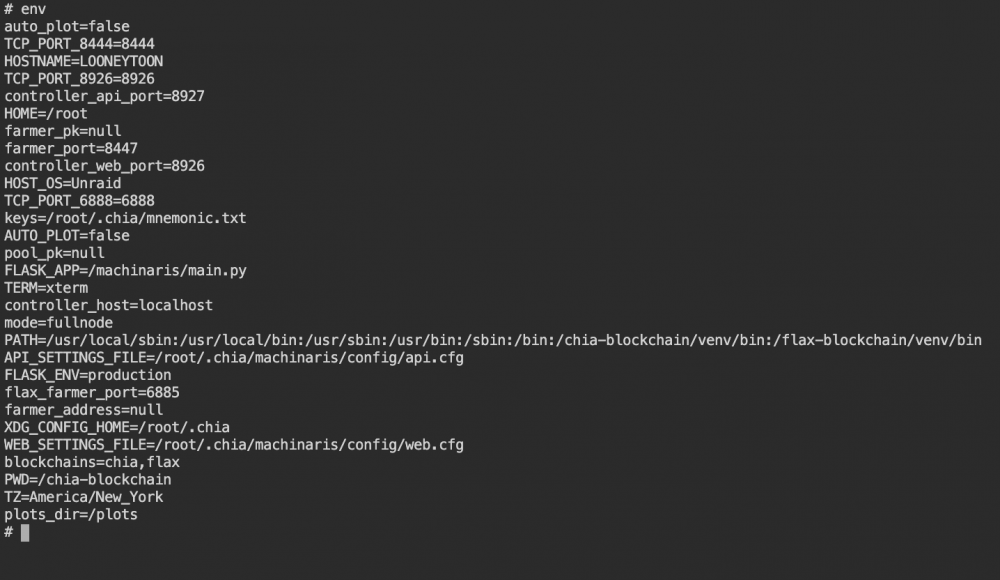
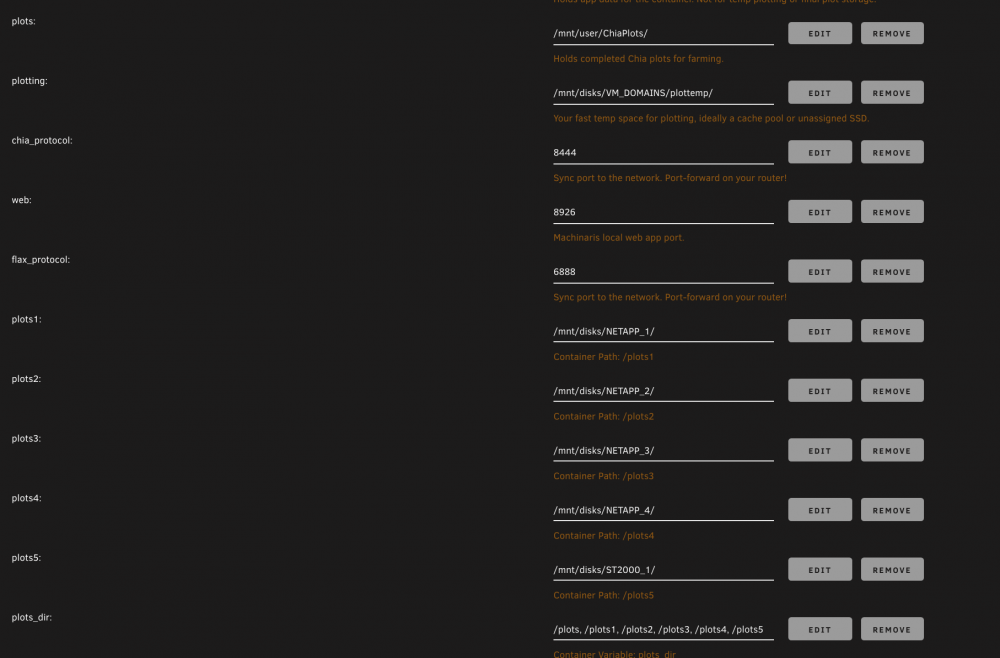
i tried with both comma and colons, both did not work, when i check the 'env' in the container, it doesn't seem like plots_dir is being overrided.. I even stopped Docker, deleted my docker.img, deleted the macinaris.xml, reloaded it all and still did not work. if anyone can see what i'm doing wrong, please let me know... here is my config.yaml config.yaml
-
this is what i have, but plots_dir is not working for me
-
hey there thanks, could you please show me your complete settings, exactly as you have setup, please and thank you!
-
could someone post their unraid docker setting screen that has multiple plots_dir working. It's driving me crazy that I can't get mine to work. Thanks
-
hi there , i just tried with comma's, still no luck for me
-
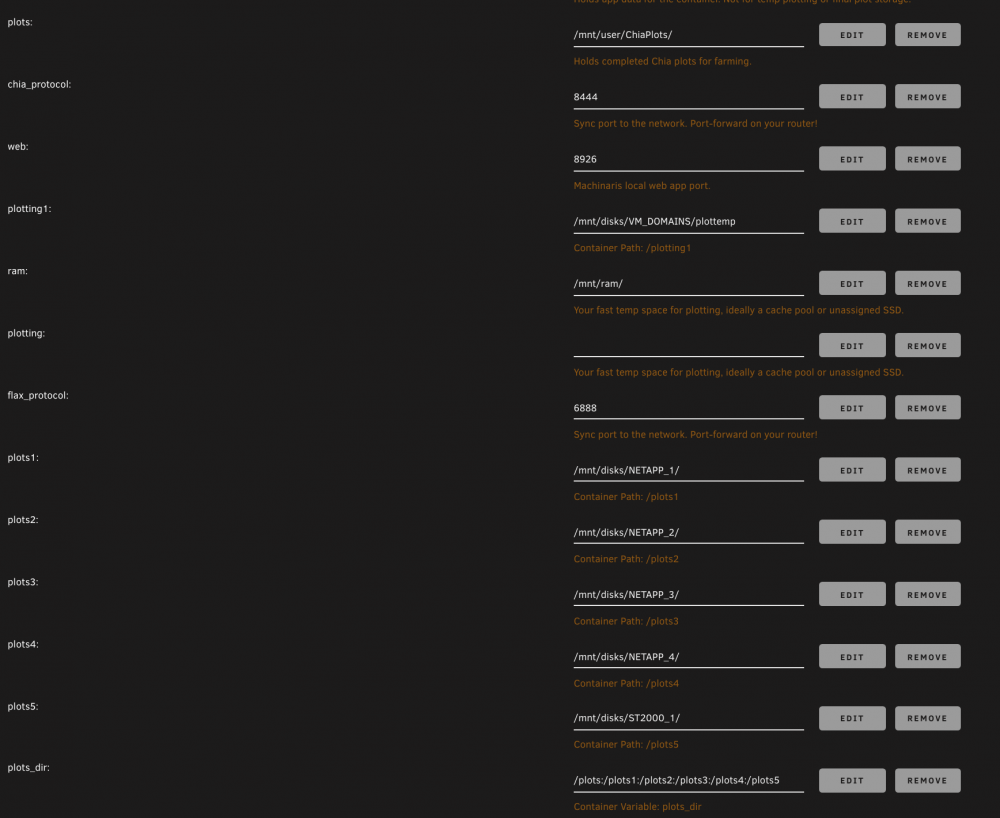
hi does my plots_dir setup look correct?
-
just use regular unraid terminal and use actual directories in unraid, not the forwarded ones inside docker
-
what i do to monitor temp drive space is open several terminal windows and run the following command in each one 1st terminal - watch -n10 du -sh /mnt/plotting <--- put your directory here for tmp 1 2nd terminal - watch -n10 du -sh /mnt/ram <--- put your directory here for tmp 2 they should both empty out after each job hope this helps you trouble shoot EDIT : also you can use an old ipad/iphone or any tablet/phone, that you may have lying and use that to monitor your plotting screen. like i use an iphone 5 and iphone 5c to monitor drive space, and iphone 6 to monitor Machinaris GUI. use safari to login to unraid, open terminal window and type in your commands ALSO make sure to turn OFF sleep mode on phones/tablet
-
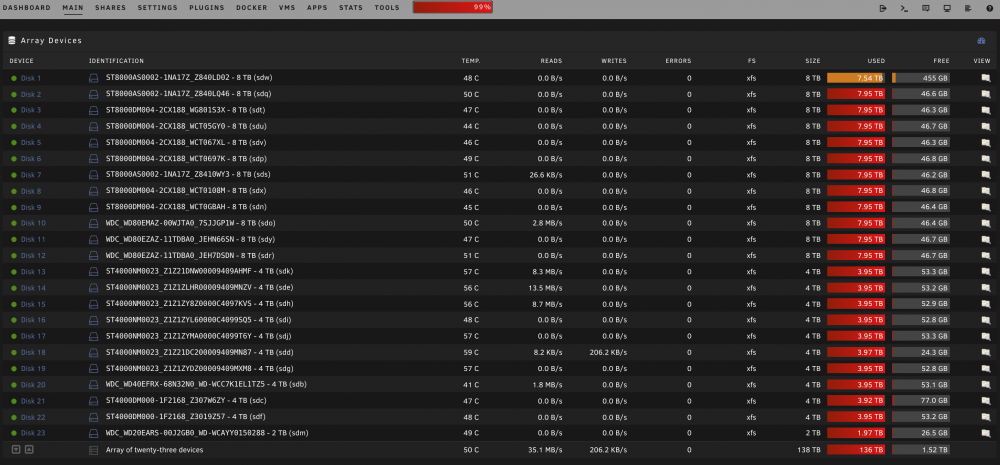
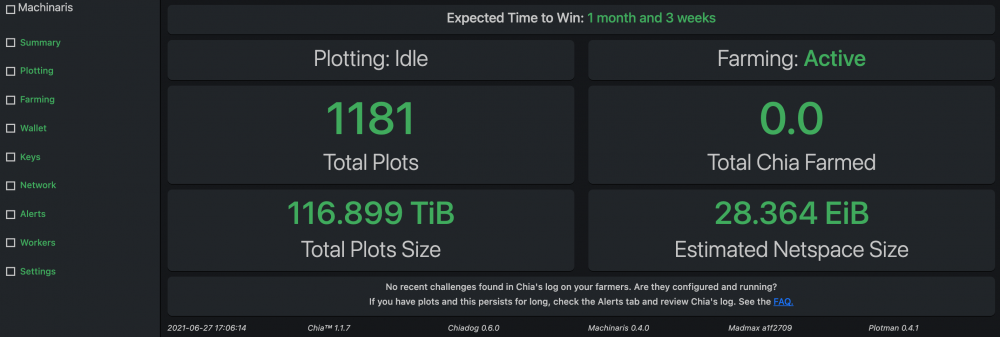
Plotting complete for me, one month to complete 1181 plots on existing old hard drives. 90% of these drives have CRC & Bad sectors on them so i don't trust them for real data, but for chia i don't care if it fails. lets earn some Chia hopefully.. Note: Disk 1 is for surveillance only, no chia Thanks Machinaris for making it easier!!!!
-
yes because when i just used /tmp, it would crash on me, until i found that creating a dedicated ramdisk was more stable. just trial and error testing.
-
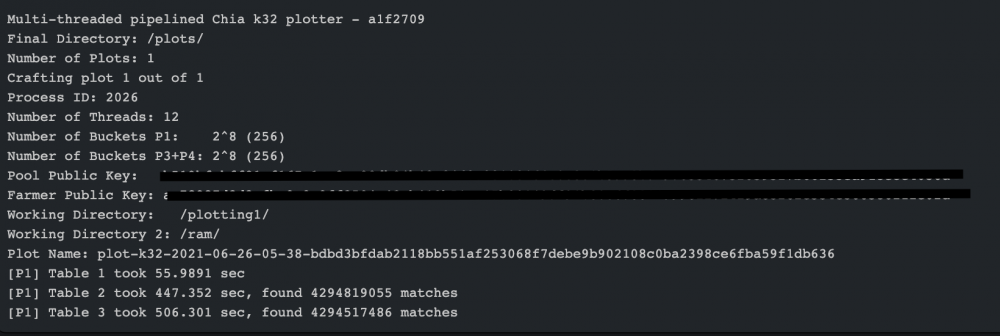
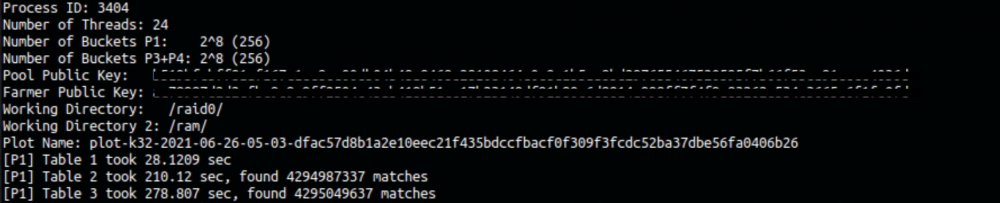
(12 threads) Total plot creation time was 6534.52 sec (108.909 min) (24 threads) Total plot creation time was 3947.82 sec (65.797 min)
-
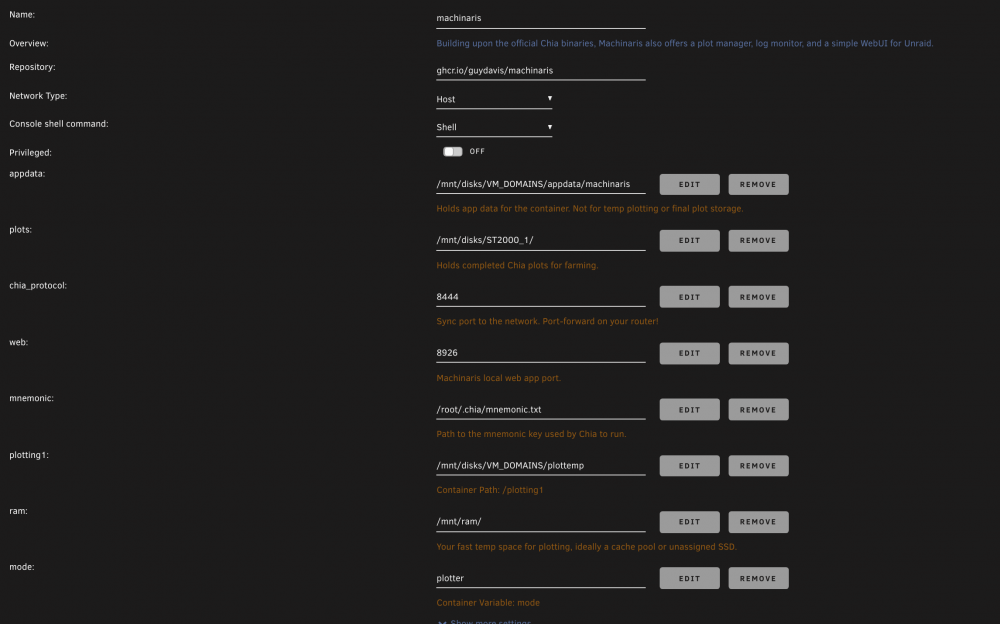
working great so far, I created a ramdisk to use as '-2' tmp drive here are the command lines i use in unraid terminal mkdir /mnt/ram mount -t tmpfs -o size=110G tmpfs /mnt/ram/ to remove ramdisk later, make sure it's empty rm -f -R /mnt/ram/*.* umount -f /mnt/ram rmdir /mnt/ram make sure to add the ramdisk (/mnt/ram) to your settings in machinaris docker here is what mine looks like, here is my plotter settings, I highlighted the only things i changed in YELLOW ----------------------------------------------------------------------------------------------- # Learn more about Plotman at https://github.com/ericaltendorf/plotman # https://github.com/ericaltendorf/plotman/wiki/Configuration#versions version: [2] logging: # DO NOT CHANGE THIS IN-CONTAINER PATH USED BY MACHINARIS! plots: /root/.chia/plotman/logs user_interface: use_stty_size: false commands: interactive: autostart_plotting: false autostart_archiving: false # Where to plot and log. directories: # One or more directories to use as tmp dirs for plotting. The # scheduler will use all of them and distribute jobs among them. # It assumes that IO is independent for each one (i.e., that each # one is on a different physical device). # # If multiple directories share a common prefix, reports will # abbreviate and show just the uniquely identifying suffix. # REMEMBER ALL PATHS ARE IN-CONTAINER, THEY MAP TO HOST PATHS tmp: - /plotting1 # Optional: Allows overriding some characteristics of certain tmp # directories. This contains a map of tmp directory names to # attributes. If a tmp directory and attribute is not listed here, # it uses the default attribute setting from the main configuration. # # Currently support override parameters: # - tmpdir_max_jobs #tmp_overrides: # In this example, /mnt/tmp/00 is larger than the other tmp # dirs and it can hold more plots than the default. #\\\\\\\\\\\\\\\"/mnt/tmp/00\\\\\\\\\\\\\\\": #tmpdir_max_jobs: 5 # Optional: tmp2 directory. If specified, will be passed to # chia plots create as -2. Only one tmp2 directory is supported. tmp2: /ram # One or more directories; the scheduler will use all of them. # These again are presumed to be on independent physical devices, # so writes (plot jobs) and reads (archivals) can be scheduled # to minimize IO contention. # REMEMBER ALL PATHS ARE IN-CONTAINER, THEY MAP TO HOST PATHS dst: - /plots scheduling: # Run a job on a particular temp dir only if the number of existing jobs # before tmpdir_stagger_phase_major tmpdir_stagger_phase_minor # is less than tmpdir_stagger_phase_limit. # Phase major corresponds to the plot phase, phase minor corresponds to # the table or table pair in sequence, phase limit corresponds to # the number of plots allowed before [phase major, phase minor] tmpdir_stagger_phase_major: 3 tmpdir_stagger_phase_minor: 0 # Optional: default is 1 tmpdir_stagger_phase_limit: 1 # Don't run more than this many jobs at a time on a single temp dir. # Increase for staggered plotting by chia, leave at 1 for madmax sequential plotting tmpdir_max_jobs: 1 # Don't run more than this many jobs at a time in total. # Increase for staggered plotting by chia, leave at 1 for madmax sequential plotting global_max_jobs: 1 # Don't run any jobs (across all temp dirs) more often than this, in minutes. global_stagger_m: 60 # How often the daemon wakes to consider starting a new plot job, in seconds. polling_time_s: 20 # Configure the plotter. See: https://github.com/guydavis/machinaris/wiki/Plotman#plotting plotting: farmer_pk: <PUT YOUR KEYS> pool_pk: <PUT YOUR KEYS> # If you enable 'chia', plot in *parallel* with higher tmpdir_max_jobs and global_max_jobs # If you enable 'madmax', plot in *sequence* with very low tmpdir_max_jobs and global_max_jobs type: madmax # The chia plotter: https://github.com/Chia-Network/chia-blockchain chia: k: 32 # k-size of plot, leave at 32 most of the time e: false # Disable bitfield back sorting (default is True) n_threads: 2 # Threads per job n_buckets: 128 # Number of buckets to split data into job_buffer: 3389 # Per job memory # The madmax plotter: https://github.com/madMAx43v3r/chia-plotter madmax: n_threads: 12 # Default is 4, crank up if you have many cores n_buckets: 256 # Default is 256 farmer_pk: <PUT YOUR KEYS> pool_pk: <PUT YOUR KEYS> ---------------------------------------------------------------------------------------------------------------------------------------- these are the times I'm getting from my log, DELL R610 Dual Xeon X5675, 192 GB Ram is only 800 mhz speed (12 threads) (24 threads) looks like 12 threads will do 1 plot/2hrs approx and 24 threads will do 1 plot/hr approx Stay safe
-
you might want to make sure your plotting temp directories are clean out first if you reboot during the middle of plotting
-
I tried madmax on all my dell servers (1 x R510 and 2 x R610) and i get the same error on all 3, some thread error, googled it and no match, so i gave up. maybe a dell thing. tried in unraid and ubuntu. Machinaris is the way to go in unraid, "set it and forget it"
-
hi there, any way to add --preallocate to the rsync command, this helps me in unraid since i have my plots share directory as "write-most" so as to not daisy chain plot writes to the same drive causing slow down. thanks
-
i found my Windows VM slow as well after update, what i did was use an older machine setting in the VM settings this fixed my issue.

-
need help with settings if possible, I can run 6 to 7 plots at a time I also understand that chia requires only 1 tread after stage 1 when plotting, I want to limit the plots to only have 3 plots max at stage 1, so that i may assign more threads to start each plot i believe this can be done using these setting tmpdir_stagger_phase_major: 2 tmpdir_stagger_phase_minor: 1 # Optional: default is 1 tmpdir_stagger_phase_limit: 1 but am confuse as to what i should set these parameters to be???? anyone know how i should configure this? thanks current setting plotman.yaml
-
hi yes i did the script fix already, but was hoping that it would be fixed in the next version. I'm only using Machinaris to Plot, turned off everything else "chia stop farmer"
-
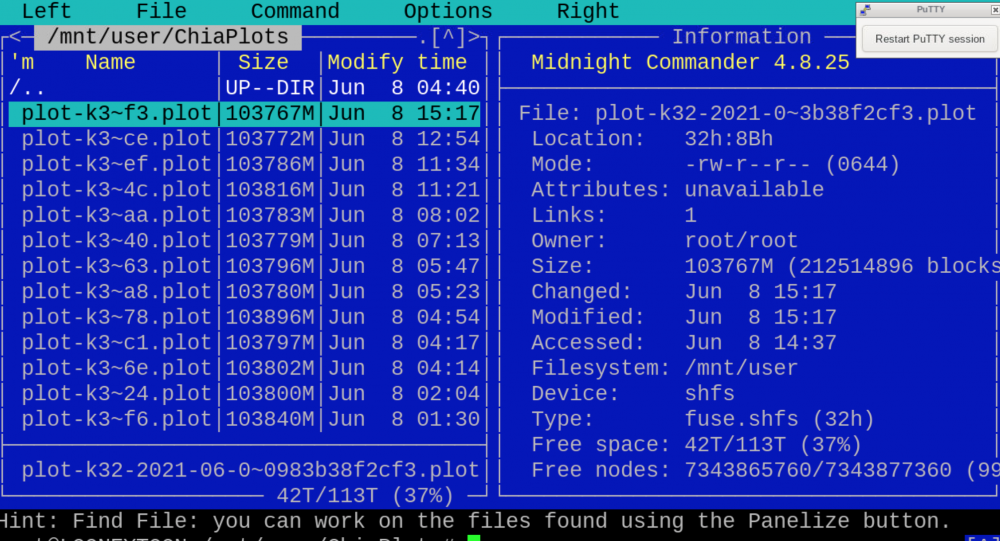
hey there, having an issue, after the plot is create and moved to final location, the file attributes are -rw-r--r-- which is read/write for the owner (root/root), but read only for everyone else. anyway to make it read/write "-rw-rw-rw-" for all files in the next update? this causes an issue for Hpool when scanning the files, hpool thinks the files are invalid. thanks, great work!
-
quick question, do i uninstall Chia and then install and run this instead? in other words, I don't run Chia and Machinaris at the same time? thanks
-
i just encounter the same thing, all shares disappeared. currently rebooting to see if it fixes it. unraid 6.9.1 --------------- after reboot, all shares reappeared. but now i have no GUI on the server side, i can log in remotely. tinytoon-diagnostics-20210323-0257.zip
-
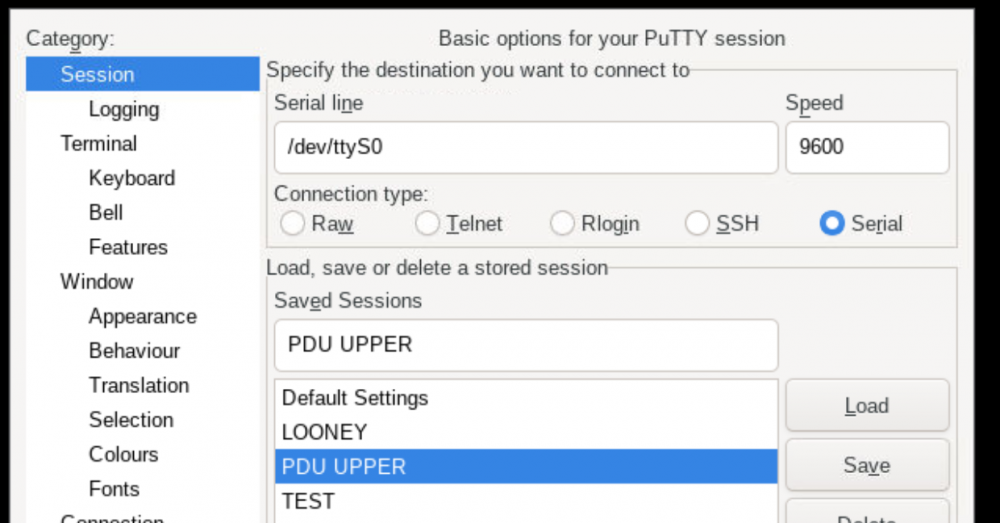
Hi there, since i updated to 6.9.0-rc2 i lost access to my serial port, the port is there, just can't can not access ttyS0 from putty Putty setup Diagnostic looneytoon-diagnostics-20210212-1011.zip any help would be great Thanks

-
ok will try that thanks but what happens when i access dropbox from another PC with another different user name??
-
hi there, try that, it's still the same. thanks








