





geekypenguin
Members
-
Joined
-
Last visited
Everything posted by geekypenguin
-
where is this? i have in the config file but not found it in the gui. edit: found it, I dont have an internal option but I have an external: XMLTV grab which is enabled an pointing at the socket file
-
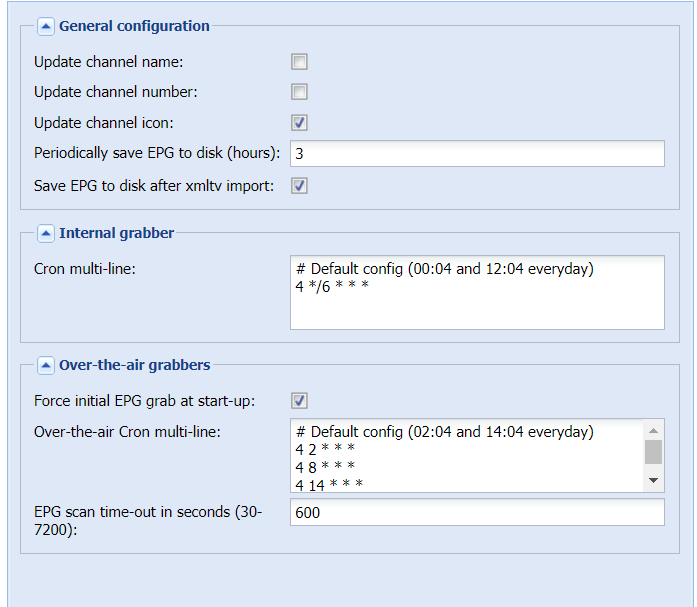
Can anyone help me with the XMLTV EPG setup please? I have a guide.xml file in the /data folder, and have set enabled to true in the epg config file under the grabber named xmltv. A restart of the docker and i now have an xmltv.sock file in the epg folder. But this is as far as I have got. I cant see anything under the epg graber config page on the web interface on how to set up the XML grabber any further (see screenshot) and under the channel editor there are no options under the epg source dropdown and manually typing XMLTV doesnt get retained after hitting save. Help!
-
Youre welcome, thanks for making an awesome docker and for being so proactive about tweaking it. I'll keep an eye out for an update and give it another try, but ill stick with the software option for now
-
Thanks. Ive attached two log files, for the same source file. The one timestamped 1418 is the "software" encoded one which works fine, and the one from 1458 is the one using the nvidia script, which has the sync issue postProcess.07-08-2019-1458.log postProcess.07-08-2019-1418.log
-
Sadly it is a file issue. Conversions using software are fine, but Nvidia processed ones are out of sync for some reason
-
Thanks, I didn't have the subtitles variable set but now I do it is working as should 🙂 Playback of a converted test file has the audio out of sync with the video but that might be the player. Going to try a few different players before tweaking settings
-
Thanks, I've checked the logs and it's found all the files and has them in the failed list. The conversion log says /scripts/software: no such file or directory
-
Hi, I've just downloaded recordings-converter and just had a quick question. Is there a way of monitoring what it is doing, or manually triggering a conversion? I've let it sit for a few hours now and I cant see any existing ts have been converted, and a new ts file I've moved into its watch directory hasn't either. I left the config all standard except changing the watch folder path Thanks in advance
-
So my zm instance was running fine until yesterday when it unexpectedly crashed. Not showing any updates pending but the docker won't restart. In the logs I get: *** /etc/my_init.d/20_apt_update.sh failed with status 100 The next line is killing all processes and then the docker stopped. Ideas?
-
Hope someone can help me with this issue, or at least point me in a direction to help work out what the issue might be. So ive never used unbalance before but have had unraid for a few years, and im looking to use the gather function to move my cctv share onto one disk. If I dont have all disk in the array spinning, then unbalance wont list any shares (dont know if its related or not). My main issue, however, is once i select a share, and click next, I cant go any further. The next screen doesnt list any disks to gather to, the next and previous buttons dont function and the links across the top to settings, log etc are static text and not links. There is just a small coloured bars animation that gives the impression something is doing something, but even after waiting over an hour, still nothing. Any ideas? never mind, i removed the plugin and tried a fresh install and its working now, albeit very slowly.
-
It absolutely can be done! I use the letsencrypt docker as a reverse proxy for a bunch of Apache based web services. I don't have a one specific for zoneminder but it will be exactly the same config as any others you have working, just set your backend server to the ip:port of your zoneminder instance
-
Just checked, 2 weeks 4 cameras is just under 1TB
-
There is more than one thing using g the cache admittedly, but I get a lot of motion past some of the cameras so get quite a few events. I'll try the zoneminder forum if you can't think of anything in your container. Thanks
-
I'm using modect
-
That doesn't really fix the issue, my cache (at 500gb) isn't big enough to store more than a couple of days worth of footage from all the cameras. That's why I move them onto the array for 2weeks before purging. The config folder for the docker sits only on the cache, and the cache/data share is on the array using the cache drive.
-
I don't know if this has been brought up before, but I couldn't find an answer on a quick search. Since upgrading to version 1.x many months ago now (zm was on version 0.something for over a year without issue) my array is always spun up. Zoneminder writes to the cache initially, and then mover puts the recordings on the array overnight. Using openfiles I can see that ZM is holding open seemingly arbitrary event files after they've been moved off the cache drive, and thus keeps the array spun up. If I restart ZM it releases the files and the array spins down. However, if I open the web interface again, or wait until the mover runs again, the array spins back up and ZM holds onto another random set of files. Any ideas?
-
Bump?
-
Don't know if this has been asked before or not but just in case. My config for nextcliud is stored in appearance on my cache drive, and the /data folder is kept on the array. However, there is a file "own cloud.db" that is in this data directory that nextcliud keeps accessing, which is keeping my array spun up. How do i relocate this file to the config directory or similar?
-
Is that under advanced> extra parameters perchance? Advanced view > Extra parameters then the full command is -e EXTRA_DOMAINS=<domain2>,<domain3> etc Thanks!
-
Sorry if this has been asked before but i couldnt find it in the thread. Is it possible to add a second domain? I have multiple domains and am trying to use this docker as a reverse proxy to different VMs on my network. I have got this to work with the first domain, but I cant get the second domain working as I am unable to provide the certificate file in the nginx config files as letsencrypt is only getting the certificates for one domain. I hope that makes sense!
