




(Small).png.20e01e54adf9a0993af949e43e312763.png)
CorneliousJD
Members
-
Joined
-
Last visited
Everything posted by CorneliousJD
-
Hi all, I posted over in the MariaDB forum but haven't heard anything back just yet. I want to make sure I'm doing this correctly. New MariaDB install that i want to use for Nextcloud for now, and possibly more in the future. I have HeidiSQL on my Windows box that I can manage the DBs with. I was going to create a separate user that is NOT root as I understand this is the right way to do things? e.g. create a "nextcloud" user and a "nextcloud" database. My question is what privileges does that user need and how do I grant them just to that one database? Thanks. PS - Right now my /data is just going to /mnt/user/nextcloud which is a share I have setup for nextcloud data - is this the correct way to do this? I'm under the impression I shouldn't point it at a share that I already have existing with documents/pictures/etc in it?
-
That's super weird. I have a Supermicro server and haven't had any call traces like that so that's really odd, sorry you're having such trouble. Hopefully more people report it if/when it occurs so that it can get the attention it needs then. In the meantime I would suggest setting up a quick debain VM, if you're not familiar with the linux terminal you can install a GUI and still run pihole with a few simple commands on the terminal. The GUI will help you with things like setting a static IP for the VM, etc. This is what I was doing up until I decided to give the docker container another go and got that working so I killed off my VM.
-
This is also how I used to run it. I just had a debian VM setup with command line only and no GUI for being as lightweight as possible. It worked well, but I've since migrated to the docker container and I run it with its own IP... sounds like you have some deeper issue if running a container with its own IP is causing call traces. Post diagnostics and logs in the general support forums maybe? If you can get that sorted out then this docker container should work for you.
-
Hi All, I want to make sure I'm doing this correctly. New MariaDB install that i want to use for Nextcloud for now, and possibly more in the future. I have HeidiSQL on my Windows box that I can manage the DBs with. I was going to create a separate user that is NOT root as I understand this is the right way to do things? e.g. create a "nextcloud" user and a "nextcloud" database. My question is what privileges does that user need and how do I grant them just to that one database? Thanks.
-
According to this https://github.com/diginc/docker-pi-hole/releases you SHOULD be able to edit the container to have this as the repository diginc/pi-hole:v3.3 I'm not 100% sure that will work, basing this off of my Ombi container that is linuxserver/ombi:65 from here: https://github.com/linuxserver/docker-ombi/releases As I'm running the version listed as tag 65 due to a bug introduced after that. EDIT: To add to this I would suggest you submit bug reports with logs so they can get this corrected, as this container is simply a template to use diginc's pihole container. https://github.com/diginc/docker-pi-hole/issues -- report issues here.
-
I was able to fix this by changing INTERFACE variable to eth0 as that seems to be what the docker container actually names the interface. things are running and working now it seems. Not sure why it worked on first launch with br0 picked but not 2nd launch, but this changed fixed it and i've started/stopped/forced updates and all is good. Note I also had to CHMOD the setupVars.conf file in order to edit it from my Windows machine using Notepad++, I wanted to change a few settings there. Namely these DNSMASQ_LISTENING=single DNS_FQDN_REQUIRED=false DNS_BOGUS_PRIV=false DNSSEC=false
-
I'm currently getting the following issue - this is a new setup for me, and I had things working, added a few whitelists from my old Pi.Hole config and restarted and it doens't seem to actually want to block anything or process queries now. dnsmasq: warning: interface br0 does not currently exist br0 is what it is bound to on my docker container network type, br0 with 10.0.0.20 and the variable for INTERFACE is also set to br0.
-
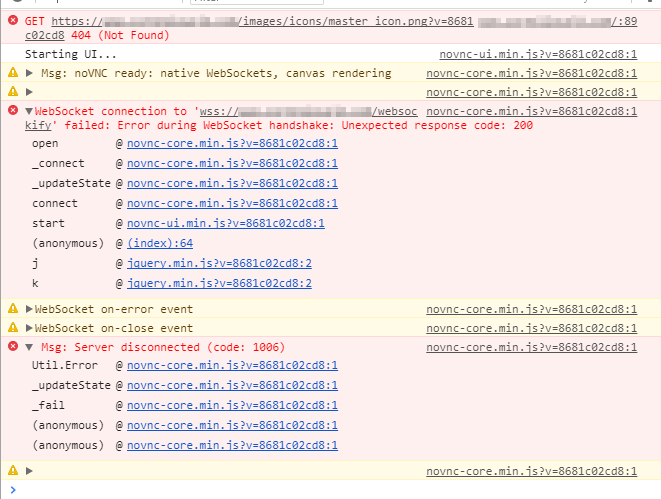
Figured out what I was doing wrong. Leaving config here for anyone that needs to do something similar in the future. The websockify needs to be port 7910, while the vnc itself is 7810. Oops! Also the "auth_request" portion of this config is only if you're using Organizr with server-auth configured. Comment those lines out otherwise. # CRASHPLAN CONTAINER location /websockify { auth_request /auth-admin; proxy_pass http://10.0.0.10:7910/; proxy_http_version 1.1; proxy_set_header Upgrade $http_upgrade; proxy_set_header Connection "upgrade"; proxy_set_header Host $host; proxy_read_timeout 61s; proxy_buffering off; } location /crashplan/ { auth_request /auth-admin; proxy_pass http://10.0.0.10:7810/; proxy_http_version 1.1; proxy_set_header Upgrade $http_upgrade; proxy_set_header Connection "upgrade"; proxy_set_header Host $host; }
-
Ok so I understand what you mean now @Djoss, here's my current config and the error I'm seeing. Still getting an error when the websocket goes to make the connection, gets error 200, so something is still off. # CRASHPLAN CONTAINER # NOT CURRENTLY WORKING # location /crashplan/ { # auth_request /auth-admin; # proxy_pass http://10.0.0.10:7810/; # proxy_http_version 1.1; # proxy_set_header Upgrade "$http_upgrade"; # proxy_set_header Connection "upgrade"; # proxy_read_timeout 86400; # } # NEW TESTS BELOW location /websockify { proxy_pass http://10.0.0.10:7810/; proxy_http_version 1.1; proxy_set_header Upgrade $http_upgrade; proxy_set_header Connection "upgrade"; proxy_set_header Host $host; proxy_read_timeout 61s; proxy_buffering off; } location /crashplan/ { proxy_pass http://10.0.0.10:7810/; proxy_http_version 1.1; proxy_set_header Upgrade $http_upgrade; proxy_set_header Connection "upgrade"; proxy_set_header Host $host; }
-
Super new to nginx and reverse proxying, so maybe I'm missing something but this isn't working for me? I just keep getting bad gateway or if I do get anything to load it's the VNC wrapper that shows it's disconnected and the image is broken in the top left too. If you know what I'm doing wrong let me know, would be very helpful, thanks!
-
Is there a way I can reverse proxy to this container? I want to be able to check it from the outside when I'm logged into Organizr. I'm not sure what kind of VNC web service it's using so I haven't been able to find a working config. Thanks!
-
Thanks for the update, working great again now. Hope whatever is in your plate isn't bad stuff!
-
Any update on getting this integrated into the actual plugin and updated in CA? Would like to avoid the patch provided as I know I'll forget that it's there and stumble on it in 6 months asking myself "what the heck is this..."
-
You know, I may not have stopped it, but it was definitely running w/ torrents again and i did a stop/start just for kicks w/out doing anything in between and it lost data again the day. I haven't stopped/started it since in fear of losing all the torrents again. They're all in the state folder for me to re-add, but it takes time/effort to do so each time.
-
Also wondering this before i kill off my VM for this container.
-
No problem! It wouldn't even let me save the XML at all so it's on PCI and all the other settings/drivers/etc are all there.
-
So I'm on unRAID 6.4 and have a new Windows 10 VM. Followed the other steps but it says that an address type cannot be "drive" so I cannot change these settings. I changed everything but left address type as 'pci' and it still shows as a normal hard disk instead of a thin provisioned drive. Any advice on what to change it to instead of pci? Thanks!
-
I've had Deluge lose my state data of ~100 torrents twice today now... I got the thin client part setup and working fine but I've lost state again as I was testing a few things. Is there a way to prevent this from happening? Losing the state of 100 torrents is a major pain to go through and re-add everything...
-
Hi all, I'm trying to setup my Windows box to have the full Deluge interface (there's somethings I just can't do via the WebUI) and I'm trying to follow this guide here: http://dev.deluge-torrent.org/wiki/UserGuide/ThinClient however I'm stuck at the point of adding/modifying the auth file - it doesn't seem to work. I go to my addpdata/deluge/auth and edit it and add a user/pass and auth level but i still can't connect. Also more importantly, after I modified the auth file and restarted the Deluge container all my torrents are gone?!
-
Thanks for the second read on that - I had cleared cache a few times via automated tools but that didn't work... tried on a laptop that hadn't visited the site before at all and everything was good, so was totally a cache issue. doh. I cleared manually on my main desktop and everything was fine. Time to stop trusting tools to do things for me. Thanks for everything, all running how I want it to now with HTTPS from Let's Encrypt! Awesome job LSIO Team!
-
So I made progress on this - I got HSTS disabled - that worked okay. And I got HTTP to HTTPS redirect working, but that caused another problem. I have links on that site to http://mydomain.com:8881 etc that do not use HTTPS because it is not supported or offered. To try and get around this I tried to set a location on my redirect but that doesn't seem to be working to let it through on http:// only, it still tries to force an HTTPS redirect. My default site conf looks like this at the top server { listen 80; server_name _; location = / { return https://$host$request_uri; } }
-
EDIT: Thanks I'll look into the nginx redirect part, and see if I can find a way to disable HSTS as well due to the below issue I had just posted. Unless someone knows a quick way to disable HSTS? Another, separate issue - I use my www.mydomain.com as kind of a shortcut page to other services, e.g. a shortcut on there links to my UniFi setup, which runs HTTPS on a different port than 443, and obviously doesn't use the same certificate. When I try to browse to that site I get Because this site uses HTTP Strict Transport Security, you can’t continue to this site at this time. That's in IE, and in Chrome it shows You cannot visit mydomain.com right now because the website uses HSTS.
-
Got everything setup and running now - but when users to go to www.mydomain.com it fails to load, but if you go to https://www.mydomain.com it will load fine, and then going to the plain old HTTP version (no HTTPS) will auto-redirect after that. How can I get visitors to not have to first enter HTTPS and get it to auto-redirect? Thanks!
-
Did you give the Docker container a static IP address (since this is now part of 6.4)? If so that may be messing with something that was previously set? I currently am not using this container right now but that may be a good place to start troubleshooting. For some insight when I setup a Debian VM and installed pihole last night, it lost my static IP after a reboot of the VM, I had to go into /etc/network/interfaces and make my changes there.
-
6.4 is out now - but to combat this kind of stuff I had just setup PiHole on a very slim (~3GB) Debian 9 VM and setup a crontab to run pihole -up at 5AM nightly. I'd like to use the container but how often is it updated or if development on the container ceases how can we get this updated? I want to be sure I'm not throwing away all my config on Debian and getting things *just* right haha.
(Small).thumb.png.b884b0484e848c502a315fc27b995f59.png)

