





bastl
Members
-
Joined
-
Last visited
-
Nichts zu danken. Das automatische Scrollen hast du exakt so umgesetzt wie vorgeschlagen. Großartig! Danke dafür! Das fehlt jetzt allerdings auch noch bei den Restore-Tests 😂 Das Verhalten wäre hier glaube auch super. Das Klicken auf den Pfeil vorm Repo-Namen öffnet ja auch nach unten erweiterte Infos. Dynamisch wäre hier auch sehr bedienerfreundlich, zumal man aktuell da sogar 2 Scrolleisten hat und das Verhalten ein wenig seltsam ist. Befindet sich die Maus in dem aufgeklappten zusätzlichen Info Feld, scrollt man nur dort und kann gegebenenfalls dann auch nicht alles sehen. Man muß quasi aus dem Feld raus, kurz scrollen, wieder ins Feld wechseln und wenn man Pech hat nochmal scrollen. Ich hoffe der kurze Clip veranschaulicht was ich meine. Borg_Backup_UI_Restore_Test_scroll_2026-10-31_17-10-30.mp4 MfG
-
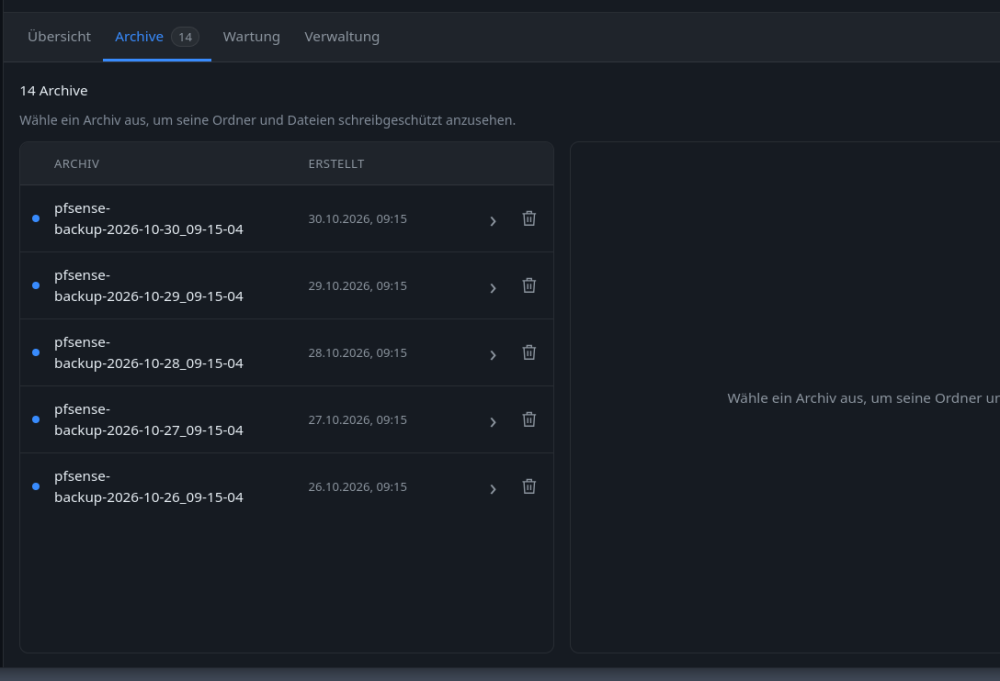
Danke für das Update. Ich bin gerade ein wenig am testen und eine Kleinigkeit ist mir direkt aufgefallen. Kurze Erklärung zum Vorgehen: Ich öffne die Repo-Seite. Nice schön übersichtliche alle meine 5 Jobs. Öffne testweise den untersten Job und merke nach unten klappt was auf, was wenn der Browser die falsche Höhe hätte man garnicht mitbekommt (2-3 Zeilen weniger hätten genügt). Das ich weiter runter scrollen muß, dacht ich mir dann schon, gesagt getan. Ich scrollte einmal am Mausrad bis ich folgendes sah.Vielleicht fällt an dem Punkt ja schon auf, wo ich ins Straucheln kam. 14 Archive hat das Repo, wo ist der Rest? Zumal unter dem letzten Eintrag ja noch nen Leerraum ist, was suggeriert, dass da noch Platz für mehr zum anzeigen wäre. Wo sind nun die restlichen Sicherungen? Ab in die Console und das Repo von Hand abgefragt und tatsächlich 14 Sicherungen vorhanden. Hat ne Weile gedauert, bis ich gecheckt hab, dass unterhalb des Angezeigten, außerhalb des Fensters noch "1-5 von 14 geladenen Archiven" stand und man vor und zurück blättern konnte. 🤣 Ist mit bewußt, das ist Jammern auf ganz hohem Niveau, es sind aber nunmal Kleinigkeiten, die nen gutes UI ausmachen und was man im ersten Moment selber garnicht auf dem Schirm hat. Ich würde die Anzeige "1-5 von ..." direkt über den ersten Eintrag packen (direkt nur in die linke Sektion) damit da nicht noch wer drüber stolpert. Hat man in den meisten Foren ja auch, dass sowohl oberhalb als auch unterhalb der Eintrag zum Umblättern vorhanden ist. Alternativ würde auch funktionieren, dass wenn man das jeweilige Repo durch Klick auf ">" öffnet, sich automatisch die Ansicht nach oben schiebt, dass man vielleicht auch die unterste Zeile direkt eingeblendet bekommt oder zumindest visuell sieht, dass was passiert. Keine Ahnung ob das machbar ist, aber ich hoffe man versteht was ich meine. Noch ne Kleinigkeit. Auf dem Dashboard in der Standort Sektion ganz unten ist der Button "Jobs öffnen" doppelt (bei mir mit nur einem Standort). Der oberste führt zu alle Standorte und is quasi überflüssig, wenn man darunter sowieso nochmal zu den jeweiligen getrennten Standorten verweist. MfG

-
Ist auf jedenfall übersichtlicher. Man könnte sogar den ausgegrauten ABBRECHEN Button noch weg lassen. Da würde man in der Höhe noch etwas Platz sparen und könnte es noch ein wenig zusammen rücken. Details anzeigen hast du ganz raus geworfen oder klickt man einfach den Job irgendwo an und es zeigt sich dann die Infos über Prune Create etc. oder unter dem ... Button ?
-
Nabend, Ich hatte gestern noch nen Uptime Kuma Screen vor mir und hab gedacht, so ein bisl in die Richtung könnte man die UI ja auch vorschlagen und so ein wenig geht es auch in die Richtung. Die Backupläufe über Zeit erinnern zumindest schonmal daran. Nettes Gimick auch, dass die Auslastung des Servers direkt mit im Dashboard zu sehen is. An der Übersichtlichkeit der Job Seite müßte man aber unbedingt noch was machen. Wenn ich auf Details anzeigen klicke bei nem Job klappt etwas auf, was so schon zu sehen ist, nur als Liste und nicht nebeneinander. Irgendwie doppelt gemoppelt. Direkt die Standardansicht verschwendet auch jede Menge Platz. Da sind mehr Leerräume als Infos. Mir wird da, wenn alles eingeklappt is gerade mal knapp 2 von 5 Jobs angezeigt, Rest muß ich scrollen. "letzter Test", "gültig bis" und "nächster Lauf" würde ich in eine extra Spalte packen und die zeile mit create prune compact check was wie gesagt doppelt is, nur über Details anzeigen lassen und schon hast du die Höhe die ein Job belegt mehr als halbiert Grüße
-
I noticed Unraid is on 1.2.0. Just to let you guys know. more infos: https://nvd.nist.gov/vuln/detail/cve-2026-111497 Broccoli2ShellBroccoli2Shell: the Brotli decoder bug (CVE-2026-111497)An out-of-bounds write in Google's Brotli decoder reaches Node.js, Python and more. Affected versions, checks and fixes.
-
Der Button farblich hervorgehoben als Indikator für nen laufenden Job und dann Abbrechen passt denke ich.
-
I noticed the same

-
Das geht ja rucki zucki hier 🤣 Jetzt fehlt noch nen Button zum Abbrechen des laufenden Jobs, oder geht das schon? Habs noch nicht darauf geachtet wenn ein Job läuft ob da irgendwo nen Button is.
-
@Thorsten Danke für den Vermerk. Hab gerade zeitgleich meinen letzten Post noch editiert wegens Ablauf des Tests. Nur als Info das es nicht untergeht.
-
Kleiner Verbesserungsvorschlag noch an dieser Stelle. Läuft ein Job wird dies auch unter Jobs angezeigt indem anstelle des "Jetzt starten" (in blau) Button rot dargestellt wird. Das könnte man auch bei den Restore Tests einführen. Man sieht nicht direkt gleich welcher Job läuft, wenn man die Sektion öffnet, sondern man bekommt nur in der Ecke eine Popup Warnung, dass en Job läuft. Welcher genau sieht man nicht, sondern man muß runter scrollen in das aktuelle Protokoll und findet dann erst in der 10 Zeile oder so den Namen des aktuellen Jobs Edit: Nachtrag zu dem zweiten Test mit 6GB Host Limit in den Settings. Der Job lief auch problemlos durch mit der neueren Plugin Version. Dateianzahl die gleiche, Test dauerte allerdings 2:08h. Auslastung vom RAM is auch nicht wirklich zu erkennen. Vor Beginn 66% belegt 9,4 frei, während des laufs um die 68% mit 8,6 frei. Server selbst scheint nicht wirklich nebenbei was zu tun gehabt zu haben. Nextcloud lief kurz nen Datenbank Job, was allerdings kaum Last erzeugt.
-
Ich bin es komplett so durchgegangen. Plugin aktualisiert, Settings wie gewünscht (waren bereits voreingestellt), RAM des Servers vor Beginn bei ca. 65% Auslastung (9,59GiB free), VMs laufen, Test Job mit nur ca 10K Dateien manuel angestoßen, lief ohne Probleme. Speicherverbrauch steigt augenscheinlich kaum an nur um ein paar 100 MB auf 66%. Test erfolgreich in 13:53min im Vergleich zum letzten geplanten Lauf des Jobs vom Sonntag mit 10:38min für 11K Files. Den kritischen "appdata" task dann wieder mit L2 Settings als geplant starten lassen. RAM wieder bei ca. 9,5GiB free vor Beginn, VMs laufend. Auch hier wie bei dem "kleinen" Test steigt der Speicherverbrauch nun kaum an. max 67% belegt und 9GiB free. VMs laufen ohne Probleme durch und auch der Test endet erfolgreich nach 1:42h bei diesmal "nur" knapp über 1,5mio Dateien. Letzter manuel gestarteter Lauf mit den 1,9mio lief in 56min durch. Warum die 400K Files weniger kurz erklärt. Das Verzeichn was gesichert wird, beinhaltet mehrere Speicherstände die vorher mit Rsync dorthin geschrieben wurden. Das Rsync Script räumt auch alte Sicherungen auf. Task lief heut schon, daher der Unterschied zu den gestrigen 1,9mio. hier noch das Log: [2026-10-26 18:06:01] ============================================================ [2026-10-26 18:06:01] Borg Restore Test v1.0.0 [2026-10-26 18:06:01] Level: 2 | Location: all | Force: False [2026-10-26 18:06:01] Log: /mnt/user/borg-backup-ui/logs/Borg-Restore-Test--2026-10-26_18-06-01-3377862.log [2026-10-26 18:06:01] ============================================================ [2026-10-26 18:06:01] Repositories: 1 [2026-10-26 18:06:01] Restore-test policy: job=b6c9c136-255d-4887-a4b0-f3757b6c39ba; level=L2; schedule=6 18 * * 1; source=schedule [2026-10-26 18:06:02] Memory protection active: 2048 MiB for worker and Borg children; host reserve 1024 MiB; group retained until final counter check [2026-10-26 18:06:02] ──────────────────────────────────────────────────────────── [2026-10-26 18:06:02] TEST: appdata (local) [2026-10-26 18:06:02] Repository: /mnt/remotes/DISKSTATION_UNRAID/BACKUPS_MINI/borg-backup-ui/borg-backup-appdata [2026-10-26 18:06:02] Level 1: Repository integrity [2026-10-26 18:06:28] OK Level 1 - latest archive: appdata-backup-2026-10-26_09-15-04 [2026-10-26 18:07:09] Size: 69.7 GB, files: 423813 [2026-10-26 18:07:09] Level 2: Extract Dry-Run [2026-10-26 18:10:14] Testing the complete archive (1569038 files) [2026-10-26 19:48:20] OK Restore test succeeded (6137s) [2026-10-26 19:48:20] Final memory counters: oom=0, oom_kill=0 [2026-10-26 19:48:20] → Ergebnis: /mnt/user/borg-backup-ui/restore-status/b6c9c136-255d-4887-a4b0-f3757b6c39ba.test [2026-10-26 19:48:20] Unraid dashboard widget cache updated (restore test result written) [2026-10-26 19:48:21] ============================================================ [2026-10-26 19:48:21] Summary: 1 OK | 0 failed | 0 unavailable | 0 skippedAktuell hab ich auf 6GB Limit hoch gestellt und teste nochmal.
-
Hier noch das Log von dem automatischen Task der fehlerhaft war. Wird aber denke ich nicht sehr hilfreich sein. Mehr als dass man sieht, dass er nach ner Minute etwa abbricht sieht man leider nicht. [2026-10-25 22:00:01] ============================================================ [2026-10-25 22:00:01] Borg Restore Test v1.0.0 [2026-10-25 22:00:01] Level: 2 | Location: all | Force: False [2026-10-25 22:00:01] Log: /mnt/user/borg-backup-ui/logs/Borg-Restore-Test--2026-10-25_22-00-01-476656.log [2026-10-25 22:00:01] ============================================================ [2026-10-25 22:00:02] Repositories: 1 [2026-10-25 22:00:02] Restore-test policy: job=b6c9c136-255d-4887-a4b0-f3757b6c39ba; level=L2; schedule=0 22 * * 0; source=schedule [2026-10-25 22:00:02] ──────────────────────────────────────────────────────────── [2026-10-25 22:00:02] TEST: appdata (local) [2026-10-25 22:00:02] Repository: /mnt/remotes/DISKSTATION_UNRAID/BACKUPS_MINI/borg-backup-ui/borg-backup-appdata [2026-10-25 22:00:02] Level 1: Repository integrity [2026-10-25 22:00:04] OK Level 1 - latest archive: appdata-backup-2026-10-25_09-15-04 [2026-10-25 22:01:04] Level 2: Extract Dry-Run [2026-10-25 22:01:06] → Ergebnis: /mnt/user/borg-backup-ui/restore-status/b6c9c136-255d-4887-a4b0-f3757b6c39ba.test [2026-10-25 22:01:07] Unraid dashboard widget cache updated (restore test result written) [2026-10-25 22:01:07] ============================================================ [2026-10-25 22:01:07] Summary: 0 OK | 1 failed | 0 unavailable | 0 skippedUnd dazu noch der Ausschnitt aus den allgemeinen Logs des Plugins zu dem Zeitpunkt. Vielleicht siehst du dort ja noch etwas hilfreiches: [2026-10-25 22:00:01] RESTORE_TEST requested request_id=32cd3132b44b source=schedule actor=scheduler run_id=20261025T210001Z-f0d6296ee0cd level=2 location=all selected_jobs=["b6c9c136-255d-4887-a4b0-f3757b6c39ba"] auto_selected=false [2026-10-25 22:00:01] API ok request_id=32cd3132b44b status=200 method=POST path=/api/restore-tests/run-job duration_ms=48 bytes=246 context={"job_key": "b6c9c136-255d-4887-a4b0-f3757b6c39ba", "phase": "restore-test-run", "source": "schedule", "run_id": "20261025T210001Z-f0d6296ee0cd", "selected_jobs": ["b6c9c136-255d-4887-a4b0-f3757b6c39ba"]} [2026-10-25 22:00:01] RESTORE_TEST process_started request_id=32cd3132b44b source=schedule actor=scheduler run_id=20261025T210001Z-f0d6296ee0cd pid=476656 level=2 location=all log_file=/mnt/user/borg-backup-ui/logs/Borg-Restore-Test--2026-10-25_22-00-01-476656.log selected_jobs=["b6c9c136-255d-4887-a4b0-f3757b6c39ba"] [2026-10-25 22:01:07] RESTORE_TEST notification job_key=b6c9c136-255d-4887-a4b0-f3757b6c39ba event=restore_test_failed source=restore_test status=Failed duration_seconds=64 exit_code=0 unraid=true email=false apprise=false apprise_mode=queued [2026-10-25 22:01:07] RESTORE_TEST finished request_id=32cd3132b44b source=schedule actor=scheduler run_id=20261025T210001Z-f0d6296ee0cd status=failed exit_code=1 duration_seconds=65 log_file=/mnt/user/borg-backup-ui/logs/Borg-Restore-Test--2026-10-25_22-00-01-476656.log ok_count=0 failed_count=1 unavailable_count=0 skipped_count=0 [2026-10-25 22:14:12] RESTORE_TEST notification job_key=b6c9c136-255d-4887-a4b0-f3757b6c39ba event=restore_test_overdue source=scheduled_reminder status=overdue duration_seconds=0 exit_code=0 unraid=true email=false apprise=false apprise_mode=queued [2026-10-25 22:14:12] Notification reminders checked: checked=6 sent=1 skipped=0 [2026-10-25 23:14:12] Notification reminders checked: checked=6 sent=0 skipped=1 Beide Log-Ausschnitte sind nur für den ursprünglichen automatischen Test-Task der fehlerhaft war. In dem später manuel gestartete Lauf seh ich in den Logs auch nichts, außer "API ok requests" zum Status. Falls du noch was benötigst an Info, sag Bescheid. Ich stell erstmal auf L1 um für das Repo und behalte es im Blick.
-
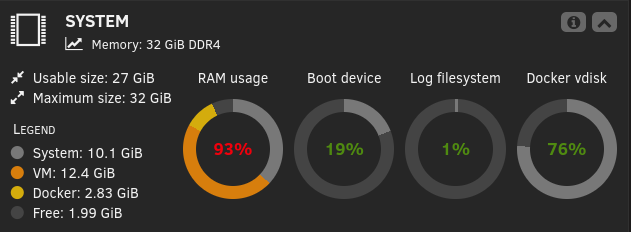
Servus. Ich denke ein normaler Container mit einem zusätzlichen Agenten für den Host macht am meisten Sinn. Wer quasi nur Verzeichnisse sichern möchte ist mit dem "normalen" Container gut bedient, egal auf welchem System der dann läuft. Wenn man dann noch Zugriff zum Host benötigt ist die Idee mit nem Host-Agent eigentlich ganz clever. Je nach Host System einfach den passenden Agent installiert. Problem ist nur, dass man dann auch mehrere Agents pflegen muß. Einer für Unraid, einer für TrueNAS, Proxmox etc. Bisher lief es bei mir eigentlich ohne Probleme, bis vor 2 Wochen einer der Restore Tests nicht abgeschlossen wurde. Ich hatte mir das angeschaut und gemerkt, dass wenn der Test läuft, mein System dann den RAM komplett zu haut, was dazu geführt hat, dass eine von 2 VMs die immer läuft gekillt wurde und der Test abbrach. Ich hab der VM dann vorsorglich 2GB RAM entzogen, von 8 auf 6 und der Test lief dann manuell gestartet durch. Letzte Woche lief der Test ebenso ohne Probleme automatisch, nur gestern leider wieder nicht. Gleiche Symptome, Borg vermeldet, dass der Test abgebrochen wurde. Schau ich mir dann den Prüfbericht an, scheint es bei Metadaten-Check nen Timeout gegeben zu haben. Repo erreichbar und Archiv lesbar beides grün, danach Feierabend. Ich hab leider keinen Screenshot gemacht und finde nachdem ich den Lauf nochmal von Hand gestartet hab, keine Infos/Logs zu dem abgebrochenen Durchlauf mehr. Entweder bin ich blind oder es gibt keine Option dazu. Ich hab hier aber noch nen Auszug aus dem Unraid Log (siehe Anhang) selbst falls das weiter helfen könnte. Eine Anmerkung hierzu, der eigentliche Durchlauf der geplant war, bzw. keiner der geplanten Durchläufe hat etwas in den Unraid Logs hinterlassen, weder den Start, noch Warnungen oder Meldungen auch das killen der VM ist nicht aufgeführt. 19:30 läuft nen Trim Durchlauf vom Cache etwa 5 Min. Danach passiert nix weiter auf dem Server. 20Uhr sind die Tests geplant und auch diese sieht man in den Unraid Logs nicht. Ursprünglich hab ich alle 5 auf die gleiche Zeit gelegt, vor 3 Wochen nach dem ersten Absturz der VM dann den betreffenden Test vom "appdata" Repo auf um 22Uhr nach hinten geschoben. Die anderen 4 Tests liefen immer ohne Probleme, nur der appdata Test verursacht Probleme. Kurz vor halb 1 hab ich den Test dann von Hand angestoßen mit laufender VM und kurz darauf schießt es mir wieder die VM ab. Der Testlauf läuft aber erfolgreich durch. Hier noch ein paar Anmerkungen zum Setup: Im Idle läuft der Server mit 70-80% RAM usage, wobei an dem Punkt 5-6GB von 32 gesamt noch frei sind. Während des Tests und auch während der anderen Repo Tests läuft der RAM hoch bis auf 92-93% zumindest sieht man das in der Unraid UI so. Nur bei dem "appdata" Repo gibt es aber das Problem. Während der Laufzeit des Tests sowohl geplant als auch danach manuel gestartet läuft auf dem Server nichts weiter aktiv. Docker wie Nextcloud und Jellyfin sind zwar aktiv, haben zu der Zeit aber keine Nutzer und auch keine Management Jobs laufen. Die betroffene VM ist auch im Idle. Info zum Repo: gesichert wird ein Verzeichnis in dem sich mehrere rsync Sicherungen vom Appdata Verzeichnis befinden. Etwa 180K Dateien befinden sich in einer Rsync Sicherung ca. 32GB. Suma sumarum sollen etwa 1,8mio Dateien gesichert werden. Ich weis, nicht gerade wenig und dauert auch über ne Stunde, aber im Prinzip egal. Sicherung läuft ja auch problemlos. Die Backups laufen auch eigentlich mit Standard Settings bis auf die Komprimierung. Diese steht bei allen auf zstd 6 statt 4. Die Restore Test settings stehen ebenfalls auf den Default Werten. L2 bei allen Tests. Folgendes hat mir der Manuelle Lauf gestern noch im Verlauf angezeigt: [2026-10-26 00:24:34] ============================================================ [2026-10-26 00:24:34] Borg Restore Test v1.0.0 [2026-10-26 00:24:34] Level: 2 | Location: all | Force: True [2026-10-26 00:24:34] Log: /mnt/user/borg-backup-ui/logs/Borg-Restore-Test--2026-10-26_00-24-34-1027308.log [2026-10-26 00:24:34] ============================================================ [2026-10-26 00:24:34] Repositories: 1 [2026-10-26 00:24:34] Restore-test policy: job=b6c9c136-255d-4887-a4b0-f3757b6c39ba; level=L2; schedule=0 22 * * 0; source=manual [2026-10-26 00:24:34] ──────────────────────────────────────────────────────────── [2026-10-26 00:24:34] TEST: appdata (local) [2026-10-26 00:24:34] Repository: /mnt/remotes/DISKSTATION_UNRAID/BACKUPS_MINI/borg-backup-ui/borg-backup-appdata [2026-10-26 00:24:34] Level 1: Repository integrity [2026-10-26 00:24:35] OK Level 1 - latest archive: appdata-backup-2026-10-25_09-15-04 [2026-10-26 00:24:45] Size: 89.3 GB, files: 630030 [2026-10-26 00:24:45] Level 2: Extract Dry-Run [2026-10-26 00:30:04] Testing the complete archive (1921601 files) [2026-10-26 01:21:10] → Ergebnis: /mnt/user/borg-backup-ui/restore-status/b6c9c136-255d-4887-a4b0-f3757b6c39ba.test [2026-10-26 01:21:11] Unraid dashboard widget cache updated (restore test result written) [2026-10-26 01:21:11] OK Restore test succeeded (3396s) [2026-10-26 01:21:11] ============================================================ [2026-10-26 01:21:11] Summary: 1 OK | 0 failed | 0 unavailable | 0 skipped Wie man sieht 1,9mio Files deckt sich also mit meiner groben Schätzung. Metadatencheck is in 10s durch und Restore-Probe dauerte etwa 56min. Docker und VMs werden durch Borg Backup UI nicht angetastet, nur das reine Dateiverzeichnisse wird gesichert auf ein gemounteten NFS Share zu einem Synology NAS. Frage ist nun, wie kann ich verhindern, dass mir das Plugin irgendwelche VMs und Dienste abschießt? Kann ich irgendwo die Arbeitsspeichernutzung begrenzen? Sollte falls nicht vorhanden unbedingt auf die ToDo List, dass das Plugin sich nicht einfach gnadenlos nimmt bis nix mehr da is. 🤣 Danke schonmal unraid-log-snippet.log
-
Hallo zusammen. Hab die Tage bei meinen Updates gesehen, dass das Python Plugin eingestellt wird. Im Support Text steht "support will end on 30.11.2026". Als Hauptgrund wird die Ankündigung von Unraid 8 genannt. Macht im Prinzip Sinn, wenn Unraid dann eh auf Fedora umstellt. Problem dabei ist, Unraid selber hat noch keinen Releasetermin genannt. Irgendwann nächstes Jahr. Ist die Thematik schon in die Projektplanung eingeflossen? Das Pluginsystem so wie bisher soll es dann wahrscheinlich nicht mehr geben. Wirds dann ein Docker für das Tool kommen? Kannst du da schon irgendwas sagen, wo es hin geht? @Thorsten Danke
-
Kann ich nachvollziehen. Was ich von meinen Tests her sehen konnte, funktioniert das meiste ja auch schon super. Bisher sind mir nur Kleinigkeiten aufgefallen was Bedienerfreundlichkeit angeht, was keine prio hat, wie die recht versteckte Option für den Restore-Test-Pfad. Eine genauere Job Planung für die Tests wäre dennoch in meinen Augen sinnvoll. Aktuell sag ich geplant, stell nen Intervall ein das Level, drücke Speichern und ein Klick auf "Jetzt Testen" entscheidet dann an welchem Tag und welche Uhrzeit der Test läuft. Ist so nicht gerade ideal keinen wirklichen Einfluß auf die Ausführungszeit zu haben. Dass so ein Test je nach größe des Repos und je nach Quelle auch schnell mal sehr lange dauern kann ist mir bewußt. Ein Hinweis dazu gibt es ja auch bereits, schonmal gut. Dennoch müßte man irgendwie dem User eine Option geben es detailierter konfigurieren zu können. 2 Kleinigkeiten hätte ich an dieser Stelle noch: für die Zeitplanung sowie Retention eine stündliche Option -H, --keep-hourly wäre super und ein Möglichkeit gezielt von Hand einzelne Backups aus einem Repo löschen zu können wäre noch toll. Durch meine Tests und durch die Typ-ID Umbenennung hatte ich in dem betreffenden Repo dann 3 Archive die angezeigt wurden aber nur 2 ausgelesen wurden. Löschen konnte ich über das WEB-UI das unter anderer "Typ-ID" erstellte Backup dann nicht und mußte übers Terminal ran. Einen Github Account um Feature Requests einzureichen besitze ich nicht, sonst hätte ich das bereits getan, deswegen an dieser Stelle. und vielen Dank nochmal für dieses Projekt.




