





Everything posted by [email protected]
-
RE: Port, update to template coming in the next few hours: RE: iGPU, as far as I know, LocalAI only supports Nvidia CUDA, not iGPU. https://localai.io/features/gpu-acceleration/index.html
-
You should just need to restart the app now that the file it expects is there.
-
Run touch anythingllm.db from inside your "/mnt/user/appdata/anythingllm" folder. I have just updated the template to mention this.
-
I just pushed out an update to the template that should fix this, check back tomorrow once it's synced.
-
You'll need some kind of integration that can use the models. I'd recommend a GUI like bigAGI: https://localai.io/docs/integrations/
-
Thanks for letting me know. The `.env` file must exist before running, otherwise Docker will try to make it (and assumes it's a folder, not a file). I have updated the template to note that.
-
Is there a way to mitigate breaking changes and/or major versions in a CA template? One app I manage a template for has a new major (x.y.z) version out, which requires changes to both the Docker/CA settings (some new config fields, some removed, some changed type from a string to a dropdown option) and to non-Docker settings (permission changes to the remote API the app interacts with via the provider's portal). 1. Is there a process that I can take to properly migrate user settings from the old "string" type to the new "dropdown" type? If not, is there a way to call this out to the user or force them to view the app's configuration page during an update? 2. In the same vain, is there a way to stop users from auto-updating to a new major version, or bring attention to it? It doesn't seem like there's necessarily versioning for CA templates. The container currently uses `Branch` for which Docker image to use, but with `latest` being the only option. Perhaps changing the only available branch to a specific older image?
-
As the error suggests, your command is incorrect. You need to provide the "-c" flag when providing a config file path. Use the following instead: python run.py -c /mnt/user/appdata/prerolls/config.yaml Also, please reserve this thread for discussion specifically about running this Community App as a Docker container on Unraid. For general questions about running the Python script directly, please open an issue on the project's GitHub page: https://github.com/nwithan8/plex-prerolls
-
Thank you for bringing the bug to my attention, it has been patched and will be available in the latest version shortly. The masking of the cron template has also been fixed. In the future, please open an issue on GitHub about the project: https://github.com/nwithan8/plex-prerolls, I check that more often than I check these forums.
-
The path "/mnt/user/data/media/..." doesn't exist inside Plex. You need to use the path to each file as Plex would see it, perhaps something like "/media/...". Refer to the mapped paths on your Plex Docker container. Also, those Fall, Winter et. al schedules won't work with just paths to the prerolls folders, you need to include full paths to individual media files (not sure if perhaps you redacted those for this help session)
-
The Docker container does not need to access the pre-roll files directly. In your schedule, use the path that Plex would use to access each file.
-
A second application release: Plex Prerolls GitHub: https://github.com/nwithan8/plex-prerolls Docker: https://hub.docker.com/repository/docker/nwithan8/plex_prerolls/general This application parses a simple schedule and, on a cron job, updates the prerolls used by Plex before a movie.
-
Apologies, I haven't been on the forums in a while. Did this resolve itself?
-
Yes, Squid has mentioned that to me. I didn't do a search for ntfy before making the template. I mostly was seeking to get Tauticord released.
-
Support thread for all my Docker Templates for CA. I am the developer on some of these applications. Others, I simply provide the template of an existing Docker application. This thread is reserved for issues with the Unraid Docker templates. For issues with an application itself, please redirect your concern to the app's own support channels.
-
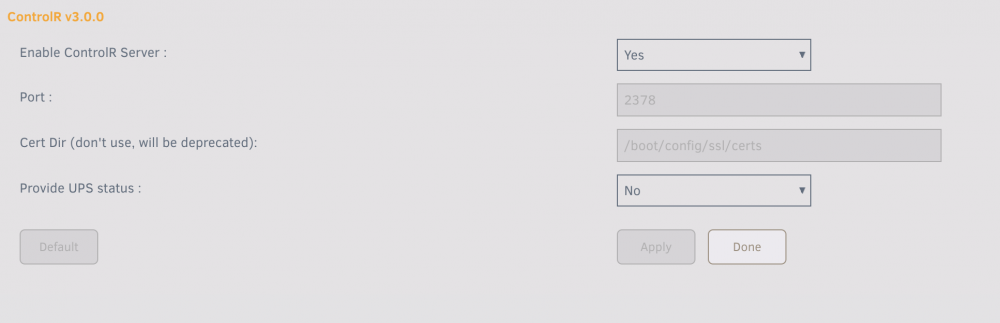
Running into the same issue, Unraid 6.9.2, latest ControlR plugin version. Ran `/usr/local/emhttp/plugins/controlr/controlr` and recieved: I: 2022/03/13 14:29:20 app.go:57: controlr v2021.11.25|3.0.0 starting ... I: 2022/03/13 14:29:20 app.go:65: No config file specified. Using app defaults ... I: 2022/03/13 14:29:20 app.go:185: cert: found MYSERVERNAME_unraid_bundle.pem I: 2022/03/13 14:29:20 app.go:75: state(&{Name:MYSERVERNAME Timezone:America/Denver Version:6.9.2 CsrfToken:9B4C04CC22086972 Host:http://MYSERVERNAME Origin:{Name:MYSERVERNAME Protocol:http Host:MYSERVERNAME Port:80 Address:XXX.XXX.X.X} Secure:false Cert:MYSERVERNAME_unraid_bundle.pem UseSelfCerts:false}) I: 2022/03/13 14:29:20 core.go:83: starting service Core ... I: 2022/03/13 14:29:20 core.go:355: Created ipmi sensor ... I: 2022/03/13 14:29:20 core.go:382: No ups detected ... 2022/03/13 14:29:20 Unable to wait for process to finish: exit status 127 Settings: Diagnostics via https://github.com/jbrodriguez/controlr-support: controlr.zip
-
Seems your GitHub repo was deleted? I was working on something similar, but wanted to contribute to yours first if possible.
-
I have updated the videos. Apologies for the error. I will say, the UUD is far better than whatever I had before
-
Following binhex_delugevpn update recently, CP's connection to Deluge is broken. After mucking around, I think I've pinpointed the issue to an incompatible SSL protocol in transfer.py. Seems CP is still running on Python 2.7, and lacks support for the new protocol used by Deluge 2.0. Any way to update the Python version in CP?
-
So much for the Wiki. If anyone has access and can grant me access, I'd love to help edit it and update it. H200 works with firmware 20, running on unRAID 6.6.7 Great instructions and necessary files here: https://techmattr.wordpress.com/2016/04/11/updated-sas-hba-crossflashing-or-flashing-to-it-mode-dell-perc-h200-and-h310/comment-page-1/ (S/O to techmattr on Reddit)
-
Having the same issue I think. Cant' access webui. Only one ovpn in the folder (Netherlands, which has port forwarding). Mind having a look? supervisord.log



