





capino
Members
-
Joined
-
Last visited
-
Thanks for the update. Systems tab is working and I was also able to remove the old disk.
-
Im experience the same error with the "System" tab. Beside that, I'm also unable to remove disks from the History on the bottom of the "Tray Allocations" tab
-
After some more digging, I found this pull request in the VIM GitHub repository. https://github.com/vim/vim/pull/12996 I also found a newer version of VIM (9.0.2127) on https://packages.slackware.com/. This version of VIM needs libsodium version 1.0.19 (which is also to be found on https://packages.slackware.com/. But after manually installing these two packages. I got the following errors: vim: /lib64/libc.so.6: version `GLIBC_2.38' not found (required by vim) vim: /lib64/libm.so.6: version `GLIBC_2.38' not found (required by vim) This suggests to also upgrade glibc to version 2.38. But, I'm not sure how this will affect the working of UnRaid itself.
-
Did you manage to fix this problem? Since some time I also have this issue with vim (9.0.1672) on UnRaid 6.12.4
-
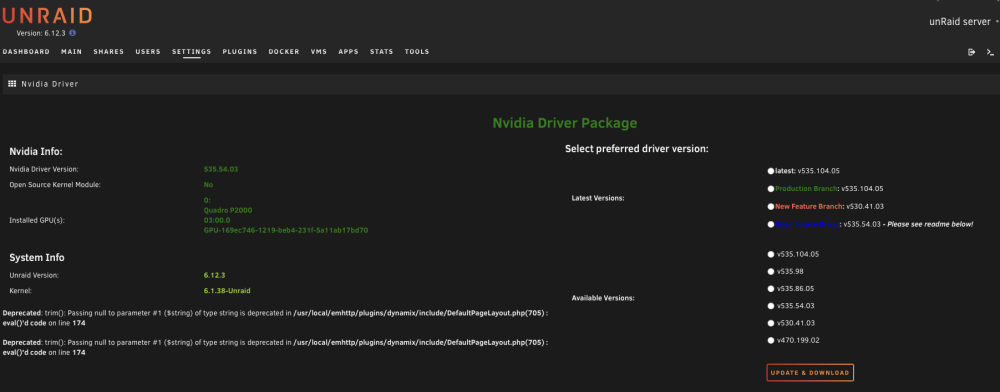
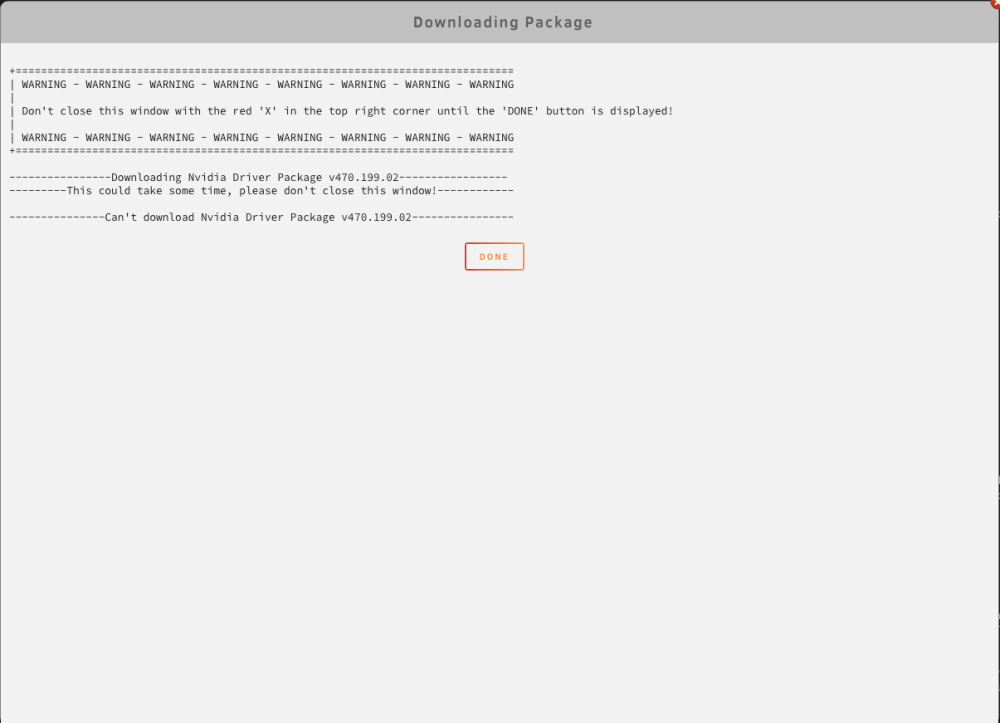
Reinstalling the plugin seems to resolve the problem. (without reboot in between) During the reinstall, driver version v535.104.05 has been downloaded. I still have to reboot the server. This will be done somewhere this weekend since I'm not at home at the moment.
-
Just updated the plugin to the latest version (2023.08.31) But cannot update to any driver version anymore. There is a deprivation notification now. When I try to update to latest I get the following message:
-
As mentioned in the Bug Report this problem seems to be fixed in 6.12.2
-
I have not rebooted yet, and I'm up to 4876 pays at the moment
-
When using a webbrowser to open a docker container console, multiple pty's are allocated, but not all are unallocated on close. This can lead to not being able to open a pty when the amount of allocated pty's gets to high with the following message: OCI runtime exec failed: exec failed: unable to start container process: open /dev/ptmx: no space left on device: unknown A reboot is needed to free up the allocated PTY's A workaround is to increase the max pty's by running: sysctl -w kernel.pty.max=8192 I have tested this in FireFox, Brave, Safari and Chrome.
-
I did some additional testing and it looks like, when a docker container console session is opened in a browser, multiple Pty's are allocated, but only one gets unallocated on close. When I open Unraid Pty console session only 1 is allocated. But sometimes the browser windows is not closed on running exit (a new Pty is opened). Running exit in this second (new) session keeps both allocated. Using ssh through a remote terminal seems (for now with some quick tests) not to keep Pty's allocated.
-
After doing loads of google searches, I finally found the correct syntax and a workaround. I seamed like the pts sessions are not correctly closed or unallocated. the amount of pseudo terminals is so high bij running: ls /dev/pts | wc -l I see there are 3432. As a workaround, I upped the amount by running. sysctl -w kernel.pty.max=8192 I'm not sure if this is because of something I did while creating my self build container, or this is due to an old kernel bug (https://lkml.org/lkml/2009/11/5/370)
-
After testing a self build container, I'm no longer able to open the console of any of the running dockers. I already removed the self build container and all unused volumes and images. When trying to connect to the console of a docker, I get the following error: OCI runtime exec failed: exec failed: unable to start container process: open /dev/ptmx: no space left on device: unknown I also have tried to stop an start docker, but this did not help. All running dockers seem to be running without problems. Does anybody have any idea what could have created this issue and how to resolve this? P.S. These are the values of docker container sizes: Total size 29.3 GB 7.05 GB 2.19 GB
-
capino changed their profile photo
-
After upgrading from 6.9.2 to 6.10.2 my server hangs during my backup using duplicati docker to OneDrive. During reading of the files (about 120GB an 1 million files) I noticed that there are processes in uninterruptible sleep. (ps aux with stat D). After a while the amount of processes in uninterruptible sleep are getting to a amount that the server becomes unresponsive. I noticed some of the Workers are in an uninterruptible sleep state. At that point, the only thing to do, is to stop the duplicati docker and everything comes back. If the duplicati docker is not stopped shortly after the load becomes to high, the server becomes unresponsive all to gather and only a hard reboot is possible to get unRaid working again. This same happend when upgrading to 6.10.0 so I downgraded back to 6.9.2 Since this also happend in 6.10.2, my server is back to 6.9.2 I imagine the problem has something to do with I/O. Is there a solution for this. Maybe restrict the I/O for the duplicati docker, or something overal?
-
It had to do with the fact that Unraid cannot talk to dockers with a static IP. I changed Elasticsearch, MongoDB and Graylog to the host IP and now it works.
-
I'm running unRaid 6.9.2 and tried the extra parameters, but nothing is landing In Graylog. --log-driver=syslog --log-opt tag="radarr" --log-opt syslog-address=udp://192.168.1.17:5442 My Graylog server is running as a docker on ip 192.168.1.17. When I do the same from docker on my MacBook, the logs are landing in Graylog. I also tried the GELF log-driver, but the same problem within UnRaid, but from MacBook it works. Does anybody have a solution for this?




