





Sinister
Members
-
Joined
-
Last visited
Everything posted by Sinister
-
in this case would mnt/user count as a possible Ram Drive directory if one chooses too ?
-
my apologies after rereading several times and getting it right i do see it does not show up in the panel but now even with it in the correct directory i still am prompted for login credentials
-
Followed this to a T whenever i try connecting to the share i created im prompted for login credentials even though its a public share. none of my created users are valid even though users panelshows i have read write access to the share
-
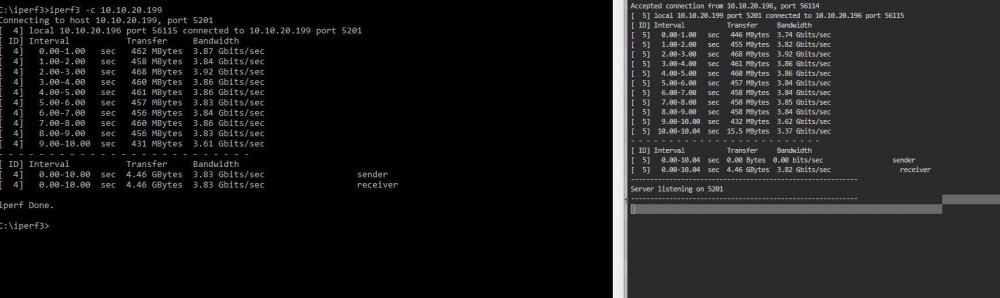
that makes sense which is why spaceinvaderone used 2 ramdisks in his tutorial. but then my question is why do i get these speeds using iperf3 which ignores hard drives. my PC on the left unRAID server on the right
-
Im sorry i dont understand im not sure i understand how to run that test i followed the latest spaceinvaderone video tutorial regarding iperf i dont think he did anything in particular to get it working for him. I followed along and definitelydid not get the same result
-
For the windows PC the card is in a PCIE x16 slot and the same for the unRAID server the windows PC is the P8Z77-WS with 32 gigs of ram I7 3770k processor. unRAID server is supermicro X9DRI-LN4F+ with 64 GB of ECC ram and 2x INTEL XEON E5-2680V2 10 CORE 2.80GHz
-
Hello all i recently purchased 2 Dell Broadcom 57810 Dual Port 10Gb PCIe SFP+ for faster transfer speeds between my Windows 10 PC and my unRAID server running 6.8.2. I watched multiple guides and have googled an epic ton and believe i have setup everything properly but i am only able to get a speed of 400+ MB/s capping at 500. I have setup a ramdisk on the windows pc and tried transferring between a Unassigned Devices SSD, and have tried transferring between an SSD on the windows PC and an SSD on the unRAID server. i have also setup iperf3 and run the necessary test's and am only getting about maybe 3.89 to 4 GB bandwith speed. I have tweaked the settings of the MTU/jumbo frames and it absolutely makes no difference, what is it that i am missing ?
-
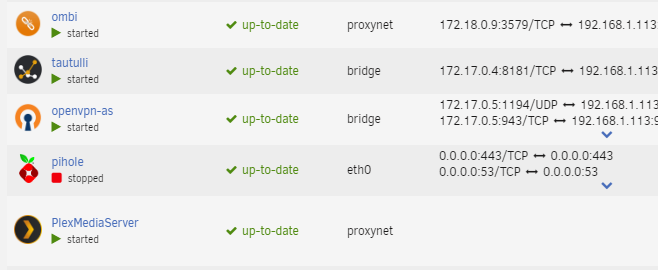
yes i am now able to reach plex via my domain name but now i cant reach it locally through unraid GUI via the WEBUI option when you click the docker. Any idea how to fix that ? also docker is not showing any IP address info like other dockers on proxynet custom network
-
Hello alli am currently going crazy, I am currently trying to reverse proxy plex using my own domain with letsencrypt and cant seem to get this working. Can someone tell me where i am going wrong ?, i have the address set in the plexmediaserver docker as https://mydomain.org and have created a CNAME for it. Here is my current config server { listen 443 ssl; listen [::]:443 ssl; server_name plexh.*; include /config/nginx/ssl.conf; client_max_body_size 0; proxy_redirect off; proxy_buffering off; # enable for ldap auth, fill in ldap details in ldap.conf #include /config/nginx/ldap.conf; location / { # enable the next two lines for http auth #auth_basic "Restricted"; #auth_basic_user_file /config/nginx/.htpasswd; # enable the next two lines for ldap auth #auth_request /auth; #error_page 401 =200 /login; include /config/nginx/proxy.conf; resolver 127.0.0.11 valid=30s; set $upstream_app PlexMediaServer; set $upstream_port 32400; set $upstream_proto http; proxy_pass $upstream_proto://$upstream_app:$upstream_port; proxy_set_header Upgrade $http_upgrade; proxy_set_header Connection "upgrade"; proxy_set_header X-Plex-Client-Identifier $http_x_plex_client_identifier; proxy_set_header X-Plex-Device $http_x_plex_device; proxy_set_header X-Plex-Device-Name $http_x_plex_device_name; proxy_set_header X-Plex-Platform $http_x_plex_platform; proxy_set_header X-Plex-Platform-Version $http_x_plex_platform_version; proxy_set_header X-Plex-Product $http_x_plex_product; proxy_set_header X-Plex-Token $http_x_plex_token; proxy_set_header X-Plex-Version $http_x_plex_version; proxy_set_header X-Plex-Nocache $http_x_plex_nocache; proxy_set_header X-Plex-Provides $http_x_plex_provides; proxy_set_header X-Plex-Device-Vendor $http_x_plex_device_vendor; proxy_set_header X-Plex-Model $http_x_plex_model; } } i am using dns verication with wildcard
-
thank you for trying to help hopefully someone knows what this is and how to address this. I have found posts on other sites saying that they fixed this by deleting the table in the database via MySQL but this isant something i can make sense of how to do this
-
I had already gotten that far and it seems even in the CLI im back where i started

-
so would that look like? wget https://download.nextcloud.com/server/releases/
-
i am currently on version 15 when grabbing the update it grabs the latest which is 17 im unsure how to grab version 16 since you have to update in intervals
-
Hello all im having a problem updating nextcloud after clicking the update button at what would normally be the login screen i get Doctrine\DBAL\Schema\SchemaException: The table with name 'nextcloud.oc_login_flow_v2' already exists. Detailed logs Preparing update Set log level to debug Turned on maintenance mode Repair step: Repair MySQL collation Repair info: All tables already have the correct collation -> nothing to do Repair step: Repair SQLite autoincrement Repair step: Copy data from accounts table when migrating from ownCloud Repair step: Drop account terms table when migrating from ownCloud Updating database schema Doctrine\DBAL\Schema\SchemaException: The table with name 'nextcloud.oc_login_flow_v2' already exists.
-
They have been added Via Jackett Should i still raise a github issue with that being the case ?
-
Were either of you ever able to resolve this issue as i am still having these problems with indexers failing
-
Is it that this is a widely known issue and easily solvable ?
-
My apologies if this have been covered elsewhere but I haven’t been able to find a solution regarding my issue . The problem I am having is that all my indexers keep failing every single day I have increased the rss sync interval to the maximum and when I go into the indexers tab and manually test they all succeed and sonarr functions normally until they all fail again
-
I apologize if this is a noob question but how do you update this docker? pi hole tells me there is an update available but any CLI commands i try dont work thanks in advance
-
ok let me be more specific the URL is not the issue the issue is the method that i had to use to set it up to reverse proxy it if you click the link in the last post youll see CHBMB made a blog post about How to set it up. His method is different from the method spaceinvaderone demonstrates in is tutorial where after setting everything up all you have to do is edit the proxy-conf file and switch the container to your custom network within unraid that is not how my instance is currently setup what i want is to be able to reverse proxy any container using the quick and simple method in the video
-
because as i said in one of my previous posts it is setup this way https://blog.linuxserver.io/2017/05/10/installing-nextcloud-on-unraid-with-letsencrypt-reverse-proxy/ using CHBMBs method and not the way in the video
-
when i set it up as demonstrated in the video using the proxy-conf files i expect to be able to reach the intended container and not the letsencrypt landing page my sonarr,radarr,nextcloud certainly does not come up the way it should . now im not claiming to be an expert at all but im pretty good at following instructions and i have and i have not been able to achieve the same result maybe there is a setting in Unraid thats making it not work i dont know again im no expert and just asking for help
-
thank you and that definitely isnt my issue i made sure everything was correct there is a comment or 2 on the video itself with a person or 2 having the same issue and even one more user that posted here last night itd be interesting to see if we all made the same mistake but ive followed many tutorials of his and generally they work but this time is a no go for me
-
im not sure if you would mind removing that link if not no big
-
it is which i have removed from the other post cant believe i missed that but it was setup using an old blog from the legendary CHBMB https://blog.linuxserver.io/2017/05/10/installing-nextcloud-on-unraid-with-letsencrypt-reverse-proxy/ and not the way spaceinvaders tutorial is where if setup correctly all you have to do is edit the proxy-conf file and switch the container to the custom network to reverse proxy something

