radfx
Members
-
Joined
-
Last visited
Everything posted by radfx
-
Thank you! Sent from my iPhone using Tapatalk
-
i didn't realize that this would impact its ability to access files, or if it did it would impact everything (as i mentioned it will move if its in the same subdirectory) but i will do as you suggest and give it a try, thank you!
-
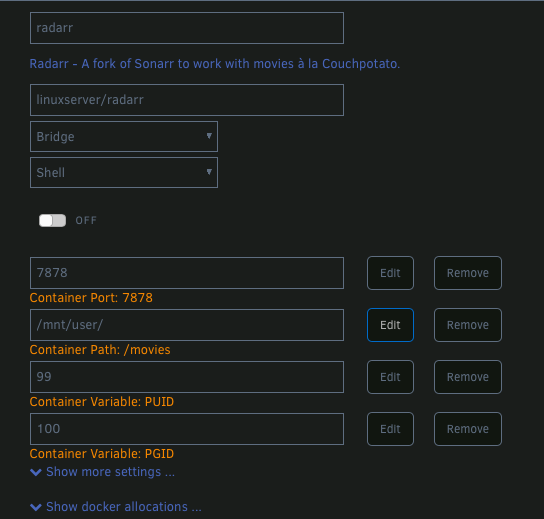
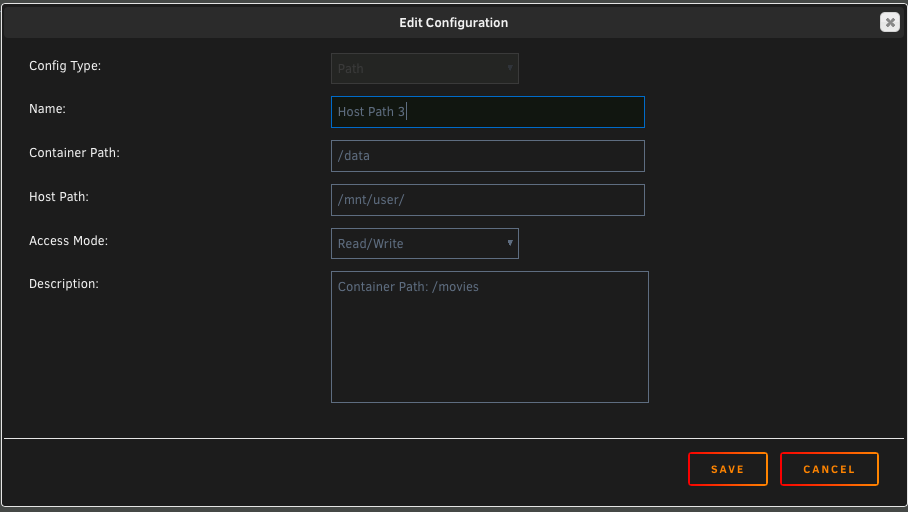
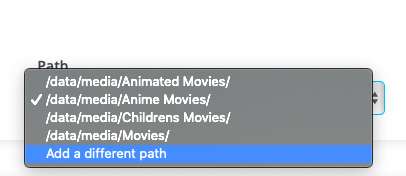
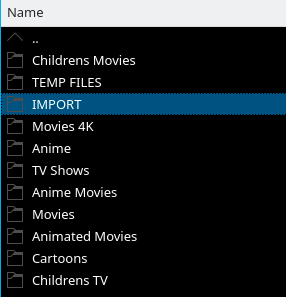
*EDIT: SOLVED* Thanks to user @ulTimaS who pointed out what people before my post were talking about an updated version of Mono (V6) that has been causing permissions and import issues for multiple users and suggested to force it to use 5.14 and my instant importing has been resolved... Thank you again. And thank you to @Squid for pointing me in the right direction earlier while he was helping another user.. Hi everyone. Im writing to ask for some help (yeah, again, sorry), I thought I had everything setup as per a previous post regarding slow import speeds because User Squid (sorry I don't know how to link or mention user accounts directly) mentioned that files traversing different mount points cannot be moved so a copy is done, and what I thought I did right following the advice posted but I noticed again when importing a 30GB movie that it took nearly an hour.. So I did some experimenting. Firstly, I have changed my Radarr mounts in unraid to be /data only (I deleted the /download mount point and changed the remaining one) as per user "Wh0_cares' "and then within radarr itself had /data/media/movies while pointing it to manually import from /data/downloads. (this was on page 10 of this post) my understanding was because /data was now the original mount point for this docker, any subdirectory difference shouldn't matter, but it still does.. If I move the file to the same folder as where the movie folders live and import, its instant, if I have it at the downloads folder, to copies, but its all originating from /data. so I think? I have included some screenshots showing the layout.. I thought I had it going, as im sure I did a test import last month when I set it up, but testing now shows it still copies when manual import is set to move unless its from the same folder as the destination. so you can see my radarr folders : all coming from /data. so if I have the source file living within /data/media/import or /data/media/temp files (see pic: its an instant move but coming from its original download folder which is /data/downloads/radarr/ it will only copy. I can happily use Krusader to move the file instantly between these directories. Any help greatly appreciated!
-
Hi, I realise this has been quite a while since This post, but I have run into the same issue you did with super slow importing of movies (now I started getting 4K stuff which is 15-50GB it takes a stupidly long time to move. so I'm looking at changing the paths but I'm just not 100% certain wha to change. I mostly use Linuxserver.io containers so my radarr paths are /downloads and /movies, when you said you removed /downloads does that mean you went to update the container, removed the host path 2: * container path /downloads line completely and just had a single Host path entry going to your /data share then within radarr itself, what paths did you have to change, I think I'm following but down want to break my setup.. Hi, I realise this has been quite a while since This post, but I have run into the same issue you did with super slow importing of movies (now I started getting 4K stuff which is 15-50GB it takes a stupidly long time to move. so I'm looking at changing the paths but I'm just not 100% certain wha to change. I mostly use Linuxserver.io containers so my radarr paths are /downloads and /movies, when you said you removed /downloads does that mean you went to update the container, removed the host path 2: * container path /downloads line completely and just had a single Host path entry going to your /data share then within radarr itself, what paths did you have to change, I think I'm following but down want to break my setup.. from what user Squid said am I thinking right that in the container editor if you have multiple hosts paths it gives the docker acmes to those directories but it will see them as completely separate volumes so 'moving' or hotlinks don't work? if you could post screenshots so I can n00b my way through it would be greatly appreciated..
-
Will give these settings a try, thank you! Sent from my iPhone using Tapatalk
-
Ahh that makes sense! Yeah handbrake is awesome but the videos I have been encoding have been double the size so there are some tweaks I need to sort out, thanks for the tips with FFmpeg Sent from my iPhone using Tapatalk
-
Handbrake with HW encoding support? *THANK YOU* just set it up, while my 8 core 16 thread server went to 60% CPU usage and my 1060GTX jumped to 11%, it was encoding at 600+ FPS. thinking the CPU was high and maybe not using the NVIDIA card, i tried a non NVEC codec.. 200 FPS and 100% CPU jumping the server to 75 degrees C within seconds.. yep, she uses a bit of CPU, but not anywhere near as much as CPU only encoding!
-
Just updated from 6.6.6 which had pulseway running perfectly, to 6.7 and am getting the same error, when trying to re hardlink the files (following the guides) i get this: ln -s /usr/lib64/libidn.so.12 /usr/lib64/libidn.so.11 ln: failed to create symbolic link '/usr/lib64/libidn.so.11': File exists then i get the same error as quoted above (no file or directory). im sure its something simple but unless there is a step by step on what to edit/patch/run, ive no idea.. Any updates would be greatly appreciated!
-
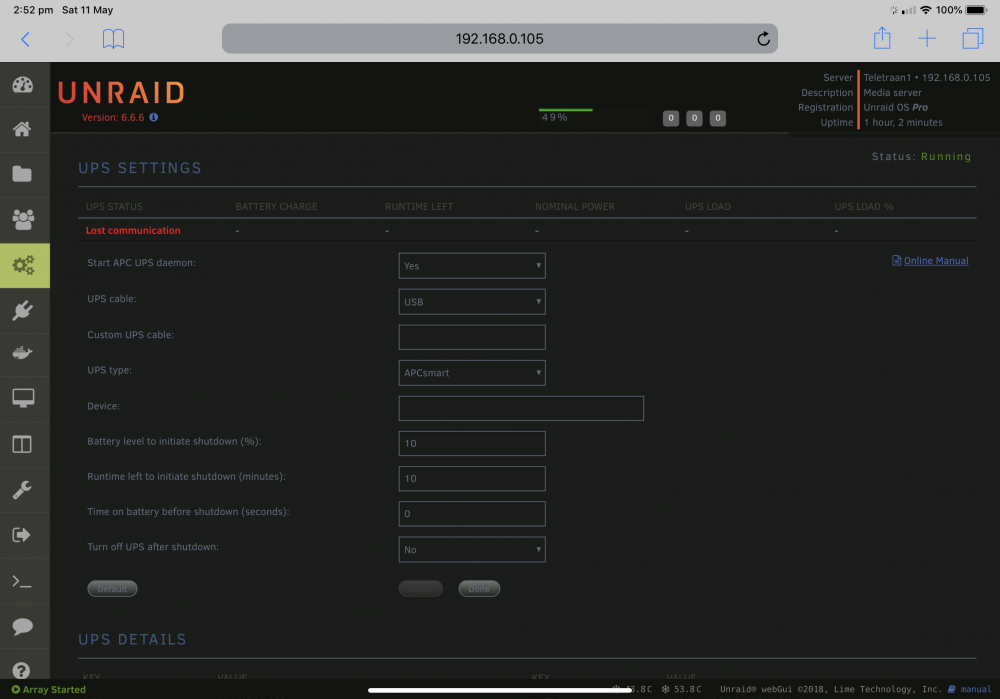
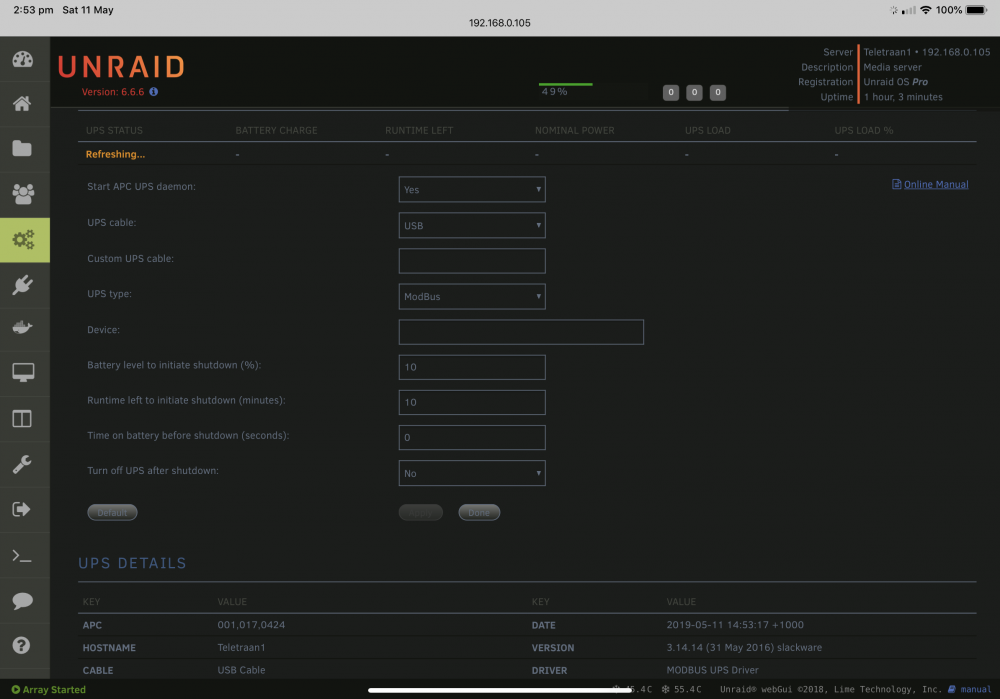
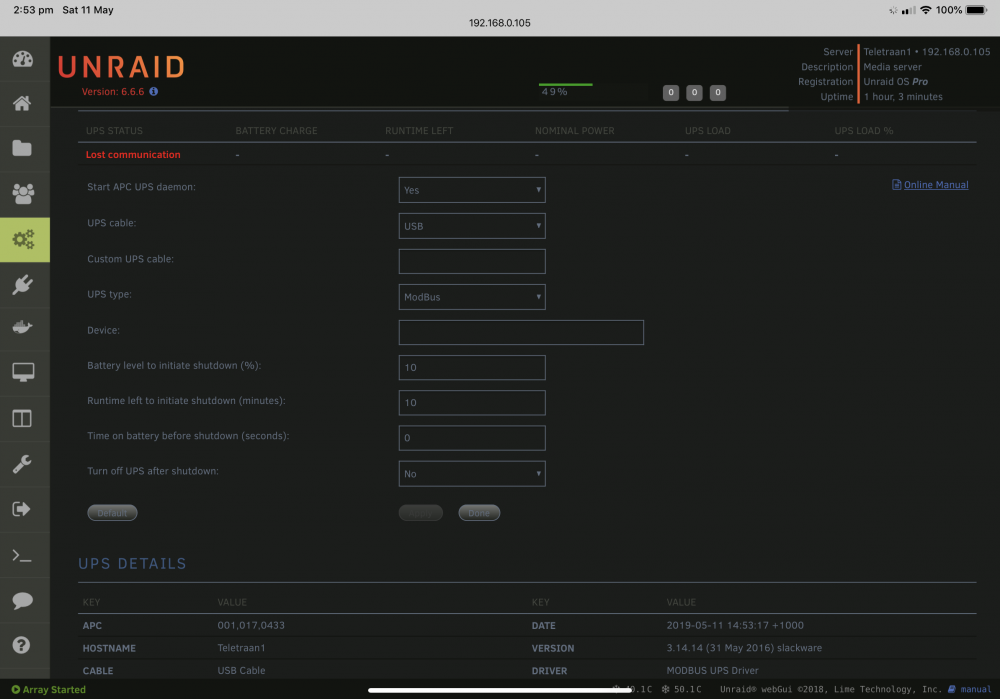
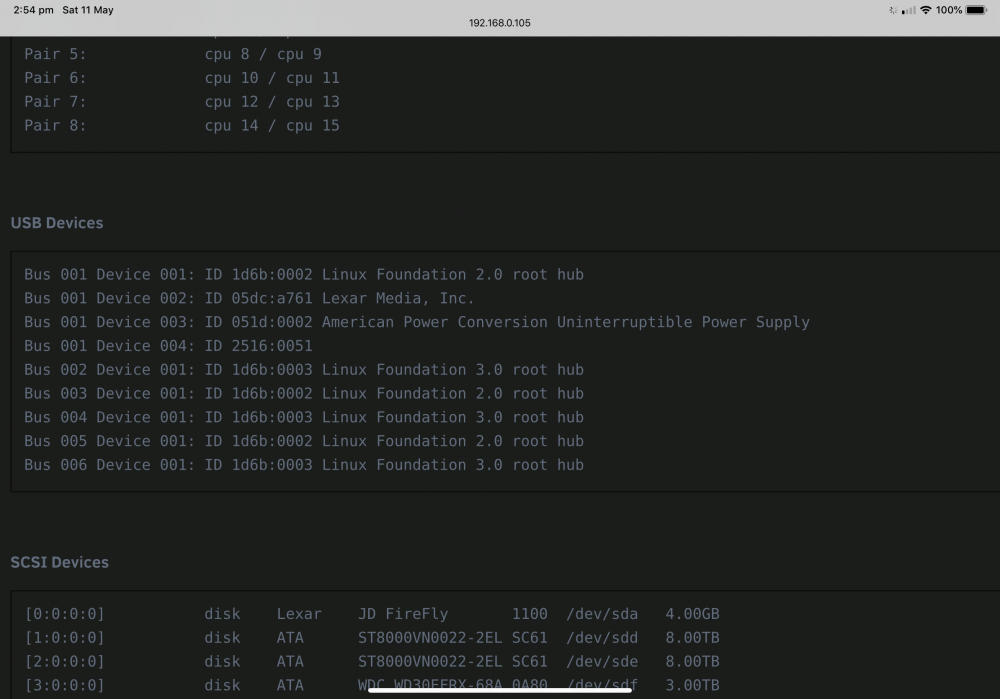
*UPDATE* got it working. Using Smart for the cable type and just USB for the APC type it saw the ups and connected (In case anyone else has this UPS and was looking for help Hi everyone, I’m hoping for a little advice, I’m still running 6.6.6 until all the kinks are worked out with 6.7, and I have purchased an APC Bx1400u-az That is being seen by the computer, it is listed in the system information as a connected USB device, however I’m not able to get the UPSDaemon to see it. i enable the APC daemon and have tried several of the UPS type options, ModBus, APCsmart but I always get connection lost. maybe this UPS isn’t compatible? any help would be appreciated
-
A million times thank you.. was lost and couldn't find anything while at work.. came home to search more thoroughly and found your post, all working again
-
Thank you for all your help, my issue appeared to be a faulty SATA connection and/or cable along that appeared to cause corruption in the plugins Database I had to delete the sql file from the USB drive and now it’s all working It shows the cause drives as unused, but at this stage I don’t care, it was 2am when I finished with the server. It’s running, I’m happy Thanks again for everything.
-
Thank you for taking the time to reply. It’s currently 2am and I have been working on the server once 9. What I thought was a software issue turned out to be a mix of hardware and software. While my system saw the 2 cache drives when I shut it all down and connected a monitor, I saw lots of errors trying to access ata12 (the second SSD) I tried a tonne of stuff but it appears the hard drive cage I used has a faulty port. I have moved the drives to a new location, new cables and did have to re-configure the second drive as cache again but it all seems to be running. I did have to goto the USB and delete the plugsin’s SQL file because it refused to see the second ssd even though Unraid is seeing it as normal. After that it’s now seeing all the drives. It doesn’t show that it’s a cache drive but rather marks it as unused. But that’ll do for now. Unraid sees them both as cache and the plugin sees them at least so I can rest easy. Thank you for all your help and suggestions.
-
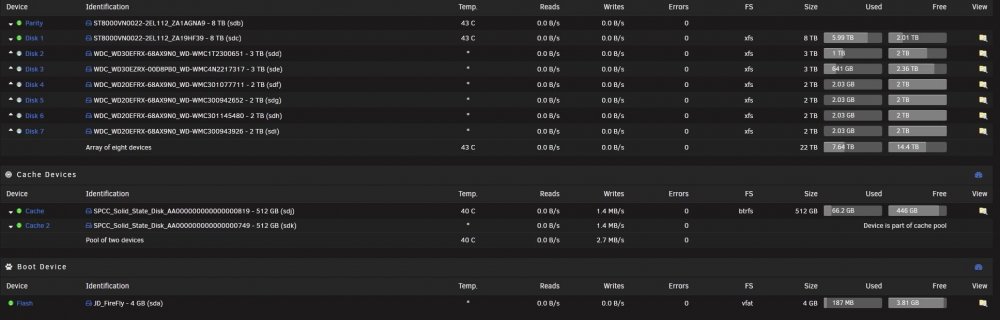
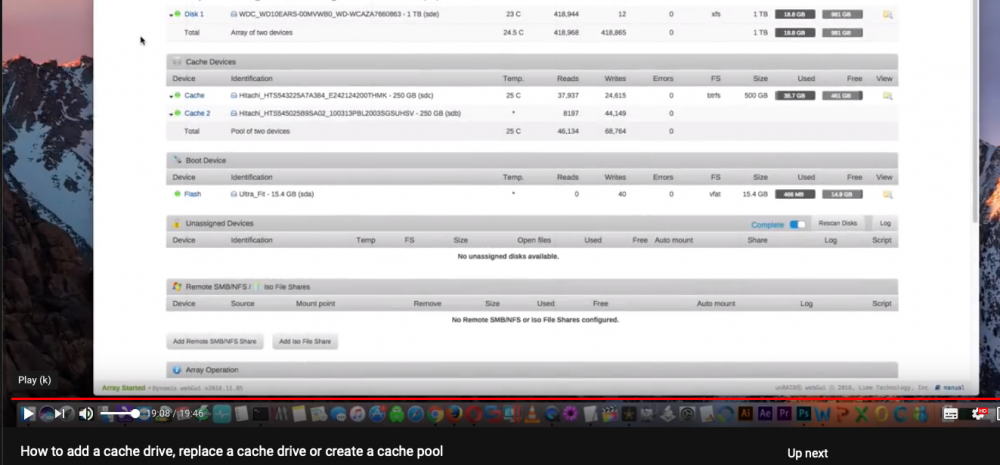
Just an update: at work right now going over spaceinvadersone's youtube video to see where I went wrong, now I didn't change the raid to stripe but I did select 'Balance' and afterwards lost the information about the second drive. this is a screen shot from his video reflecting the same missing temperature that I do so maybe no major issue.. (I thought I had broken something)
-
Well this is worrying. They are new drives and I ran diags on them before setting up the server. It remains this way after power cycle and reseating the sata cables. I may have some something wrong with my setup. I’ll go through the mirror setup more closely, but it’s nearly 3am now so that’s tomorrow’s job. Thanks for your help.
-
Thanks for the reply, those 2 SSD’s I have always report exactly 40° c, never changes. While the mechanical drives fluctuate (it’s summer here and stupid hot) So I just assumed either Unraid wasn’t able to read the data, or the drives emit a false SMART reading as to not upset some systems. It’s only after I followed Spaceinvaders video to mirror the cache drives did the second drives temperature disappear so I assumed that was expected.
-
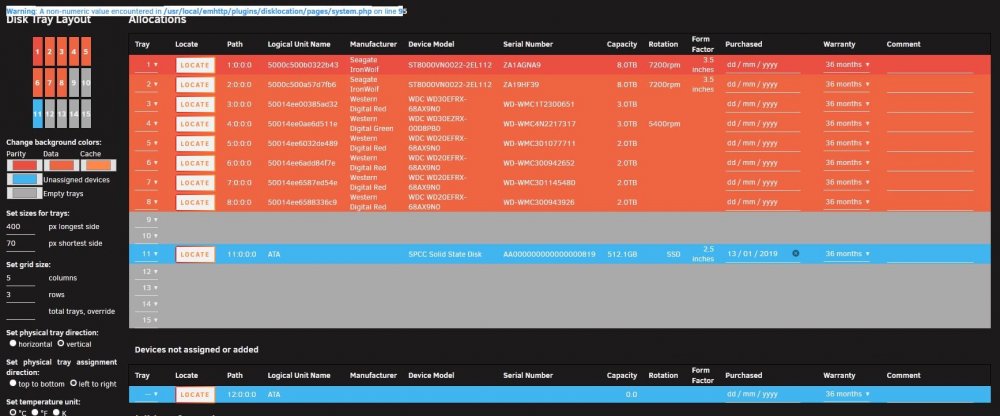
Hi, I have recently set my 2 Cache drives to be mirrored (i thought they were be default but then saw Spaceinvaders video ) anyway that sorted, but this plugin now only sees 1 drive and 1 blank space but can see something is there. (it used to just show 2 separate drives) I have tried uninstalling and reinstalling and searching through here to make sure it hasn't been brought up before. not a major issue, just was nice to see my 2 blue drives at the bottom, im also getting an error in text on the configuration page. "Warning: A non-numeric value encountered in /usr/local/emhttp/plugins/disklocation/pages/system.php on line 9" so you can see Unraid sees both drives and the plugin sees something but cant work it out? (or my Cache is borked as im very new to this ) Is there a way to have a mini version of the location page on the unraid main dashboard, so you can see an overview of your whole system? Thank you very much!