





Vitor Ventura
Members
-
Joined
-
Last visited
Everything posted by Vitor Ventura
-
Despite appear 34400 i can reach to 34401 when changed to br0, with same configuration.


-
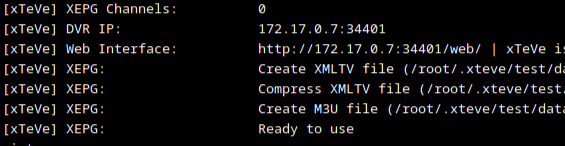
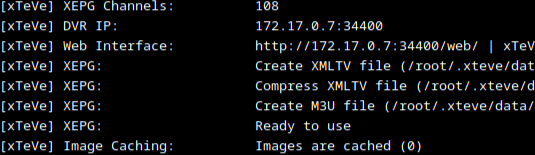
ya, VPN is configured! Round 2 this is the second i want to pass throught VPN, port is ok This is the first up and running I cant open ip:34401/web when passing via VPN. yes, i cant reach it. can't understand why it forces 34400 port, instead of 34401.


-
Changed, but still display 34400! Forgot something? Works well when its bridged, but when change to VPN, doesn't work. hmm 🤔

-
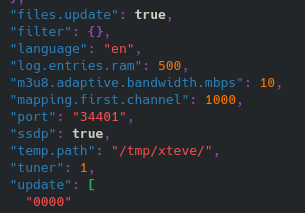
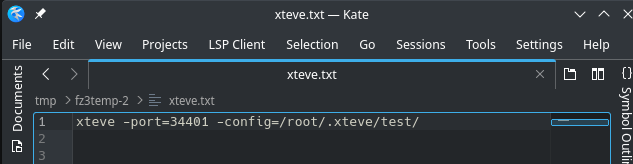
Damn i opened that files, but *didn't* pay to much attentions, because, "sample". Will try again later today! Many thanks for your hard work.
-
Unfortunately, this doesnt work. I replace port with 34401, and as soon it start, it get replaced with 34400. maybe its cronjob.sh? EDIT: Nope, nothing to do with cronjob. its impossible change port in xteve
-
Hello, thanks for your answer. I had setup both, used different ports, and boths were working, but, when i added xteve2 to VPN, i was stick with the default port (34400) on both containers. Tonight will try again.
-
Hello there, I need to run 2 Xteve containers in the same Unraid server, with VPN (wireguard). I have one running perfect with passthroughvpn with wireguard VPN, but, second i cannot make it work, because, i can't change webport. Xteve vpn edition, only works with ovpn. Any shot?
-
yeah, change appdata folder name do something nextcloud.backup, and redo everything
-
Hello, thanks for your help. Locally, only connects with internal IP, but, tried now in work, and works at first try. 🤷♂️ Need to check something in my computer. Thanks.
-
Can't make this work, external connections... Ports are open 21115, 21116 and 21118 in pfsense, tested, but, never connects.
-
I think it has something to do, with VMs, because, when trying to switch to VMs tab, simply doesnt work. i don't know, if the 6.10.3 change something in VMs
-
Hello there, After upgrading to 6.10.3, lost connection to dashboard, so, after read many complains about 6.10.3, revert to 6.10.2, and, after 14hours later, same problem. Take diagnostics via ssh, and dashboard has this error: Everything works fine, until upgrade to 6.10.3 venturanas-diagnostics-20220618-1248.zip

-
Thanks, i think i solved the problem.
-
Hello, Trying some configurations, but, i have weak performance share folder in linux VM. Is mounted like this: ~~~ VM Config: Unraid Share: /mnt/user Unraid Mount tag: user ~~~ Addition to /etc/fstab: #2020-04-14 Sample auto-mount via "Unraid Mount tag" user /mnt/user 9p msize=262144,trans=virtio,version=9p2000.L,_netdev,rw 0 0 But when im trying unzip one specific file, take ages to unzip, but, if i copy the file to Downloads, is really fast. The share is in the same nvme disk. I dont mind running from a folder inside VM, but, i need backup from that folders, in case of VM ran into troubles. Thanks
-
FIY, After some messes, the right procedure, to change appdata and system share location is: Make backup, using Backup/Restore Appdata Stop Docker Service Stop Array to add new cache pool Change appdata and system shares to use new cache pool Start Array Delete all appdata and system share Restore backup, using Backup/Restore Appdata to new location Start docker Everything will running as before.
-
Having a few problems, but, the best way, i think its restore appdata backup for the new locations. Some containers lost their appdata information.

-
Of course, i forgot! I need one service up faster than the others. Can i turn off autostart containers, stop docker, move that container appdata and docker image to new location, update appdata share pool settings, and start docker right? And than, move all data, and when finished, turn on autostart. Move Plex data, can take ages, but i need my bots online.
-
Hello everyone, After swapping a failure parity disk, added one more disk (i thought Unraid OS Plus was 10 disks, not 12), added one NVME disk. I can use it for appdata and docker image. Watch SpaceInvader's videos, but, only have references to new servers. The procedure to move appdata and docker image to a new cache drive is this? Stop docker and VMs MC - move all appdata and docker image to new cache pool update all docker containers for new path to the new cache pool Thanks
-
Thanks! 💪🏼
-
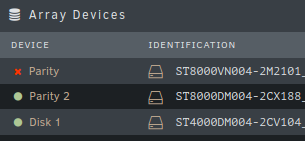
Hello, Need to replace one parity disk, in a dual parity disk setup, but, FAQs, talks more about upgrading parity disks and data disks. The procedure is the same? I have Unraid OS Plus license, but, dont have any space for a new disk, to pre clear. Whats the best procedure? Im in 6.10.0 RC4 Thanks.
-
Another lockup during night. Unraid simply didnt respond. Had to reboot via ssh, and i managed to take diagnostics. Im in 6.10.0-rc4 venturanas-diagnostics-20220326-0956.zip
-
thanks!
-
i ask in emperor discord second link FROM ubuntu:21.04 MAINTAINER Daniel van Rijn <[email protected]> ENV DEBIAN_FRONTEND noninteractive ENV SERVER_MANAGER_DIR /acc-server-manager RUN apt -y update && apt -y install gettext-base wine64-development wine-development libwine-development libwine-development-dev ENV WINEARCH=win64 ADD acc-server-manager ${SERVER_MANAGER_DIR}/acc-server-manager ADD OSM.License ${SERVER_MANAGER_DIR}/OSM.License RUN chmod +x ${SERVER_MANAGER_DIR}/acc-server-manager ${SERVER_MANAGER_DIR}/acc-server-manager WORKDIR ${SERVER_MANAGER_DIR} ENTRYPOINT [ "/bin/sh", "-c", "./acc-server-manager"]
-
can you check these 2? https://hub.docker.com/r/aeroxuk/acc-server-manager https://discord.com/channels/557940238991753223/841323431601766442/842721564860481536
-




