





coblck
Members
-
Joined
-
Last visited
Everything posted by coblck
-
https://forums.plex.tv/t/geminilake-j4105-hw-transcoding-failing-on-win10/229306 what i had to do to enable igpu on my g4650 works great
-
5)navigate to “config” and find the “go file” --> make a copy (I called mine go_orig) https://imgur.com/DZM9yyA 14 6)open the Go file (NOT THE COPY) with wordpad / notepad/ notepad++ or similar and make it equal to mine then SAVE & CLOSE the go file Copy to clipboard #!/bin/bash # Start the Management Utility /usr/local/sbin/emhttp & #enable module for iGPU and perms for the render device modprobe i915 chown -R nobody:user /dev/dri chmod -R 777 /dev/dri https://imgur.com/GJRG9s0 15 go to you docker tab and click on Plex https://imgur.com/wDE2oiF 14 upper righ clich on basic view button (upper right - will become advanced) https://imgur.com/k1aYxUv 15 find extra parameter line and write in it exaxctly --device /dev/dri:/dev/dri https://imgur.com/Xazlmt7 20 then “APPLY” at the end of docker setting. Reboot you server, DONE !!!
-
Great thanks ive been replying to you on you tube, im a total beginner in every sense of the word, ive installed plugib so do i just drop this in
-
Hi if you have an xbox one they have an excellent plex player, i personally use a nvidia shield tv which is also great
-
No worries I had same problem until I checked my log and noticed my driver had errors that's when I found out my problem. Best to up load logs so someone with a bit more know how can help. Sorry I can't be more help and u hope you get it fixed. Post here if u do. Good luck
-
Can only speak for myself but if i use my windows vm and set graphics card to intel on baord instead of VNC it crashes my i915 driver which affects my transcode ability in plex, if reboot and fixes itself until i try and use VM again with intel graphics. Doubt thats yer problem but only a suggestion
-
Do you use windows VM by any chance
-
I have h/w transcode with my g4560 no problem. i used method in link below https://forums.plex.tv/t/geminilake-j4105-hw-transcoding-failing-on-win10/229306/21?u=coblck
-
Hi my unraid server is setup to use static ip address but im going to have to change this address (unavoidable) in the very near future, what will i have to do in the plex docker so my service works before the ip address. Any help gratefully appreciated
-
Fixed it many thanks for help new much much smaller usb fitted and working thanks again
-
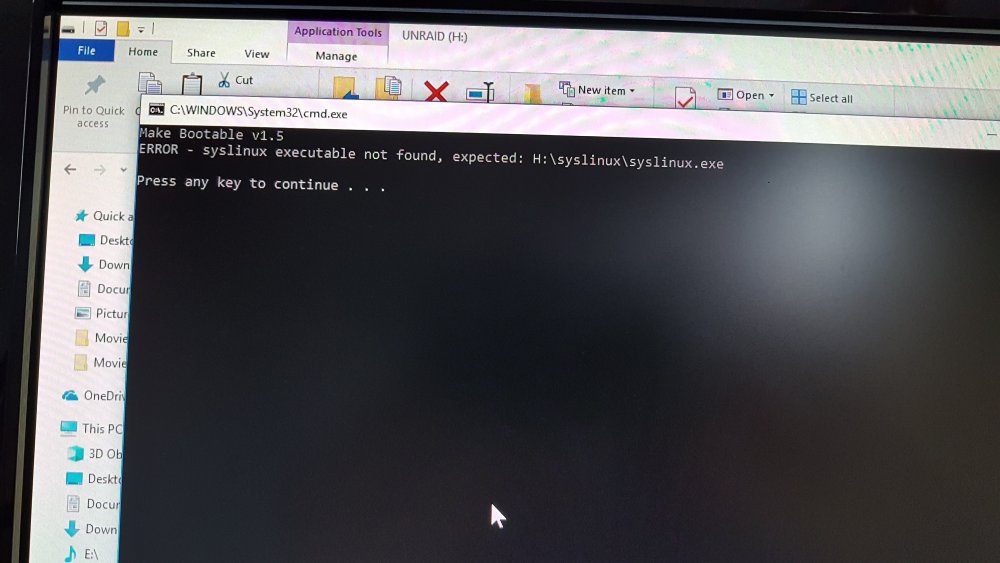
Thanks very much for your reply message when try to make bootable y getting error
-
Well my new usb arrived and did a backup through unraid OS, shut down server, reformatted USB with title UNRAID and fat32 copied files over from backup download , plugged in unraid server and it wont boot, went into bios new USB detected as 1st and only boot option restarted but still wont boot. What did i miss ?? Any help
-
Hi i would like to change my usb stick my unraid OS is on, i have backed up do i just copy files to new stick then restart
-
My apologies....will work it out thanks anyway
-
Is this not the plex server thread ????
-
Thanks for your reply i was told that was the wrong thread i posted the original thread so sorry for repeating the question, im using the limetech version.
-
Hi my server is notifying me there is an update and i have downloaded update but says need to be installed manually.....how do i do that ???? any help, it says in my docker container its up to date if i hit force update i still get alarm within plex there is an update, any help would be appreciated
-
Ok thanks again
-
Thanks for the help, the camera wont let me search unfortunately, also if i try an enter user/Public it gives error saying no symbols are not allowed in path, on my nas i could tell the nas what folder to use for ftp server is that not possible for unraid
-
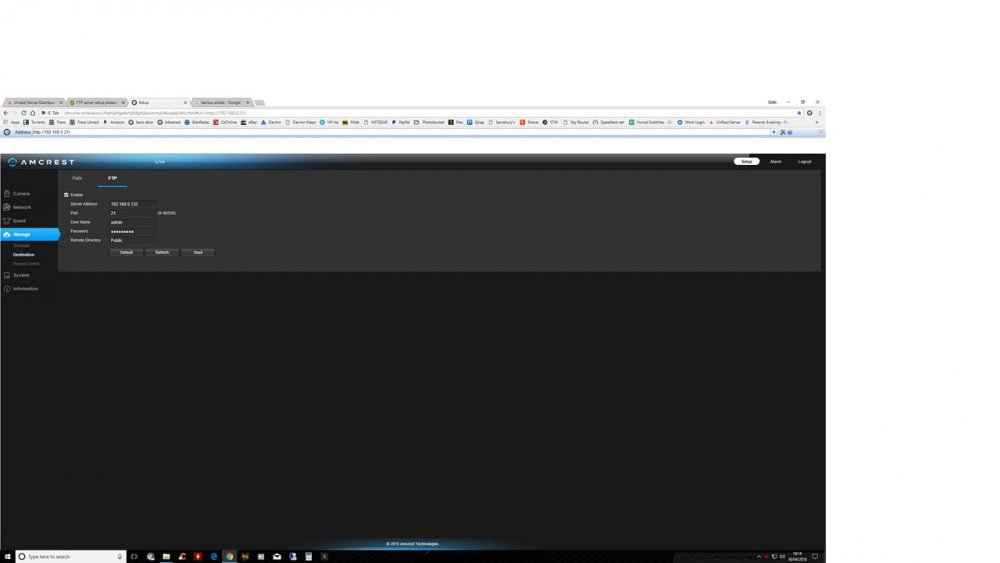
Here is setting for ip camera
-
This is what i get in my log Apr 30 18:09:28 Unraid-Server vsftpd[31721]: connect from 192.168.0.21 (192.168.0.21) Apr 30 18:09:28 Unraid-Server vsftpd[31721]: [admin] OK LOGIN: Client "192.168.0.21" Apr 30 18:09:28 Unraid-Server vsftpd[31724]: connect from 192.168.0.21 (192.168.0.21) Apr 30 18:09:28 Unraid-Server vsftpd[31724]: [admin] OK LOGIN: Client "192.168.0.21" Apr 30 18:09:29 Unraid-Server vsftpd[31746]: connect from 192.168.0.21 (192.168.0.21) Apr 30 18:09:29 Unraid-Server vsftpd[31746]: [admin] OK LOGIN: Client "192.168.0.21" Apr 30 18:09:29 Unraid-Server vsftpd[31749]: connect from 192.168.0.21 (192.168.0.21) Apr 30 18:09:29 Unraid-Server vsftpd[31749]: [admin] OK LOGIN: Client "192.168.0.21" Apr 30 18:09:30 Unraid-Server vsftpd[31751]: [admin] FAIL MKDIR: Client "192.168.0.21", "/mnt/Public" Apr 30 18:09:36 Unraid-Server vsftpd[31886]: connect from 192.168.0.21 (192.168.0.21) Apr 30 18:09:36 Unraid-Server vsftpd[31886]: [admin] OK LOGIN: Client "192.168.0.21" Apr 30 18:09:37 Unraid-Server vsftpd[31907]: connect from 192.168.0.21 (192.168.0.21) Apr 30 18:09:37 Unraid-Server vsftpd[31907]: [admin] OK LOGIN: Client "192.168.0.21" Looks like it cant mount directory
-
My camera records any video if motion is detected and send footage to ftp server to store it
-
Yeah built in ftp server, can you recommend any ftp server from the community
-
Hi total newbie here so please take it easy, im moving from my qnap nas to my new built unraid server (have 9 days left before i buy) and really love it so far, i have only 1 problem my ip camera is setup to record to an FTP server which was easy enough to setup on my nas but for the life of me cant seem to work out on my unraid, i have enabled it and entered user and went to ip camera and entered detailed there ( ip, username and password ). But cant seem to find folder on server to check recordings, can anyone help or point me in the right direction. Many thanks

