





coblck
Members
-
Joined
-
Last visited
Everything posted by coblck
-
Would you recommend adding --delete so "rync -avP --delete /mnt/user/Tvshows/ /mnt/remotes/UNRAID1_Tv-Shows" so it will delete any files that i remove ????
-
Changed to this as suggested "sync -avP /mnt/user/Tvshows/ /mnt/remotes/UNRAID1_Tv-Shows" and now works thanks so much for your help just when you think your getting to grips with something this happens once again thanks
-
Hi thanks for replying see below sent 104,055 bytes received 5,248 bytes 218,606.00 bytes/sec total size is 1,799,293,836,489 speedup is 16,461,522.89 (DRY RUN) rsync -avzP --ignore-times --dry-run /mnt/user/Tv-Shows /mnt/remotes/UNRAID2_Tvshows Hope this helps
-
Hi folks can anyone point me in the right direction PLEASE After op error i managed to delete my whole Tv shows directory (don't ask) so over the weekend i backed up from my other unraid server using Krusader. Now the problem, i had a script that ran every night backing up any new shows but now if i try to run the script again it want to copy over everything again. After some research (AI) its ask me to try these commands but it still want to copy everything again. rsync -avzP --ignore-existing --dry-run /path/to/source/ user@remote-server:/path/to/destination/ rsync -avzP --size-only --ignore-times --dry-run /path/to/source/ user@remote-server:/path/to/destination/ Be gently please but can anyone point me in the right direction
-
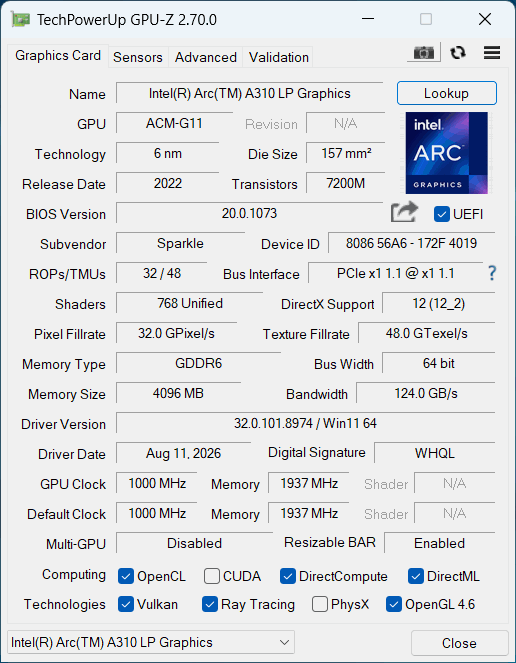
Have created windows 11 vm and installed a new intel arc a310LP, this is just for video encoding. Everything seems to be fine but GPUz reporting pcei 1 x1, card is definitely in x16 slot and bios setup correctly and resize bar enabled as well. Power plan is set to high performance. Any more ideas please see below for xml for vm. I have also attached photo of gpuz. Thanks in advance. If checked AI but really don't trust it. 🫣 <?xml version='1.0' encoding='UTF-8'?> <domain type='kvm' id='33'> <name>Windows 11</name> <uuid>e032cde4-37fd-4a51-0f34-1fc024e05a22</uuid> <metadata> <vmtemplate xmlns="unraid" name="Windows 11" iconold="windows11.png" icon="windows11.png" os="windowstpm" webui="" storage="default"/> </metadata> <memory unit='KiB'>12582912</memory> <currentMemory unit='KiB'>12582912</currentMemory> <memoryBacking> <nosharepages/> </memoryBacking> <vcpu placement='static'>14</vcpu> <cputune> <vcpupin vcpu='0' cpuset='2'/> <vcpupin vcpu='1' cpuset='3'/> <vcpupin vcpu='2' cpuset='4'/> <vcpupin vcpu='3' cpuset='5'/> <vcpupin vcpu='4' cpuset='6'/> <vcpupin vcpu='5' cpuset='7'/> <vcpupin vcpu='6' cpuset='8'/> <vcpupin vcpu='7' cpuset='9'/> <vcpupin vcpu='8' cpuset='10'/> <vcpupin vcpu='9' cpuset='11'/> <vcpupin vcpu='10' cpuset='12'/> <vcpupin vcpu='11' cpuset='13'/> <vcpupin vcpu='12' cpuset='14'/> <vcpupin vcpu='13' cpuset='15'/> </cputune> <resource> <partition>/machine</partition> </resource> <os> <type arch='x86_64' machine='pc-q35-10.2'>hvm</type> <loader readonly='yes' type='pflash' format='raw'>/usr/share/qemu/ovmf-x64/OVMF_CODE-pure-efi-tpm.fd</loader> <nvram format='raw'>/etc/libvirt/qemu/nvram/e032cde4-37fd-4a51-0f34-1fc024e05a22_VARS-pure-efi-tpm.fd</nvram> </os> <features> <acpi/> <apic/> <hyperv mode='custom'> <relaxed state='on'/> <vapic state='on'/> <spinlocks state='on' retries='8191'/> <vpindex state='on'/> <synic state='on'/> <stimer state='on'/> <vendor_id state='on' value='none'/> </hyperv> </features> <cpu mode='host-passthrough' check='none' migratable='off'> <topology sockets='1' dies='1' clusters='1' cores='7' threads='2'/> <cache mode='passthrough'/> </cpu> <clock offset='localtime'> <timer name='hpet' present='no'/> <timer name='hypervclock' present='yes'/> </clock> <on_poweroff>destroy</on_poweroff> <on_reboot>restart</on_reboot> <on_crash>restart</on_crash> <devices> <emulator>/usr/local/sbin/qemu</emulator> <disk type='file' device='disk'> <driver name='qemu' type='raw' cache='writeback' discard='unmap'/> <source file='/mnt/user/domains/Windows 11/vdisk1.img' index='3'/> <backingStore/> <target dev='hdc' bus='virtio'/> <serial>vdisk1</serial> <boot order='1'/> <alias name='virtio-disk2'/> <address type='pci' domain='0x0000' bus='0x05' slot='0x00' function='0x0'/> </disk> <disk type='file' device='cdrom'> <driver name='qemu' type='raw'/> <source file='/mnt/user/isos/Windows/Win11_25H2_EnglishInternational_x64_v2 (1).iso' index='2'/> <backingStore/> <target dev='hda' bus='sata'/> <readonly/> <boot order='2'/> <alias name='sata0-0-0'/> <address type='drive' controller='0' bus='0' target='0' unit='0'/> </disk> <disk type='file' device='cdrom'> <driver name='qemu' type='raw'/> <source file='/mnt/user/isos/virtio-win-0.1.285-1.iso' index='1'/> <backingStore/> <target dev='hdb' bus='sata'/> <readonly/> <alias name='sata0-0-1'/> <address type='drive' controller='0' bus='0' target='0' unit='1'/> </disk> <controller type='pci' index='0' model='pcie-root'> <alias name='pcie.0'/> </controller> <controller type='pci' index='1' model='pcie-root-port'> <model name='pcie-root-port'/> <target chassis='1' port='0x8'/> <alias name='pci.1'/> <address type='pci' domain='0x0000' bus='0x00' slot='0x01' function='0x0' multifunction='on'/> </controller> <controller type='pci' index='2' model='pcie-to-pci-bridge'> <model name='pcie-pci-bridge'/> <alias name='pci.2'/> <address type='pci' domain='0x0000' bus='0x01' slot='0x00' function='0x0'/> </controller> <controller type='pci' index='3' model='pcie-root-port'> <model name='pcie-root-port'/> <target chassis='3' port='0x9'/> <alias name='pci.3'/> <address type='pci' domain='0x0000' bus='0x00' slot='0x01' function='0x1'/> </controller> <controller type='pci' index='4' model='pcie-root-port'> <model name='pcie-root-port'/> <target chassis='4' port='0xa'/> <alias name='pci.4'/> <address type='pci' domain='0x0000' bus='0x00' slot='0x01' function='0x2'/> </controller> <controller type='pci' index='5' model='pcie-root-port'> <model name='pcie-root-port'/> <target chassis='5' port='0xb'/> <alias name='pci.5'/> <address type='pci' domain='0x0000' bus='0x00' slot='0x01' function='0x3'/> </controller> <controller type='pci' index='6' model='pcie-root-port'> <model name='pcie-root-port'/> <target chassis='6' port='0xc'/> <alias name='pci.6'/> <address type='pci' domain='0x0000' bus='0x00' slot='0x01' function='0x4'/> </controller> <controller type='pci' index='7' model='pcie-root-port'> <model name='pcie-root-port'/> <target chassis='7' port='0xd'/> <alias name='pci.7'/> <address type='pci' domain='0x0000' bus='0x00' slot='0x01' function='0x5'/> </controller> <controller type='virtio-serial' index='0'> <alias name='virtio-serial0'/> <address type='pci' domain='0x0000' bus='0x03' slot='0x00' function='0x0'/> </controller> <controller type='sata' index='0'> <alias name='ide'/> <address type='pci' domain='0x0000' bus='0x00' slot='0x1f' function='0x2'/> </controller> <controller type='usb' index='0' model='nec-xhci' ports='15'> <alias name='usb'/> <address type='pci' domain='0x0000' bus='0x00' slot='0x07' function='0x0'/> </controller> <interface type='bridge'> <mac address='52:54:00:18:96:88'/> <source bridge='br0'/> <target dev='vnet32'/> <model type='virtio'/> <alias name='net0'/> <address type='pci' domain='0x0000' bus='0x04' slot='0x00' function='0x0'/> </interface> <serial type='pty'> <source path='/dev/pts/0'/> <target type='isa-serial' port='0'> <model name='isa-serial'/> </target> <alias name='serial0'/> </serial> <console type='pty' tty='/dev/pts/0'> <source path='/dev/pts/0'/> <target type='serial' port='0'/> <alias name='serial0'/> </console> <channel type='unix'> <source mode='bind' path='/run/libvirt/qemu/channel/33-Windows 11/org.qemu.guest_agent.0'/> <target type='virtio' name='org.qemu.guest_agent.0' state='disconnected'/> <alias name='channel0'/> <address type='virtio-serial' controller='0' bus='0' port='1'/> </channel> <input type='mouse' bus='ps2'> <alias name='input0'/> </input> <input type='keyboard' bus='ps2'> <alias name='input1'/> </input> <tpm model='tpm-tis'> <backend type='emulator' version='2.0' persistent_state='yes'/> <alias name='tpm0'/> </tpm> <audio id='1' type='none'/> <hostdev mode='subsystem' type='pci' managed='yes'> <driver name='vfio'/> <source> <address domain='0x0000' bus='0x03' slot='0x00' function='0x0'/> </source> <alias name='hostdev0'/> <address type='pci' domain='0x0000' bus='0x06' slot='0x00' function='0x0'/> </hostdev> <hostdev mode='subsystem' type='pci' managed='yes'> <driver name='vfio'/> <source> <address domain='0x0000' bus='0x00' slot='0x14' function='0x0'/> </source> <alias name='hostdev1'/> <address type='pci' domain='0x0000' bus='0x02' slot='0x01' function='0x0'/> </hostdev> <watchdog model='itco' action='reset'> <alias name='watchdog0'/> </watchdog> <memballoon model='none'/> </devices> <seclabel type='dynamic' model='dac' relabel='yes'> <label>+0:+100</label> <imagelabel>+0:+100</imagelabel> </seclabel> </domain>
-
WOW thanks that did it after reboot have sent some beer money
-
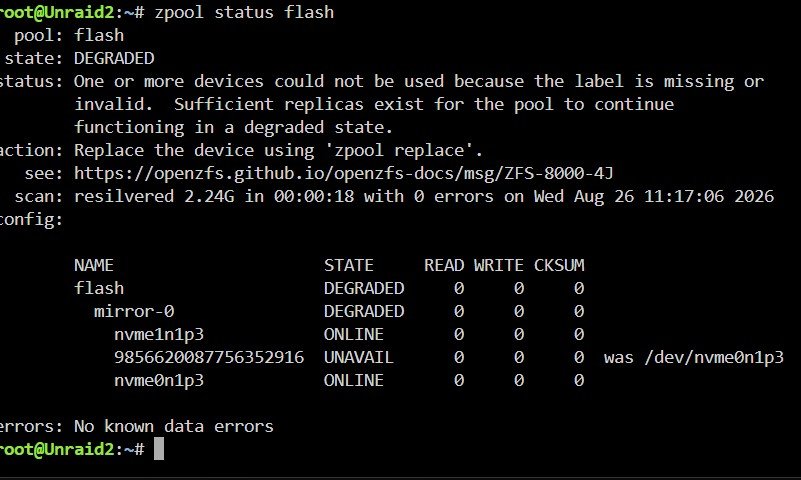
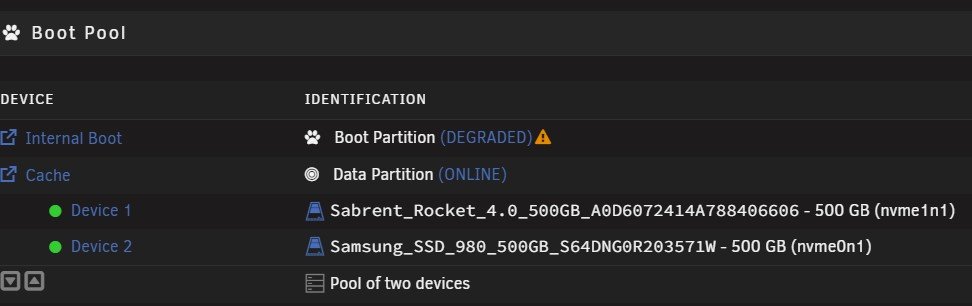
As title suggest one of my nvme cache drives failed so i replaced but now when rebooting and putting online my internal flash boot is degraded, can anyone help please see screenshots. I believe this can be fixed with command line but even after AI still nothing.
-
how do i ssh and apply curl -X POST "http://localhost:32400/myplex/claim?token=YOUR_CLAIM_TOKEN_HERE"
-
So after 3 years my USB has failed, as i needed server back asap i just used an old one lying about which is quite large, my old one was a small stubby one. I have ordered new samsung stubby drive and arriving today, my question is will i be allowed to change again is such a small period of time ??
-
Cant seem to find this plugin in app section
-
Yep same for me Plex docker is no longer hardware transcoding on Intel Quick Sync as of v1.32.6.7468
-
Hi ive been seeing this error for a while now and wondering what it could be and how to stop it. Jun 15 02:02:11 Unraid-Server nginx: 2023/06/15 02:02:11 [crit] 7634#7634: *57520 SSL_do_handshake() failed (SSL: error:141CF06C:SSL routines:tls_parse_ctos_key_share:bad key share) while SSL handshaking, client: 35.216.237.60, server: 0.0.0.0:443 Any help or advice would be appreciated.
-
Seen people report anything between minutes and hours depends on size of database I imagine but I’m know expert sorry.
-
Just wait should come back
-
So i go to https://slackware.pkgs.org/15.0/slackware-x86_64/python2-2.7.18-x86_64-4.txz.html how do i actually download the package, i download it buts a .rar file is this the file i put in the the flash drive folder ????
-
Yep tried it and works perfect turned off and transcodes fine.
-
Thanks can you show me by screen shot where i enetr that version please
-
Thanks so much that seems to be working. Thanks again @JorgeB
-
So if I change 1gig to eth0 it will adopt the setting of the 2.5gb nic ie IP address
-
Hi i have currently 2 nic's on my server one 1gb and another 2.5gb, ive been using the 2.5gb one since the start but want to move to the 1gb nic and connect the 2.5gb one direct (bridge) to my pc which has 2,5gb as well as there where all my tranfering of files happen, this will save me buying an expensive switch. So this morning i unplugged ethernet cable from 2.5gb and connected it to the 1gb and assigned the nic with a static ip address within the router range but wont let me connect to unraid server using new ip address. Anyone help or suggest what im doing wrong??? thanks in advance
-
Great video here as well
-
As title setting set to yes, array spins down fine
-
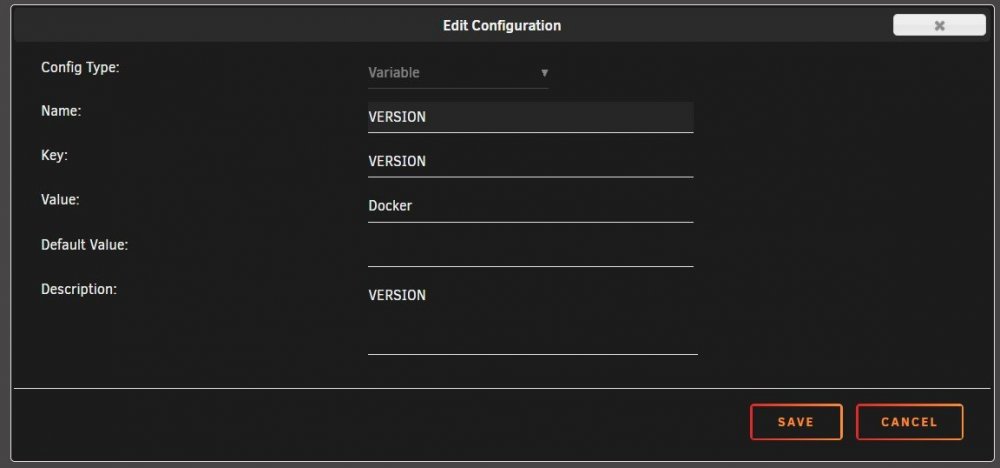
Is this the correct setup for this to keep plex upto date
-
I5 7400 and all seems OK
-
I have latest as well in version as seems to be working with hdr transcodes

