





jbartlett
Community Developer
-
Joined
-
Last visited
Everything posted by jbartlett
-
Did you manually change the default port number to 54777 from 18888? If not, try port 18888. Did you launch the UI via clicking on the icon and selecting "WebUI"?
-
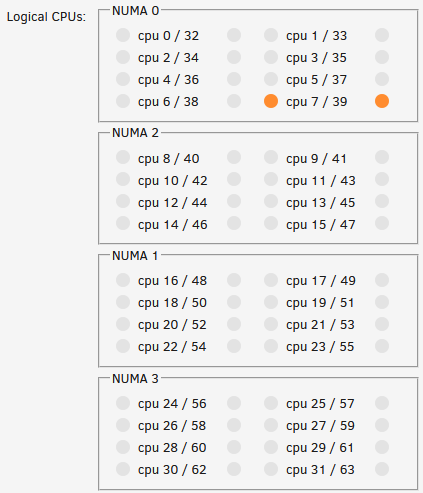
I've started working on enhancing the VM Form Editor in my spare time to add extra support for the CPU block so these tweaks we're making can be applied without manually editing the XML. Unfortunately, spare time is kinda non-existent. So far, added NUMA detection & grouping to the form editor. (I got tired of counting CPU's to find the nodes)
-
I'm wondering if Java's memory "junk removal" isn't happening properly. I can add code to force that if it is. My backup NAS always has the docker running too, I'll kick off a full benchmark & a controller benchmark once or twice a day to see if I can duplicate.
-
Well, it's not a matter of low memory. Do you start the docker when you want to run a test or is it basically always on?
-
Running RC5 vs RC6 because of the USB device passthrough issue mentioned in another bug report. I had a VM (Cam 1) with a custom CPU block with 16 CPU's pinned. This is to enable hyper-threading in the VM when the Threadripper CPU itself doesn't really support it. <cpu mode='custom' match='exact' check='full'> <model fallback='forbid'>EPYC</model> <topology sockets='1' cores='14' threads='2'/> <cache level='3' mode='emulate'/> <feature policy='require' name='topoext'/> <feature policy='disable' name='monitor'/> <feature policy='require' name='hypervisor'/> <feature policy='disable' name='svm'/> <feature policy='disable' name='x2apic'/> <numa> <cell id='0' cpus='0-13' memory='6291456' unit='KiB'/> <cell id='1' cpus='14-27' memory='6291456' unit='KiB'/> </numa> </cpu> I cloned the hard drive of another Windows 10 VM and used "Settings > CPU Pinning" to remove four CPU's (2 CPU/2 HT) from "Cam 1" and assigned them to "Cam 1 PiP". The VM "Cam 1 PiP" had a standard web GUI form editor template. When I clicked the Apply button, I got back an error message akin to "CPU topology doesn't match maximum vcpu count" and then the "Cam 1" VM was gone from the list of configured VM's. I recreated the "Cam 1" XML but I wasn't able to duplicate. Recommend restoring the original XML if the CPU Pinning edit of the XML results in an invalid XML. vm1-diagnostics-20191119-0743.zip
-
If you get the Java error again, please post a screen shot of it. How much RAM does the system have/free?
-
Kick off a benchmark from the main screen, select your parity drive and at least one other drive. There needs to be at least two drives being benchmarked for the following to be displayed: "Click on a drive label to hide or show it." The period at the end of a line is a hidden hyperlink which unhides the iframes that is doing the actual work. That will give additional detail as to what's going on.
-
I created a new Win10 VM, first one on RC6, passing through a Logitech receiver/mouse and a Corsair keyboard (1b1c:1b20) and video card. Standard procedure, same process I've done three times on RC5 when setting up a new VM. After starting the VM, the keyboard becomes unresponsive on the unraid console, as expected as it's being passed through to the VM. Roughly 25 seconds later, the keyboard becomes responsive again on the console and not responding in the VM. I expect this issue to go away on RC7 with the rollback but logging for posterity. vm1-diagnostics-20191118-2155.zip
-
Browser & browser version?
-
My onboard & PCIe Aquantia Corp 10G NICs with the Atlantic driver experience occasional network drops with versions prior to 6.1.13 due to a possible memory leak/bug/something. Ref: https://bugzilla.redhat.com/show_bug.cgi?id=1499321 (meat is a little past half way down). Fix seems to be included in the "in-tree aquantia driver" root@VM1:~# ethtool -i eth0 driver: atlantic version: 5.3.8-Unraid-kern firmware-version: 1.5.44 Nov 12 01:42:57 VM1 kernel: atlantic: link change old 10000 new 0 Nov 12 01:42:57 VM1 kernel: br0: port 1(eth0) entered disabled state Nov 12 01:43:11 VM1 kernel: atlantic: link change old 0 new 10000 Nov 12 01:43:11 VM1 kernel: br0: port 1(eth0) entered blocking state Nov 12 01:43:11 VM1 kernel: br0: port 1(eth0) entered forwarding state vm1-diagnostics-20191116-2049.zip
-
Did you checked the device manager if the CPU with the new tweaks is completly initialized? Remember, applying this tweaks the first time, Windows recognizes it as new CPU and has to install the drivers first. Maybe the combination of changing the CPU type AND the core count produces this issue. Did you searched for newly installed hardware in the device manager to trigger a rescan manually? Maybe that helps to detect the new cores. Just an idea. Turns out, the VDrive needed scanning for errors. When I viewed the device manager, it reported one unknown PCI device (balloon driver). When I restarted the VM with the driver ISO, Windows didn't pick it up. So I decided to go bare bones down to 1 CPU and 2 GB of RAM to see if it picked up that change. It did, but it also detected drive issues at boot and did a scan & fix. No issues after that. I believe I found the issue with the random no-hyperthreading - the GUI editor stripping out the <cpu> attributes and removing the fallback tag. I saw the other optional cpu tags so my brain gave it a green checkmark.
-
I had Livestream Studio ingesting two Brio web cams at 1080p@60fps and outputting those two cams to two VM's via NDI. With the numatune memory mode set to interleave, the 32 CPU VM was hovering between 30% and 31%. Without the numatune, it hovered around 29% and 30%. So while the memory read/write/copy speeds are significantly higher, the increased latency @bastl mentioned did have a small impact to CPU time. I've run into an annoying issue. I was adjusting the assigned CPU cores down to see what I could get away with on an NDI into OBS VM and for some reason, no matter what I have set in the XML, the VM only sees 2 cores/2 threads. Created a new VM template with 20 CPU's assigned and the VM still only saw 4 total. Had to restore the backup of the VDrive. Not sure if it's related or not but the Win 10 versions aren't registered yet as I'm still setting them up/testing.
-
I usually create the new VM first without booting it up, size of the vdisk doesn't matter and after that, I copy over the old vdisk only and overwrite the newly created one. Maybe try it this way. I'll give this a shot tonight. Will check this tomorrow. I just finished setting up a new Win10 install and then applied the EPIC settings to it. Wasn't visible on first boot after the EPIC settings but was after a Start > Reboot. The big 32 thread VM never had an issue with it. The similarities are the VM's have 4 cores/2 threads on the same NUMA node (no numa settings), 4G of RAM allocated. Both Seabios i440fx. Same CPU settings you gave, but emulator/thread pinned to a single CPU.
-
Question: I created VM "A" and then copied the qcow2 directory over to VM "B" to try to save on installation time. (Or just move it to a different directory). SeaBios does not detect a bootable drive even though the drive reference is correct. Anyone know why? I still have roughly 5 more Windows 10 installs to do after the current one.
-
Couple points of observation. 1. The AMD hyper-threading workaround with setting it to emulate the EPIC processor doesn't always work every boot. With one VM, CoreInfo does not always detect hyper-threading but does after a reboot (OS reboot, VM still active). 2. If you edit a VM after changing anything in the GUI editor, you have to go back and reset your CPU topology if you have to manually edit to set the threads back to 2.
-
I'll have to ponder this. My use case is video overlay which Livestream Studio seems to do in memory vs the GPU and exporting video over NDI. Once I'm done building my Ubuntu VM on the same box which takes that NDI feed, possibly an average CPU utilization with it spread out or on the same node will be telling.
-
<numatune> <memory mode='interleave' nodeset='0,2'/> </numatune> You're right, spreading the memory over both nodes did increase the average latency from 92.7 to 125.6 (26% increase). However, the read/write/copy scores improved under this "RAID" like effect by 27.9% / 45.5% / 31.2% respectively. Seems like a good trade off.
-
With Hyper-threading detected in the VM, Cinebench R20 gave a 1.89% improvement in average scores (1/16/2) but the scores were a lot tighter. I was able to get the variance down to 50 with the high/low differing at 23 & 27 after dropping the three scores that varied farthest from the average (which were on the high side) with only three runs.
-
I think I'm going to take your stance there. I don't need to squeeze out every MHz of processing possible.
-
Holy CPUs Batman! This got me hyper-threading in my VM! Of course, it had to go through a Blue Screen first and then setting up my devices but yuh! Another set of Benchmarks to compare apples to apples coming up....
-
Is there another section? I added it to my XML, set my cpuset, and on saving I get: unsupported configuration: Cannot find 'iothread' : 1
-
Looks like I'll be installing Topo before I open my mouth again. haha Unless you already have the PNG....
-
I had my CPU's isolated (CPU Pinning in the Settings makes it easy) but I didn't know about nohz_full & rcu_nocbs. Just added those. Good point on the task scheduler wanting CPU 0 because that's pinned to the main VM. I used to pin the emulator to the whole core but I've never seen the Dashtop show any usage on the 2nd one.
-
The 2990WX has four nodes, ram is attached to notes 0 & 2. I pinned all the CPU's on nodes 0 & 2 to the VM so I didn't have to worry about getting memory from other nodes. Node 0 Node 1 Node 2 Node 3 Total ------ ------ ------ ------ ----- Huge 0 0 0 0 0 Heap 0 0 0 0 0 Stack 0 0 0 0 0 Private 7171 0 5199 0 12370 ------- ------ ------ ------ ------ ----- Total 7171 0 5199 0 12370 I can't get CPU-Z to work at all if I don't use the stock template, gets to the CPU detection part at 10% and just hangs. 3DMark, in the past, was questionable as it would hang at the collecting system info after a test or two. I'll try it again. I'll download AIDA64 and retry 3DMark. I don't know how my CPU will handle your 1950x's tweaks since the 1950 only has one numa node. It's promising because my main NAS us running the 1950 and I have a Win10 VM there that is my main driver for email & plex.
-
<cpu mode='host-passthrough' check='none'> <topology sockets='1' cores='4' threads='2'/> <feature policy='require' name='topoext'/> </cpu> Topoext is automatically enabled in guests if the host supports it. Adding it to an AMD host that doesn't support it doesn't force it on. The CoreInfo utility still showed no hyper-threading.


