





jbartlett
Community Developer
-
Joined
-
Last visited
Everything posted by jbartlett
-
There's a script inside the docker itself that tests if the cache is working. Open up a container terminal and type in: ./cache_test.sh Technically, it only works once. root@f38521741aa9:/scripts# ./cache_test.sh % Total % Received % Xferd Average Speed Time Time Time Current Dload Upload Total Spent Left Speed 100 7620 100 7620 0 0 17046 0 --:--:-- --:--:-- --:--:-- 17046 % Total % Received % Xferd Average Speed Time Time Time Current Dload Upload Total Spent Left Speed 100 7620 100 7620 0 0 7441k 0 --:--:-- --:--:-- --:--:-- 7441k Succesfully Cached
-
I had identical network speeds of just under half of my 1Gbe network (local & uplink) during a new install and unchanged on uninstall/reinstall. Thus why I'm trying to see if there's a way to otherwise verify a cache hit/miss.
-
It shows URLs being queried in the nginx/access.log. It doesn't show cache hits & misses. From appearances, it's never hitting against the cached version.
-
Check your default share configuration. (Edit: Settings > Global Share Settings) You'll need to apply "Tools > New Permissions" on the lancache share before running Krusader.
-
Just came across this after discovering the monolith cache, thanks for it! I did some testing with it on a small Steam game and checking out the download speeds and I'm not seeing any improvements in my download speed. I see hits against the nginx/access.log but I don't see anything that indicates if it was a cache hit or not. I do see files being saved to ./lancache/cache. How can we tell if we get a cache hit or not?
-
That is an excellent suggestion. I've been getting some time to work on things again (who knew that having your fiancee move in with you would also mean a lot less evening time available? 😉 ) so I've been working to move the backend website & database to a cloud server and off of my local server. Then I'll be working on adding drive images for drives released in the past year and adding features/fixing bugs to the Diskspeed app & the Hard Drive database app.
-
I tried to implement's unraid's version of spinning up a drive but had issues with it but that was a bit ago, should try again. The way it works now is to issue a dd command to read random sectors on the drive but I've noticed that even those that seems to execute without issue, drives aren't always spun up.
-
Clicking on the "Diskspeed" header or refreshing the page should fix.
-
You're behind one version. I believe that's fixed in 2.5. Whoops, that's my development version.
-
FWIW, I got the crash screen a couple times that many others have posted, typically after a cold boot after I moved some hardware around. It booted fine after hitting the RESET button.
-
Did some on/off node testing with a TR 2990WX (off node = no direct access to ram/devices). Configured a VM with four numa nodes with two CPU's each (4 with HT) and 4 GB of RAM (1 GB per VM numa node), all set to hit against the same physical numa node. Tests were done on UNRAID 6.8.1 RC1 with the TR being passed through and the guest seeing both the hyperthreaded CPUs & NUMA nodes. Benchmarks were Cinemark R20 for CPU and AIDA64 for memory. Each score is an average of 5 runs with outlayers dropped (tested too far off the variance). Each pass moved a VM node from a numa node with direct access to one without. On Numa R20 Read Write Copy Latency 4 3663 31944 32558 32159 93.5 3 3645 30786 30483 30292 93.7 2 3587 27387 29982 27557 93.6 1 3607 19153 19809 20805 93.5 0 3526 14693 15097 17033 162.1 CPU scores saw a diminishing gain as the CPU's got moved off to a numa node without direct memory access as expected by the evenly spread score was surprisingly low. Memory scores shows a clear benefit to having at least one CPU on node in memory access with the times being negatively impacted nearly 100% being completely isolated.
-
I have not but AMD agrees with you on the latency issues having to utilize the Infinityfabric. They're not creating multiple numa nodes for TR3.
-
(Ref "on node": Numa 0 & 2 with direct access to PCI & RAM. "off node": Numa 1 or 3) Some interesting findings I had last night. I had three VM's running, Cam1 (hogging numa 0 & 2) had four Brios connected, each set to output the cam over NDI. Cam2 running OBS taking in a NDI feed from Cam1. CPU % steady. When I started OBS on Cam3 taking in a NDI feed from Cam1, Cam2's CPU utilization jumped. When I closed OBS on Cam3, the CPU % on Cam2 returned back. The effect could also be seen in reverse. Cam2 & Cam3 were running "off node" with accessing the memory. I just ran a benchmark and showed that memory latencies as well as read/write/copy times were negatively affected by around 50% if the memory access had to utilize the Infinityfabric of the TR2.
-
2990WX memory speeds are seriously impacted if the VM has to utilize the Infinityfabric. This is likely true for all TR2 models. Memory latency is 58.8% slower and the read/write/copy scores jump by 47% / 48.9% / 54% respectively.
-
My guess is that the read speed of the faster drives were capped by the OS in order to maximize the output of the other slower drives. Gives better overall performance. You're only utilizing 2GB of the stated 7.8GB bandwidth so you may have a bottleneck elsewhere in the PCI chain.
-
Hmm what work around? I pass it through as an EPYC so it sees the L3 cache right and it does threading correctly that way as well. Also posted video of with and without but feel its not as defined. Both times the machine was just idle/logged in I have this block in my XML <cpu mode='custom' match='exact' check='full'> <model fallback='forbid'>EPYC</model> <topology sockets='1' cores='4' threads='2'/> <cache level='3' mode='emulate'/> <feature policy='require' name='topoext'/> <feature policy='disable' name='monitor'/> <feature policy='require' name='hypervisor'/> <feature policy='disable' name='svm'/> <feature policy='disable' name='x2apic'/> </cpu> With this setup, likely driven mostly by the cpu mode/matach and model EPYC, CoreInfo shows the TR as hyperthreaded. Logical to Physical Processor Map: **------ Physical Processor 0 (Hyperthreaded) --**---- Physical Processor 1 (Hyperthreaded) ----**-- Physical Processor 2 (Hyperthreaded) ------** Physical Processor 3 (Hyperthreaded)
-
I use the Hyperthreading workaround in my VM's, CPUZ hangs when it scans the CPUs.
-
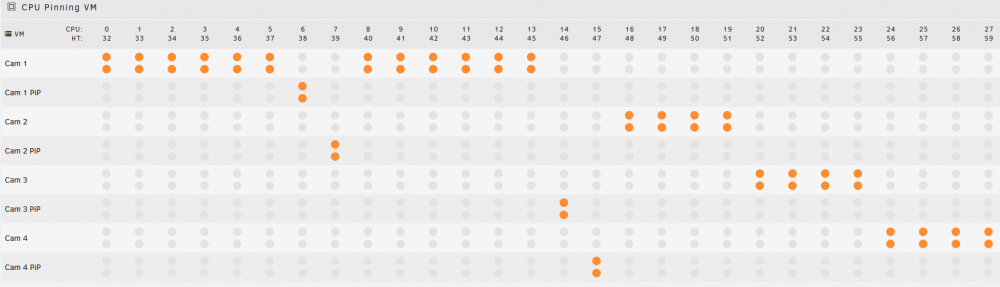
You're definitely going to have to enable the PCIe override to even have a prayer. I didn't do any benchmarks with it on & off because I was able to utilize my use case with it off. Your performance may be less with the override on. Please refer to the first post on this thread for PCie slot/memory to NUMA slot assignments as well as what controllers can be passed through to a VM and if it needs an override or not along with quirks I've found to date. This is true. Note that I haven't been able to find which USB controller will let the onboard USB2 ports pass through. Other notes: The Infinityfabric for internode communication is fast enough on TR2 that having off-node graphics card will cause a slight CPU usage bump but no meaningful difference in GPU scores. I haven't tested off-node memory speeds but I have two VM's where one is on node and one off so I can do that. I have a GeForce GT 1030 (single slot) for unraid to grab in slot #1 since the MB demands a GPU. I have a Quadro P2000 in slot #2 for my Main VM. I was able to pass through a USB3 PCIe card to a VM in slot #3 but none of the other slots worked with override=off. I was able to connect several Brio's and pass them through but I had the occasional video glitch with a 1080p@60 video feed which hinted that the data stream wasn't operating at a constant speed. This almost ruined my planned VM buildout until I discovered that I had no issues with passing through the onboard USB3 controllers that don't require an override. Not ideal because those USB3 ports only have one controller but it is what it is. I have cores CPU's 1-59 isolated and while I do see CPU 0 bump that doesn't seem to mach the VM's task manager, I haven't noticed any impact yet. I still need to try out @Jerky_san clock/hyperv tweaks. Here's my pinning layout. Cam 1 is running Livestream Studio and it exports multiple Brio's via NDI to the other VM's to upload to YouTube using OBS.
-
While the socket size is identical to TR2, the TR3 socket has remapped several of the pins to optimize trace lengths. I haven't had any issues with the 2990WX chip. I've got eight Win10 VM's configured and running at the same time, one of which spans NUMA 0 & 2 (the ones with the direct PCIe/RAM connections). I had all 8 uploading a feed to YouTube at the same time. Cam 1 has 12 cores, Cam 2-4 has 4 cores, PiP Cams 1-4 all have 1 cores. Do you have the VM's installed on spinners or SSD's? If it's spinners, that's likely your problem.
-
I'll look into being able to set a custom web port. 👍
-
I don't get a panic but it's not working for me currently either. When I plug in the 10G port after it was already booted, I get a solid orange light but no activity. Booted with it plugged in and the port doesn't get any lights at all. Confused by it. When it was working previously, the port would briefly go dead if I jiggled the cable - might be a defective port on my board. The built-in driver seems to be buggy, I get the occasional network drop.
-
How big (small) is your flash drive?! Surely there must be something that can be removed non-unraid related. Pretty much any thumb drive from one of the bigger manufacturers will do. Don't go cheap.
-
In the unraid GUI, Tools > Update OS. Click "Check for updates". Change "Branch" dropdown to "Next".
-
Ah, I thought it was numad that was put in the GUI version and then later apparently removed. I missed that it was lstopo. This gives me a starting point but would require the GUI boot to enable. I believe it was to keep the size down on the bzroot root. Looks like it would add 15.9MB to the compressed file.
-
I thought of that too but the problem is lstopo has to be manually installed first following the spaceinvaderone videos though it could probably be added to a "VM Helper Plugin" with SI1's permission.



