





jbartlett
Community Developer
-
Joined
-
Last visited
Everything posted by jbartlett
-
If you're asking this, you're likely not using the Docker version of the application or you would see the benchmarks when you opened up the application's site in the given URL's. What are you running?
-
If you are running DiskSpeed via UNRAID, click on the Docker tab and then click on the DiskSpeed icon. Select "WebUI". For other installations, use the given IP of the machine running Docker with port 18888. Examples: http://localhost:18888/ http://192.168.1.2:18888/
-
Please update the docker, it should reflect version 2.10.1. I corrected the logic error that caused this issue.
-
That drive has an interesting block size of either 4,096 / 4,160 / 4,224 bytes. Please update the Docker DiskSpeed settings to pull from repository "jbartlett777/diskspeed:2.10a" - this version has more robust logging plus additional error trapping added. It should allow you to get past that point (but may error elsewhere) and will display a link at the bottom to create a debug file if it successfully finishes. However, prior to doing so, please click on the DiskSpeed icon in Unraid and select "Console" and then enter the following command: cp /tmp/DiskSpeedTmp/spinup.sh /tmp/DiskSpeed/spinup.sh If it errors again, update the URL to replace "/ScanControllers.cfm" with "/isolated/CreateDebugInfo.cfm?Back=1" When creating the debug file, please select the middle option for missing controllers or drives.
-
@MustardTiger - I added a debug version of DiskSpeed for you to try which forces the diagnostic files from not being removed after the hardware scan. Please update the Docker repository to "jbartlett777/diskspeed:2.10a" and open DiskSpeed. After the hardware is scanned, it'll prompt you to create a debug file, please do so and email it to the address given.
-
I pushed a tweaked 2.10 up, please update and try again. I added a list of partitions to the check to see if the drive assignments have been updated but I missed that it forces the drives to spin up one at a time. As for the benchmarking part, after updating the app, open and click on the "Create Debug File" link at the bottom and then the left button on the dialog. Attach to a reply or email it to [email protected]
-
It's kinda an inclusive statement. If the drive is not mounted *or* is mounted but with 25GB or less available *or* is part of a pool, then it can't be benchmarked. If you are referring to the unassigned device, you'll need to use the "Unassigned Devices" plugin to mount the drive (may need formatting) and then restart DiskSpeed so it can see the change. I'll see about updating to indicate more specifically why it can't be benchmarked. The mounted requirement is because files have to be created on the device and it has to be mounted to do so. Please open a command shell to your unraid box or the DiskSpeed app and enter the following commands and reply with the result: lsblk /dev/nvme0n1 lsblk /dev/nvme1n1
-
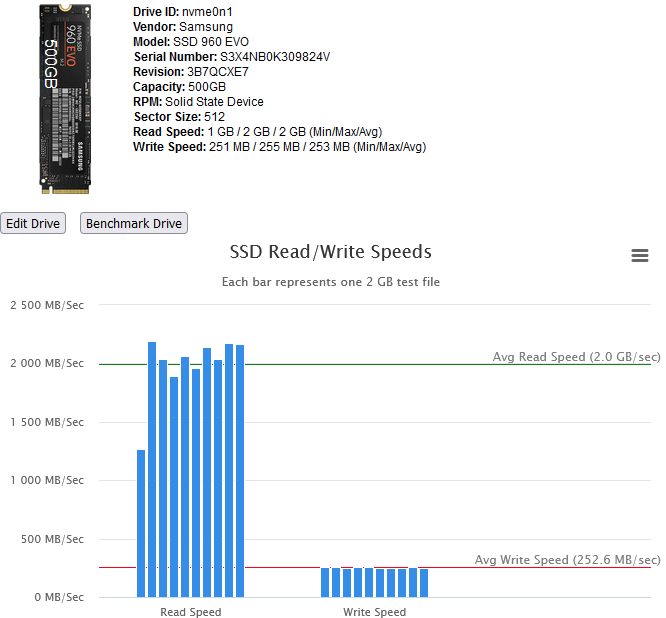
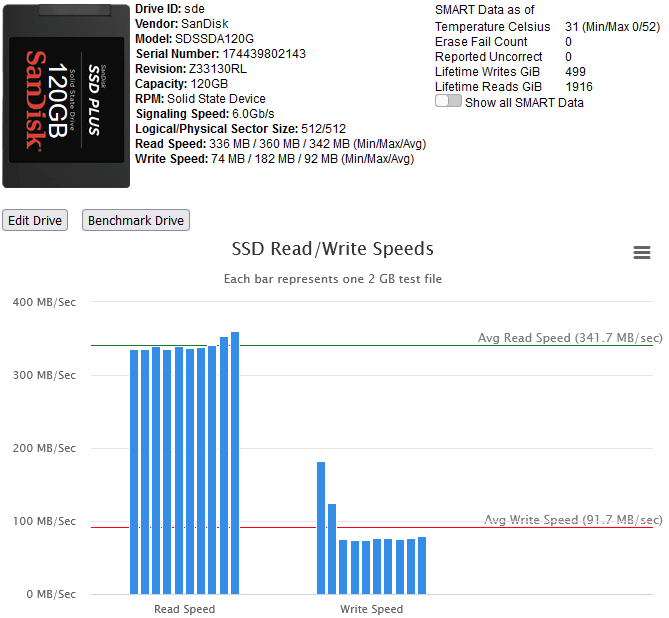
Right Proper SSD benchmarking has been added. To perform a benchmark, a configurable number of test files of a given size (defaults to 10 2GB files) are written to the drive and then read back. The overall time taken for each is used to compute the MB/Sec average for the file. Restriction: SSD's that exist in a multi-drive pool are excluded. To benchmark a SSD intended to be in a pool, use the "Unassigned Devices" plugin to format & mount the SSD and restart the DiskSpeed docker. After benchmarking, use "Unassigned Devices" to clear the partitions and then add to your pool. While the system cache is bypassed when benchmarking, some devices have a built-in cache that ignores cache bypass commands. An initial high write speed that quickly levels out is a sign of such as shown below.
-
I've found that this error by itself is harmless, it's the OS trying to identify what the drive supports. If you want to try to isolate what is causing the problem, here are the series of commands that are executed. Start the DiskSpeed docker app but do not open the web interface. Open a command shell on the system and enter the following: docker exec -it DiskSpeed bash Unfortunately, the debug files you sent did not include any of the data files that are created while scanning the drive. Please try running the following to see if any of these cause issues. I don't need to know what worked or what was returned, just which one blew up if any. /usr/bin/lspci /bin/ls -l /sys/dev/block /bin/lsblk /bin/ls -l /sys/block /usr/sbin/hwinfo --pci --bridge --storage-ctrl --disk --ide --scsi /usr/bin/lspci -D /usr/bin/find /sys/devices -name usb? /bin/ls -l /sys/block /usr/sbin/nvme list /usr/bin/lshw -c storage /sbin/blockdev --getmaxsect /dev/nvme0n1 /sbin/blockdev --getsize64 /dev/nvme0n1 /sbin/hdparm -I /dev/nvme0n1 /usr/bin/lshw -xml /usr/sbin/dmidecode -t 2 /usr/sbin/dmidecode -t 9 /bin/df -B 1KB /sbin/parted -m /dev/nvme0n1 unit B print free /sbin/blkid -o export /dev/nvme0n1 /sbin/blkid -n -o mountpoint /dev/nvme0n1 If these all work, I'll see about adding support for adding a "sync" after each file creation to enforce the data to be saved prior to running the more dynamically generated commands.
-
You can remote in as instructed in my previous post and SFTP the files out. The problem is the files are in a proprietary format so they won't be of much use to you without a tool to convert them. I read of someone doing so but it was with an older version of Unifi Protect so it might not be viable.
-
@MustardTiger - Please create a diagnostic file from this URL: http://[nas ip]:18888/isolated/CreateDebugInfo.cfm and click on the "Create Debug File" button. This button will create a file that has the container diagnostics of what it was doing. Using the age of the files, I can see what it was attempting when your server crashed. A Docker shouldn't ever be able to crash its host. Do you have anything "odd" to your setup?
-
FYI, I'll be off visiting my parents so I now won't be able to look resolve that issue code wise until after the 20th.
-
What drive is sdu? It performed a parted command and got back something unexpected. Open up a command shell to your unraid box and enter in the following and reply with the result. The first line takes you into the DiskSpeed Docker container and the 2nd returns the partition information. docker exec -it DiskSpeed bash parted -m /dev/sdu unit B print free You should get back something like the following: root@NAS:~# parted -m /dev/sdf unit B print free BYT; /dev/sdf:6001175126016B:scsi:512:4096:gpt:ATA WDC WD6002FFWX-6:; 1:17408B:32767B:15360B:free; 1:32768B:6001175109119B:6001175076352B:btrfs::;
-
Kick off a benchmark of two or more drives so the "Click on a drive label to hide or show it." label shows up. The period at the end, or the space right after, is a hidden link that displays the hidden iframes that are performing the actual tests. The error message will be displayed in there along with the command or text describing what it tried to do. Share that info but you can exclude any long stack trace.
-
This error can be ignored. It's something that the Lucee application server team has to resolve. As long as the DiskSpeed application itself recovers...
-
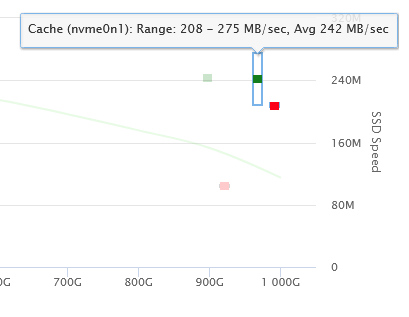
That'll be inadvertently resolved in version 2.10. I'm adding proper benchmarking of solid state devices by writing multiple files to the device and then reading them back taking the averages. Highcharts is giving me issues with the multiple x & y axis on one graph, the width of the bars get smaller the larger the spinners included are. Bench marking solid state devices will be limited to ones in an array slot or a single drive pool and requires a mounted partition with 25GB free space available (based on default benchmarking configuration). You'll be able to test write/reading x number of files of y size. I'm also leaning towards allowing write benchmarking of spinners but that'll definitely require a drive with no partitions and will likely not be included into version 3.0.
-
@FQs19 - you can ignore those logs in most cases. Anything that shows up there tends to be integration issues between Lucee and Java and they'll eventually work themselves out as the Lucee org takes cares of them.
-
@IZSkiSurfer - 2.9.7.1 pushed to include the i-1 change to the Spinup process, decided to get that out instead of waiting for 2.10 with the SSD benchmarking as the cosmetic tweaks getting SSD's and Spinners to look good together on the same graph is taking longer than I expected.
-
I getcha. I made the adjustment.
-
@FQs19 - You've got two errors here, the 2nd one (logs from DiskSpeed) shows an out of memory condition. How much memory does your system have?
-
It was supposed to loop from 0 to 9 instead of 1 to 9. I made that change. I'll take a look at the block size computation. Can you email me a small debug file from the "Create Debug File" from the DiskSpeed app to [email protected]? I'm currently adding proper SSD benchmarking so it's kinda moot in 99% of the cases. It will write ten 2GB files and then read the ten files back taking the min/max/avg times, bypassing the system cache. Requires a mounted partition with at least 25GB of free space. That logic is done, now working on figuring out how to render that on a chart with a stock ticker reflecting the three values. Thank you, I'll investigate.
-
Version 2.9.7 deployed. Change Log Correct issue of Drive images not preserving over installing a new version of this application Verify that the DiskSpeed application can write to the externally mapped volume Prevent against some potential race conditions on formatting drive images on full system scan On fresh startup, fetch device's block size from "/sys/class/block/DeviceID/queue/logical_block_size" for use in forcing a drive's spin-up Note: While your drive images will persist over this update if you have not previously submitted the drive image to the HDDB, the style formatting will not persist due to a bug on a second scan of your controllers setting the saved configuration to match one given drive. I was able to add code to persist the drive image. Ways to resolve this: If you don't care about your benchmarks, click on the button "Purge everything and start over". Note: After at least one benchmark is done on a drive, you have the ability to recover previous benchmarks that were uploaded to the HDDB by viewing the drive in question and clicking on the button "Manage Benchmarks". Edit a given drive and correct the text overlay. If you have multiple drives of the same model, you'll have an additional checkbox labeled "Apply changes to all drives of the same model" - check it.
-
Ah, I follow now. That spinup code is ancient from around when I first wrote the Docker version. If the drives hasn't been scanned yet (or are being rescanned), there's no information on them so it defaults to a 512 byte block size. I also recall seeing that the spinup sometimes worked and sometimes didn't in the past, this might be the reason why. After hunting around, looks like I can gather the block size from /sys/class/block/nvme0n1/queue What do you get from the following commands? cat /sys/class/block/nvme0n1/queue/hw_sector_size cat /sys/class/block/nvme0n1/queue/logical_block_size cat /sys/class/block/nvme0n1/queue/physical_block_size
-
How did you switch your nvme to 4K mode? DiskSpeed doesn't use a 512 byte block size. The block size that DiskSpeed uses is the values returned for MaxSectorsPerRequest multiplied by LogicalSectorSize. From my investigations, this is the same block size that the OS determines to use in access the drive. Max Sectors Per Request is determined via: blockdev --getmaxsect /dev/nvme0n1 For my drive, I get back "2560" Blocksizes for nvme drives are determined using the command "nvme list" and getting the value from the Format column. You'll need to be inside the DiskSpeed Docker to run this command. Enter via "docker exec -it DiskSpeed bash" My system returned Node SN Model Namespace Usage Format FW Rev ---------------- -------------------- ---------------------------------------- --------- -------------------------- ---------------- -------- /dev/nvme0n1 S3X4NB0K309824V Samsung SSD 960 EVO 500GB 1 191.01 GB / 500.11 GB 512 B + 0 B 3B7QCXE7 /dev/nvme1n1 175014425233 WDC WDS256G1X0C-00ENX0 1 256.06 GB / 256.06 GB 512 B + 0 B B35900WD So the block size is 2560 x 512 or 1310720 bytes. AKA bs=1310720 for the dd command.
-
@Snubbers - There's no plans to add benchmarking of USB sticks because there's too many factors that can influence the results. However, you can perform the same test manually with the following command dd if=/dev/sdx of=/dev/null bs=1310720 skip=0 iflag=direct status=progress conv=noerror Replace "sdx" with your drive's device ID (such as "sda" for your UNRAID boot stick). Press CTRL-C to stop the scan when the reported speeds stabilize.


