






rollieindc
Members
-
Joined
-
Last visited
Everything posted by rollieindc
-
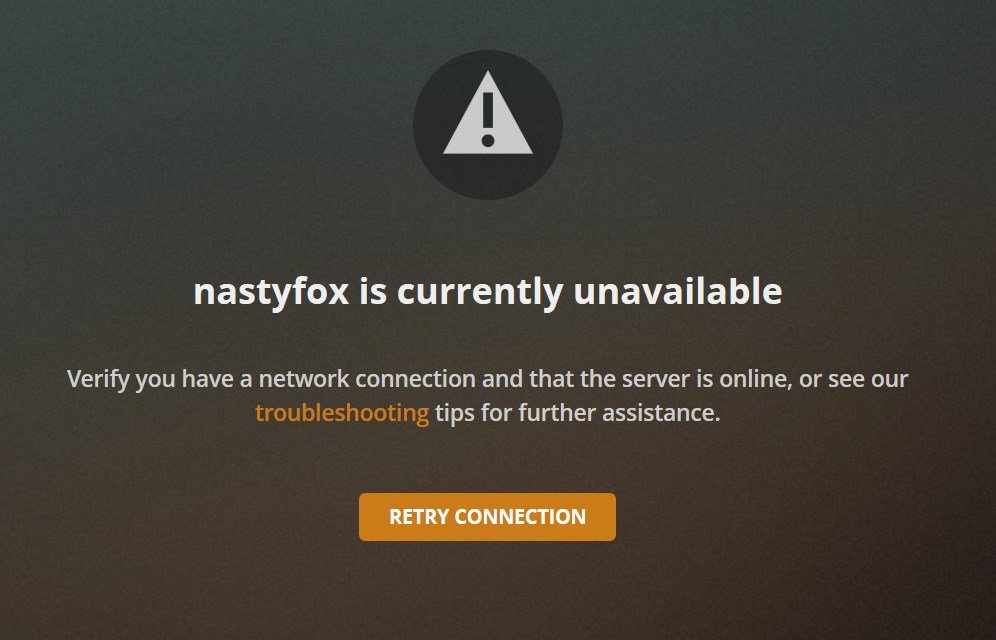
01FEB2020 Update - And upgraded to 6.8.2 So I upgraded from 6.8.0 to 6.8.2, and as usual, my Windows 10 VM RDP is "dead" (unreachable by Chrome RDP) again. No idea why this happens. This seems to be some weird Windows 10 update issue that causes the VM to be unreachable through the Chrome RDP. Annoying, but if I go back in and rebuild the image, it comes back again. Otherwise, the system has been mostly rock solid. Drives seem happy, and the system temps have all been reasonable, including inside the bays and trays. Might add one more case fan just to reduce the temp a bit more. In the OS upgrade, the Plex migration was a bit of a hassle, but I also added a Silicon Dust HomeRunDR Duo Network TV system, and Plex seems perfectly happy to program and record local over the air (OTA) HD content. I have tried running the BEETS docker app to sort my music library, and am just getting annoyed by it rather than finding it to be helpful in finding anything in the indexs that make the music playable or searchable.
-
Thanks for sharing back! I think you looked at a bunch of problems very systematically, and I like the lower bay drive cage adapter. That is very cool. Will keep that in mind if I need to add more drives. And yeah, I always update my NIC card Firmware first thing after installing then. Been bitten by that issue far too many times. Emby sounds like a better solution for your set up. And for now, I am sticking with Plex in a docker. I solved most of my issues (remote access, stutter, etc.) with changing the NAT tables in my DSL modem and router. You might also consider trying Chrome Remote Desktop. I had been using teamveiwer, and sure enough- their “claim“ was I was using it for commercial purposes- and locked me out of Remote connections into my own server before I could refute it. I then had to argue that I wasn’t, before they did anything, which was 72 hours later- and caused me issues while on travel. No weekend support either. Well, teamviewer is in my dustbin now, and won’t be reinstated until I see a better product than Chrome RDP. I have been thinking about putting a windows VM on a separate SSD, and may still do that. But for now, my windows images seem snappy enough sharing the cache SSD. Am surprised you didn’t stick with unRAID as the base OS, but if what you have works- good for you. Stay in touch!
-
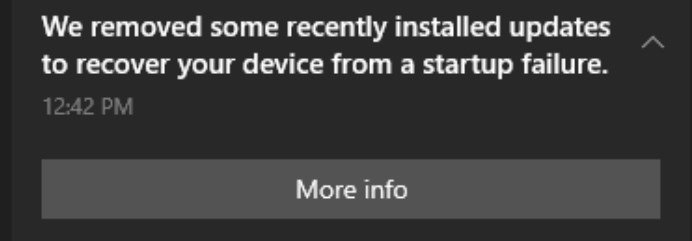
01 JANUARY 2020 - HAPPY NEW DECADE So, the Dell T310 has mostly been stable, without much in the way of issues. Updated to 6.8.0 - and so far, so good. Drives are all up and with zero errors, well within temperature tolerances (less than 100*F). My two main issues have been the Plex Docker image, and the Windows 10 VM. So the Plex Media Server docker (PlexInc version) runs for the most part well, and I added a SiliconDust HomerunHD Duo to be able to watch and record a couple of local stations I can't get on my DirecTV. But - I am still struggling with Plex being "in and out" of the remote connectivity part of it. I have it set for Port 32400, manually, and forwarded the port through my router - but for some reason, the connectivity drops every so often. I tried various fixes (uPnP on/off, manual port forwarding, etc) but nothing seems to prevent the drop outs. The system will sometimes "heal" the issue, but at other times - I got nothing. Starting to consider a Arch or Mint Linux VM to run Plex in, rather than the docker. I keep getting this weird feeling like the Plex Docker is not getting enough resources to run properly, and as a result, drops the remote connection. The Windows 10 VMs are still being a persistent bugger too. Even with the AMD Radeon R7 240 2G Low Profile/Low Power video card installed - the VM gets lodged in this weird "broken" state. I am unsure, but I think part of it is the Windows 10 system trying to automatically upgrade the ethernet or video drivers. And of course, when that happens, I have to rebuild the VM from scratch - because no amount of tinkering will allow me to get the remote desktop back with teamviewer, Chrome remote desktop, or even the VNC (with the video controller changed back to the default setting.) For now, I have "updates" disabled, but am quite certain that some day soon - they are going to "whack" my system and have it go offline again.
-
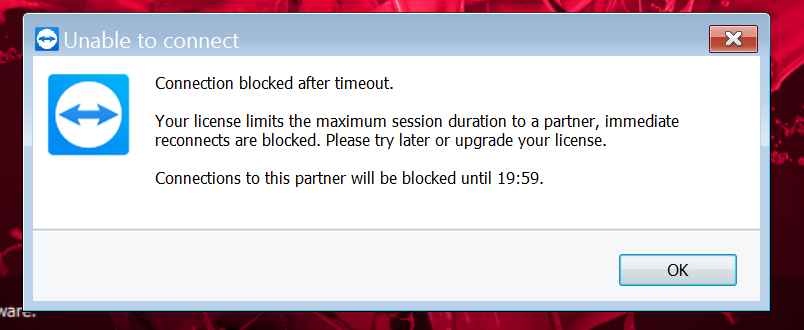
07 DECEMBER 2019 - PEARL HARBOR RECREATION ENACTMENT ON MY SERVER BY TEAMVIEWER I started using TeamViewer remote desktop because it worked fairly well. I only had my one server, and I am not running it for a commercial service in any way shape or form. (I work for the government, and they frown on such things.) However, just moments ago as I was trying to resolve an issue with my Windows 10 VM, the software popped up with a "We're taking away your connection" ransom note. I thought this was a joke, but this is EXACTLY why I had seen so many others saying that TeamViewer was no longer their preferred system. Now I see why. Right in the middle of a effort, a "ransom note" - pay up, or we're turning off your ability to use your VMs. No if's, and's or but's. No way to contact anyone. No email. No chat option. You have to pay, or no more access. Pretty much a "F*ck you" by the TeamViewer team. Sorry, NO ONE deserves this kind of treatment. Ever. So, "F*CK YOU TEAMVIEWER." If anyone comes into my office saying that they use the software for a required job in order to input data - I will now (physically) throw them out of my office, terminate their contract with me, and consider them "Non-conformal" to stated performance and security requirements. "TEAMVIEW IS BULLSH*T."
-
25 NOVEMBER 2019 - PLEX-ing my muscles, in MINECRAFT???!!!. So, I picked up a lifetime subscription to Plex (on sale at 20% off) and upgraded my Plex server (Docker) from the LimeTech build to the Plex, Inc build - inside of Docker. Thanks to the excellent youtube video tutorial from SpaceInvaderOne - I was able to move over the Plex configuration and files within about 15 minutes. No muss, no fuss. (Reminder: 1 beer owed!) While I'm not seeing any real improvements in the way the new Plex docker handles the streams to my devices outside of my home network - I, at least, feel a little more in control of how Plex and Beets are organizing my music and video library. So I spent a lot of the weekend suffling multiple CDs and DVDs through ripping programs on laptops, loading up the music library. (Reminder to self, I need to back the library up on a spare portable HDD.) For what it's worth, I use CDex and EAC for most music CDs, and WInX DVD Ripper Platnium for my DVD movies. Not really seeing a need for 4K or 8K yet, but that's probably a future thing I will need to consider with whatever my next "server" I might need to get. Plus, I am interested to see if the Plex's "TV" functionality is something that I can use with my server. Seems like it's just a small USB dongle and antenna away from pulling in "over-the-air" HDTV shows and into my server via Plex's DVR like capabilities. But I've found in the past that these kinds of solutions have always been finicky for me at best. Still, I am encouraged to consider it. And I do have the option of running a VM connected to one of the USB ports with the HDTV dongle, and having the same HDTV capabilities - and maybe even better. Considering that a new larger format, smart HDTV is somewhere in my future - as is a whole house renovation, I need to consider my options on how to Plex and how it will work with our existing/future DirecTV system. (Gahds, I hate ComCast!) Also the MSI Radeon R7 240 video card is working nicely in the server under a Windows 10 VM. So it will likely be December before I find the time to work on the nVidia video card again. The Teamviewer remote desktop controller I am using is pretty good, but the Acer Chromebook that I am controlling it from - has some minor issues with "passthrough" of right and left mouse clicks from their implementation on the touchpad. I might try using an external mouse to see if that resolves that issue. But the idea of using a connected "lightweight" Chromebook is pretty attractive for when I travel (which I do a lot) compared to having to tote a larger laptop around. (I have to RDP into my work's VNC and VM in order to read emails!) But overall, I like the "look and feel" of the server solution that I have now. Much more of what I originally envisaged when I started the project. A low cost, lightweight, simple NAS, with modest extensibilities - that had modestly good access to files, ability to back up into, and the ability to run VMs and Dockers/APPs. If I was doing this "professionally" - I'd probably want to use a platform like SuperMicro's motherboards and hardware, but this wasn't intolerable to work through either. But too, I'd want a much faster internet connection than I have now (Verizon DSL), and would love it if I could gain access to a FTTH connection - but the locale where I am doesn't offer that. =( With "Black Friday" deals coming in, I will probably be looking for a few larger Enterprise HDDs. 6TB and 8TB SAS/SATA drives at lower prices are starting to show up on some recent sales - now that the 12GB enterprise drives are coming onto the market, so that might be were I increase storage capacity and replace the current parity drive. (Adding two 6 or 8TB drives would move me into the 20+TB range on a small, single (quad core) CPU server space - which I think is pretty amazing.) And I don't think a second 1TB SSD for Cache makes sense - but would be interest in what others have to share about their experiences. So, what's next for my server? Probably the following: (green requires very few funds and is low risk to get, yellow requires funds/significant personal effort/increased risk to the current server) Adding HDTV DVR functionality to Plex or separate "over the air" HDTV VM, & how that will work w/DirecTV or future smart-TV A couple larger hard drives (currently up to 13TB, but growing music and video library), Getting the nVidia to work in a Win 10 VM and remoting in, Adding a docker or two for cloud sharing & bit torrents, Upgrading the xeon processors from the X3440 to something like X3480 (2.53 to 3 Ghz speed bump for about $25). Working on some VMs to support DruPal functionality as a satellite node off my current externally hosted website, permitting "file drag and drop" document library "like" functionality. After that, it's a new system really. I am sure I am getting close to maxing out the power supply on the T310. And this is otherwise max'd out for a NAS. Plus I'd rather not "bog" this system down trying to edit photos or videos natively from it. I got it as a NAS, and that's the main reason for it being... serving and making data available where ever I go. I have a heavyweight laptop and a heavyweight standalone PC for video and graphics editting that work well for me. Plus I can't see the need for a higher network connection, at least not for what my family does. Sure, I might wire for 10Gigabit around the home, but everything that I will link into it will likely be 10/100/1000 for a long time to come. Plus I have other projects to work on that are not server related: a new wireless (g/n/ac) router to be installed, a new high speed document scanner (ethernet IP based), a revamped/standalone Win 10/x64 dual xeon based video/photo editting system, a standalone Mac Pro 5.1 (dual xeon x56xx's) with 32GB ram and a standalone i7 Mac-Mini (likely will become the HTPC or the daughter's future workstation)! And unRAID was the absolute BEST solution for this kind of centerpiece NAS server - with all that future functionality in mind. Yes, I would like to have the nVidia issue to be resolved, but that's not LimeTech's issue... that's really an nVidia driver issue. )=p Also, my wife has recently recognized me as the "CIO" of our home based (not for profit) business. It's an IT staff of one. But I have my 11 year old daughter as a new intern trainee. And she will be wanting a minecraft server soon... and yes... the CIO will consider that as part of the future. But she has to get her school grades up first. She's definitely interested, that is, when she's not wanting me to teach her how to play softball and play catch with me. 😃
-
Friday, November 15, 2019 - The day I "cursed" nVidia. So, still running unRAID 6.7.2 - but I had enough of trying to get the nVidia GT 1030 OC Phonenix card from Asus to work in the Dell T310 box, and tonight ran out to Microcenter and bought a low profile/low power MSI Radeon R7 240 2GB video card. Yes, I knew it wasn't going to be blazing fast, but then neither is my server. The card didn't need an extra power plug, just the power from the PCIe slot. And I just wanted something to work in the tower that would give me some decent graphics capabilities and not the accused "error 43." And sure enough, the Radeon is in - working on the first try with the VM, loaded up the updated Win10x64 drivers - and is broadcasting through TeamViewer at a decent 1280x1024 resolution. (Trust me, this is soooo much better than a Error 43 and default 800x600 resolution... I can at least run some programs again from the server!) In particular, I was able to run Second Life (it's a fun virtual world game for me) and it actually looked pretty good. Not amazing, but "pretty good." And although I just got a good hint from another poster about a potential fix for a VM using the nVidia 1030, I decided am going to let this server configuration "cook" for awhile "as is." Plus I can still use the 1030 in another box I am building for doing some video editing and graphics work.
-
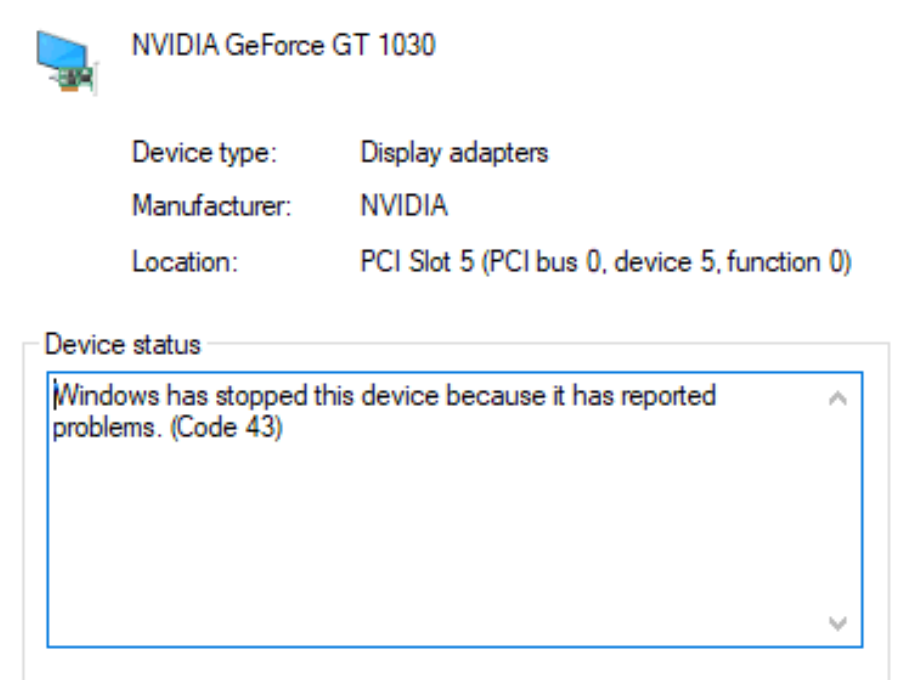
November 11, 2019 So, back at it again tonight. Have to say, I like 6.7.2 for the windows "findability." Also those automatic docker and software updates make for a lot fewer "warning notices" and a lot smoother running server/machine. System has repeatedly been up for DAYS with no real dwn time for maintenance. Sadly though, I have had "Less than zero" luck with the nVidia pass-throughs on VMs. And I have tried just about everything. I've re-re-re-watched SpaceInvader One's videos, and tried every trick in the book. So am now to the point of throwing in the towel on the nVidia GT1030 all together (and into another system I have), and finding some other decent video card that doesn't have the continued nVidia "Code 43" VM issues. (See attached photos). I've tried everything I can think of. Different slots, various IOMMU groupings, editing the pulled BIOS ROM binary file with HXD hex editor, turned off Hyper-V, Booting with SeaBios, Booting with OVMF - and finally placed some chicken bones on it, while holding a pair of crossed screwdrivers (one Phillips, one Slot) and reciting Ohm's law. Now, I'm just buggered over it. I'd rather run a cheap AMD video card at this point for my gaming and photo/video editing. Suggestions welcome. nVidia seems to be taking the "Micro$oft" approach to things lately. Makes me think that AMD might just... walk past them too. Card requirements: Works in a VM Works with TeamViewer (Personal preference to remote in with) No PCIE power (must run off the slot power in a PCIE 8x slot) No need for a HDMI dummy load Works with Adobe Photoshop, Premier, and program called "Second Life". Ok, time for bed. Night all.
-
Enjoy a cold one on me...

-
Squid, I could kiss you... or buy you a beer. I didn't even know one existed... but will pop it in now! Thanks!
-
Well, time for an unRAID update. The Dell T310 has been mostly quiet and doing what it does best - Parity Checks. Very few issues running unRAID. Only real issues are that it screams for updates on software tools and dockers, which I do regularly. Otherwise, it's been up continuously for 45 days, serving files, running a couple of VMs - without much of an issue. One 600GB Seagate SAS 15K drive I have - alerts that it gets "Hot" at 115F, but quickly goes back to 99F within a minute or two. May be a fan/circulation issue in that 3x drive bay that I have it in. Likely will "push" the drive bay fan to a "fully on" state, rather than temperature controlled (which I think it's currently in.) I also have a Win7/64 VM and a Win10/64 VM, which have also been running in the background with Plex, and they seem mostly "just working." I did install BEET, which cleaned up my music library files nicely - once I figured out the terminal console interface for it. The GUI for BEET doesn't work for much. If the terminal program wasn't easy and relatively useful, I'd have ditched it after the first 20 minutes - the GUI was that bad. Also on the "new to me" hardware front, I am now at the point where I may want to make some "changes." Mostly since I got the following hardware really cheap, which has me quietly thinking about a "rebuild." (Have I mentioned I love cheap used hardware!) (#1) The first is a SuperMicro X7DCL-I-YI001 motherboard with two Xeon LGA 771 quad core cpus (Might be E52XX's), and 32GB of DDR2 ram - for $20. The downside of this is that it only has 2 (x8) PCI-e, 1 (x4) PCI-e (using x8 slot), and 3x 32-bit PCI slots slots, and the DDR2 memory is maxed out. It came with a 4U case (no power supply) and a bunch of other fans and interface cards. My guess is that it was a failed attempt at a bitcoin miner. There was very little dust, and the system looked super clean. For $20, I felt like it was a steal. Still looks like it has a lot of life left in it, even if I throw it into another ATX case with stuff I have lying around - like a nVidia GT610 or 1030GT card (on a riser), 6Gbs SATA PCIe controller, and a 240GB SDD. And I could also upgrade with a new (cheap) set of 3Ghz Xeons (Seeing some of the LGA 771 X5460's on eBay for $25/pair), so I think this could become a decent desktop running Windows 10. I realize I am capped on memory with this Motherboard, but I am also working on a cMP (classic Mac Pro 5.10 w/dual Xeons - that will ultimately become my video/photography editing workhorse.) But even if I strip it and resell the parts from this SuperMicro unit, I think I am ahead of the game - by a lot. (I even heard "HACKINTOSH" in the back of my mind, but quickly grabbed a beer and killed those brain cells before they took root!) My question is, would this SuperMicro really be better than my T310 as a NAS/VM server? (#2) An nVidia TESLA K10 GPGPU card, also for $20. It was mod'ed, but again - it's a "What the heck" buy. Wondering if this would work with the nVidia build of unRAID - but since I run "vanilla Plex" without a subscription, I'm thinking it will have limited value/use/overall speed increases. Mostly I wanted to get it - to tie it to a VM for running some simulation programs - but unsure if it's worth it or not for anything else. I did read that I could put it on a 8X to X16 (powered) riser, maybe for the SuperMicro above... but I am just not sure of the value of it. I cannot put this into the T310, since it needs more power than is available from the T310 Power supply, and I am not really interested in replacing the T310's redundant dual power supplies. To be honest, I just want to leave the T310 alone and just have it keep serving up and storing files for me. (If it ain't broke...) Decisions, decisions...
-
First - You're absolutely welcome! Bummer about the SATA/SAS cables, hope that's resolved now. Mine have given me zero issues. And yes, I am "eye"-ing larger SAS drives, but am waiting for the prices to fall a little more. When I can Three 8TB or 10TB drives (one parity, one data, and one "hot swap" spare) then I will move over to larger drives. For now, I am fine with the multiple 4TB drives... easy to get spares if I need them. And I am not using up that much space yet (although I upgraded my photo, sound and video equipment too!) I'll have to look into OpenMediaVault. Am using the unRAID smb shares connections, but not sure I will stick with that - but it works. And yes, the motherboard sata ports are S-L-O....W. Like 1.5Gbs slow. Let me know how you're doing... for me, I am kinda just hanging out for awhile - as I am traveling a lot recently. Nice to be able to access my music via the PLEX server from my cellphone and play it on my rental car's CARPLAY stereo as I was driving between Monterey and San Jose. (My server is back in Virginia) I still need to fix that ASUS 1030 nVidia card... DARNIT!
-
Thank you for the reply Jonathanm, I do appreciate you taking the time to follow up with me. To your comment - I can get to the management console with "root" or "admin" accounts. However, I used to be able to use https://nastyfox/Main and now I have to use https://nastyfox.local/Main to get to the server. I can also get to the management console with https://192.168.0.119/Main But I am unable to reliably map a network drive to my unRAID shares in Win7/64, like the one named "Music". In Win 7/64 using 6.7.1 with any user and password combination, it connected the "M:" drive to //nastyfox/Music. But since the upgraded to 6.7.2, nothing else seems to allow me to map it to "M:" with the sole exception of "//192.168.0.119/Music" And I find this rather odd behavior.
-
31JULY2019 - Upgrade to 6.7.2 issue? Upgraded the OS to 6.7.2 from 6.7.1, but something new happened. I had been able to access the system with https://tower (actually https://nastyfox) but now have to issue https://tower.local/ or the direct IP address http://192.168.1.119 - in order to get to the server GUI. This was not an issue in 6.7.1. I tried a few fixes, including purging the network (DNS) entries in router - without any success. Plus all of my drive maps in Win7/64 laptop had to be remapped and re-logged in. Another issue is when I try to log in with any user name than "root" - I seem to be unable to get the system to recognize the user/password combination correctly. "root" works fine, but my other usernames (admin and peter) are not working very well.
-
32GB DDR3 ECC - Using most of it for running Windows VMs.
-
-
I just upgraded my tower from 6.7.0 to 6.7.1 - No Issues. Thanks for the denial-of-service and processor vulnerabilities security plugs! 😀
-
Update: June 23, 2019 - The continuing saga that is the nVidia - ASUS 1030 GT OC card. I did manage to get the video card to display from the display port in both boot and a Win10/64 VM configuration with OVMF, i440fx-2.12. (Yea, some success!) I had to make the card the primary display in the T310, essentially disabling the onboard intel video chip in the server's bios. the boot screen now shows up through that display. To get this far with the VMs, I used the downloaded and editted BIOS from the TechPowerUP in the VM's XML, and set the sound card to a ich9 model. So far, it was looking good. Until the machine rebooted when installing nVidia drivers. (UGH!) At that point I got the dreaded "Error 43" code in the windows driver interface box, and was stuck in 800x600 SVGA mode - unable to correct it. I will likely remove the card and dump the BIOS from another machine, and then use that in a new VM machine build to see if that works. I am unsure if I need to go back to SeaBIOS and try that option to make it workable - but that's another path I could persue. Also unclear if i440fx-3.1 is an option or not. In some regards, I am just encouraged to know that the 1030 GT video card is indeed working in the Dell T310, and that I can have it be a displayed output - even if "hobbled" at present.
-
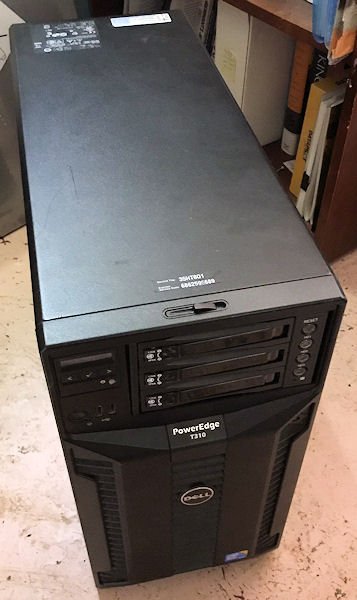
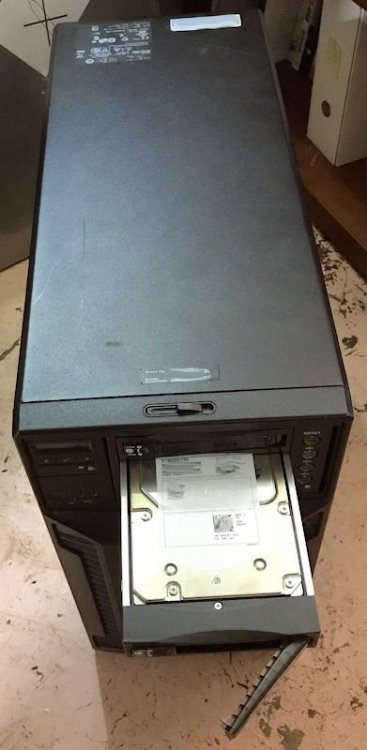
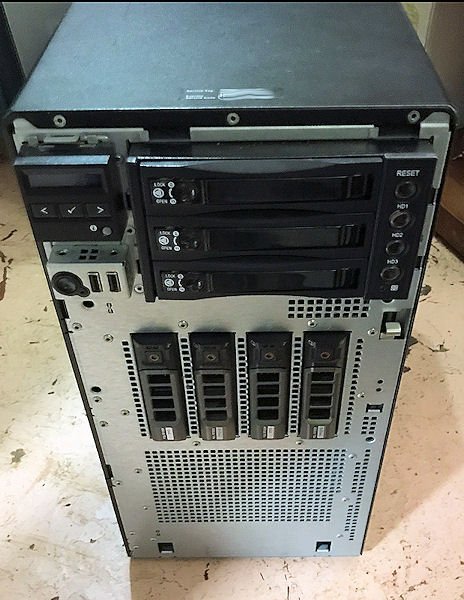
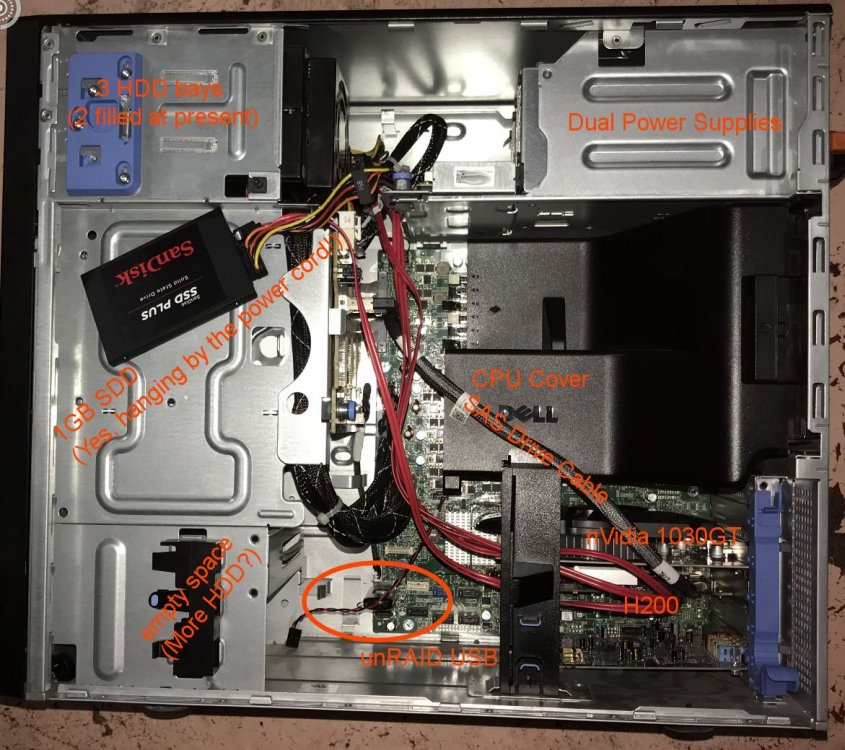
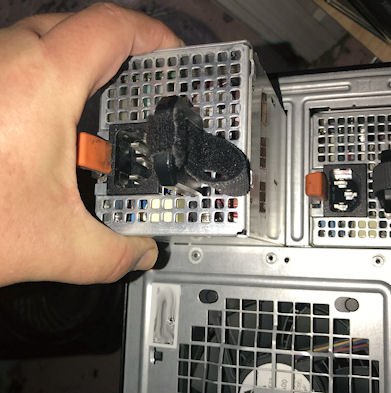
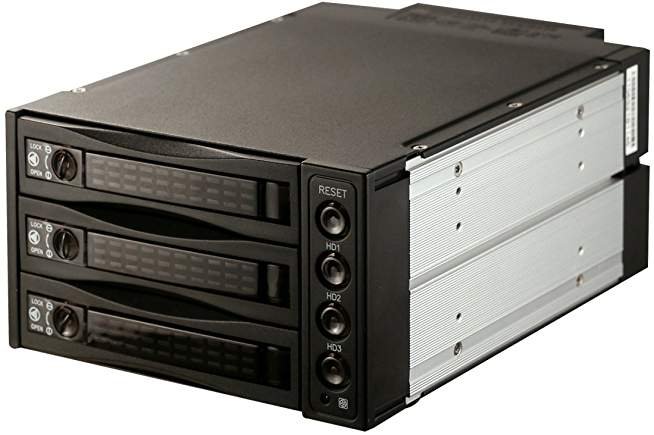
Heyas - Happy to share what I know. Just to be clear, I am running my T310 as a "headless" system, with no keyboard, mouse or video display. If you intend to use it as a desktop type system to run games, then you might want to consider how the VMs and the other components are installed. I wanted to be able to run 24/7 as a NAS, with some Virtual Machines (VMs) - that I could remote desktop into via a VPN, have some Docker apps (Plex) and otherwise house my digital photo library. Attached are some of the photos of my system. Excuse the pink floor, the house is in a state of "pre-remodeling". Let's start with your power question. The 4x HDDs in the array have a power tap already. For my system, and in the photos - you can see how I removed the side cover panel in one of the photos and see all the drive bays. I made an addition of a StarTech 3x 3.5" HDD removable kit in the top/front of the system. So I used the molex power tap from the removed RD (Dell removable hard drive) and the SATA power from the removed Dell DVD Drive, and have since I replaced those with that aftermarket SATA removable drive bay. Essentially, what I had originally was a 2x 5.25 half height (or one Full Height) bay to work with. I also included a view inside, so you can see the "inner workings" of the server, power, video and drive/cabling layout. You can see that new drive bay I installed the other photos too. So I have the one moxel split into two SATA power outlets, and one SATA power outlet (existing) - resulting total of three SATA power taps to work with. Two go into the new three HDD drive bay (yes, it only needed two SATA taps for three 3.5" drives) and I used one SATA power split tap for the SSD. Overall, I like this setup, and think I am good on power- but would have liked it better if I had been able to find a 3x or 4x bay system that didn't use removable trays - and just accepted the bare SATA/SAS drives by sliding them into a SATA port/locked with a cover. And yes, I currently have the SSD hanging from the cords ("etherially mounted") and it will get hard mounted later (or duct taped if enough people gripe complain about it!) I also included a shot of the redundant removable power supplies. I really like this power supply feature, so I can swap out a bad PS, and the system can run on the remaining PS in the interim. So "no," as you can see - I did not remove the backplane - and I wouldn't recommend it. If you install the redundant power bricks- you should be able to pull the existing power supply, and then replace it with the new ones - and add the redundant distribution board. You can see the distribution board just to the left of the power supplies in the overall "guts" view. The one existing molex for the drive - and the one existing SATA power connector came from that distribution board and are unchanged. The molex and SATA power cables from the distribution board looked "beefy" enough, so I think I am ok for power consumption given what I am using the system for, and the way the power is distributed to the drives. CAVEAT EMPTOR: I WOULD NOT RECOMMEND THIS SET UP FOR A VIDEO PRODUCTION ARRAY. IF I WAS BEATING THIS ARRAY WITH VIDEO EDITS, I WOULD GO WITH SOMETHING MUCH MORE ROBUST AS A SERVER! (Besides, I really hate this issue debugging the nVidia card in a VM. If that was my goal, I think I'd rather pay for a SuperMicro server. But - I am a cheap Scotsman with a mustache.) You can also see where I have my USB unRAID memory stick plugged into the motherboard. And trust me when I say this, booting from USB for unRAID is not a speed issue. It's very compact, and it "unfolds" itself very quickly into a full blown server. My unRAID total boot time is about 90 seconds to 2 minutes, and I leave it run 24/7. Now, just to be clear - you will want to have that SSD set up for the apps, dockers, and virtual machines (VMs) in order to get something that is speedy/responsive. And the part I really like is that all the VMs can run independently, 24/7 as long as you don't try to use the same resource (e.g same graphics card) at the same time. And most VMs can run a virtual "display" and output through a VNC. I've already had Unbuntu, Win7 and Win10 images running simultaneously on my T310 with VNCs. (Although I am still fighting with the VMs using an nVidia 1030GT graphics card - ARGH!) If someone just wanted is a single machine that is not up/on 24/7 - then I suggest they consider installing Win10 image on a T310, slapping in a good SDD and video card - and go with it. But if they wanted a NAS, that is on more than an hour or two while you work with photos or watch videos, (but not run a producton system) that can also run VMs and apps (like Plex) - I am pretty much convinced this (unRAID) is the best way to go. If they wanted a production system that serves more than a few (5?) users, and did audio or video production - I'd be looking at a higher class dual Xeon or Dual Thread Ripper machine with a good PCIe backplane/video car compatibility track record. Did I miss anything? Questions? Comments? Argumentative Speculation? Philosophical Diatribes? 😃
-
Heyas, Welcome to the T310 club. Feel free to ask/share info. Sounds like you have a good start on a nice system. I’d see about adding a redundant power supply, if you are able. Not a mandatory thing, but I like the reliability bump I get with mine. And yes, I have mine hooked into an UPS brick- just in case. I had the H700, but went to a H200 card so I could use the Smartdrive info to monitor my drive health more closely. But the H700 is a nice card too. One piece of advice for the H700- Copy your RAID config file settings for the H700, that way if you have a drive fail with unRAID and were running parity, you can still rebuild your drive array. And - Yes, I use a SAS/SATA splitter cable (4x channel, and 2 channels per card for a total of 8 drives) and yes, I get 6GBs (or the drive’s max speed) on them. Ebay sells them for less than $10. Look for “SAS SFF-8087 4 SATA Hard Drive Cable”. If I were you, I’d consider making all three of the 3TB drives you have as RAID 0, and then make one of them a parity drive. That would give you 6TB of parity “covered” storage. Then for every drive you add, you add 3TB of “parity covered” storage. I went with 4TB drives, based on price point, but if you stuck with the 3TB and went up to 8 drives, you’d sit at 21TB maxed out. My only reason that I’d go back to RAID 5/10 disk configuration now, would be just for improved read speeds. And since I am using my system mostly for a few VMs (on the SSD) and as a NAS, I don’t see the need. You might want to read up on how parity is implemented in the unRAID system, vice RAID 1. There were compelling reasons that I went that way -for my needs. With unRAID you’d likely want to use SSD drive as a cache drive, which works well for VMs. For me, I’d keep the SSD on the pcie card, you’ll probably get speeds as good as the H700, and it will probably run faster on a separate PCIe slot. You might want to go to a 500gb SSD- and move to an NVME type drive- but to start with 250GB is good (2-3 VMs plus a docker app) And- Sure, I can grab a pic of my drive layout and will post it later. There’s enough room in the T310 to get 8x 3.5” drives inside the box if you think it out carefully. If you decide to go with an external drive cage you might need to get an external connector card - like a H200e. FYSA- I do not recommend a usb HDD box on the system for anything other than file transfers. The USBs on the T310 are s-l-o—-w. But for temporary file use or transfers, they work well enough. With unRAID, I think I read that you can run the Windows 2016 image as a virtual machine. Then you can assign the unRAID “shares” as virtual drives- as you want. Best of both worlds. But for me, I am able to attach my unRAID (NAS) shares directly to PCs (win 7, 10, macs) on my network easily. Looks & works like a regular network mapped drive. More later...
-
Moving on (June 15 update) Still happy with the Dell T310 server as an unRAID platform. Very few down days. Installed the Samsung 1TB SDD, definite performance bump with it over the Patriot 240GB one. Still working on the ASUS nVidia 1030 card - and tonight my next step is to make it the primary video card at boot-up. (Nope, that didn't work either. Will need to remove the card and dump the bios/firmware on another machine) Starting to enjoy the Plex docker. Still not got SickChill working well. Also tried to get Deluge-VPN docker working, but confused by the config file locations in the interface to unRAID 6.7 seems to have changed significantly. Uninstalled the DarkTable docker, the interface was just too clunky and difficult to use in a docker. Even on my metal laptop, it's still clunky. Noted that there is now a docker for GIMP, but honestly - I'd rather run it through a Windows VM on the server.
-
Moving on (June update) Updated/Max'ed out the RAM in my server to 32Gigs from 16Gigs. (16GB for $49 on eBay) Added a Plex docker. Tried BinHex's SickChill docker, but it's not working well (yet.) Also bought a 1TB SDD (Samsung $89 at MicroCenter) but have yet to install it. Also still need to debug my ASUS nVidia 1030 card issues, but the system is working well without that working fully - at present. Loaded up the DarkTable docker app for photo cataloging, not sure yet it's something I will keep.
-
That and disabling the motherboard graphics chip are all I have left to try, but that will have to wait a bit. (Family life calls!)
-
Just the one (Asus 1030). There is the onboard graphics chip, but not using it - although I have not tried disabling it ... yet.
-
So, I'm about out of ideas. (This is on my Dell T310 Server, specs in my signature) Still trying to get a Asus 1030 card to passthrough, and having no joy. I've watched S-I-1's videos a dozen times. (Thank you!) Made over a dozen VM's with various settings. The unRAID server boot mode is set to Legacy. Downloaded the Asus 1030 BIOS from techpowerup and edited it, as shown. Am able to get Win 10 Pro to boot, video to show up, and fully load up. (login works) Can even get to where the card is recognized as a 1030. But any driver tried only leaves me with "Windows has stopped this device because it has reported problems. (Code 43)" ----------------------- Within the VM: Doing passthrough of the CPU (intel Xeon, from 1 to 6 cpus), or emulated. Using OVMF bios to boot. (will not boot under SeaBios) Machine is i440fx-2.8, 9 or 11 (Will not boot under i440fx-3.0) Hyper-V is set to no. Using either SD or HDD to boot makes no difference (although IDE seems to work best, occasionally) Am passing through the card & the HDMI sound lane as well. (And sometimes a second sound card) The Video ROM is included or not (and including it does seem to make the booting process more stable.) Also tried a similar set up with Windows 7, but it crashed on boot up. Most of the time can only use the VM with the MS basic (800x600) video display driver. Do ATI Radeon cards have the same issues? From some posts elsewhere, it looks like they are having similar issues with VMs too.
-
Another day, another issue... Still having issues with the VM using the Asus nVidia 1030 card. I did pull out a monitor, keyboard, and mouse to make a proper go of it. And I don't think it's the card, it's the VM. So I continued tinkering with it, and more will be required. I am using direct video out to a monitor over the DVI interface. So yes, the card is recognized, but it still refuses to accept the drivers (new or old) and reverts back to the Microsoft Standard Display adapter settings. This included removing the old driver with DDU (Display Deinstall Utility) - and reinstalling only the recommended one. At this point, I am going to start over and build a brand new VM, checking everything twice. As for the Plex docker, that has gotten a lot more stable and it's beginning to grow on me. I did buy the iOS app for my phone ($4.99), and it's good at connecting to my library (music & video). I'm not a big media dog by any means, but I have some tunes that I do like to listen to - and a few movies that I like to watch occasionally. I also am trying to set up the binhex vpndeluge, but that's far more complex - and as I run NordVPN, I couldn't even determine which port was being used in OpenVPN files & servers to get past the initial install stage. (And I have other issues at home that are a much higher priority.)


