




gulo
Members
-
Joined
-
Last visited
-
Looking for any additional help with CodeProject AI Unraid Docker and USB Coral. Per previous post, I have added a device to the Docker by using value "/dev/bus/usb" and set the Docker to privileged mode. When running "lsusb" in Unraid I was showing the Coral as "ID 1a6e:089a Global Unichip Corp. " Per official instructions, I have installed and reinstalled the ObjectDetection (Coral) module several times, until it finally found the Coral which caused it to change how it appears in lsusb command to "ID 18d1:9302 Google Inc. " I also see "objectdetection_coral_adapter.py: Edge TPU detected" in the CodeProjectg AI server log. However I am unable to run any images. When I try the first object detection I get the following error message: "RuntimeError: Encountered an unresolved custom op. Did you miss a custom op or delegate?Node number 11 (EdgeTpuDelegateForCustomOp) failed to invoke." All subsequent attempts return: "The interpreter is in use. Please try again later" If I restart the Docker, or stop/start the Coral module, it goes back to that first error message. Any ideas?
-
Hello My docker is constantly crashing with errors likes, any time something new is added (new audiobook, author, library etc): [Error: ENOENT: no such file or directory, mkdir '/metadata/items/li_tfyi9cajjicm2rmixj'] { errno: -2, code: 'ENOENT', syscall: 'mkdir', path: '/metadata/items/li_tfyi9cajjicm2rmixj' } or [Error: ENOENT: no such file or directory, mkdir '/metadata/items/li_d6yt9cxpjkynla5wyb'] { errno: -2, code: 'ENOENT', syscall: 'mkdir', path: '/metadata/items/li_d6yt9cxpjkynla5wyb' } If I keep restarting the docker/rescanning the library it does eventually add new media, but anytime something new is added the same thing happens again. Like it basically fails every time it tries to process new data, and then upon restart it works for the one file. What could be causing this?
-
I am experiencing the same thing, has anyone figured this out?
-
Thanks, I did see a list of directories that QDirStat couldn't access and I manually looked through them but didn't see anything that would add up to 100GB. Just trying to make sure I am not missing something obvious.
-
Hello In the "Main" tab in Unraid my Cache drive shows 444GB being used. I am trying to figure out what's taking all this space so I can clean it up. I have installed QDirStat docker, however that one only shows 350.5GB being used. Is there some good way to figure out what's taking up the other 100 GB ?


-
OK, I *think* it works now. Can anyone take a look and see if I am missing anything? Anything I should add to make it safer? Thanks server { listen 443 ssl; listen [::]:443 ssl; server_name bi.*; include /config/nginx/ssl.conf; client_max_body_size 0; location / { include /config/nginx/proxy.conf; include /config/nginx/resolver.conf; set $upstream_app 192.168.1.31; set $upstream_port 7968; set $upstream_proto http; proxy_pass $upstream_proto://$upstream_app:$upstream_port; proxy_set_header Range $http_range; proxy_set_header If-Range $http_if_range; } }
-
Hello, Sorry I am total noob, I have been using Nginx Proxy Manger for a long time and all of sudden it won't renew my certificates for some reason. So I installed Swag. I think I got the certificate and the ports set up properly because when I go to my subdomain bi.xxxx.com it does open page saying "Welcome to your SWAG instance" However I can't figure out how to make it forward to my Blue Iris IP running on a Unraid VM as it used to with Nginx. I understand I need to create xxx.subdomain.conf file but I don't know how to make it work. I found a .conf file from my nginx docker but the format seems to be different? This is what the old one looked like: server { set $forward_scheme https; set $server "192.168.1.31"; set $port 7968; listen 8080; listen [::]:8080; server_name bi.redacted.us; access_log /data/logs/proxy_host-1.log proxy; location / { # Proxy! include conf.d/include/proxy.conf; } # Custom include /data/nginx/custom/server_proxy[.]conf; } I just need it to forward to 192.168.1.31:7968 Any ideas what the swag conf file should look like? Thanks!
-
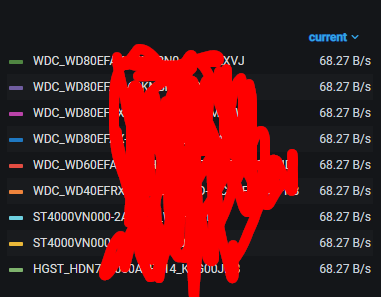
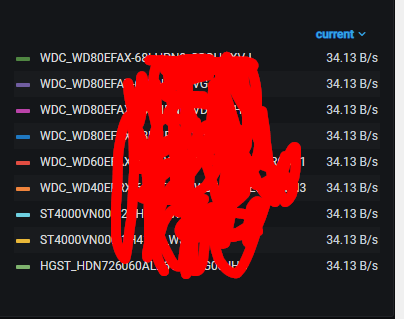
Hello I just upgraded from 6.8 to 6.9 last night. Since the upgrade I noticed that my drives won't spin down anymore. I saw something about it as being fixed in 6.9.1 but that is the version I upgraded to. I have telegraf installed to monitor the server in Grafana. I noticed that all the drives are constantly reading at the low rate. The rate is slightly changing but it's always the same for all drives: Any idea what's causing it or how to troubleshoot? Thanks
-
Hello, Few days ago my Telegraf docked stopped working. I get the following error: [telegraf] Error running agent: could not initialize input inputs.smart: smartctl not found: verify that smartctl is installed and it is in your PATH (or specified in config): provided path does not exist: [] I just upgraded to Unraid 6.9.1 but the error remains. Any ideas? Thanks
-
Oh, this was easier than I thought Thank you Skylord123 and UNOPARATOR!
-
Hello I would like to use Watch Node / File In Node in Node Red to read files, but I am not sure how I can access my Unraid shared folders? I tried "\\192.168.1.10\ShareName" but Node Red doesn't see it / can't access. Do I need to somehow map those share folders in the Node Red docker configuration? Thanks!
-
Hello I have purchased 2 Supermicro CSE-M35T1 3x5 drive cages. Do I need to plug in both Molex power connectors in each cage, or should just one work? Unfortunately I don't have enough Molex connectors on my power supply. Is it safe to use one molex and one sata power cable with sata->molex adapter (link to adapter) per cage?
-
Hi I am interesting in running this - https://github.com/greghesp/assistant-relay It says it runs on node.js but should it work on nodered as well? It says to download the package zip file "and then use npm i to get started", but I have no idea where to place this zip file? Thanks!
-
OK I think the problem was me adding * after the folder name in SABnzbd which prevents creating job subfolder. This subfolder actually contains the proper name which Sickrage will use to rename the file to properly. Thanks
-
So is there any way to handle it? Because I am using Sickrage to get shows and when they're done downloading Sickrage can't process them because it has no idea what they are (and neither do I, unless I dig into SABnzdb log)

