





Grobalt
Members
-
Joined
-
Last visited
Everything posted by Grobalt
-
Die ganzen Mellanox Karten nehmen sich viel Strom. Ist auch ein Grund weshalb ich sie nicht einsetze (obwohl ich hier noch 40 Stück 100 Gbit CX6 Karten rumliegen habe). Es ist kein Problem pro Karte 20 Watt zu rechnen.
-
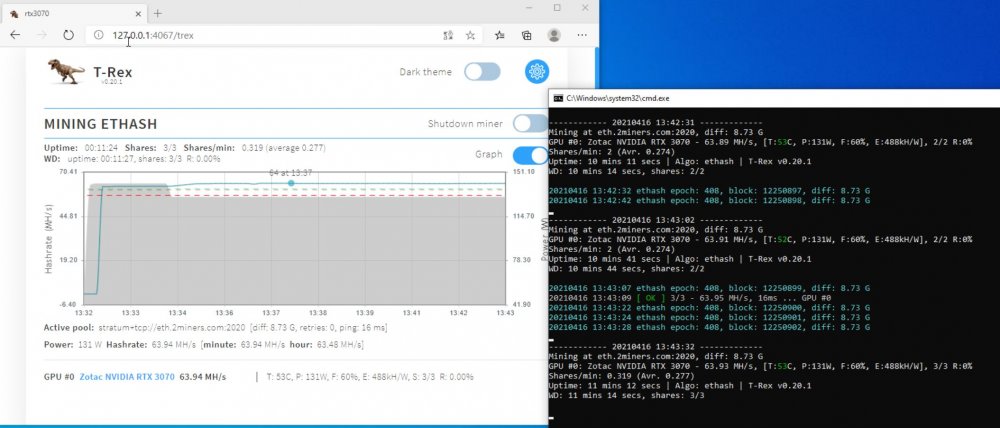
i created a windows 10 VM. was a bit difficult to get that running well with 6.9.2 - always crashed the whole unraid server during nvidia driver installation. setup.exe -s was succesful, a silent driver installation. then with afterburner settings applied i was able to mine with nearly 64 MH/s which is quite fast for a RTX3070 🙂
-
I have an idea but i am not able to test tonight - is it possible that the overclocking settings are not applied as i have no more a display connected ?
-
No, and unraid is fresh from last week, nothing installed yet, beside of fileshare. i just deleted nvidia driver and the docker and reinstalled ... tried different driver versions between. Nothing changed. how can i check the gpu frequency and memory frequency, check that the settings are applied ? sorry, just mining on windows the last weeks ...
-
Thanks, the driver check works and it downloads the matching driver. I have just power and ethernet plugged in, but this was not different at the first location. ErrorWarningSystemArrayLogin ---Trying to get Nvidia driver version--- ---Successfully got driver version: 465.24.02--- ---Checking Xwrapper.config--- ---Configuring Xwrapper.config--- ---Driver version missmatch, currently installed: v460.39, driver on Host: v465.24.02--- ---Downloading and installing Nvidia Driver v465.24.02--- ---Trying to get Nvidia driver version--- ---Successfully got driver version: 465.24.02--- ---Checking Xwrapper.config--- ---Configuring Xwrapper.config--- ---Driver version missmatch, currently installed: v460.39, driver on Host: v465.24.02--- ---Downloading and installing Nvidia Driver v465.24.02--- ---Output of nvidia-smi--- Thu Apr 15 13:16:40 2021 +-----------------------------------------------------------------------------+ | NVIDIA-SMI 465.24.02 Driver Version: 465.24.02 CUDA Version: 11.3 | |-------------------------------+----------------------+----------------------+ | GPU Name Persistence-M| Bus-Id Disp.A | Volatile Uncorr. ECC | | Fan Temp Perf Pwr:Usage/Cap| Memory-Usage | GPU-Util Compute M. | | | | MIG M. | |===============================+======================+======================| | 0 NVIDIA GeForce ... On | 00000000:01:00.0 Off | N/A | | 0% 46C P8 16W / 135W | 0MiB / 7982MiB | 0% Default | | | | N/A | +-------------------------------+----------------------+----------------------+ +-----------------------------------------------------------------------------+ | Processes: | | GPU GI CI PID Type Process name GPU Memory | | ID ID Usage | |=============================================================================| | No running processes found | +-----------------------------------------------------------------------------+ ---Set persistent mode--- Persistence mode is already Enabled for GPU 00000000:01:00.0. . ---Configuring xorg.conf--- WARNING: Unable to locate/open X configuration file. Package xorg-server was not found in the pkg-config search path. Perhaps you should add the directory containing `xorg-server.pc' to the PKG_CONFIG_PATH environment variable No package 'xorg-server' found Option "AllowEmptyInitialConfiguration" "True" added to Screen "Screen0". Option "AllowEmptyInitialConfiguration" "True" added to Screen "Screen0 (1)". Option "AllowEmptyInitialConfiguration" "True" added to Screen "Screen0 (2)". Option "AllowEmptyInitialConfiguration" "True" added to Screen "Screen0 (3)". New X configuration file written to '/etc/X11/xorg.conf' ---Starting X server--- X.Org X Server 1.19.6 Release Date: 2017-12-20 X Protocol Version 11, Revision 0 Build Operating System: Linux 4.15.0-124-generic x86_64 Ubuntu Current Operating System: Linux a972730727e2 5.10.28-Unraid #1 SMP Wed Apr 7 08:23:18 PDT 2021 x86_64 Kernel command line: BOOT_IMAGE=/bzimage initrd=/bzroot Build Date: 30 November 2020 08:01:56PM xorg-server 2:1.19.6-1ubuntu4.8 (For technical support please see http://www.ubuntu.com/support) Current version of pixman: 0.34.0 Before reporting problems, check http://wiki.x.org to make sure that you have the latest version. Markers: (--) probed, (**) from config file, (==) default setting, (++) from command line, (!!) notice, (II) informational, (WW) warning, (EE) error, (NI) not implemented, (??) unknown. (==) Log file: "/var/log/Xorg.0.log", Time: Thu Apr 15 13:16:51 2021 (==) Using config file: "/etc/X11/xorg.conf" (==) Using system config directory "/usr/share/X11/xorg.conf.d" vesa: Ignoring device with a bound kernel driver (EE) Fatal server error: (EE) no screens found(EE) (EE) Please consult the The X.Org Foundation support at http://wiki.x.org for help. (EE) Please also check the log file at "/var/log/Xorg.0.log" for additional information. (EE) (EE) Server terminated with error (1). Closing log file. ---Adjusting GPU values--- Power limit for GPU 00000000:01:00.0 was set to 135.00 W from 135.00 W. . Unable to init server: Could not connect: Connection refused ERROR: The control display is undefined; please run `nvidia-settings --help` for usage information. Unable to init server: Could not connect: Connection refused ERROR: The control display is undefined; please run `nvidia-settings --help` for usage information. Unable to init server: Could not connect: Connection refused ERROR: The control display is undefined; please run `nvidia-settings --help` for usage information. Unable to init server: Could not connect: Connection refused ERROR: The control display is undefined; please run `nvidia-settings --help` for usage information. ---Starting worker--- 13:17:01 miner nsfminer 1.3.12 (No stinkin' fees edition) 13:17:01 miner Copyright 2021 Jean M. Cyr, Licensed under the terms 13:17:01 miner of the GNU General Public License Version 3 13:17:01 miner https://github.com/no-fee-ethereum-mining/nsfminer 13:17:01 miner Build: linux/release/gnu 13:17:01 miner 3rd Party: GCC 7.5.0, CUDA 11.2, Boost 1.75.0 13:17:01 miner 3rd Party: OpenSSL 1.1.1i, Ethash 0.5.0 13:17:01 miner Configured pool eth.2miners.com:2020 13:17:01 miner Configured pool eth.2miners.com:2020 13:17:01 miner Selected pool eth.2miners.com:2020 13:17:01 miner Stratum mode : Stratum 13:17:01 miner Established connection to eth.2miners.com:2020 13:17:01 miner Spinning up miners... 13:17:01 cu-0 Using Pci 0000:01:00.0: NVIDIA GeForce RTX 3070 (Compute 8.6) Memory : 7.80 GB 13:17:01 miner Authorized worker 0x??????????????????.rtx3070 13:17:01 miner Epoch : 408 Difficulty : 8.73 Gh 13:17:01 miner Job: 904999b5 eth.2miners.com:2020 xinit: giving up xinit: unable to connect to X server: Cannot assign requested address xinit: server error xinit: giving up xinit: unable to connect to X server: Cannot assign requested address xinit: server error 13:17:06 miner 0:00 A0 0.00 h - cu0 0.00 46C 0% 16.30W 13:17:07 cu-0 Required GPU mem: Total 4.25 GB, Cache 67.00 MB, DAG 4.19 GB, Miscellaneous 56.00 B 13:17:08 miner Job: d90d0acd eth.2miners.com:2020 13:17:08 miner Job: d90d0acd eth.2miners.com:2020 13:17:11 miner 0:00 A0 0.00 h - cu0 0.00 54C 0% 134.78W 13:17:15 miner Job: 862c2da2 eth.2miners.com:2020 13:17:16 miner 0:00 A0 0.00 h - cu0 0.00 56C 0% 134.59W 13:17:19 cu-0 4.19 GB of DAG data generated in 12.1 seconds 13:17:21 miner 0:00 A0 14.75 Kh - cu0 14.75 58C 0% 134.84W 13:17:22 miner Job: ce0400e7 eth.2miners.com:2020 13:17:22 miner Job: ce0400e7 eth.2miners.com:2020 13:17:26 miner 0:00 A0 51.55 Mh - cu0 51.55 59C 0% 134.79W 13:17:26 miner 0:00 A0 51.55 Mh - cu0 51.55 59C 0% 134.79W 13:17:29 miner Job: f34ef082 eth.2miners.com:2020 13:17:31 miner 0:00 A0 51.54 Mh - cu0 51.54 60C 0% 134.87W 13:17:36 miner Job: 20685c30 eth.2miners.com:2020 13:17:36 miner 0:00 A0 51.53 Mh - cu0 51.53 60C 0% 134.88W 13:17:41 miner 0:00 A0 51.54 Mh - cu0 51.54 60C 50% 134.66W 13:17:43 miner Job: d04fcd12 eth.2miners.com:2020 13:17:44 miner Job: 173a1c51 eth.2miners.com:2020 13:17:46 miner 0:00 A0 51.55 Mh - cu0 51.55 61C 50% 134.65W
-
Thanks for this docker, very nice. I had it run yesterday several hours with a single RTX3070 with ~59 MH. Then i shutdown the unraid server, moved it to another room and at startup i have now an error: unable to connect to X server: Cannot assign requested address it seems to have an impact to performance, as the same config has now only ~51MH. Any idea ?
-
Frequenz drosseln bringt nur etwas wenn man der CPU gleichzeitig auch weniger Spannung gibt. Zumindest ist das bei GPUs so .. beim Crypto Mining. Kannst den Takt auf 30% packen, wenn man die Spannung nicht senkt hat es 0 Auswirkung.
-
i have one for my evga htpx mainboard ... dual socket 1366 - only fits into 4 or 5 cases available worldwide. Case is heavy, but great material and good concept for cables etc - worth that money
