





xorinzor
Members
-
Joined
-
Last visited
Everything posted by xorinzor
-
Interesting, though you can kinda confirm it by checking the output of netstat -atunl | grep 51820
-
That has been tested already, it's closed. We're just trying to figure out why at this point. Could be completely unrelated to the port forwarding if there's no service listening to the port.
-
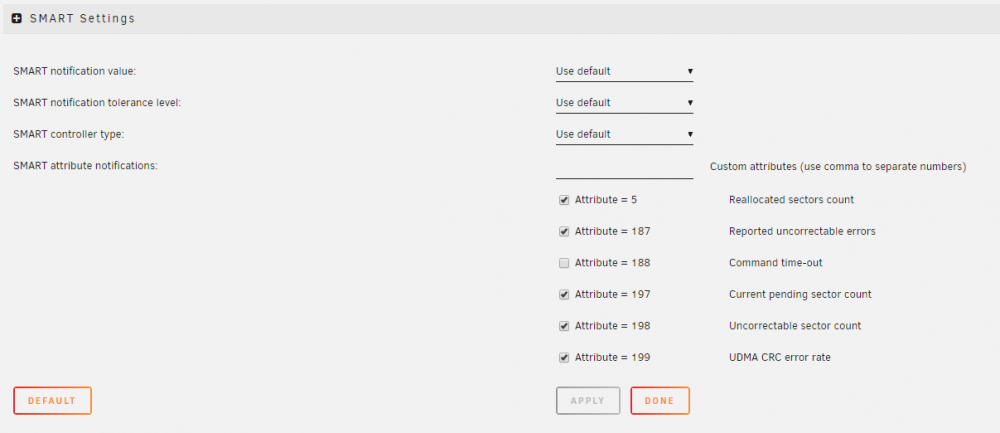
I've had no issues with my intel xeon upon rebooting. Wasn't aware of any issues with intel either. Did you notice my edit? If you checked the port I don't think that's the issue, but it can't hurt to make sure. Let us know what the logging tells you (do another port check to trigger it, as well as try to connect with a wireguard client)Do you have a static IP configured for your unraid server? Are other ports on your unraid server reachable? What if you enable the logging in your router for that port, does that give you any indications? I use unraid 6.8.2 too, but it works fine for me. EDIT: the blurred local endpoint, just to make sure, isn't set to Unraids local IP, but your external IP. Correct? In which case, did your external IP perhaps change?Did you confirm the Wireguard service to be running? I've had a few instances where it stopped itself after editing the config. Also, If you check the port using an online tool, is it open? if not, either the port is closed, not forwarded correctly, or nothing is listening on the port (ie: wireguard service disabled).I've had this on the android app of wireguard happen too, it looks as if it's connected even when it isn't. Maybe your external IP changed? or your server got a different IP address invalidating the port-forwarding? Either way, if your unraid server doesn't show the device as connected, it isn't.If you just put your USB-stick with the unraid installation in your computer, and access the config file at /boot/config/wg0.cfg you can remove the network from peer allowed IPs again, to see if that fixes it. Not sure why it'd cause your admin panel to become unreachable however, but either way, this way you can still access all config files from unraid. As well as some log files.Ah, I wasn't aware that it sent the "start" request via the GUI as well. I assumed this was handled by the plugin on the backend. Not sure how the plugin handles these requests, but perhaps it'd be able to send the current state along with any request made, and restore the state to it's original state if needed.I'm running into the issue where; after I edit a peer config (or add a peer) and hit the save/apply button, the wireguard service just stops. This happened both times when I was doing this remotely while connecting via Wireguard to my server. Obviously I'd understand if the service would need to restart to apply the changes, but it never comes back up. I have to manually start it again when I'm back home. When I make changes however, while I'm not connected to Wireguard, the service seems to stay up and running. Is this a known issue?All PHP commands from this container are suddenly giving "Bus Error". This started yesterday. It's currently sending me an error mail roughly every 30 minutes because of the cronjob trying to execute `/usr/lib/php/sessionclean`. If I open the container console and run "php" or even just "php -v" I also get "Bus Error". EDIT: Having rebooted the entire Unraid server seems to have fixed it. Not sure what was going on, rebuilding the container didn't fix it. No disks are out of space, no other containers had issues.sorry for the confusion. The last entry in the FAQ did indeed answer my question, thanks.But how will creating a local file, help me in getting CA to recognize the template? This container should eventually be able to be installed on other unraid installations too.can someone please explain to me how I can get the custom template to be recognized / used by CA for both search and install of the container? This is my container: https://hub.docker.com/r/xorinzor/shoutz0r And I tried creating this template, but that didn't seem to do much. https://github.com/xorinzor/docker-templates/blob/master/xorinzor/shoutz0r.xml Haven't been able to find some kind of guide or tutorial either, so I'm pretty much guessing here based on what other people did.Using Unraid 6.6.7 I have 2 shares, "downloads" and "media". Files that have finished downloading are written to a directory, thats checked for changes by a FileBot container. It then renames and moves the files to their respective directory in the media share. I used to have caching enabled for the media share, but recently decided it was better to have these files written to the array directly. For some reason however, FileBot still leaves these files on the cache drive, instead of writing it to the array. At first I thought it was an error by me, because the path used was still set to "/mnt/cache", but after changing it to "/mnt/user", it still happened. Even when I removed the "Media" directory from the cache drive. When manually invoking the mover it doesn't move the files either oddly enough.Hi, I've installed the MotionEye Docker container and attached the USB webcam to it via the extra parameters via: --device=/dev/bus/usb/002/004 which shows up fine in the container. But MotionEye fails to detect it as a webcam. I've read around that a usb webcam is supposed to show up as an /dev/video* device, but it doesn't for me. Is there any way to get this working without using a VM? "lsusb" shows: Bus 002 Device 004: ID 046d:0823 Logitech, Inc. It's a Logitech C920 (I think). And it works totally fine on my Windows Desktop, so I can confirm it's not broken.Ah, I didn't realize they already counted towards the limit. Nevermind then.If the drive would be part of the array, either by extending it, or functioning as a cache drive, I would agree with you. However, I'm just using it as a separate drive to store my config files on because I want to prevent my HDD's spinning up unnecessarily. I feel like the device count only counts (and should stay that way) towards the array functionality, as that's what UnRaid is mainly all about. If this plugin would be integrated with unraid and they'd start counting towards the device limit, a lot of people of the community will get very unhappy. And reasonably so.Regarding: With the normal disks mounted within unraid itself you can enable/disable the monitoring of certain SMART values. The mounted disks via Unassigned Devices don't have this option, and seem to follow the default settings as set in "UnRaid: settings -> disk settings". Would it be possible to implement this same SMART attribute monitoring menu like in unraid where these can be toggled on/off ?
 I'm running into the problem that all sent emails end up as "250 - Message queued". All ports are open and confirmed to be open using an online tool. When configuring SMTP relay to my local IP they get sent, but immediately return a Delivery Failure email (because it checks if the domain is configured on my own mailserver, instead of looking up what mailserver to send it to). Wasn't this supposed to be an all-in-one solution? Right now it seems like it's just completely incapable of sending emails and only capable of receiving them. So, for clarification, emails aren't being sent, seemingly not even an attempt to send them is being made. Not to be confused with emails getting rejected or ending up in SPAM (which isn't one of my concerns since it's for personal use only anyway). Tried checking log files, but they don't tell me anything useful either, only that the message got queued, but nothing after that. EDIT: Turns out my ISP is blocking the outgoing port 25 somewhere along the way. I didn't bother to check at first since I never ran into a similar issue before with my ISP so figured they weren't blocking anything.I'd like to see a feature where notifications can be customized to a certain extend. For example, using a template system where you can add placeholders and as such modify both the subject line, as well as the message contents. Currently my SSD is dying and I get spammed about unrecoverable sectors, but because I can't edit the subject line, and the number of sectors is included in this line, each and every single notification ends up as a new email. Preferrably I'd change this to something like "[Unraid] %Type% - %Status%" which would turn into "[Unraid] disk sdb - Error" (or something like that).All of my drives were spun down, then I started a file transfer from a different computer via the SMB share to my unraid server array, but I noticed in the dashboards the temperatures were still displayed as "*" even though all drives were already spinning. I then proceeded to press the "Spin up" button, and after I did that the temperatures finally appeared and started updating as normal. Is it possible that the interface didn't correctly parse the drives spinning up and thus didn't bother checking the temperatures from the smart data? if I clicked on the disk I could read the temperature from the SMART data just fine, the dashboard just didn't update properly it seems.



