FlamongOle
Community Developer
-
Joined
-
Last visited
Everything posted by FlamongOle
-
I still can't see why this would fail, everything seems to be in order and added as they should. Even after GUI fails. I think I might need to see a PHP debug: 1) go to Tools -> PHP Settings 2) clear the logs if it contains anything 3) set Error Reporting to "All categories" and "apply" 4) go to Disk Location and setup the drives that fails 5) when GUI fails to load (wait 1 minute or so), delete the database/plugin folder 6) go back to Tools -> PHP Settings 7) view the log and attach it here (check for sensitive data before posting). 8.) set error reporting to "default" and "apply"
-
As long as smartctl outputs something, Disk Location is quite agnostic to the numbers themselves. If it fails with smartmontools, then there's not much I can do. What I find confusing here is that the drives in fact are already added to the database, it just fail being assigned for whatever reason. Please give the output of these to me: sqlite3 /boot/config/plugins/disklocation/disklocation.sqlite "select * from disks WHERE model_name LIKE '%ST4000%';" sqlite3 /boot/config/plugins/disklocation/disklocation.sqlite "select * from location;" sqlite3 /boot/config/plugins/disklocation/disklocation.sqlite "select * from settings_group;" Run this, it will create a TXT file that you can send to me (one drive is enough): smartctl -x --all --json /dev/sdb > /tmp/dl_debug_sdb.txt You might want to choose another output location if you want to grab the file easier, like somewhere on you array.
-
EDIT: Did you check and try the "Undelete all devices" under "System"? Would be my first thing, before "Force update all". If you don't see that button, then likely it's not in the database at all and are lost forever. Original answer: After removing it from the "History" under "Tray Allocations", a "Force update all" should bring it back as long as the drive is still in the system. If it is in fact a history drive, you might need to do a manual database task, unless you can use a backup (if you have). Backup the current one before restoring an old one or fiddling with it manually. You can enter database by, in terminal: sqlite3 /boot/config/plugins/disklocation/disklocation.sqlite Then enter this to find your drive: select id,device,model_name,smart_serialnumber,status from disks; When you have identified your drive, type: update disks SET status='' WHERE id=<ID OF THE DRIVE>; eg. update disks SET status='' WHERE id=23; End the SQL with .quit After this, do a "Force update all" and fix the drive as you intend, unless it fixes itself.
-
Do a "force update all" and check again. If it's still says it's failing, you might need to look more into the drive. Can be a plugin bug, can be something delayed, can be something unsupported somehow.. there's possibilities. You might send in diagnostics to the unraid guys if it persists (not here). Hopefully you find out about it. Feel free to comment back about it in case I must look more into this later, but that will be after my vacation -- starting now!
-
Update 2024.07.25 Commit #315 - BUG: Export TSV did not export the list as intended. Update 2024.07.26 Commit #319 - MINOR: ZFS Hot Spares status was not recognized. Commit #318 - FEATURE: Possible to download TSV with RAW data (exception for the units read and written which is already calculated from the logical block size, it will show the actual bytes read and written).
-
No way to force it, just wait for an updated smartmontools to arrive with that info. Maybe next version has it, maybe it won't be added, it's out of my control. You can obviously add that info manually to the database, but next time it updates it will be overwritten again, so no point in that either.
-
You can always try to wipe/rename the disklocation.sqlite from /boot/config/plugins/disklocation: mv /boot/config/plugins/disklocation/disklocation.sqlite /boot/config/plugins/disklocation/disklocation.sqlite.bak But if it halts, it might be wrong config with the devices still. You can try to run the updater manually to see which device it fails (if any): php -f /usr/local/emhttp/plugins/disklocation/pages/cron_disklocation.php force
-
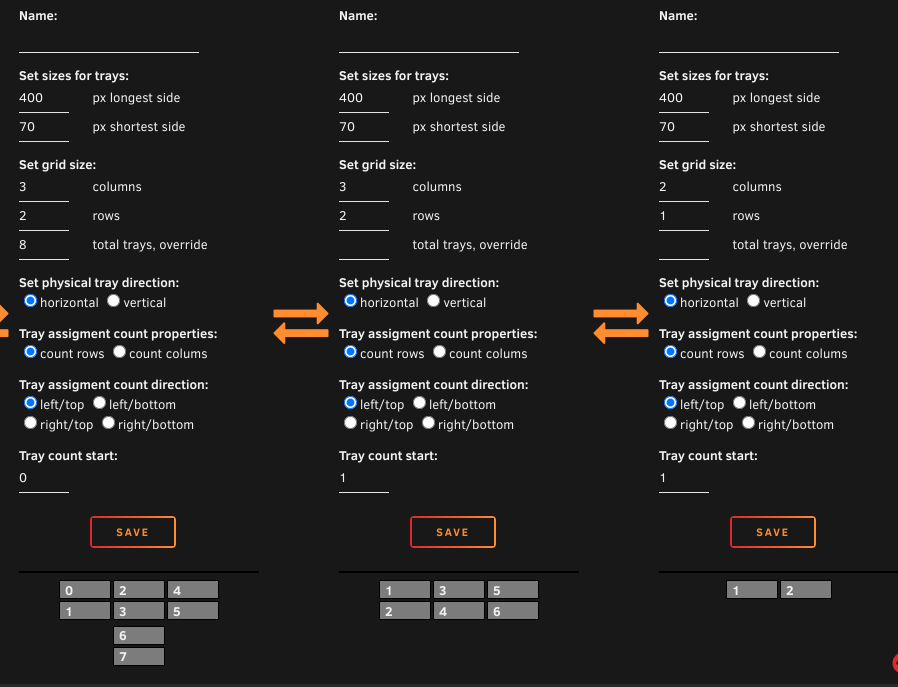
It won't match, is not intended to match all the various physical layouts out there, but the closest thing you can do is either create two separate groups (this will be closest to match the physical layout). Yon define the start number of each group. Or you can set it up to 3 columns, 2 rows, 8 total, override. examples:
-
Did you try to go to "Tray Allocations" -> "Reset all custom colors"?
-
Did you try "Force update all"?
-
Nah, it's either disabling the cronjob entirely from Disk Location or leave it as it is. "S.M.A.R.T updates" under Settings
-
Best is not to install anything unless you know what you're doing. It's relatively easy if the package is already built, other than that. Wait for next Unraid version that includes a newer smartmontools package. Earlier I used to include a newer version of smartmontools with Disk Location plugin, but I don't want to maintain that. As for now, Disk Location threat both of you NVMe drives the same and cant tell a difference looking at the unique ID it has been given.
-
Might be an issue related: https://github.com/smartmontools/smartmontools/issues/233
-
Likely not Disk Location per say, but due to a bug related to smartmontools: https://github.com/smartmontools/smartmontools/issues/233 Nothing clean and useful I can do about it.
-
Nevermind first post, this is likely due to a bug with smartmontools, or the compiler used for it (might be related to Unraid OS somehow) https://github.com/smartmontools/smartmontools/issues/233
-
See next post and nevermind below. I've seen that report from someone else "recently" and I need to get some info from you as the other one did not provide with all the information I needed. In terminal, please do this: php /usr/local/emhttp/plugins/disklocation/pages/cron_disklocation.php cronjob There you should see which device(s) will post this information, it might be related to smartctl, but is something I must find out. When you see which device output the fault, please give me the output of: smartctl -x --all --json /dev/<device> *where <device> is the wrong device, eg. sda or nvme1n1 Please share that output to me, you might do it in PM if you don't want to reveal the serial number or other drive data if you care. No content will be revealed.
-
I'm baffled that you found this out the hard way? Try: Tools -> Disk Location -> System -> Backup -> 'click the backup' -> Restore
-
I see that the "CTRL CMD" is active, but I don't really see the reason why it shouldn't just be auto detected. Per disk setting in Unraid, you might have set a "SMART controller type" manually instead of leaving it to "Automatic", maybe you must do it for a reason, but usually NVMe and SATA is auto detected. Also I think "ATA" is not really common these days anymore as SATA uses the SCSI protocol (correct me if I'm wrong)? Under "Disk Settings" (Unraid settings) you will find "Global disk settings", ensure "SMART controller type" is set as Automatic as well. The sg0 is typically the USB drive containing Unraid OS. Let the OS auto detect the SMART controller type unless you must specify it to work, but I think that's more common for special RAID cards and HD enclosures etc.
-
Hard to say, which versions of things are you running? And anything special in system/php log files?
-
Do not replace and RMA yet, not sure it's the drive. But to find out, you can try: smartctl -x --all --json /dev/nvme1n1
-
I run Unraid 6.12.9 and don't notice any errors with the cronjob. The first post mention "corrupted size vs prev_size", this has nothing to do with Disk Location. You can always try to run the cron manually, either: /etc/cron.hourly/disklocation.sh or to get output: php /usr/local/emhttp/plugins/disklocation/pages/cron_disklocation.php cronjob
-
Yes, disklocation and disclocation-master/devel if it exists.
-
If the first name is either "Parity, Data or Cache", it is detected as a traditional Unraid pool. If it just has a name like "Luna" and "Merlin", it is detected as ZFS pools. "Cache: merlin*" and "Merlin" is not the same pool (or at least it shouldn't be). Unassigned devices is only added if you add them there, for all I know, adding the new drives in the wrong slots might have caused this. Not sure how it would change anything otherwise. The serialized modelname+serialnumbers string are assigned to a drive slot (TrayID), and would not be moved anyhow by itself. There has been modifications on how to prioritize the differnt pools, as for now the ZFS pools is sort of above the traditional Unraid array. It might be time to end the "traditional Unraid" way of labeling as they now allow for multiple pools etc. which was not a thing "back in the days." I haven't made up my mind what would be the best option here. There's more things to be updated and considered for this at this point.
-
Currently no. Your observation is correct. For now you can still increase the global to have it like "worst case scenario" if it bothers you. I might look into Unraids settings and use those directly at a alter point.
-
Just to add some more here, if it's under ZFS filesystem, it won't see it as it uses info from the zpool status. I must be under Unraid array.