FlamongOle
Community Developer
-
Joined
-
Last visited
-
Update 2026.10.12 Commit #528 - MINOR: zfs_disk() substring match: sda matched to ZFS member sdaa1. Thanks to kapsaicin@github for the fix.
-
Set the LED signals to "Static"
-
I will check the comment fields later. Thanks for reporting.
-
Use -4 instead of 4, negative numbers allowed
-
Update 2026.10.02 Commit #524 - FEATURE: Added cold storage option to save information of a drive not attached or online. Commit #519 - MINOR: Make the tray map usable on mobile viewports (Thanks to joshmans@github). Commit #518 - ENHANCEMENT: Fix pkill quoting, add JSON export, add PHP lint CI, harden shell_exec() calls (Thanks to joshmans@github). @getgray you can try this update, I have not been able to test this myself other than that it won't destroy anything and that it does store the set values. To use cold storage: attach the drives to your hardware do a force smart+db update go to Tray Allocations assign the drives how you want them check "cold" for those that's gonna remain as cold storage save pull the drives marked as "cold" from the hardware test by either force smart+db or reboot.
-
Important information! There's a new plugin emerging from a fork of Disk Location, it's apparently vibe coded from what I can see and it's called "Disk Location Next" I am not affiliated with that plugin what so ever, and I will request that user to rename the plugin so it won't look like it's affiliated to my work. You, users, are free to choose whichever direction you want, maybe the new plugin will be better, or even replace this one in the future. I am very happy that someone will provide with an alternative, choices are good. I will still maintain and continue to build this plugin the way I want for now, without the help of an AI. Call me old fashioned, but I am not vibe coding my plugin for several reasons, the most important is: personal lack of control and that it is very bad for our planet. Update 2026-10-18 (ISO date): "Disk Location Next" has been renamed to "Bay Watch", and will likely show up in the Apps soon. Check out the project at: https://github.com/joshmans/unraid-baywatch
-
Hello getgray, Drives will be automatically removed/moved to history when it's not detected by the system anymore. This happens during boot of the system or during Force SMART+DB. Things might have worked differently in the past, and was most likely a bug that shouldn't work that way. For you it was a feature =D Adding a possibility to add a cold storage is a good idea, and I will list it up as a feature request. I will have no ETA on when this will be implemented. However, this will require the drive to be added and scanned, then marked as cold storage before it will be removed. If it's already in the history tab, the location of the drive is of course removed as well. It should however be relatively easy to implement (but other things might break .. :p). Technically is all about adding a status letter, but it has to be acknowledged by rest of the plugin.
-
I get these errors as well: Stack overflow in unmanaged: IP: 0x14dfe318590a, fault addr: 0x555a4ed4699b But I have since start and I'm been using it for over a year. Despite the message, the server starts anyway. I never really cared about it and dunno if it matters I'm running two servers from two separate docker containers.
-
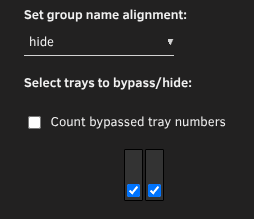
Set group name alignment: hide
-
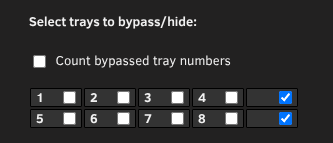
You can add bypassed/hidden drives: so 2*5 instead of 2*4 in layout, then hide the empty slots at the right side (checkmark): You can also just create a hidden layout you put between each section. 1*2, hide both drives and the name:
-
Can be if the drive was disconnected or so during a reboot. Disk Location moves not found drives as "lost", if it's detected again, it can be assigned.
-
Update 2026.08.21 Commit #515 - MINOR: Adjusted dev_by_phy_path to include partitions that exists to include more drives to be physically attached in case non part-names does not exists. This update should have minor/none effect on most systems, but might include more devices to be stored as "physical"
-
Well, is it assigned at all?
-
It shows tray numbering from the largest group. Setting it incorrectly will fail the "save". Use the numbers that makes sense, don't try to force it off the group - it won't work.
-
Sorry for the late reply, forgot to follow the topic. No, this is what I see: