





OFark
Members
-
Joined
-
Last visited
Everything posted by OFark
-
I'd just like to say everything is working fine for me, but I'd like to request a feature: Backstory: I have a load (100+) of directories scattered across the array, I've recently become aware of the split level feature so that playback is seamless. However, I have no way of bringing the files already scattered back together. That's when I started using unBalance. It works well, but I can't move everything at once as I don't have the space to shift it all. So I have to move in batches, work out what I can afford to move, it's not difficult but it could be easier if: The Request: There was an option to go through each of the selected gather directories and move each one individually to the best drive possible for that directory. Basically gathering directories to the best place individually. Or a batching system so I could queue them all up, painstaking but it would be something.
-
Ok, so I'm lost now. You are correct, from a user share to another user share the move is instantaneous. Yet I've seen it do it before. My automatic file processors take ages to move a file from my working folder to my storage folder, I have no idea why. I've double checked the container template and the paths are shared by user path. 😕
-
If unRAID is running on a different port, eg 88 because nginx is proxying for you on port 80. The URL for the Terminal becomes http://ip:88:4200 which obviously is wrong.
-
I can't remember at this point, however, I have some containers that are set up using user shares. They automate stuff from one share to another, and they're showing signs of the same behaviour I described. I'm going to try moving a large file again in a few hours time, record the steps and see what's going wrong/right.
-
I haven't tried with two cache drives. But then it still wouldn't be instantaneous. I don't know what to tell you, I have a 90GB file in one share set to cache only, I moved it via the terminal to the storage share (cache-yes) and it took ages. On inspecting the stats graph I got what you see above. If I do moves inside the share then it's instant as it can just update the file table, but across shares, it's doing a physical move. I was told on Facebook that this is the way unRAID works so it can apply disk rules. I can't even suggest that I might have it configured wrong, as I can't see what you could reconfigure, but it would be damned useful. Maybe 6.7 deals with this problem.
-
You are correct the Mover doesn't move things between shares, I was using the unRAID terminal for that file transfer. To replicate, create two shares that use the cache, in any way. With one cache drive; move a large file (several GB's) from one share to another. Make sure you're using the share folder /mnt/user/whatever not direct to the disk e.g /mnt/cache/whatever
-
That was the Mover.
-
Yes, I have tried this, with a large file. Try it. Move a file from one cached share to another. I moved a 90gb file from my working folder to my storage share and got the attached graph. See this Facebook discussion: Basically, because the shares can have different disk options, unRAID always copies the files to a new location.
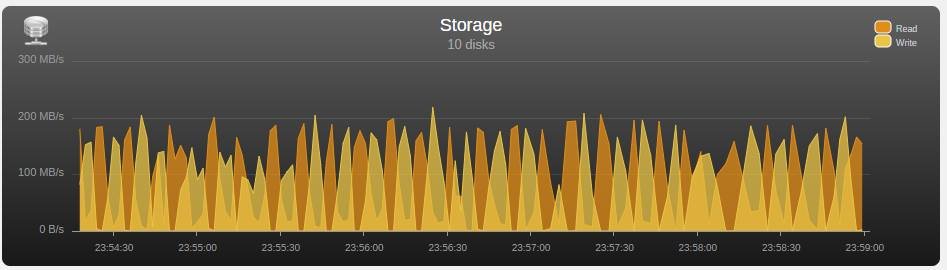
-
You say it's an unusual request, however, imagine this scenario: You have a working folder, (downloads, video editing, whatever) You don't want the mover to do anything with this. Share - Cache Only. You have a storage folder (Movies, Music, Work, whatever) You do want this to use the cache so you can move files from the working folder to it at speed. Share - Cache Yes Problem is when you move a file from Working share to Storage share (from one cached share to another) unRAID actually lifts the file and writes it back to the same cache drive. From the Cache to the Cache, this takes a lot longer than a disk to disk move as the reads and writes can't happen concurrently. If the Storage share could contain a Cache only folder, then the working folder could exist within the Storage share, not get moved by the Mover and not actually require a lift and shift move when it's moved from one folder to another because it's in the same share. Would save a lot of IOPS.
-
I've not had a chance to search this forum, in case you answered this before, because I'm at work and should be working. I've had to add the path variable /download and matched it up to the Radarr/Sonarr/Lidarr download directories so that the download paths can be passed back. Otherwise, the path to the downloads is passed back as /data instead. It would be good if Docker could formalise some sort of naming convention for this idea of passing paths around, but in the meantime would it be a good idea to add this /download path to your container template?
-
Ahh well, if I put in --finddupes into the DISKOVER_OPTS the log shows an error that says something about not finding the index, so that makes sense. it appears it always adds the -i diskover- option anyway Several options from the config appear to be missing in this version, but not on GitHub (redis_retry_on_timeout for example) in diskover_connection.py If I set that and the next option (session keepalive) to True then it starts up but bots are starting up but none are surviving. There are never any workers showing. I've posted in Github under my previous issue. Going back to v1.5.0-rc24-ls8 and everything is working again.
-
Has anyone got --finddupes working? If I put it in either DISKOVER_OPTS or WORKER_OPTS then Diskover fails to create any workers and throws errors in the dispatcher.log. I'm not even sure if either of those is the right place, but I don't know where else to try.
-
Yes, copying over the missing sections from the sample config fixed this, why aren't they in the container by default?
-
So if I force it to that version tag the REDIS version issue has gone but now I have a new problem: starting crawler with following options: --finddupes -i diskover- Traceback (most recent call last): File "/usr/lib/python3.6/configparser.py", line 1138, in _unify_values sectiondict = self._sections[section] KeyError: 'ownersgroups' During handling of the above exception, another exception occurred: Traceback (most recent call last): File "./diskover.py", line 1851, in <module> config, configfile = load_config() File "./diskover.py", line 172, in load_config configsettings['ownersgroups_uidgidonly'] = config.get('ownersgroups', 'uidgidonly').lower() File "/usr/lib/python3.6/configparser.py", line 781, in get d = self._unify_values(section, vars) File "/usr/lib/python3.6/configparser.py", line 1141, in _unify_values raise NoSectionError(section) configparser.NoSectionError: No section: 'ownersgroups'
-
Check the logs, you're probably getting an error about redis version. Since rc25 of Diskover rc24 and rc25 have been broken of the linuxserver version. See my post on the GitHub issue. What you'll need to do is regress diskover to v1.5.0-rc24-ls8 (replace the repository with "linuxserver/diskover:v1.5.0-rc24-ls8" in the unRAID container config) until a fix is released. Which would normally be Friday, but what with the holidays this may take another week.
-
Right, so I've painstakingly created a container template for ElasticSearch v5: Add this to your Docker Template repositories: https://github.com/OFark/docker-templates/ Then you'll see ElasticSearch5 in the list. This is my first container, it's taken me an hour or two, because I had no idea what I was doing. I may have done something wrong. How can I/we get it added to CA?
-
So Diskover you should be able to get from CA, Elastic search requires a set version, follow the instructions on the project page. I also mentioned how I installed it on Page 1. If Diskover isn't working, throwing errors etc. Uninstall it, completely, then reinstall it. Use the default settings. As for Gource, is a Graphical Source for GIT, meant to show the development of a project over time. However, you can load data into it via file or via the STDIN pipe. I've not tried this with Diskover yet. Whilst it was fun to see how our website had developed over the years I was using it to watch users arrive on, and crawl the website. Currently, Diskover won't work for me, I THINK it's seeing the wrong version of REDIS, though a compatible version is installed.
-
Yeah, that's it. I've posted an issue on the github page too, with logs and everything. Not sure where the problem lies at this point.
-
Me again, I'm getting errors that look like Redis isn't installed. This seems to have happened since Redis updated a few days ago. Is there a compatibility issue?
-
I have access and I can't change the Hostnames text box anyway. I put an FQDN in there and it doesn't save it.
-
In its defence, I would never have found this without it being in CA container. It's overkill for what I need it for (basically a Treesize replacement) but I've been playing with unRAID for 30 days now, and I managed to figure it out. It could do with a better guide, the current one assumes you already know a lot. But then I find with a lot of Linux guides. However, it's a good learning experience and I, for one, am grateful to have found it in CA.
-
The Custom tags were created by the context menu for folders and files, and the standard "Custom Tag 1" etc. removed in the Admin page. When Diskover actually started giving me an interface but then 500 it was after it asked me for the 2 indexes. Subsequently, after a reinstall and it worked, it never asked me. That RUN command was copy and pasted from the docker container template in unRAID, I just changed the elasticsearch and redis hosts to the IP addresses. If there is a value that should be left blank perhaps it should be blank in the template? I'm not sure what caused the PHP-FPM error, I certainly didn't configure a proxy, I don't have one.
-
Another issue: CustomTags are lost when you re-install the container. A restart doesn't affect them, but any reconfiguration of the docker container does. Files are still tagged, but the custom tags I've used are not listed in the context dropdown or on the admin page.
-
So, I deleted all the Elasticsearch data and reinstall elasticsearch, reset the CHOWN. Deleted and reinstalled Diskover And it works. It seems if you don't put in the right details the first time, you need to clean up and start again. Like the config files are written to appdata on the first docker run and then not rewritten on config change. Also seems like it messed up the elastisearch data. Still, hint to anyone working on this: Install redis and elasticsearch, despite what it says they are not optional. chown -R 1000:1000 /mnt/user/appdata/elasticsearch5/ start redis and elasticsearch Set the hosts for these two services when you first install Diskover, if you get it wrong, remove it, clear the appdata folder and reinstall with the correct settings. Check the port numbers, they should be good from the start, but check. Check diskover on port 9181 it should show you workers doing stuff. If not; you started Diskover before redis or elasticsearch. If diskover asks you for indexes one and two; your elasticsearch data is corrupt, delete it and restart elasticsearch and Diskover.
-
The plot thickens... I removed Diskover, and the appdata folder and reinstalled here is the same run command: docker run -d --name='diskover' --net='bridge' -e TZ="Europe/London" -e HOST_OS="Unraid" -e 'REDIS_HOST'='192.168.1.51' -e 'REDIS_PORT'='6379' -e 'ES_HOST'='192.168.1.51' -e 'ES_PORT'='9200' -e 'ES_USER'='elastic' -e 'ES_PASS'='changeme' -e 'INDEX_NAME'='diskover-' -e 'DISKOVER_OPTS'='' -e 'WORKER_OPTS'='' -e 'RUN_ON_START'='true' -e 'USE_CRON'='false' -e 'PUID'='99' -e 'PGID'='100' -p '9181:9181/tcp' -p '9999:9999/tcp' -p '8080:80/tcp' -v '/mnt/user/appdata/diskover':'/config':'rw' -v '/mnt/user/Stuff/':'/data':'rw' 'linuxserver/diskover' And it works! The Web GUI came up with a page, asking me for the index and a second index that I could set to be none, as it was for comparison so I did. As soon as I confirmed "diskover-" and "none" to be my index's I got a 500, and now that all I get. Despite 3 reinstalls and Appdata cleanup, all I can get is 500 and the error in the nginx log is: [error] 355#355: *1 FastCGI sent in stderr: "PHP message: PHP Fatal error: Uncaught Elasticsearch\Common\Exceptions\BadRequest400Exception: {"error":{"root_cause":[{"type":"query_shard_exception","reason":"failed to create query: {\n \"bool\" : {\n \"must\" : [\n {\n \"wildcard\" : {\n \"path_parent\" : {\n \"wildcard\" : \"/data*\",\n \"boost\" : 1.0\n }\n }\n }\n ],\n \"filter\" : [\n {\n \"range\" : {\n \"filesize\" : {\n \"from\" : \"all\",\n \"to\" : null,\n \"include_lower\" : true,\n \"include_upper\" : true,\n \"boost\" : 1.0\n }\n }\n }\n ],\n \"must_not\" : [\n {\n \"match\" : {\n \"dupe_md5\" : {\n \"query\" : \"\",\n \"operator\" : \"OR\",\n \"prefix_length\" : 0,\n \"max_expansions\" : 50,\n \"fuzzy_transpositions\" : true,\n \"lenient\" : false,\n \"zero_terms_quer" while reading response header from upstream, client: 192.168.1.102, server: _, request: "GET / HTTP/1.1", upstream: "fastcgi://127.0.0.1:9000", host: "192.168.1.51:8080", referrer: "http://192.168.1.51/Docker" Now I'm a web developer, (not PHP) and I can see that's JSON but I haven't a clue where to start.

