





OFark
Members
-
Joined
-
Last visited
Everything posted by OFark
-
I've got boot looping because I'm using a custom IP. I've commented on a closed thread on Github, someone having the same issue back in August. 2020-10-28 09:58:45.895894 [ERROR] It seems like the IP the container is using outside the default Docker DHCP range 2020-10-28 09:58:45.910462 [ERROR] Use bridge mode to run this container. Using a custom IP is not supported. 2020-10-28 09:58:45.924753 [ERROR] IP of the container: 192.168.1.20 My DHCP range for dockers is 192.168.1.0/24 so that's not right anyway. It was working recently, I noticed this morning that it wasn't.
-
If I'm using nginx for a reverse proxy how do I get it to work with Shell in a Box? I can't use the 4200 port as that's already in use by this. I can't change the port that the link goes to, to use another port. If I ignore the reverse proxy, because the URL resolves to the correct IP anyway, it doesn't work, connection refused.
-
I too am seeing this error. I have the Access to custom networks enabled, but upon restart access has been lost. Disable Docker, Apply, disable access to custom networks, Apply, Re-enable Docker and access to customer networks and boom back again. A touch frustrating.
-
Found it. That took some uncovering but it does appear it's using my appdata folder, it just buried it under advanced and then show more. Stand down, everybody, stand down. Thanks, I found it when reading the run command, just about to paste it - scratching my head like "Where, the hell, is it getting that from?"
-
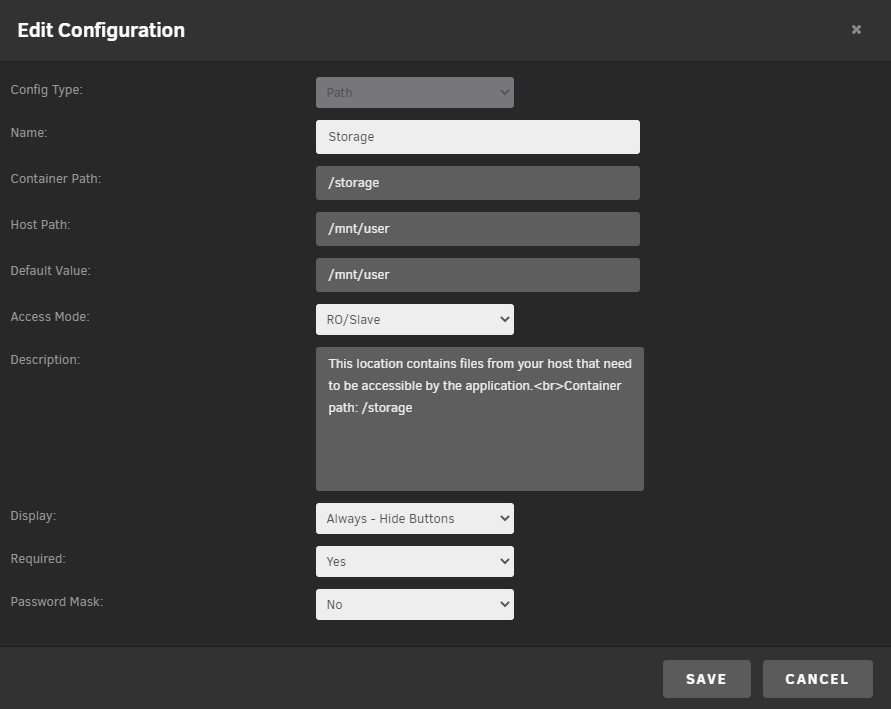
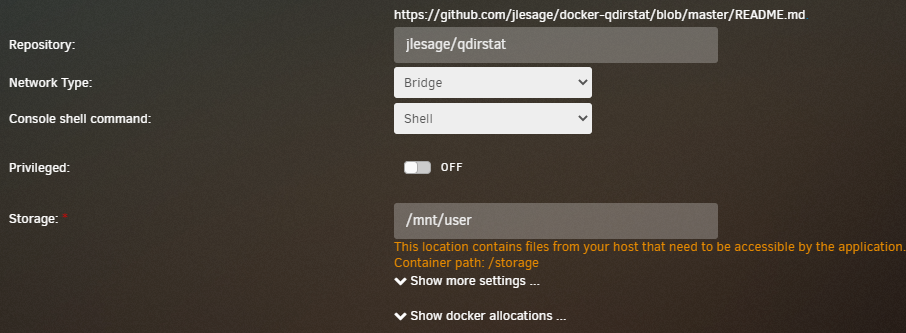
Hi, I've looked for an answer to this and I'm flooded with "whats the slave option", rather than specifically this, so apologies if I've missed it. I've install QDirStat with a Read Only mount to /mnt/user, this is the only option for QDirStat so it can be the only thing Fix Common Problems is finding when it says: "Docker application QDirStat has volumes being passed that are mounted by Unassigned Devices, but they are not mounted with the slave option". Thing is /mnt/user isn't an unassigned device, and it's mounted with the RO/Slave option. That is to say it wasn't when the error was first flagged up, because it's not an UD so I tried RO/Slave just in case and it's still showing after a retest.
-
already updated it Plex-azure.zip
-
A plex flavoured version. If you find anything I've missed let me know. I can github this if you like but I'm more than happy for Skitals to host it. Plex-azure.zip
-
There is no best option, this forum is for the Docker for Handbrake and any issues/help with the application and settings. And whilst I appreciate you are looking for the settings for Handbrake you are looking in the wrong place. But, I have stated there are no best options. There are some recommendations, but for Anime/Cartoons the recomendation differs to Action films to Dramas as percentage frame changes differ. My recomendation: Go look through Handbrake specific forums for guidance on the best options for you, save them as a config and then use this docker to automate using that config. Good luck.
-
No, not seen anything to that effect. However, I would urge you check out quality issues. On my journies I've seen various reports about using multiple core encoding reducing quality. Something about more cores equals less quality. I have no idea how or why, I've limited mine to 6 of the cores with pinning. But if your happy with what you're getting manually then I'm afraid I don't know what's going on there.
-
What's with the twice daily updates?
-
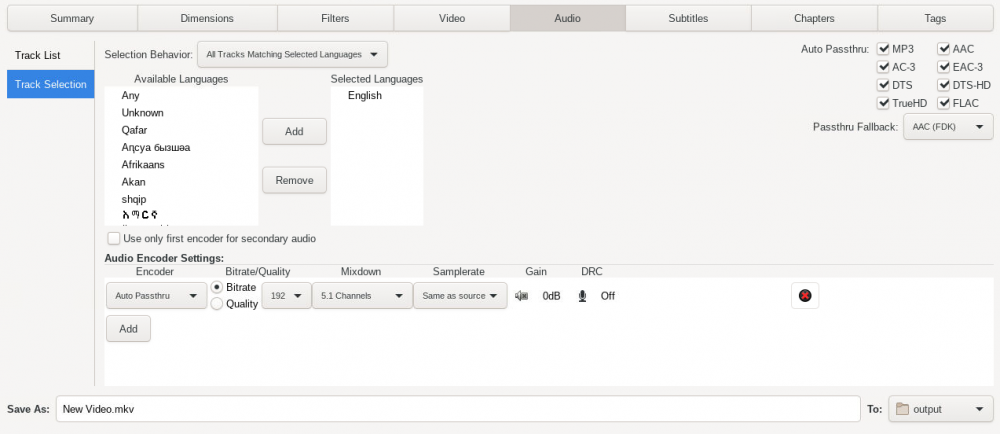
On the Audio and Subtitles tabs you need to go to the Track Selection sub-tab. This specified how you're selecting tracks. I do teh same as you and just passthrough everything. See the attached image, for the Audio settings. You'll notice the audio settings has a config, this is a bug I guess, it's set to Auto-Passthrough and these settings are ignored. Note, this is for English audio passthrough only, you could change it to Any. Subtitles work the same.
-
You specify a variable (AUTOMATED_CONVERSION_OUTPUT_DIR) as the output folder name i.e. /output and then the path (/output) as whereever you want to store the vidoes on your shares.
-
MediaInfo is reporting Plex conversions as "Codec ID: avc1". Handbrake encodes fail with any QSV setting I choose, including h264. Do you know of any other docker I could try that would use QSV Hardware Encoding I could try?
-
Next I tried setting teh environmental variable LIBVA_DRIVER_NAME to i965 and although I only had h264 available for QSV is still failed with the follwing (very similar) log: libva info: User environment variable requested driver 'i965' libva info: Trying to open /opt/intel/mediasdk/lib64/i965_drv_video.so libva info: Found init function __vaDriverInit_1_6 libva info: va_openDriver() returns 0 [15:14:45] encqsvInit: MFXVideoENCODE_Init failed (-15) [15:14:45] Failure to initialise thread 'Quick Sync Video encoder (Intel Media SDK)' I'va also shutdown Plex incase it was interfering and removed all CPU pins for the same reason. No Joy. Assume any thing you suggest will be applied to a normal image, after stuff doesn't work I'm resetting the docker.
-
And I've just tried upgrading the libva driver to 2.6.1-r0 - no change
-
-
CPU pinning is sorted. Not sure what happened there. I still cannot get the QSV to work. same -17 error. No matter what I've tried. Which isn't helpful to you so here's what I've tried: A built in h265 preset modified to use QSV Giving the docker highest privileges CHMOD 777 and CHOWN nobody:users on /dev/dri Verified that Handbrake and Plex are using the same GUID PUID and /dev/dri settings (they are, Plex works fine) Only encoded video Several different videos Different resolutions. Yelling Being forceful with the keyboard Nothing has helped, not even Obi-Wan. The Processor is: Intel® Core™ i7-8700 CPU @ 3.20GHz (as reported by UNRAID) On Windows 10, according to Handbrake GitHub this is an Intel driver issue. but I'm seeing other UNRAID users doing this so I must be missing something.
-
Google isn't helping me here so I'm hoping I can get some help here. I've enabled QSV support, and it's showing up. I've done the same in Plex and it's happy. But Handbrake is not. qsv_hevc_make_header: MFXVideoCORE_SyncOperation failed (-17) encqsvInit: qsv_hevc_make_header failed Failure to initialise thread 'Quick Sync Video encoder (Intel Media SDK)' Trying to re-encode a HEVC 10Bit movie to HEVC 10bit again (But it also fails in H265 (Intel QSV) and H264 (Intel QSV)). Can anyone help? Side note: I enabled to HW support because Handbrake is ignoring CPU pinning. Other dockers comply, but not Handbrake. It uses all of my cores, even though it's set to use half of them. Makes the whole system fairly unusable. Also it's claiming that a 30fps movie that's 2 hours long is going to take 421 hours at 2 fps, where as math says that should be closer to 30 hours. So I thought I'd see if it was the same in HW mode.
-
I haven't seen much mention of the H265ize docker in this thread, but the support link brough me here so I'm gonna add my thoughts: The tmp folder for the encoding is part of the docker image. A superlative idea sir with just two minor flaws; 1) Because it fills up a relatively small image file with rather large media files and 2) because it fills up a relatively small image file with rather large media files. Now I realise that technically speaking thats only one flaw, but I thought it was such a big one it was worth mentioning twice. Dwarfing aside: if you add a path variable to the docker targetting the host path /tmp and redirecting it to a temp share it'll allow H265ize to continue without bombing out afer 13hours because it's filled up the space in your docer image file.
-
I like Quicksync, it allows those on crappy connections to get videos without putting a burden on my machine. With Quicksync my CPU hardly registers any work. Without it it maxes out a core. Causing buffering and a poor viewing experience. Some people can't do anything about their connection speed as they're out in the sticks. So +1 to QuickSync.
-
Like I said I was tired, I got hung up on this: But of course you can use Intel's Quick Sync. And in the Guide it shows a picture of the "throttled" status and underneath it: So -1 for Speed reading when tired. Still I do think the issue is with Plex, not this guide. I can't see the sharing of this device going that badly wrong that it's intermittent.
-
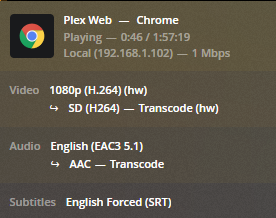
It's late, I'm tired but; "no hardware decode accelerator found" - You can't hardware decode on Linux, end of. Hardware Encode fine. Which is what Transcoding is doing so that log means very little here. Also "Throttled" suggests Plex is throttling the data due to bandwidth restrictions not transcoding. I mean it LOOKS like your trying to play a MKV in 480p, but I don't know the original video and I don't know the source and the destination for the network. It looks like you've done everything right with regard to the setup for Hardware Acceleration, so I'd be concentrating on why Plex is Throttling not transcoding. I have attached a screenshot of what a 1080p => 480p Hardware Transcode should look like.
-
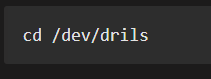
I can't be the only one, I got stuck on cd /dev/drils. Looks like your code blocks are removing the return carriages. Once I figured out what was going on, it worked like a charm. Thanks.
-
If I'm attempting to unbalance more files than I have space on another drive for that's not going to work, it's not going to let me start, as it won't be able to specify a destination disk.
-
Well in unBALANCE I would define the "best" drive to move them to as the one requiring the smallest transfer. Since I only have enough cache for small batches is exactly why I'm asking for this feature, so it will move and allocate folders one at a time, rather than the entire selection. That way I don't have to keep coming back to it, and it can run over-night and be done by the morning, not as I have had to do and be small batches each night.


