




-
[Support] ich777 - Gameserver Dockers
Using the other container almost feels like cheating on you...your Valheim Container and I have been together for so long. ;) I do not WANT to use the other container.... but, it appears I HAVE to.
-
[Support] ich777 - Gameserver Dockers
So a new dedicated Valheim server popped up in the App section of unraid (https://github.com/blckassassin/unraid-game-servers/tree/main/games/valheim) I wiped out everything from ich777 container and pulled down the above. The server starts fine with no issue. Maybe @ich777 can take a look at the above container and see what is different between the two?
-
[Support] ich777 - Gameserver Dockers
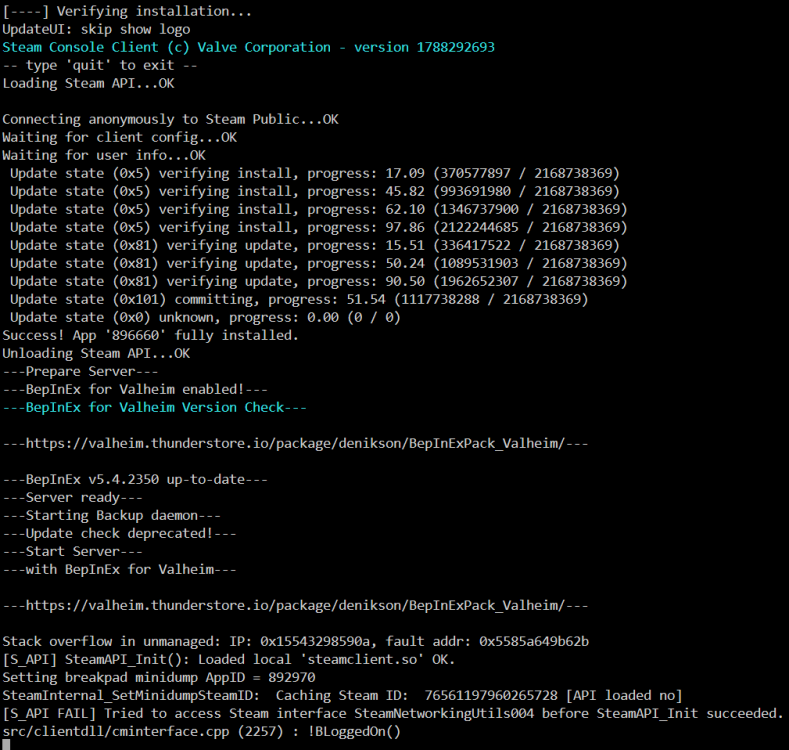
I had already tried turning it on/off... it didn't make a difference on mine. Still the same error message: Stack overflow in unmanaged: IP: 0x1465dab8590a, fault addr: 0x55fa7842d26b
-
[Support] ich777 - Gameserver Dockers
I've set the container to host from bridge and still getting the error(s). I've also re-booted the Unraid server... .still same errors.
-
[Support] ich777 - Gameserver Dockers
Removed container, removed template, removed /appdata/valheim. Pulled down a new container let it install. Still get the same error: Stack overflow in unmanaged: IP: 0x147ca418590a, fault addr: 0x555e3bcb582b Using the server browser in-game, there is a red X over both the WAN and Local IP of the server. So it is for sure not starting.
-
[Support] ich777 - Gameserver Dockers
Strange. I, and others, can't get anyone to join - yet you have no issues with the same error......
-
[Support] ich777 - Gameserver Dockers
Also having the same issue with the Unmanaged IP error. Running Unraid 7.3.2 and running the container in Bridge mode. Client refuses to connect either via Local IP or WAN
-
[Support] Nodiaque - Gameserver docker
Well, let's hope they listen and, follow through.
-
[Support] Nodiaque - Gameserver docker
None of what you wrote regarding the "new" Windrose container sounds better than what you had already put together for us months ago. I'll stick with yours.
-
[Support] Nodiaque - Gameserver docker
For anyone that is/was having issues copying the single player world over to the dedicated server, they've changed how it's done (again). The easiest way that I have found is to copy the entire \Username\appdata\local\R5\Saved\SaveProfiles\{Bunch of random numbers' folder\RocksDB and the RocksDB_V2 folders over to your \appdata\windrose saved world location. Then go into your windrose directory on your server, delete everything out of RocksDB and RocksDB_V2 folders that IS NOT "worlds" subdirectoy. There was an issue with the patch changing the RocksDB to RocksDB_V2 and the single player world not migrating correctly blah blah blah. I tried every which way to get it to "stick" otherwise it would just create a new world and overwrite any changes to the Serverdescription.json file that you put into it.
-
[Support] Nodiaque - Gameserver docker
They aren't making it easy for us - they keep introducing breaking changes. Now for instance, since today's update, they've changed the location of the "world / save" folder. I've fixed the crashing on the container start. I've figured out the new format for copying over a single player to the dedicated server with no crashes. However, now I'm unable to connect anymore to the dedicated server as I could before with just the invite code. It's back to dropping me back into the main loading screen. Sigh. LoL
-
[Support] Nodiaque - Gameserver docker
Got to post #2. You need to delete a file to "kick start" the update. It's been mentioned in this thread 30+ times now.
-
[Support] Nodiaque - Gameserver docker
I sent in a bug report with what I posted earlier, the errors. I have been tinkering in the meantime. It seems that the P2pProxyAddress entry in the server.json MUST match the IP Unraid assigns it. For example, I earlier had that P2pProxyAddress set to my tower's IP address of 192.168.X.XXX and it was working fine before the updates were pushed out. I've changed it to the internal IP set by the container (172.17.0.28) and I am no longer getting the crash/restart cycle.
-
[Support] Nodiaque - Gameserver docker
Yes. It's the same procedure I've used in the past to move over the world.
-
[Support] Nodiaque - Gameserver docker
Just started the container after a few weeks because I'm about to travel for work and wanted to test it out. However, it's now in some sort of loop. Spits out these error messages and then re-starts... spits out the same error messages, re-starts... etc.. I've nuked the /appdata/Windrose folder. Pulled down the windrose folder again fresh. Starts fine. The error occurs when I copy over my world folder now from my localPC to the /appdata/Windrose folder and try to start the container. Maybe some permission error or something? LogOutputDevice: Error: === Crash Stack Trace: === LogOutputDevice: Error: LogOutputDevice: Error: [Callstack] 0x0000000141475686 WindroseServer-Win64-Shipping.exe!UnknownFunction [] LogOutputDevice: Error: [Callstack] 0x000000014413ba9d WindroseServer-Win64-Shipping.exe!UnknownFunction [] LogOutputDevice: Error: [Callstack] 0x00000001414024b3 WindroseServer-Win64-Shipping.exe!UnknownFunction [] LogOutputDevice: Error: [Callstack] 0x0000000141370d0a WindroseServer-Win64-Shipping.exe!UnknownFunction [] LogOutputDevice: Error: [Callstack] 0x0000000149139e6f WindroseServer-Win64-Shipping.exe!UnknownFunction [] LogOutputDevice: Error: [Callstack] 0x00000001490ff629 WindroseServer-Win64-Shipping.exe!UnknownFunction [] LogOutputDevice: Error: [Callstack] 0x000000014451e1d9 WindroseServer-Win64-Shipping.exe!UnknownFunction [] LogOutputDevice: Error: [Callstack] 0x0000000144500f21 WindroseServer-Win64-Shipping.exe!UnknownFunction [] LogOutputDevice: Error: [Callstack] 0x0000000144500903 WindroseServer-Win64-Shipping.exe!UnknownFunction [] LogOutputDevice: Error: [Callstack] 0x000000014c01d8e9 WindroseServer-Win64-Shipping.exe!UnknownFunction [] LogOutputDevice: Error: [Callstack] 0x00006ffff91f1074 VCRUNTIME140_1.dll!UnknownFunction [] LogOutputDevice: Error: [Callstack] 0x00006ffff91f239c VCRUNTIME140_1.dll!call_catch_block4() [Z:\usr\src\packages\BUILD\dlls\msvcrt\handler4.c:440] LogOutputDevice: Error: [Callstack] 0x00006fffffc3f869 ntdll.dll!UnknownFunction [] LogOutputDevice: Error: [Callstack] 0x0000000144ee2abe WindroseServer-Win64-Shipping.exe!UnknownFunction [] LogOutputDevice: Error: [Callstack] 0x0000000146b76117 WindroseServer-Win64-Shipping.exe!UnknownFunction [] LogOutputDevice: Error: [Callstack] 0x0000000146adbd13 WindroseServer-Win64-Shipping.exe!UnknownFunction [] LogOutputDevice: Error: [Callstack] 0x0000000146b51a9e WindroseServer-Win64-Shipping.exe!UnknownFunction [] LogOutputDevice: Error: [Callstack] 0x0000000141427842 WindroseServer-Win64-Shipping.exe!UnknownFunction [] LogOutputDevice: Error: [Callstack] 0x0000000146a6a404 WindroseServer-Win64-Shipping.exe!UnknownFunction [] LogOutputDevice: Error: [Callstack] 0x0000000146a72458 WindroseServer-Win64-Shipping.exe!UnknownFunction [] LogOutputDevice: Error: [Callstack] 0x000000014141ec48 WindroseServer-Win64-Shipping.exe!UnknownFunction [] LogOutputDevice: Error: [Callstack] 0x000000014128a9d1 WindroseServer-Win64-Shipping.exe!UnknownFunction [] LogOutputDevice: Error: [Callstack] 0x0000000141284e7f WindroseServer-Win64-Shipping.exe!UnknownFunction [] LogOutputDevice: Error: [Callstack] 0x00000001416e7ec5 WindroseServer-Win64-Shipping.exe!UnknownFunction [] LogOutputDevice: Error: [Callstack] 0x00000001416ee665 WindroseServer-Win64-Shipping.exe!UnknownFunction [] LogOutputDevice: Error: [Callstack] 0x00000001416e971e WindroseServer-Win64-Shipping.exe!UnknownFunction [] LogOutputDevice: Error: [Callstack] 0x00000001416c088f WindroseServer-Win64-Shipping.exe!UnknownFunction [] LogOutputDevice: Error: [Callstack] 0x00000001438550d0 WindroseServer-Win64-Shipping.exe!UnknownFunction [] LogOutputDevice: Error: [Callstack] 0x0000000144101b61 WindroseServer-Win64-Shipping.exe!UnknownFunction [] LogOutputDevice: Error: [Callstack] 0x000000014410512c WindroseServer-Win64-Shipping.exe!UnknownFunction [] LogOutputDevice: Error: [Callstack] 0x00000001441051aa WindroseServer-Win64-Shipping.exe!UnknownFunction [] LogOutputDevice: Error: [Callstack] 0x0000000144105c1d WindroseServer-Win64-Shipping.exe!UnknownFunction [] LogOutputDevice: Error: [Callstack] 0x000000014410b094 WindroseServer-Win64-Shipping.exe!UnknownFunction [] LogOutputDevice: Error: [Callstack] 0x000000014bf6aace WindroseServer-Win64-Shipping.exe!UnknownFunction [] LogOutputDevice: Error: [Callstack] 0x00006fffffa64819 kernel32.dll!BaseThreadInitThunk() [Z:\usr\src\packages\BUILD\dlls\kernel32\thread.c:61] LogOutputDevice: Error: [Callstack] 0x00006fffffc3fa1b ntdll.dll!UnknownFunction []
