





Joly0
Members
-
Joined
-
Last visited
Everything posted by Joly0
-
Hey @johner i have two things regarding the plugin If you dont accept PRs, why do you have it enabled in the first place? If you dont accept or dont want them, atleast disable the feature so people like me dont just waste their time trying to improve this plugin just for you to close the PR without saying anything You should really work on your release pipeline for this plugin. Every commit is made by "AICliAgents Release Publisher" with tens of thousands of lines added and thousands of removed, most of the actual changes are from your src/assets/ui folder where you have like a hundred files that you keep re-commiting just with slightly different names (i assume this has something to do with minification and a terrible release pipeline on your end that ships the files like that although there are no changes as new files). You ship like ten features and bug fixes with a single commit. This all makes it super hard to understand your code base and understand what was added or changed in each of your commits. I do not know who build this for you, even claude (which i assume you use heavily) would never suggest this to you unless you explicitly tell it you want it that way, but you should improve this man....
-
Hey, sorry for the late reply. So this doesnt seem like a direct issue with the plugin itself. The problem seems to be, that pangolin changes unraids resolv.conf file for its dns resolving without letting unraid know it (there is basically no way for me to properly implement this properly unfortunately). It can happen, that when unraid does changes to the resolv.conf file when pangolin cli is up and connected then the original unraid file is restored and the changes from pangolin are reverted. This can for example happen when the server uses DHCP and the DHCP lease is renewed or when tailscale settings change and tailscale writes changes to the resolv.conf file. If this happens again, can you please run these commands: cat /etc/resolv.conf pangolin status client --json iptables -S INPUT | grep -n -e pangolin -e ts-input tail -50 /var/log/pangolin_cli.logand please post the results either here or better create an issue on my github https://github.com/Joly0/unraid-pangolin_cli
-
Hey, sorry for the super late reply, for some reason i didnt get a notification for your message here. So in theory the plugin should not have the problems, docker container can have problems, though these are rare and i have not yet encountered something like you described, neither with the plugin nor the docker container with my jellyfin server
-
-
-
-
If you are able, please report issues or feature requests via GitHub; support will still be provided here but GitHub is the preferred method. https://github.com/Joly0/unraid-pangolin_newt/issues Pangolin Newt An Unraid plugin that installs Pangolin Newt and adds a settings page to connect your server to a Pangolin instance as a site. This lets you reach public resources directly on your Unraid host, witohut relying on any docker container. From Pangolin themselves: https://docs.pangolin.net/manage/sites/understanding-sites Installation Community Application Install via the Community Applications plugin in unRAID by going to the 'Apps' tab and searching for 'Pangolin Newt'. Manual Install Install manually by navigating to: Plugins → Install Plugin and entering the plugin URL: https://github.com/Joly0/unraid-pangolin_newt/raw/main/pangolin_newt.plg
-
Hey, i have seen you recently added a global mcp server configuration. One thing though, i have seen http type mcp servers have basically no additional things to configure, but http (and i think this applies to sse servers aswell) can have authentication (mainly through headers), which currently wouldnt work with the way those are configured. For example in my claude.json file i have an mcp server configured like this: "mcpServers": { "Coding": { "type": "http", "url": "https://mymcp.mydomain.org/Coding/mcp", "headers": { "X-API-Key": "RANDOMAPIKEY" } } },It would be great, if this was possible to configure (you could keep that simple and just allow headers in general to be configurable and the user has to handle which and how these headers are added, but thats up to you).
-
-
-
-
If you are able, please report issues or feature requests via GitHub; support will still be provided here but GitHub is the preferred method. https://github.com/Joly0/unraid-pangolin_cli/issues Pangolin CLI An Unraid plugin that installs the Pangolin CLI and adds a settings page to connect your server to a Pangolin instance as a machine client. This lets you reach private resources directly on your Unraid host. From Pangolin themselves: https://docs.pangolin.net/manage/clients/understanding-clients Installation Community Application Install via the Community Applications plugin in unRAID by going to the 'Apps' tab and searching for 'Pangolin CLI'. Manual Install Install manually by navigating to: Plugins → Install Plugin and entering the plugin URL: https://github.com/Joly0/unraid-pangolin_cli/raw/main/pangolin_cli.plg
-
Hey guys, i noticed after rebooting my unraid server, HA-in-a-box is not able to start the vm and throws this error: Version check passed. Continuing... Host path for '/domains' is /mnt/user/domains Highest Q35 machine type available is pc-q35-10.2 The default VM network type is eth0 Putting default ha vm icon in place Icon copied successfully. Home Assistant directories are already present...continuing. There is already a vdisk image here...skipping. As this is an OVMF VM, I need to create an NVRAM file. Creating now .... Formatting '/etc/libvirt/qemu/nvram/d8e05b6b-07e0-4a41-b1b4-2a961f908de2_VARS-pure-efi.fd', fmt=raw size=65536 All required files are present. Attempting to define the VM... Failed to define the VM. There was an error during the VM definition process. Not sure though how to solve this problem, i have no idea why its failing there and how to fix it. Starting the container manually works though and starts the vm properly
-
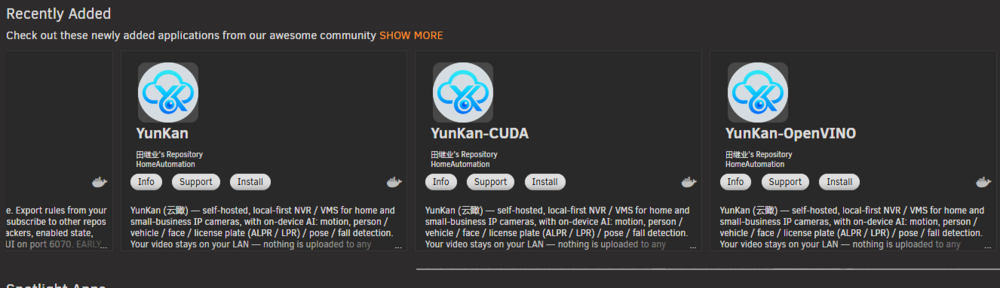
Hey guys, someone maybe knows why these "yunkan" containers keep re-appearing under "recently added" every few days? The templates are found here GitHubyunkan-unraid-templates/templates at main · mrtian2016/yu...云瞰 YunKan — Unraid Community Applications 模板仓库(CPU / OpenVINO / CUDA 3 个 amd64 变体) - mrtian2016/yunkan-unraid-templatesbut i cannot see any reason why they are re-added all the time, i just see they update the "changes" part in the templates when its updated. Its super annoying to see them every few days again and again.
-
Just looked through it, couldn't find it, then realized I linked the wrong repository (but still correct for container templates). The actually file you should edit is this one: https://github.com/Squidly271/AppFeed/blob/3127c70c026d256115bce4d64f3777afdd6c0862/statistics.json#L1856
-
The repository is here https://github.com/Squidly271/Community-Applications-Moderators If you search for your username in the repo, you will find the blacklist file I was mentioning. Just delete the part for your main branch and PR it
-
For your information, squid has the community applications moderations repository on his GitHub, which includes everything for CA ,including blacklisted stuff. You basically have to create a PR to un-blacklist (remove your repository from the blacklist file) and let squid merge it. It's super simple and straightforward. I have done that myself 3 times already (not for plugins, but for docker container templates, which got falsely marked as duplicates)
-
Hey, i noticed after a reboot the agent is simply gone. When i try to access it for example through the normal unraid webui terminal and run something like "claude" i get this error: bash: /usr/local/emhttp/plugins/unraid-aicliagents/agents/claude-code/node_modules/.bin/claude: No such file or directory The "agent store" says its installed. I either have to uninstall and reinstall or (if available) update to get claude (and others) back working.
-
Hey ,after the latest update something broke regarding removing and creating zram swap. So i had one running before the update. Then updated and wanted to re-create the swap file to use the higher swappiness (as far as i could read in the changelog, this is only applied to new zram´s?). I removed the existing zram, which looked to be ok, then the page had to be reloaded, but after reload it still showed the "remove" button. After doing that for a another 3-4 times, it finally reloaded and showed the "create" button instead of "remove", but when i clicked create, the log showed that it couldnt create it, because the file already exists. I tried thisn a few times over an over, always getting the same problems with removing and re-creating and finally gave up. Then randomaly i looked on the dashboard card and saw, that the zram appears to be created correctly with the correct 150 swappiness.
-
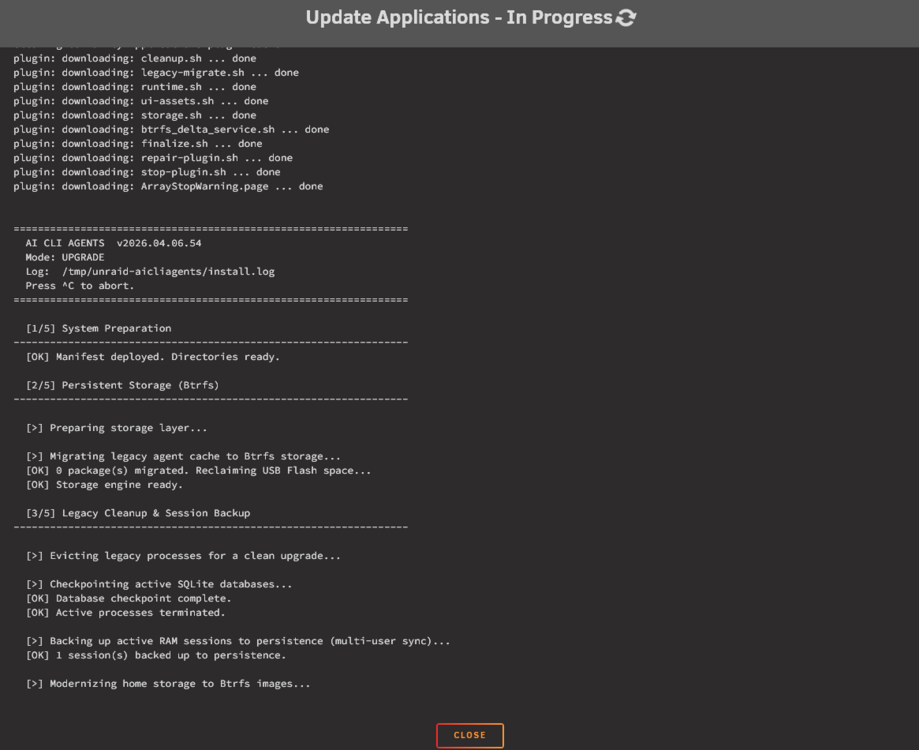
Yes, trying to from the default unraid shell, would be great if there was a way to do this for testing and debugging (currently trying to troubleshoot working with an claude code to opencode bridge). Another thing: This has been running for over an hour, it was stuck for most of the time now at the "Backing up active RAM sessions..." step. Not sure how long it will take for the next step, but this rough for a plugin update
-
Also another thing i have noticed: When i have to debug mcp servers using npm/npx they do not use the correct paths and usually defualt back to /root/ directory instead of the /tmp/unraid-aicliagents/work/root/. Even when starting them like this /usr/local/emhttp/plugins/unraid-aicliagents/bin/npx it doesnt work either and they still usually place their place under /root/. It would be great here if there was some way to easily get into the same environment as cli´s would run under. I assume you are doing some path shenanigans or something similar
-
Btw, just did the latest update with the migration and everything and afterwards the directory /tmp/unraid-aicliagents/work/root/ was empty, so all sessions, configurations, etc were gone. I had to manually copy back those files from the backup location under /boot/config/plugins/unraid-aicliagents/persistence/root
-
Just came here to say the incognito feature is pretty crazy good, in my opinion volumes should be masked aswell, because they unusually contain data to make it obv which container is which, which for example wouldnt or usually isnt the case for things like networks, ips or ports
-
Also could you explain how and where the different cli´s are installed, cause i would like to use things like claude code usage monitor or meridian/opencode-with-claude and they require things like the opencode.json file or the config location for claude, and i cannot find them. I searched under /tmp/unraid-aicliagents but couldnt find for example the opencode.json file
-
Hey, two other things i noticed is that the sync is running indefinitely (atleast for me was running for over 10 minutes and didnt finish) and the schedule for that is not saved nor applied in any way, so saving doesnt work



