





Joly0
Members
-
Joined
-
Last visited
Everything posted by Joly0
-
Hm, ich habe das mal ausprobiert, allerdings meldet "Tips and Tweaks" weiterhin "Driver: ACPI CPU Freq" Da müsste ja eigentlich AMD P-State oder etwas ähnliches stehen, oder woran machst du fest, dass der richtige Treiber geladen wurde?
-
Hey, i am having another issue on 6.12 (any RC). I am missing the option to autostart containers, i can autostart whole folders, but no the containers (i think the toggle for it is off screen, cause everything is quite missalligned.
-
Hey guys, i am running a 7950x on 6.12 RC3 Can someone tell me, where to put what? There are many overlapping informations by various people and i am unsure now, which one to use. ! thing thats certain is "modprobe amd_pstate" in my go file, but what about the syslinux.cfg? I have seen these 3 informations now already: modprobe.blacklist=acpi_cpufreq amd_pstate=passive idle=halt initcall_blacklist=acpi_cpufreq_init amd_pstate.enable=1 amd_pstate.replace=1 modprobe.blacklist=pcspkr,k10temp,sp5100_tco,acpi_cpufreq,eeepc_wmi,mxm_wmi,wmi_bmof,asus_wmi,wmi amd_pstate.shared_mem=1 idle=halt which are correct, which one to choose, why is there such a difference in these 3?
-
Great to hear. If you need someone to test, i am willing to help, just message me then
-
Who is now responsible for this project? As it is no longer working on Unraid 6.12 (Beta)
-
Still an issue for you? I have found the issue, fixed it and made a pr on github, already merged. Since then no problem for me
-
I know of that, but there you can only include/exclude disks, they still get filled up randomly per selection of the fill-up setting and the split setting and if that one disk is full, what happens next?
-
As far as i know, unraid doesnt have a feature like an option to tell unraid, to keep a share on a specific drive, except when that drive is full then either write to the next drive or a specific other drive. I know its possible to fill up a disk one after the other, and its possible to adjust the splitting, but telling a share to write data only to a specific drive easily is not possible as far as i know and that would be super helpful. So for example i could have my movies on one drive, my series on another, my isos on the third drive, my nextcloud on the fourth. Now i add data to nextcloud this data lands on the first drive, if i havent set the correct split and fill-up settings, and even then, if the nextcloud drive is full, the files go randomly somwhere else or nowhere. Isnt one of the main concepts of unraid to keep disks spun down? Then wouldnt it make sense like the way i explained it so only the nextcloud disk gets spun up and now like a bunch of other disks, just cause there are a few text documents laying on them? I might be wrong, but this would be a great addition to unraid.
-
Sry for the super late reply. Yes, in foreground it does work without a problem
-
Browser is firefox, i could try it again with the tab in foreground
-
Through command line it takes a few minutes, roughly 5-7 minutes or so, but not that long.
-
Hm, somehow the snapshot feature isnt working correctly for me. I tried to create a snapshot and a window popped up and . . . . . appeared on and on and on until forever. I never got a message like "done" or "finished" or something,and it kept loading, though after hours i just closed the popup and there is the snapshot. Is this intentional?
-
Ok guys, can someone tell me what i have to do, to enable cppc driver for my 7950x? If i run corefreq-cli cppc is blue, not green, but i am not sure what i have to do now
-
Somehow i cant get this container to run at all. After first start i get this output Connecting to raw.githubusercontent.com (185.199.109.133:443) wget: server returned error: HTTP/1.1 404 Not Found Netdata entrypoint script starting And after every other restart the last line just repeats, nothing happens and the container stays stopped EDIT: I have found the issue myself and created a pr on github
-
Would it be possible to integrate something like this https://github.com/derrod/legendary into the lancache-prefill docker to also cover epic games?
-
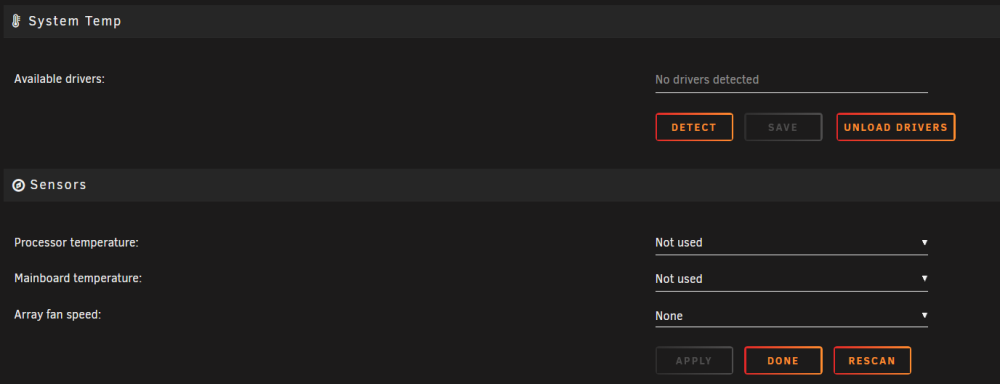
Hey guys, i am running Unraid 6.11.5 and just switched to Ryzen 7000 and now i cant see my temps anymore through the temp plugin? I just shows "not drivers detected" when i click detect. It recently worked on my older plattform. Anything i can do there?
-
Can this be used as a drop in replacement for the official filerun container? I dont want to mess up my files but would like to access them via smb
-
Wait. Wat??.... You are right... How on earth did this happen??? Thats quite awkward, i am certain i havent changed anything regarding the path, as i havent changed it since setting this up half a year ago. Well, thx
-
You have a typo in your command and i had to filter out docker subvolumes, but here is the output

-
Hey guys, i noticed, that my automatic snapshots arent working anymore. I get the following error in the logs snapshots: btrfs subvolume snapshot -r '/mnt/cache/lxc/AMP' ' /mnt/cache/snaps/AMP-20221028170521' Error ERROR: not a btrfs filesystem: /mnt/cache/snaps /mnt/cache/snaps is the folder i use for the snapshots to store. That directory was working once, but now it doesnt anymore. It is on my cache, which is 100% a btrfs filesystem, and even if it where on my array, thats btrfs aswell, so shouldnt matter. I already tried to recreate the share normally and also created it as a subvolume. Both times i can see it in my cache, but it still doesnt work.
-
Btw, is it possible to set a custom schedule for snapshots or maybe some more pre-defined schedules, like half an hour or every 15 minutes or so? Something like znapzend for zfs would be great. With tiered snapshots, like 1 snapshot every 10 minutes which last for 2 days, then a snapshot every hour which lasts for 1 month or so?
-
New update works great. Thank you
-
I have it setup as /mnt/user/system/docker for simplicity though system is cache only so /mnt/cache/system/docker would fit for me aswell
-
Any news regarding my feature request? The snapshot page is barely usable as there are hundreds of docker btrfs snapshots which make it really hard to find anything
-
I dont have an Intel iGPU but i guess alot of people would appreciate this feature. I can totally agree on the second part, just take your time 😄


