





tucansam
Members
-
Joined
-
Last visited
Everything posted by tucansam
-
No idea whatsoever what that even means, but I'm off to research.
-
I don't know any other way. What's the best method?
-
Unfortunately docker won't let me set the appdata path. I'm in the docker tab in the web gui. I was able to set the path to "/mnt/disks/ssd1/docker.img" for the docker file, but its giving me a "path doesn't exist" error for "/mnt/disks/ssd2/appdata." When I browse from that form field, it only shows me directories in /mnt/user -- it will only look to the array for an appdata path. Is it possible to store the appdata on an ssd mounted with unassigned devices, not in the user shares?
-
You're backing up appdata daily? How many docker applications are you running? My appdata directory is 102GB, and the Plex instance alone is several million files. I'm backing it up weekly. Five or six dockers running, the usual suspects I suppose. And docker.img is not super critical? Where is the config data for each (sab, plex, etc) stored -- appdata or in the docker.img file?
-
I've had the exact same problem since day one, years upon years now. It really only makes a difference when I try to move files between drives or folders. I get permission denied errors and either have to go to the shell prompt to chmod/chown or use docker safe new permissions. All of my media that gets downloaded suffers the same thing, movies, music, TV shows.
-
I've finally upgraded my server after 10+ years. My final task is to copy the contents of an old Evo 850 SSD to two new m.2 SSDs. Is it worth placing docker.img and appdata on different SSDs, for the sake of performance? Thanks.
-
Happened to notice that sab hadn't downloaded a tv show in weeks. Movies are fine. Sonarr, under activity, has every entry with a yellow clock next to it that say "Pending -- Download client is unavailable." Not sure where to begin troubleshooting -- literally no setting has changed in my setup in almost a decade. Clicking "Test" in settings give me a green check mark. Ideas welcome. ETA Looking at the config page under Radarr, it exactly mirrors Sonarr. Yet Sonarr will not work.
-
ddrescue worked! I was able to decrypt, and then mount, the resulting image file. looks like more than 99% of my data is in tact.
-
First I'd be trying anything like this. Any chance there are guides online?
-
Thank you Jorge. I realize this is purely speculative, but would it be worth a try to buy an exact same disk and use the logic board from it on the old disk, to see if that keeps it up long enough to recover data? ddrescue has run all night and is showing that its about 75% complete, and it claims it has recovered some data. I guess we'll see when it finishes. A four-hour ETA for finishing turned into almost 12, and it still not done.
-
This is what I get when I try to mount a disk I need to get some info off of: -- Nov 13 18:34:09 ffs1 kernel: ata2: SATA max UDMA/133 abar m2048@0xf7d36000 port 0xf7d36180 irq 27 Nov 13 18:34:09 ffs1 kernel: ata2: SATA link up 6.0 Gbps (SStatus 133 SControl 300) Nov 13 18:34:09 ffs1 kernel: ata2.00: NCQ Send/Recv Log not supported Nov 13 18:34:09 ffs1 kernel: ata2.00: ATA-9: ST3000VN000-1HJ166, W6A0TZ31, SC60, max UDMA/133 Nov 13 18:34:09 ffs1 kernel: ata2.00: 5860533168 sectors, multi 0: LBA48 NCQ (depth 32), AA Nov 13 18:34:09 ffs1 kernel: ata2.00: NCQ Send/Recv Log not supported Nov 13 18:34:09 ffs1 kernel: ata2.00: configured for UDMA/133 Nov 13 18:34:09 ffs1 kernel: sd 2:0:0:0: [sdb] 5860533168 512-byte logical blocks: (3.00 TB/2.73 TiB) Nov 13 18:34:09 ffs1 kernel: sd 2:0:0:0: [sdb] 4096-byte physical blocks Nov 13 18:34:09 ffs1 kernel: sd 2:0:0:0: [sdb] Write Protect is off Nov 13 18:34:09 ffs1 kernel: sd 2:0:0:0: [sdb] Mode Sense: 00 3a 00 00 Nov 13 18:34:09 ffs1 kernel: sd 2:0:0:0: [sdb] Write cache: enabled, read cache: enabled, doesn't support DPO or FUA Nov 13 18:34:09 ffs1 kernel: sdb: sdb1 Nov 13 18:34:09 ffs1 kernel: sd 2:0:0:0: [sdb] Attached SCSI disk Nov 13 18:34:38 ffs1 emhttpd: ST3000VN000-1HJ166_W6A0TZ31 (sdb) 512 5860533168 Nov 13 18:34:38 ffs1 emhttpd: read SMART /dev/sdb Nov 13 18:36:41 ffs1 unassigned.devices: Disk with ID 'ST3000VN000-1HJ166_W6A0TZ31 (sdb)' is not set to auto mount. Nov 13 18:36:50 ffs1 emhttpd: shcmd (154): /usr/sbin/cryptsetup luksOpen /dev/sdb1 W6A0TZ31 Nov 13 18:37:19 ffs1 kernel: ata2.00: READ LOG DMA EXT failed, trying PIO Nov 13 18:37:19 ffs1 kernel: ata2: failed to read log page 10h (errno=-5) Nov 13 18:37:19 ffs1 kernel: ata2.00: exception Emask 0x1 SAct 0xf SErr 0x0 action 0x0 Nov 13 18:37:19 ffs1 kernel: ata2.00: irq_stat 0x40000001 Nov 13 18:37:19 ffs1 kernel: ata2.00: failed command: WRITE FPDMA QUEUED Nov 13 18:37:19 ffs1 kernel: ata2.00: cmd 61/02:00:41:80:00/00:00:00:00:00/40 tag 0 ncq dma 1024 out Nov 13 18:37:19 ffs1 kernel: ata2.00: status: { DRDY DF ERR } Nov 13 18:37:19 ffs1 kernel: ata2.00: error: { ABRT } Nov 13 18:37:19 ffs1 kernel: ata2.00: failed command: WRITE FPDMA QUEUED Nov 13 18:37:19 ffs1 kernel: ata2.00: cmd 61/20:08:48:80:00/00:00:00:00:00/40 tag 1 ncq dma 16384 out Nov 13 18:37:19 ffs1 kernel: ata2.00: status: { DRDY DF ERR } Nov 13 18:37:19 ffs1 kernel: ata2.00: error: { ABRT } Nov 13 18:37:19 ffs1 kernel: ata2.00: failed command: WRITE FPDMA QUEUED Nov 13 18:37:19 ffs1 kernel: ata2.00: cmd 61/20:10:c0:40:51/00:00:22:00:00/40 tag 2 ncq dma 16384 out Nov 13 18:37:19 ffs1 kernel: ata2.00: status: { DRDY DF ERR } Nov 13 18:37:19 ffs1 kernel: ata2.00: error: { ABRT } Nov 13 18:37:19 ffs1 kernel: ata2.00: failed command: WRITE FPDMA QUEUED Nov 13 18:37:19 ffs1 kernel: ata2.00: cmd 61/20:18:60:2a:6b/00:00:22:00:00/40 tag 3 ncq dma 16384 out Nov 13 18:37:19 ffs1 kernel: ata2.00: status: { DRDY DF ERR } Nov 13 18:37:19 ffs1 kernel: ata2.00: error: { ABRT } Nov 13 18:37:19 ffs1 kernel: ata2.00: both IDENTIFYs aborted, assuming NODEV Nov 13 18:37:19 ffs1 kernel: ata2.00: revalidation failed (errno=-2) Nov 13 18:37:19 ffs1 kernel: ata2: hard resetting link Nov 13 18:37:25 ffs1 kernel: ata2: link is slow to respond, please be patient (ready=0) Nov 13 18:37:27 ffs1 kernel: ata2: SATA link up 6.0 Gbps (SStatus 133 SControl 300) Nov 13 18:37:27 ffs1 kernel: ata2.00: both IDENTIFYs aborted, assuming NODEV Nov 13 18:37:27 ffs1 kernel: ata2.00: revalidation failed (errno=-2) Nov 13 18:37:32 ffs1 kernel: ata2: hard resetting link Nov 13 18:37:38 ffs1 kernel: ata2: SATA link up 6.0 Gbps (SStatus 133 SControl 300) Nov 13 18:37:38 ffs1 kernel: ata2.00: both IDENTIFYs aborted, assuming NODEV Nov 13 18:37:38 ffs1 kernel: ata2.00: revalidation failed (errno=-2) Nov 13 18:37:38 ffs1 kernel: ata2.00: disabled Nov 13 18:37:38 ffs1 kernel: ata2: EH complete Nov 13 18:37:38 ffs1 kernel: sd 2:0:0:0: [sdb] tag#15 UNKNOWN(0x2003) Result: hostbyte=0x04 driverbyte=0x00 cmd_age=18s Nov 13 18:37:38 ffs1 kernel: sd 2:0:0:0: [sdb] tag#15 CDB: opcode=0x8a 8a 00 00 00 00 00 22 6b 2a 60 00 00 00 20 00 00 Nov 13 18:37:38 ffs1 kernel: blk_update_request: I/O error, dev sdb, sector 577448544 op 0x1:(WRITE) flags 0x1000 phys_seg 4 prio class 0 Nov 13 18:37:38 ffs1 kernel: sd 2:0:0:0: [sdb] tag#16 UNKNOWN(0x2003) Result: hostbyte=0x04 driverbyte=0x00 cmd_age=18s Nov 13 18:37:38 ffs1 kernel: sd 2:0:0:0: [sdb] tag#16 CDB: opcode=0x8a 8a 00 00 00 00 00 22 51 40 c0 00 00 00 20 00 00 Nov 13 18:37:38 ffs1 kernel: blk_update_request: I/O error, dev sdb, sector 575750336 op 0x1:(WRITE) flags 0x1000 phys_seg 4 prio class 0 Nov 13 18:37:38 ffs1 kernel: sd 2:0:0:0: [sdb] tag#17 UNKNOWN(0x2003) Result: hostbyte=0x04 driverbyte=0x00 cmd_age=18s Nov 13 18:37:38 ffs1 kernel: sd 2:0:0:0: [sdb] tag#17 CDB: opcode=0x8a 8a 00 00 00 00 00 00 00 80 48 00 00 00 20 00 00 Nov 13 18:37:38 ffs1 kernel: blk_update_request: I/O error, dev sdb, sector 32840 op 0x1:(WRITE) flags 0x1000 phys_seg 4 prio class 0 Nov 13 18:37:38 ffs1 kernel: sd 2:0:0:0: [sdb] tag#18 UNKNOWN(0x2003) Result: hostbyte=0x04 driverbyte=0x00 cmd_age=18s Nov 13 18:37:38 ffs1 kernel: sd 2:0:0:0: [sdb] tag#18 CDB: opcode=0x8a 8a 00 00 00 00 00 00 00 80 41 00 00 00 02 00 00 Nov 13 18:37:38 ffs1 kernel: blk_update_request: I/O error, dev sdb, sector 32833 op 0x1:(WRITE) flags 0x1000 phys_seg 2 prio class 0 Nov 13 18:37:38 ffs1 kernel: sd 2:0:0:0: [sdb] tag#19 UNKNOWN(0x2003) Result: hostbyte=0x04 driverbyte=0x00 cmd_age=0s Nov 13 18:37:38 ffs1 kernel: sd 2:0:0:0: [sdb] tag#19 CDB: opcode=0x35 35 00 00 00 00 00 00 00 00 00 Nov 13 18:37:38 ffs1 kernel: blk_update_request: I/O error, dev sdb, sector 0 op 0x1:(WRITE) flags 0x800 phys_seg 0 prio class 0 Nov 13 18:37:38 ffs1 kernel: sd 2:0:0:0: [sdb] tag#20 UNKNOWN(0x2003) Result: hostbyte=0x04 driverbyte=0x00 cmd_age=0s Nov 13 18:37:38 ffs1 kernel: sd 2:0:0:0: [sdb] tag#20 CDB: opcode=0x88 88 00 00 00 00 00 00 00 00 40 00 00 00 01 00 00 Nov 13 18:37:38 ffs1 kernel: blk_update_request: I/O error, dev sdb, sector 64 op 0x0:(READ) flags 0x0 phys_seg 1 prio class 0 Nov 13 18:37:38 ffs1 kernel: sd 2:0:0:0: [sdb] tag#21 UNKNOWN(0x2003) Result: hostbyte=0x04 driverbyte=0x00 cmd_age=0s Nov 13 18:37:38 ffs1 kernel: sd 2:0:0:0: [sdb] tag#21 CDB: opcode=0x88 88 00 00 00 00 00 00 00 00 40 00 00 00 01 00 00 Nov 13 18:37:38 ffs1 kernel: blk_update_request: I/O error, dev sdb, sector 64 op 0x0:(READ) flags 0x0 phys_seg 1 prio class 0 Nov 13 18:37:38 ffs1 kernel: sd 2:0:0:0: [sdb] tag#22 UNKNOWN(0x2003) Result: hostbyte=0x04 driverbyte=0x00 cmd_age=0s Nov 13 18:37:38 ffs1 kernel: sd 2:0:0:0: [sdb] tag#22 CDB: opcode=0x88 88 00 00 00 00 00 00 00 00 40 00 00 00 01 00 00 Nov 13 18:37:38 ffs1 kernel: blk_update_request: I/O error, dev sdb, sector 64 op 0x0:(READ) flags 0x0 phys_seg 1 prio class 0 Nov 13 18:37:38 ffs1 kernel: sd 2:0:0:0: [sdb] tag#23 UNKNOWN(0x2003) Result: hostbyte=0x04 driverbyte=0x00 cmd_age=0s Nov 13 18:37:38 ffs1 kernel: sd 2:0:0:0: [sdb] tag#23 CDB: opcode=0x88 88 00 00 00 00 00 00 00 00 50 00 00 00 08 00 00 Nov 13 18:37:38 ffs1 kernel: blk_update_request: I/O error, dev sdb, sector 80 op 0x0:(READ) flags 0x80700 phys_seg 1 prio class 0 Nov 13 18:37:38 ffs1 kernel: sd 2:0:0:0: [sdb] tag#24 UNKNOWN(0x2003) Result: hostbyte=0x04 driverbyte=0x00 cmd_age=0s Nov 13 18:37:38 ffs1 kernel: sd 2:0:0:0: [sdb] tag#24 CDB: opcode=0x88 88 00 00 00 00 00 00 00 00 50 00 00 00 01 00 00 Nov 13 18:37:38 ffs1 kernel: blk_update_request: I/O error, dev sdb, sector 80 op 0x0:(READ) flags 0x0 phys_seg 1 prio class 0 Nov 13 18:37:38 ffs1 kernel: Buffer I/O error on dev sdb1, logical block 16, async page read Nov 13 18:37:38 ffs1 kernel: Buffer I/O error on dev sdb1, logical block 17, async page read Nov 13 18:37:38 ffs1 kernel: Buffer I/O error on dev sdb1, logical block 18, async page read Nov 13 18:37:38 ffs1 kernel: Buffer I/O error on dev sdb1, logical block 19, async page read Nov 13 18:37:38 ffs1 kernel: Buffer I/O error on dev sdb1, logical block 20, async page read Nov 13 18:37:38 ffs1 kernel: Buffer I/O error on dev sdb1, logical block 21, async page read Nov 13 18:37:38 ffs1 kernel: Buffer I/O error on dev sdb1, logical block 22, async page read Nov 13 18:37:38 ffs1 kernel: Buffer I/O error on dev sdb1, logical block 23, async page read Nov 13 18:37:38 ffs1 kernel: Buffer I/O error on dev sdb1, logical block 16, async page read Nov 13 18:37:38 ffs1 kernel: Buffer I/O error on dev sdb1, logical block 17, async page read -- syslog shows this at the end of the attempt: -- Nov 13 18:37:38 ffs1 kernel: Buffer I/O error on dev sdb1, logical block 20, async page read Nov 13 18:37:38 ffs1 kernel: Buffer I/O error on dev sdb1, logical block 21, async page read Nov 13 18:37:38 ffs1 kernel: Buffer I/O error on dev sdb1, logical block 22, async page read Nov 13 18:37:38 ffs1 kernel: Buffer I/O error on dev sdb1, logical block 23, async page read Nov 13 18:37:38 ffs1 kernel: Buffer I/O error on dev sdb1, logical block 16, async page read Nov 13 18:37:38 ffs1 kernel: Buffer I/O error on dev sdb1, logical block 17, async page read Nov 13 18:37:38 ffs1 unassigned.devices: Mount of 'W6A0TZ31' failed: 'mount: /mnt/disks/W6A0TZ31: can't read superblock on /dev/mapper/W6A0TZ31. ' Nov 13 18:37:38 ffs1 unassigned.devices: Partition 'W6A0TZ31' cannot be mounted. -- I've read about ddrescue, but am uncertain how to proceed. This is a member disk out of an encrypted btrfs array. Can ddrescue still be used to make an attempt at recovery? Thanks.
-
How do I mount an encrypted disk, either with unassigned devices or manually from the shell prompt? I have older disks from the array that I need to pull data from -- some mount fine, some refuse to mount. I have a few disks that I no longer need, and have used unassigned devices to format encrypted so I can store files there as a cold backup, but they will format but refuse to mount.
-
I'm quite confused about SATA plug and play. I have an unraid server that I use for backups and general testing. 8 disks on an LSI, and zero disks on the six onboard SATA ports, however those six ports have been used in the past to plug disks in for various purposes. I use unassigned devices to manage disks on those ports. I've successfully plugged in, and mounted and used, disks on those onboard ports while unraid was running. I've also had no reaction from the server whatsoever when I plug disks in. In fact, using the exact same disks, I sometimes get them recognized, and sometimes not. When they are not recognized, a reboot gets them seen by unraid/unassigned devices. I have also used a USB dock for the same purpose, however literally every disk I plug in immediately starts throwing SMART errors, and I believe the USB dock is to blame. I am confused. Does SATA PnP/hot swap work with unraid or not?
-
End of keyboard-interactive prompts from server Linux 5.10.28-Unraid. root@ffs1:~# more /boot/config/plugins/dynamix/dynamix.plugin.control.cfg ,row4,row6,row10 root@ffs1:~# Now I'm even more confused. I just want to confirm my flash drive is not corrupted, and get this annoying error message to go away.
-
Thanks. Not government action. I usually take older or broken disks to the shooting range for destruction. But I have a few that are relatively new I may try to sell, or give to friends to repurpose. Just wanted to make sure any private data would be wiped "well enough" if I preclear them first. Thanks.
-
Fix common problems keeps saying this: Your flash drive has possible corruption on /boot/config/plugins/dynamix/dynamix.plugin.control.cfg. Post your diagnostics in the forum for more assistance More Information Diags attached. ffs1-diagnostics-20221109-1912.zip
-
Will preclear securely overwriite data on a disk, for example one that is being disposed of or resold? Thanks.
-
Diags attached. Drive is not even weeks old, went into a red x state out of nowhere. Tempted just to reboot and rebuild parity, but I can't get SMART to run on it as its disabled. I may just replace it with a spare and then test it in another system. ffs2-diagnostics-20221107-1852.zip
-
Failing to start and giving me this: -- auth-user-pass credentials.conf comp-lzo verb 1 crl-verify crl.rsa.2048.pem ca ca.rsa.2048.crt disable-occ Created by... ___. .__ .__ \_ |__ |__| ____ | |__ ____ ___ ___ | __ \| |/ \| | \_/ __ \\ \/ / | \_\ \ | | \ Y \ ___/ > < |___ /__|___| /___| /\___ >__/\_ \ \/ \/ \/ \/ \/ https://hub.docker.com/u/binhex/ 2022-11-05 19:00:29.107208 [info] Host is running unRAID 2022-11-05 19:00:29.173033 [info] System information Linux 6c771cbf28b0 5.10.28-Unraid #1 SMP Wed Apr 7 08:23:18 PDT 2021 x86_64 GNU/Linux 2022-11-05 19:00:29.253826 [info] OS_ARCH defined as 'x86-64' 2022-11-05 19:00:29.323327 [info] PUID defined as '99' 2022-11-05 19:00:29.403108 [info] PGID defined as '100' 2022-11-05 19:00:29.504147 [warn] UMASK not defined (via -e UMASK), defaulting to '000' 2022-11-05 19:00:29.582532 [info] Permissions already set for '/config' 2022-11-05 19:00:29.666134 [info] Deleting files in /tmp (non recursive)... 2022-11-05 19:00:29.755806 [info] VPN_ENABLED defined as 'yes' 2022-11-05 19:00:29.827421 [warn] VPN_CLIENT not defined (via -e VPN_CLIENT), defaulting to 'openvpn' 2022-11-05 19:00:29.902021 [info] VPN_PROV defined as 'pia' 2022-11-05 19:00:30.542531 [info] OpenVPN config file (ovpn extension) is located at /config/openvpn/openvpn.ovpn 2022-11-05 19:00:30.644726 [crit] VPN configuration file /config/openvpn/openvpn.ovpn does not contain 'remote' line, showing contents of file before exit... client dev tun resolv-retry infinite nobind persist-key cipher aes-128-cbc 1 tls-client remote-cert-tls server auth-user-pass credentials.conf comp-lzo verb 1 crl-verify crl.rsa.2048.pem ca ca.rsa.2048.crt disable-occ -- Was running not ten minutes ago, and no changes made.
-
I have been watching sab for a while now, and I can confirm that it hasn't updated in several months. When I click the dockers tab, and list my dockers, all have updated over a period of a few months, except sab. I happened to have a slow start today, and decided to check the log, and saw this: -- 2022-11-01 15:45:40.993548 [info] Host is running unRAID 2022-11-01 15:45:41.059912 [info] System information Linux eba860994300 5.10.28-Unraid #1 SMP Wed Apr 7 08:23:18 PDT 2021 x86_64 GNU/Linux 2022-11-01 15:45:41.133026 [info] OS_ARCH defined as 'x86-64' 2022-11-01 15:45:41.209668 [info] PUID defined as '99' 2022-11-01 15:45:41.304346 [info] PGID defined as '100' 2022-11-01 15:45:41.408257 [warn] UMASK not defined (via -e UMASK), defaulting to '000' 2022-11-01 15:45:41.482371 [info] Permissions already set for '/config' 2022-11-01 15:45:41.564422 [info] Deleting files in /tmp (non recursive)... 2022-11-01 15:45:41.662756 [info] VPN_ENABLED defined as 'no' 2022-11-01 15:45:41.728683 [warn] !!IMPORTANT!! VPN IS SET TO DISABLED', YOU WILL NOT BE SECURE 2022-11-01 15:45:41.811815 [info] Starting Supervisor... 2022-11-01 15:45:42,612 INFO Included extra file "/etc/supervisor/conf.d/sabnzbdvpn.conf" during parsing 2022-11-01 15:45:42,612 INFO Set uid to user 0 succeeded 2022-11-01 15:45:42,618 INFO supervisord started with pid 7 2022-11-01 15:45:43,621 INFO spawned: 'start-script' with pid 68 2022-11-01 15:45:43,625 INFO spawned: 'watchdog-script' with pid 69 2022-11-01 15:45:43,626 INFO reaped unknown pid 8 (exit status 0) 2022-11-01 15:45:43,638 DEBG 'start-script' stdout output: [info] VPN not enabled, skipping configuration of VPN 2022-11-01 15:45:43,639 INFO success: start-script entered RUNNING state, process has stayed up for > than 0 seconds (startsecs) 2022-11-01 15:45:43,639 INFO success: watchdog-script entered RUNNING state, process has stayed up for > than 0 seconds (startsecs) 2022-11-01 15:45:43,639 DEBG fd 8 closed, stopped monitoring <POutputDispatcher at 23111085713744 for <Subprocess at 23111085708848 with name start-script in state RUNNING> (stdout)> 2022-11-01 15:45:43,639 DEBG fd 10 closed, stopped monitoring <POutputDispatcher at 23111085713696 for <Subprocess at 23111085708848 with name start-script in state RUNNING> (stderr)> 2022-11-01 15:45:43,639 INFO exited: start-script (exit status 0; expected) 2022-11-01 15:45:43,640 DEBG received SIGCHLD indicating a child quit 2022-11-01 15:45:43,650 DEBG 'watchdog-script' stdout output: -- What concerns me is that somehow the VPN is not starting. Plus I'm worried, and confused, as to why its not updating. I have made zero changes to sab, other than updating it (when it worked), and am not sure how to proceed. Options welcome, thanks.
-
I've got two servers, and 8-disk and a 17-disk. I understand that the array only functions as fast as the slowest drive. Over the last few months I've upgraded disks across both servers, and now am running 5900+ rpm NAS disks and 7200 rpm NAS and standard disks. Both servers contain an LSI 92xx series controller -- an 8-port and a 16-port. Both LSIs are in x8 slots on the motherboards. The 16-drive system has two parity disks on motherboard SATA3 ports, member disks on the LSI. The 8-drive system has one parity disk and all members on the LSI. For parity syncs and rebuilds, the 8-disk system averages 150MB/s. As I write this, its rebuilding the array using a new (to it) 8TB Seagate Archive, which is arguably to worst disk in the history of disks, and its currently doing 178MB/s. Conversely, the 17-disk system is currently rebuilding a new HGST 12TB 7200rpm NAS disk, and its doing 49MB/s. The last time a parity sync was done (finished overnight) it reported an average of 109MB/s. Wondering what is causing the reduced throughput on the larger array. I'm slowly doing new-configs on the larger system to remove the last remaining 8TB archives in favor of 12TB HGSTs, and will eventually have ever disk in the system on the LSI, with only a couple of NVMe disks for cache and dockers. Could the MB SATA3 ports be the bottleneck? Thanks.
-
The PS I am using is a Seasonic gold, ten months old. I don't believe it to be a power issue. The random reboots I am experiencing during a parity check came as soon as I added two 12TB parity disks and a 12TB member disk. I'm not sure where to start troubleshooting this particular issue. Removing the extra disks I mentioned above will allow me to remove an extra HBA that is running an external enclosure... I am slowly trying to eliminate variables. I was hoping to be able to get that all out of the system before I move on, as that stupid setup has caused me nothing but major issues since Day 1.
-
Thanks. Unfortunately I can't get a parity check to complete (the reboot issue I am trying to figure out) so I'm worried about doing it because I don't think a parity sync will work right now.
-
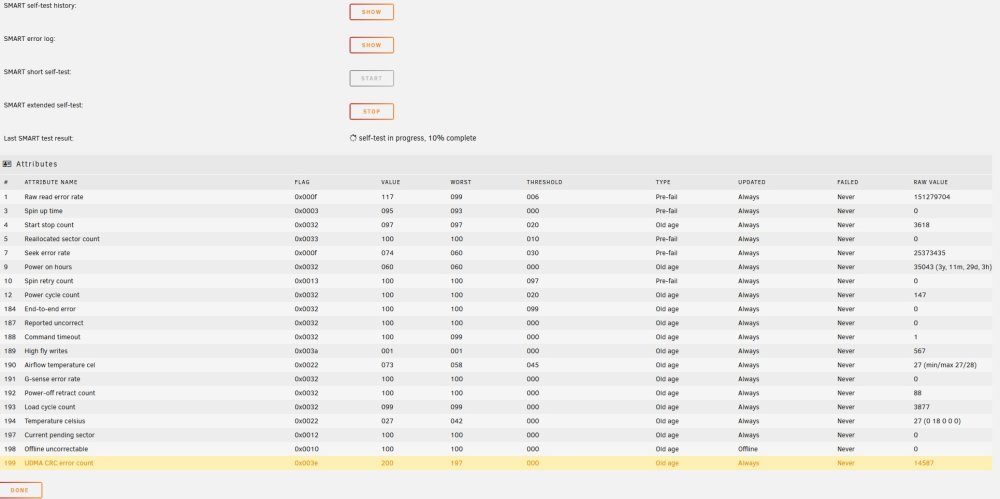
I am trying to mount a former disk to recover some data, and continue to get i/o error errors. Here's the log after a fresh power cycle on the disk. -- Oct 23 10:23:02 ffs2 kernel: ata5.00: NCQ Send/Recv Log not supported Oct 23 10:23:02 ffs2 kernel: ata5.00: configured for UDMA/133 Oct 23 10:23:02 ffs2 kernel: scsi 6:0:0:0: Direct-Access ATA ST3000VN000-1HJ1 SC60 PQ: 0 ANSI: 5 Oct 23 10:23:02 ffs2 kernel: sd 6:0:0:0: Attached scsi generic sg24 type 0 Oct 23 10:23:02 ffs2 kernel: sd 6:0:0:0: [sdy] 5860533168 512-byte logical blocks: (3.00 TB/2.73 TiB) Oct 23 10:23:02 ffs2 kernel: sd 6:0:0:0: [sdy] 4096-byte physical blocks Oct 23 10:23:02 ffs2 kernel: sd 6:0:0:0: [sdy] Write Protect is off Oct 23 10:23:02 ffs2 kernel: sd 6:0:0:0: [sdy] Mode Sense: 00 3a 00 00 Oct 23 10:23:02 ffs2 kernel: sd 6:0:0:0: [sdy] Write cache: enabled, read cache: enabled, doesn't support DPO or FUA Oct 23 10:23:02 ffs2 kernel: sdy: sdy1 Oct 23 10:23:02 ffs2 kernel: sd 6:0:0:0: [sdy] Attached SCSI disk Oct 23 10:23:03 ffs2 unassigned.devices: Disk with ID 'ST3000VN000-1HJ166_W6A0TZ31 (sdy)' is not set to auto mount. Oct 23 10:23:04 ffs2 kernel: ata5: SATA link down (SStatus 0 SControl 300) Oct 23 10:23:09 ffs2 kernel: ata5: SATA link down (SStatus 0 SControl 300) Oct 23 10:23:12 ffs2 kernel: ata2: SATA link up 6.0 Gbps (SStatus 133 SControl 300) Oct 23 10:23:12 ffs2 kernel: ata2.00: ACPI cmd ef/10:06:00:00:00:00 (SET FEATURES) succeeded Oct 23 10:23:12 ffs2 kernel: ata2.00: ACPI cmd f5/00:00:00:00:00:00 (SECURITY FREEZE LOCK) filtered out Oct 23 10:23:12 ffs2 kernel: ata2.00: ACPI cmd b1/c1:00:00:00:00:00 (DEVICE CONFIGURATION OVERLAY) filtered out Oct 23 10:23:12 ffs2 kernel: ata2.00: supports DRM functions and may not be fully accessible Oct 23 10:23:12 ffs2 kernel: ata2.00: disabling queued TRIM support Oct 23 10:23:12 ffs2 kernel: ata2.00: ACPI cmd ef/10:06:00:00:00:00 (SET FEATURES) succeeded Oct 23 10:23:12 ffs2 kernel: ata2.00: ACPI cmd f5/00:00:00:00:00:00 (SECURITY FREEZE LOCK) filtered out Oct 23 10:23:12 ffs2 kernel: ata2.00: ACPI cmd b1/c1:00:00:00:00:00 (DEVICE CONFIGURATION OVERLAY) filtered out Oct 23 10:23:12 ffs2 kernel: ata2.00: supports DRM functions and may not be fully accessible Oct 23 10:23:12 ffs2 kernel: ata2.00: disabling queued TRIM support Oct 23 10:23:12 ffs2 kernel: ata2.00: configured for UDMA/133 Oct 23 10:23:16 ffs2 kernel: ata5: link is slow to respond, please be patient (ready=0) Oct 23 10:23:21 ffs2 kernel: ata5: COMRESET failed (errno=-16) Oct 23 10:23:23 ffs2 kernel: ata5: SATA link up 3.0 Gbps (SStatus 123 SControl 300) Oct 23 10:23:23 ffs2 kernel: ata5.00: ACPI cmd ef/10:06:00:00:00:00 (SET FEATURES) succeeded Oct 23 10:23:23 ffs2 kernel: ata5.00: ACPI cmd f5/00:00:00:00:00:00 (SECURITY FREEZE LOCK) filtered out Oct 23 10:23:23 ffs2 kernel: ata5.00: ACPI cmd b1/c1:00:00:00:00:00 (DEVICE CONFIGURATION OVERLAY) filtered out Oct 23 10:23:23 ffs2 kernel: ata5.00: NCQ Send/Recv Log not supported Oct 23 10:23:23 ffs2 kernel: ata5.00: ACPI cmd ef/10:06:00:00:00:00 (SET FEATURES) succeeded Oct 23 10:23:23 ffs2 kernel: ata5.00: ACPI cmd f5/00:00:00:00:00:00 (SECURITY FREEZE LOCK) filtered out Oct 23 10:23:23 ffs2 kernel: ata5.00: ACPI cmd b1/c1:00:00:00:00:00 (DEVICE CONFIGURATION OVERLAY) filtered out Oct 23 10:23:23 ffs2 kernel: ata5.00: NCQ Send/Recv Log not supported Oct 23 10:23:23 ffs2 kernel: ata5.00: configured for UDMA/133 -- It won't stay mounted long enough to copy much data off of it. It mounts, I can 'ls' around, I can begin to copy stuff, and then it fails and is no longer communicating (won't show SMART etc). Power cycling it does help, but it drops again shortly after. I'm sure its failing. I'm running an extended SMART test on it now, but I'm not confident it will finish. Here's the SMART data I do have (the CRC errors are legacy I believe and from a bad cable)
-
I have begun replacing 8TB disks with 12TB disks, and now have a little wiggle room. Several very old 3TB and 4TB disks, four to be exact, need to go -- they are throwing errors and I have just finished copying all data off of them and onto other disks. The four disk are blank. I've read the FAQs and how-to's about doing a New Config. But before I take the plunge and remove four disks at the same time, I figured I'd post here for one final sanity check. What is the preferred procedure for permanently removing these four disks from my array? Thank you.
