





Pope Viper
Members
-
Joined
-
Last visited
Everything posted by Pope Viper
-
I've got a Plop problem I need help with. Running ESX 7.0, with a NAS VM, using PlopExec. The Unraid interface wasn't available, so I checked the VM and it was spitting out a lot of "unraid exit status 1 from user root /usr/local/emhttp/plugins/dynamix" errors. So I shut down the OS. rebooted the VM, and when I get to PlopExec, it is frozen on the main menu. I'm going to pull ESX and boot UnRaid from bare metal tomorrow, but wanted to see if anyone has run into this issue where Plop just completely locks up, with zero keyboard input. Thanks
-
Disregard. ID10T error. I had to enable Export.
-
My current server is exhibiting some odd behavior since I moved from 6.9.2 to 6.11, and I'm now at 6.12.1. *** Rollback to 6.12.0 fixed some things *** 1) I'm unable to create a new share. When I attempted to, I would get "starting services", then refresh to new share screen, and the share would never show up on the share tab. I rolled back to 6.12.0 and this seems solved. 2) When I create new shares, I can't hit them from my Win 10 box. Shares I created beforehand are still functional. I completely don't get that. 3) I was having the issues under 6.12.1 with "services starting" being stuck, but the rollback to 6.12 fixed that. So my main issue is being able to connect to newly created shares.
-
Just performed the latest updated, and while it seemed successful and the container came back up, I'm unable to attach to the plex server. Where can I start looking? Thanks!
-
Ok, I worked on it today, and finally have made some progress. I've got Varken up and running, feeding data into UUD, turns out that I hadn't designated the set the Varken DB into the various panels. So, that being said. I've got a few questions: 1) During my first attempt at this, I was able to designate my Cache/Array/Parity/Flash drives. On this attempt, when I select the drop down for a given drive, my only option is "None" I am seeing array stats, and the drives are showing up under the Drive S.M.A.R.T Health overview So I'm really not sure why the drives aren't populating in the Flash/Cache/Parity/Array areas. 3) Some panels indicate that they require IPMI and REGEX. I've installed the IPMI tools, but not sure how to do REGEX. Also, I'm seeing this in my telegraf log: 2021-02-12T23:17:50Z E! [inputs.sensors] Error in plugin: failed to run command /usr/bin/sensors -A -u: exit status 1 - So I need some assistance in addressing that. Thanks for any help!



-
OK, I had most of this up and running with GUS, but decided I would rather not have all services within one docker, so I removed GUS, and went the InfluxDB/Telegraf/Grafana route. Influx went fine, I'm currently jacking around with Telegraph. I've got the basic telegraf.conf in place, however, the post arguments don't seem to be working for me. I've tried to telegraf console to install the smartmontools, but I'm apparently not getting the syntax down correctly. I've tried the apk add commands, but not getting anywhere. I'm an old school Windows guy, and getting there slowly with Linux, any help would be greatly appreciated!
-
Hi folks - I'm trying to get the Varken side of things working, and seem to be having some difficulties. Is there an existing support thread for it somewhere? The Installation guide on the wiki seems to be blank. I'm updating the Varken.ini with the API keys to Tatulli, and after I do so, Varken refuses to start. I'm sure it's something obvious, but I'm banging my head against it.
-
I had just installed this, and then saw no recent activity by the owner. Is this no longer maintained? If not, I'll just go through the work of installing Grafana/Telegraf/Influx solo and go that route.
-
OK, with the upgrade to v3 over the weekend, I'm finding very sporadic success in having my downloads imported into Radarr. I'm seeing frequent errors such as below Everything was working flawlessly prior to the v3 upgrade.

-
Same issue. I'm also running into issues where when trying to add a searched movie, the icon just rotates, and never adds the request movie.
-
HI guys , thought I would follow up on this. Thanks!
-
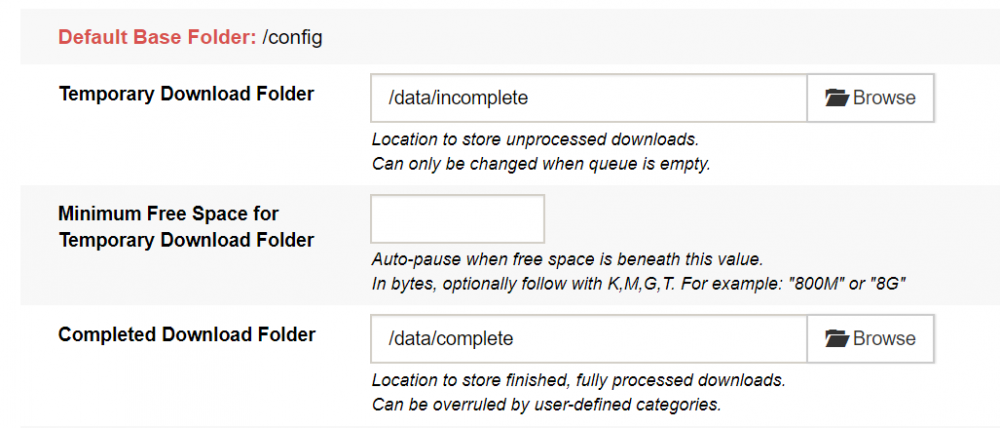
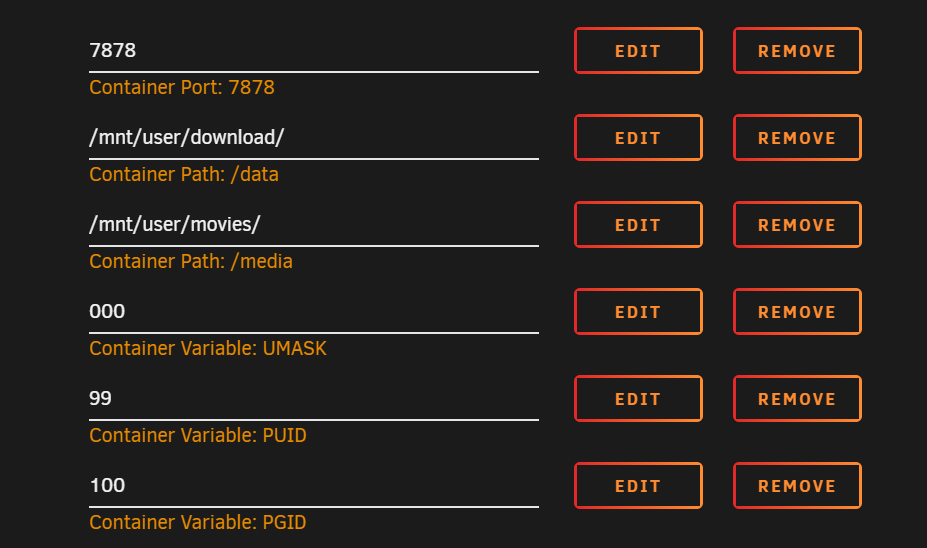
So on Linuserver Radarr, change the container path to /data?
-
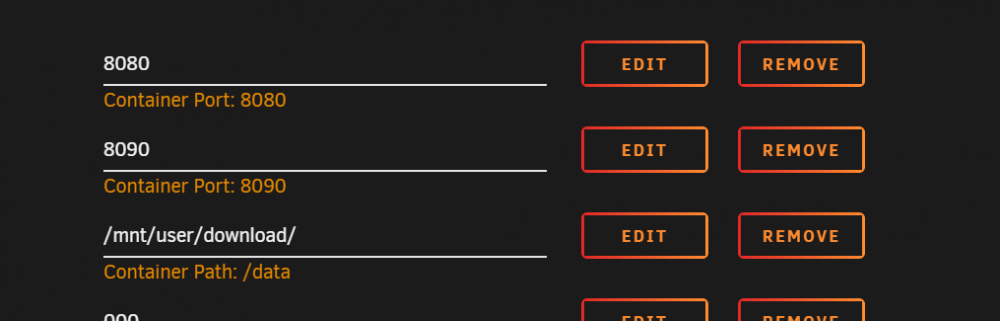
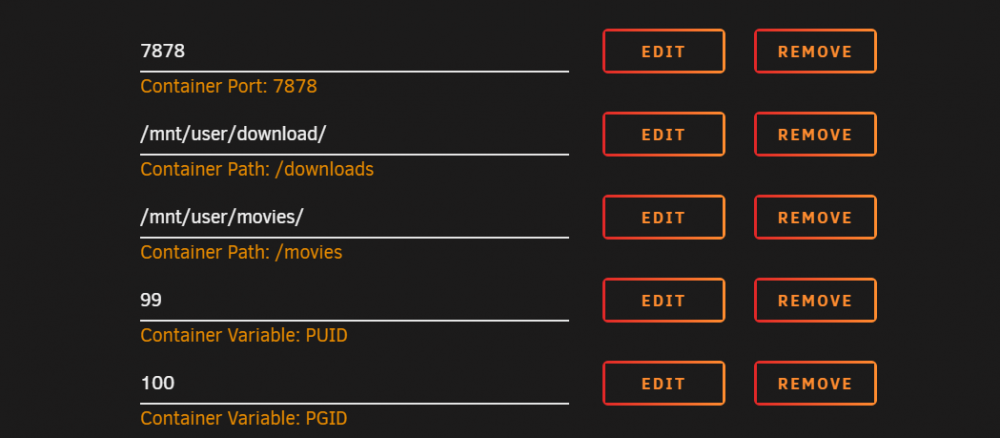
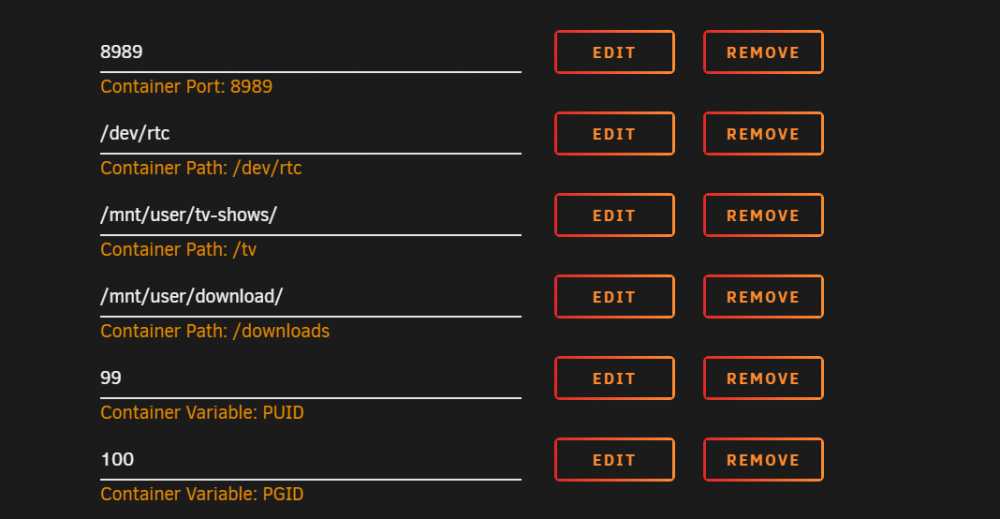
Hi guys - Was wondering if I could get some assistance. I've installed the Binhex version of Radarr/Sonarr, however I would like to get get Linuxserver.io dockers going, but keep running into a pathing issue that is frustrating me beyond belief. I've got the following: SABNZBD: Linuxserver - RADARR V3 Linuxserver - SONARR V3 Binhex - RADARR I'm not 100% sure how to reconfigure the Linuxserver's dockers to access the download area that SABNZBD is dumping things into. I would appreciate any guidance!
-
Good afternoon all, I'm running a virtualized UnRAID instance, running on ESX 6.7. I've got UR booting off of a USB Flash drive, passed through to the VM. I'm wanting to mount the VMDK so I can upgrade the system (currently running 6.5.3). I've got a friend running a similar setup, and he uses UD to access the VMDK, however he's seeing his VMDK as an unassigned device, which he can mount/dismount at any time. I however, do not have it as an option in UD. I've verified that the system does see the drive, as it's appearing in System Devices as a SCSI device ([4:0:0:0]disk VMware Virtual disk 2.0 /dev/sdc 1.07GB), I'm thinking that I might have "hidden" that right after I got the system up and running, but not 100% sure. Is there a way to unhide the VM disk, or force UA to see it so it can be mounted? Thanks for the assistance!


