





Kuwabara89
Members
-
Joined
-
Last visited
Everything posted by Kuwabara89
-
I was trying to get wireguard up and running after a change of network, I think I changed something I probably shouldn't have, now I cannot access anything though the webui. Is it possible to remove or disable a tunnel via command? just trying to get it setup with a monitor. thank you
-
It may just be the adapter I have as it is quite old and probably not designed for it. Didn't even think of the caddy that you linked, will look into testing one out. thank you. Might as well try and get use out of the hot swap bays as I no longer have them all occupied with HDDs.
-
Currently have a PC-Q25 and was looking to add 2.5" drives in the 3.5" bays. I have a 2.5 to 3.5 adapter but the drive doesn't seem to line up, doesn't seem to want to fit and don't want to push too hard. Anyone that has the case, have you been able to get 2.5" drives in? Tried looking online but no mentions of it. Many Thanks.
-
Just an update and a thank you to all who took their time to help, looks like my SSD cache was potentially at fault somehow. Got frustrated and did a fresh install of unraid and it wasn't happy with my SSD, array mounted fine without it and data accessible. Format of the SSD and it didn't have any issues after that, just have to spend some time getting things set back up.
-
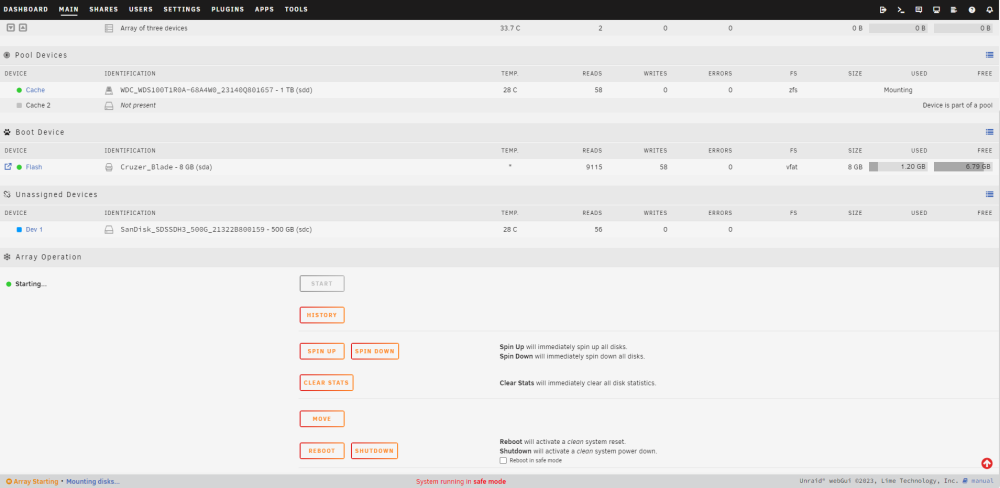
Yes sorry, same results is the GUI loading and when I go to start array it doesn't finish 'starting' GUI shutdown doesn't seem to respond, presumably because it's still processing the array start so I have to long push the power button. Image attached just to see GUI, 30 minute uptime.
-
Did see the 'reboot in safe mode' next to the reboot/shutdown options under array operation but getting the same results.
-
yes, once I click start I get the loading bars pop up and then it kind of hangs. I can go though the top menu as UI is responsive but array is stuck 'starting' Running it headless at the moment, but I will try that ASAP as it's in a bit of an awkward spot
-
Have been having a bunch of trouble with dockers at the moment, did a restart of the server and now I can't start the array. Diagnostics logs attached if anyone could take a look. tower-diagnostics-20240104-1349.zip
-
go to https://ipleak.net/ Click 'Torrent Address detection' and get the magnet link, add to torrent client and it should update with an IP. Hopefully different to your IP on ipleaks. you can also put that IP in the search just to confirm the country.
-
Yes on the same network, mine being 192.168.0.x just to confirm cant connect in anyway as the docker fails to stay running
-
Ah forgot to change that back while I've been testing with another qbittorrent docker. putting it to 8080 provides the same issue
-
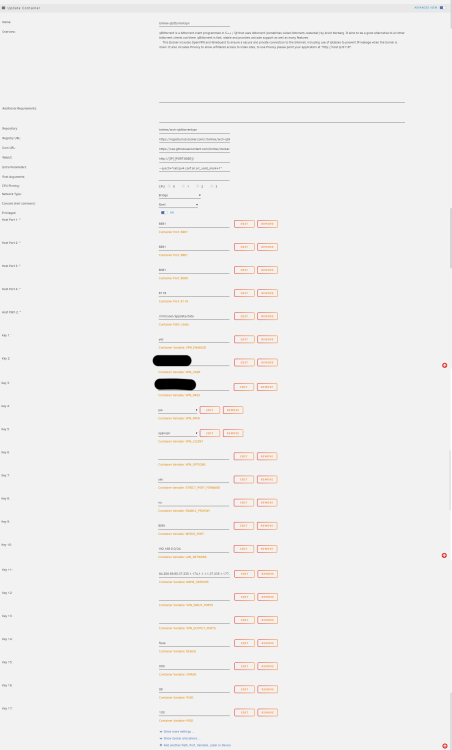
Thank you for assisting, hopefully attached is correct? Strangely I am able to run markusmcnugen's qbittorrentvpn without issues, but cant get jackett or prowler to work, binhex's or linuxserver versions, wondering if something maybe affecting multiple dockers? Might try a new docker image, not sure if that could resolve any issues.
-
log attached supervisord.log
-
Also getting the same results, have tried the extra config line also but nothing successful. Current release wont run and stops straight away, older release will stay running but not accessible.
-
Log attached as suggested, I have network type set to bridge but cannot remember if that is correct as its been awhile since I have had unraid running. Have also tried changing VPN_CLIENT to wireguard as that is something I use but again don't remember what I was using previously when it worked. supervisord.log
-
Not sure if its the same issues as others have mentioned recently, will have a read through some pages. But I have had my unraid server off for a few weeks, turned it on the other day and did some updates, now barely any of my binhex dockers load. Same goes for jackett, radarr and sonarr. Emby have deleted and reinstalled but cant seem to get others working even with rolling back to a different version. Anything vital I may have missed?
-
Anyone using PIA? No longer able to download anything. I think I might need to change my OVPN file but looking for advise on which to use. I know they don't allow torrents on some servers, just can't find which are blocked.
-
Switch Backup Manager should be what your after, you can set custom filenames
-
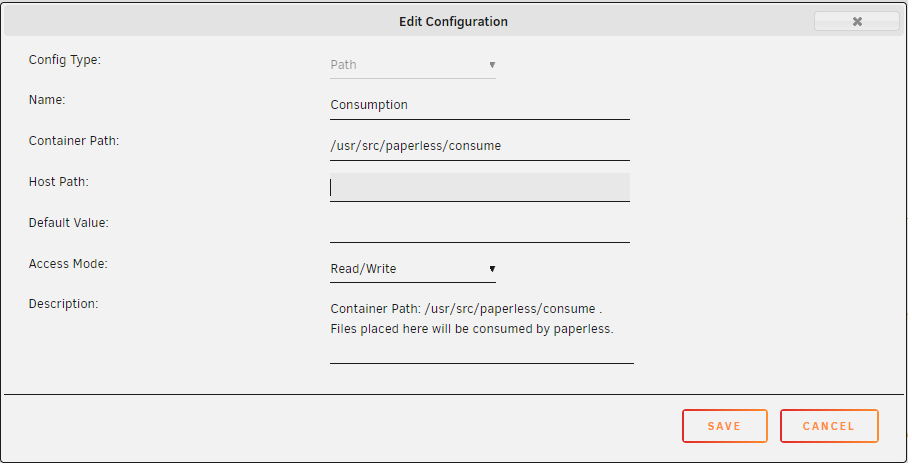
Don't know if you've sorted this but you can add it Edit the docker and at the bottom click 'Add another Path, Port, Variable, Label or Device' Here is a preview of mine minus the host path
-
Just wondering how paperless-ngx handles files with the same name? As an example, it consumes file 'invoice.pdf' processes it etc, then at a later date a file called 'invoice.pdf' (with different content) is put into the consume folder. Would this still be processed or does it need to be renamed? Thanks
-
Can paperless be configured in anyway to accept documents with the same filename in the consume folder? Obviously windows can't but at least at different times. To test this I make 2 files called 'statement' each with different content. Put one in the consume folder and waited for it to be processed then put the other in, but then nothing happens with the 2nd statement file.
-
Have done power cables also this time, will see how that goes. Actually have the PC-Q25 also and have found it good for making sure no cables can shift.
-
Attached is a diagnostics log if anyone is willing to take a look. I have had read errors on disk 2. Cancelled parity and pulled out the drive and put back in. Parity check is still going down to about 2-8MB/sec (usually in the 105-108 area) with a few read errors popping up. (was also slow before cancelling) Don't believe anything is writing to it or reading from it, any other reasons behind it, or maybe a failing drive? No other hardware changes since the last parity check. Many Thanks tower-diagnostics-20211201-2216.zip
-
looking for a bit of info on this also but can't quite make it work as needed. With the below settings and in Each Shares SMB Security set to Private, a guest has no access. anonymous users can't access certain shares (they will still see the folder) but I am struggling to also get proper access as a user also though. personally I have this in my SMB Extra settings [rootshare] path = /mnt/user comment = browseable = yes valid users = matt write users = matt vfs objects =
-
Still on 6.9.1 and not working, any recommendations on an alternative if depreciated



