





freakytoad1
Members
-
Joined
Everything posted by freakytoad1
-
This doesn't seem to stick around after a reboot of the container? Assuming you exec within the container and add this line in the first place?
-
unraid-diagnostics-20250221-1344.zip Attached are the system diagnostics. I've been running a long transfer from this unraid system to another system that is attached via SMB to this system. Unsure if that is related but it seems about 16ish hours after that transfer starts I start to see some issues in the logs about one of my sata connections. Then soon after I see warnings about pool. The web ui starts to become extremely slow to the point where it never loads. Running containers seem to go in and out of network availablity. Stopping the transfer seems to help a small amount but a full server restart seems to fix. Any ideas what is up? Should I try a new SATA cable or something like that? Feb 21 13:19:08 unraid kernel: ata6.00: exception Emask 0x0 SAct 0x0 SErr 0x50000 action 0x6 frozen Feb 21 13:19:09 unraid kernel: ata6: SError: { PHYRdyChg CommWake } Feb 21 13:19:09 unraid kernel: ata6.00: failed command: FLUSH CACHE EXT Feb 21 13:19:09 unraid kernel: ata6.00: cmd ea/00:00:00:00:00/00:00:00:00:00/a0 tag 22 Feb 21 13:19:09 unraid kernel: res 40/00:01:01:4f:c2/00:00:00:00:00/00 Emask 0x4 (timeout) Feb 21 13:19:09 unraid kernel: ata6.00: status: { DRDY } Feb 21 13:19:09 unraid kernel: ata6: hard resetting link Feb 21 13:19:09 unraid kernel: ata6: SATA link up 6.0 Gbps (SStatus 133 SControl 300) Feb 21 13:19:09 unraid kernel: ata6.00: configured for UDMA/133 Feb 21 13:19:09 unraid kernel: ata6.00: retrying FLUSH 0xea Emask 0x4 Feb 21 13:19:09 unraid kernel: ata6: EH complete [WARNING] [pool www] child 2106535 exited on signal 9 (SIGKILL) after 14.517406 seconds from start
-
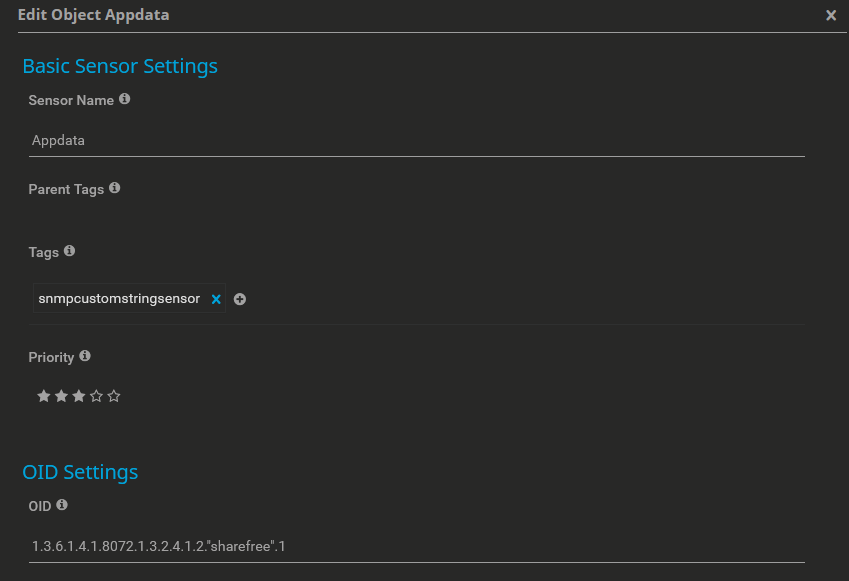
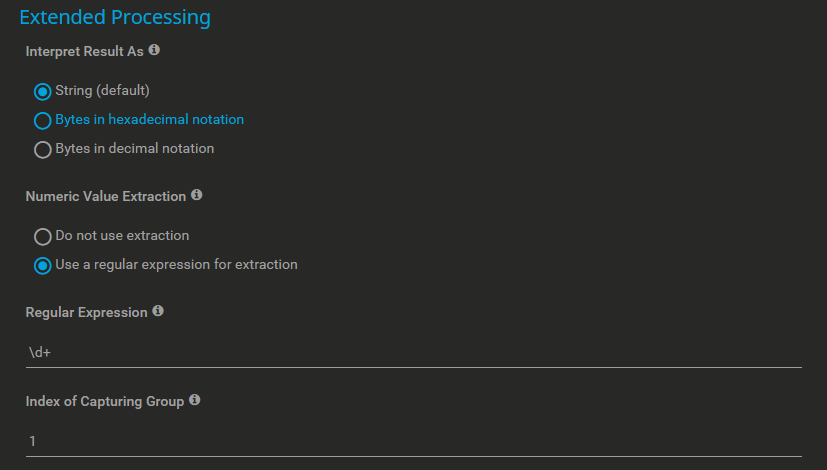
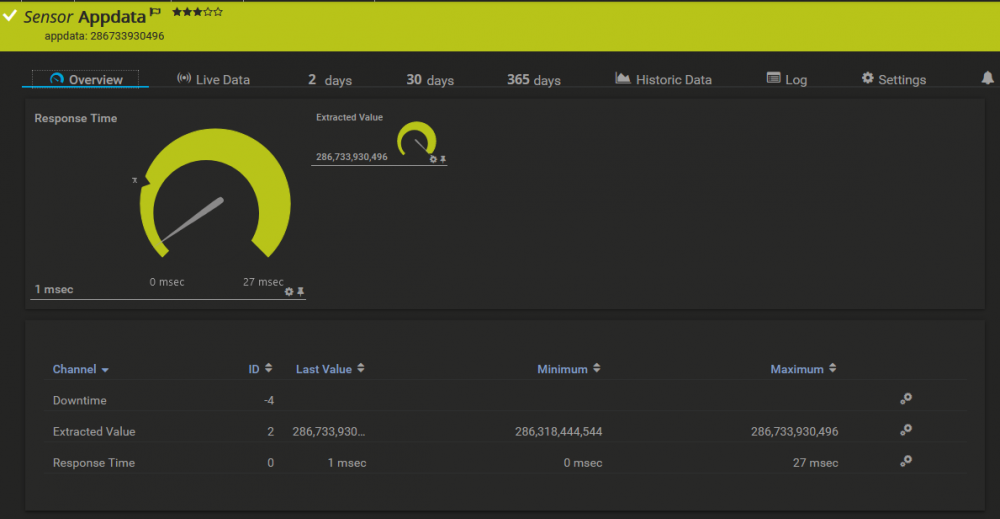
For anyone struggling to convert the MIB output to an OID, I found a way. I use PRTG to monitor snmp and it takes OIDs. It was able to auto-discover most things but not the NET-SNMP-EXTEND-MIB stuff. Not sure if the following has been noted in this thread previously but I couldn't find a coherent method among the posts. snmpwalk on the NET-SNMP-EXTEND-MIB root@BLOOTOO:~# snmpwalk -v 2c localhost -c public NET-SNMP-EXTEND-MIB::nsExtendOutLine NET-SNMP-EXTEND-MIB::nsExtendOutLine."cpumhz".1 = STRING: 3713.766 MHz NET-SNMP-EXTEND-MIB::nsExtendOutLine."meminfo".1 = STRING: MemTotal: 67461050368 NET-SNMP-EXTEND-MIB::nsExtendOutLine."sharefree".1 = STRING: appdata: 286401884160 ... Convert prefix to OID format: root@BLOOTOO:~# snmptranslate -Td NET-SNMP-EXTEND-MIB::nsExtendOutLine. NET-SNMP-EXTEND-MIB::nsExtendOutLine."" nsExtendOutLine OBJECT-TYPE -- FROM NET-SNMP-EXTEND-MIB -- TEXTUAL CONVENTION DisplayString SYNTAX OCTET STRING (0..255) DISPLAY-HINT "255a" MAX-ACCESS read-only STATUS current DESCRIPTION "A single line of output from the extension command." ::= { iso(1) org(3) dod(6) internet(1) private(4) enterprises(1) netSnmp(8072) netSnmpObjects(1) nsExtensions(3) nsExtendObjects(2) nsExtendOutput2Table(4) nsExtendOutput2Entry(1) nsExtendOutLine(2) 0 } Take note of the numbers at the end. 1.3.6.1.4.1.8072.1.3.2.4.1.2. is the OID way of saying NET-SNMP-EXTEND-MIB::nsExtendOutLine. The OID for my appdata share is then: 1.3.6.1.4.1.8072.1.3.2.4.1.2."sharefree".1 PRTG accepts this as an snmpcustomstringsensor In PRTG use the following to extract the numerical portion of the string: What the sensor looks like:
-
What would 'process_name' be in this case? nginx?
-
I wrote a User Script to do this at the start of my array. The sed command will replace "public" with whatever you put in the 2nd portion of the command and then overwrite the existing file. Then 2nd line restarts the service. #!/bin/bash sed -i 's/public/other-string/' /etc/snmp/snmpd.conf bash /etc/rc.d/rc.snmpd restart
-
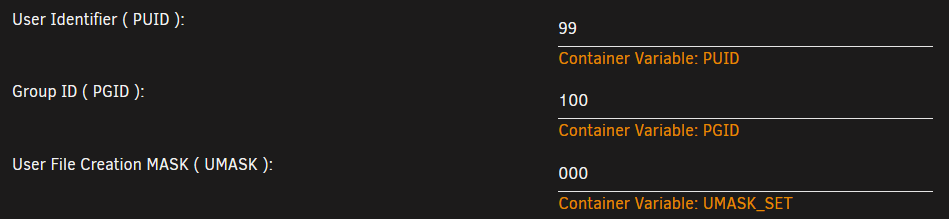
For anyone having permissions issues when trying to move the files after they download I suggest you use the following variables in the docker config. This replicates the variables from a LinuxServer IO type docker.
-
Getting a lot of HTTP 429 errors in the last week from this docker. This docker worked for several days and was able to download videos just fine before this. I am still able to use something like tartube from a windows pc and download videos using youtube-dl. No 429 errors on that. Both systems are behind the same public IP. {"level":"info","msg":"Initiating db","time":"2020-08-13T23:29:05Z"} {"level":"info","msg":"server running on port 8080","time":"2020-08-13T23:29:05Z"} {"level":"error","msg":"uploadCheckerPlaylists: GetCheckingInterval: empty target list","time":"2020-08-13T23:29:05Z"} {"level":"info","msg":"received a request to get the checking interval","time":"2020-08-13T23:32:15Z"} {"level":"info","msg":"getting all channels from channels.json","time":"2020-08-13T23:32:15Z"} {"level":"info","msg":"Returning checking-interval: {15 minutes Channel}","time":"2020-08-13T23:32:15Z"} {"level":"info","msg":"successfully read all channels","time":"2020-08-13T23:32:15Z"} {"level":"info","msg":"[{https://www.youtube.com/channel/UCLtREJY21xRfCuEKvdki1Kw WeeOkvkEYUU Video And Audio Uploads from H3 Podcast any [GSw5YvHhGUg] 08-06-2020 20:39:35 15 minutes Channel /channels/%(uploader)s/video/%(title)s.%(ext)s}]","time":"2020-08-13T23:32:15Z"} {"level":"info","msg":"received a request to check a playlist for new uploads","time":"2020-08-13T23:33:20Z"} {"level":"info","msg":"checking for new videos","time":"2020-08-13T23:33:20Z"} {"level":"info","msg":"getting all channels from channels.json","time":"2020-08-13T23:33:20Z"} {"level":"info","msg":"successfully read all channels","time":"2020-08-13T23:33:20Z"} {"level":"info","msg":"[{https://www.youtube.com/channel/UCLtREJY21xRfCuEKvdki1Kw WeeOkvkEYUU Video And Audio Uploads from H3 Podcast any [GSw5YvHhGUg] 08-06-2020 20:39:35 15 minutes Channel /channels/%(uploader)s/video/%(title)s.%(ext)s}]","time":"2020-08-13T23:33:20Z"} {"level":"info","msg":"executing youtube-dl command: /usr/local/bin/youtube-dl -j --playlist-end 1 https://www.youtube.com/channel/UCLtREJY21xRfCuEKvdki1Kw","time":"2020-08-13T23:33:20Z"} {"level":"error","msg":"From GetMetadata(): exit status 1","time":"2020-08-13T23:33:23Z"} {"level":"info","msg":"returning response: {Error ERROR_CHECKING_PLAYLIST There was an error while checking the playlist: CheckNow: From c.GetMetadata(): ERROR: Unable to download webpage: HTTP Error 429: Too Many Requests (caused by HTTPError()); please report this issue on https://yt-dl.org/bug . Make sure you are using the latest version; type youtube-dl -U to update. Be sure to call youtube-dl with the --verbose flag and include its complete output.\n}","time":"2020-08-13T23:33:23Z"}
-
Been a user for several months so far. Many more years ahead of me.




