Skip to content
View in the app

A better way to browse. Learn more.

Unraid

A full-screen app on your home screen with push notifications, badges and more.

To install this app on iOS and iPadOS
  1. Tap the Share icon in Safari
  2. Scroll the menu and tap Add to Home Screen.
  3. Tap Add in the top-right corner.
To install this app on Android
  1. Tap the 3-dot menu (⋮) in the top-right corner of the browser.
  2. Tap Add to Home screen or Install app.
  3. Confirm by tapping Install.

Frank1940

Members
  • Joined

  • Last visited

Solutions

  1. Frank1940's post in Major reorganization of UnRaid server. was marked as the answer   
    You can't copy if the file is in a 'Share' because you will then have two files with the same name in the share. By the way make sure that your copies are disk-to-disk and not disk-to-share! you risk data loss if you do!!!


    Even if you copy a file (say, Mash.mkv) from disk 12 to disk 5 cp /mnt/disk12/movies/Mash.mkv /mnt/disk5/movies/Mash.mkv You will now have two copies of that mkv file in the movies Share. This can cause real cockpit confusion later. You want a move operation which is often a copy-then-delete sequence.
  2. You were looking for an NFS server-- not a SMB server! Click here to look for a SMB server:


    EDIT: I think this way of offering choices is confusing to the many people!
  3. Frank1940's post in 7.1.4 - Fastest way to upgrade 18TB parity to 24TB and add two 24TB drives? was marked as the answer   
    Let me point out one thing. Adding files to the array while updating/building parity will slow down both operations an probably require more time for complete the combined operation than rebuilding parity first and then adding the new disk. (Which if it is precleared, takes about two minutes!)

    By the way, while you are rebuilding Parity 2, you only have the illusion of dual parity. You can only have one other disk fail and not loss data. (If you think about it, when you remove PArity2, that becomes a disk "failure"!)

    You will have only single parity the instant you remove Parity 2 . No rebuild of parity is required for this operation.
  4. Frank1940's post in Can't see newly transferred files/folders on linux or windows "file explorers" was marked as the answer   
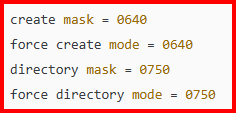
    Directories MUST have the execute bit set on them or they are not visible or 'enterable'! Run the New Permissions Tool/Script on just the Share with the problem. (If you need more information, you need 'Google' with a term something like Linux directory permissions This topic is never widely discussed as much as permissions on regular files so you might have vary the search parameters to find real good information on directories!
  5. Frank1940's post in Unclean shutdown about every 24 hours was marked as the answer   
    I would try a memtst first (Min 12 hours) as it is free to perform. (Remember memory tests are conclusive only if they find a bad memory)

    Next thing I would do is to swap out the power supply. PS's have been the culprit in several cases similiar to this one. (Sometimes this can a free test if you can obtain a spare one (Yours or a friend) or using a thirty-day vendor return window.)
  6. Frank1940's post in Can't Access SMB via DNS name anymore in Win11 was marked as the answer   
    I have had this similiar type of problem happen in the past with Win11. BUT I don't have the problem at this time. I don't know how to reproduce the problem. I have no clue as what happened to fix it. (I am using WIN11 PRO version 24H2 at this point in time.)

    Here is my suggestion. Access it via the IP address. I would set up a Windows Credential to the server using the IP address.

    Now look at this post:

    https://forums.unraid.net/topic/191221-some-musings-on-smb-and-samba-and-unraid-and-windows/#findComment-1561585

    You can pin the server to the Quick access portion of File Explorer but the Quick access link will be the IP address.

    If you use the "An Approach for the more Complex Network" section and rename the Shortcut to the server's DNS name, you will have two clicks (the second one being the server name) to get to the server. Unfortunately, File Explorer refuses to be tricked by our attempt to rename the IP address and displays the IP address on the address bar.

    BTW, Windows could care less whether you use DNS name or the IP address. It will use either. And, apparently, WIN11 considers each one to be a different server so you can login with a different set of credentials with this trick. (I thought for a long time that my failure to be able to use an IP address was because I was already logged in using the DNS name and Windows was preventing a second connection to the server via the IP address. )
  7. Frank1940's post in Can "New Permissions" be removed or a severe warning placed on it? was marked as the answer   
    I agree with you on this one. Since you are the one who had a problem (squeaky wheel), I would suggest that you make a 'Feature Request' (about four subforums below this 'General Support' one) and ask that this be done and point back to this thread. And while you are about it, Under the 'Share' setting, suggest getting rid of the 'All' option!
  8. Frank1940's post in Unraid SMB + Windows Headache was marked as the answer   
    This condition can result if Export: is not set to 'Yes" in the SHARE-name settings.


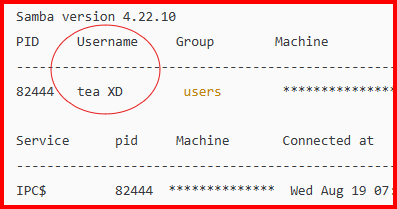
    I can tell you that this share does not show up under the User as shown here (Notice that BackupMedia is not shown in the list):


  9. Frank1940's post in Creating shares within existing share's directory structures in the array - subtle issue? was marked as the answer   
    I think I see what you are troubled about. When you click on the 'images' share you only want to see the contents of the 'IMAGES'.

    Let's take a deep breath at this point...

    Going back 40+ years when I took an introductory course in UNIX from a guy who personally knew Ken Thompson, Dennis Ritchie and some of the other UNIX GURUs at Bell Labs, he started his course with basically this statement-- "There are only files in the UNIX Operating System! Even a line printer is a file. A Disk Drive is a file. A tape transport is a file. The reasoning behind this decision is simple. A user can send the output from any source to any destination using the same method."

    Now for a quick example. Look at this quick example:


    I have redirected the Output of the Echo command from stdout to a file. I could just as easily have sent it to a printer by specifying a 'printer file' rather than a file. (A complete aside, those early developers prided themselves on being able to do 'anything' using a Shell Script written for the Bourne Shell. There was a rumor at Western Electric when I worked there that they had developed a Bourne Shell script that started with a database of Telephone subscribers and produced the Telephone White Pages that every subscriber got in those days without any intervention!)

    Another big revelation was the fact that in UNIX (and thus, Linux), a directory is a file. Granted its contents are really a database and there is special flag that indicates that has special meaning to the UNIX and will be opened as used as required by the UNIX kernel, it is still just a file.

    Look carefully at the ln command. Let me grab a quote---

    "The ln command is primarily used to create links for files in Linux, effectively allowing one file to reference another. Doing so allows you to manage files more efficiently without creating duplicates, making this command crucial for optimizing storage and managing files in Unix-like operating systems."

    Remember what I said about everything being a file. Well, while a directory is a file (and that allows us to link to it), there is nothing in the ln command switches that will allow one to see the contents of the file. The Link only shows us the name of the file. And the same thing is true if we use it to built a link to a directory. We will see only the name of the directory-file depending on how we come at it.

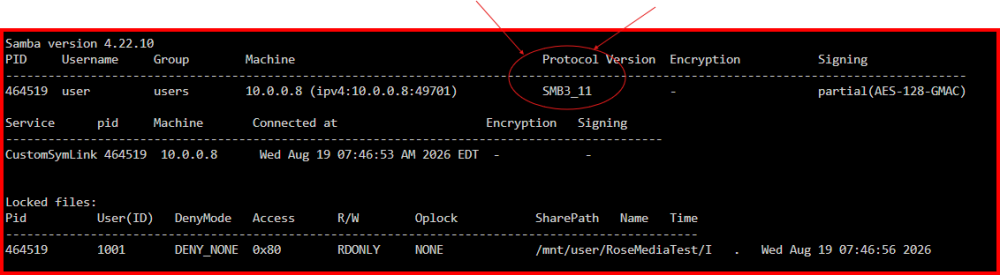
    For example, if we come at it via SMB on a Windows machine, we would see this:


    To see the contents of the Folder " I ", one would have to click on it. It seems a small price to pay to be able to share only a portion of an Unraid Share. Without this tool, there is no way to be able to do this in Unraid. In fact, until someone stumble across this workaround, anyone who asked about how to share only a portion of an Unraid Share was told it was impossible!

    At this point, I would like to make a small suggestion. Rather than calling the SymLink-- " IMAGES ", call it -- " IMAGES_FOLDER " or " IMAGES_DIRECTORY ".


  10. Frank1940's post in [HELP] change HDD configuration (SOLVED) was marked as the answer   
    Not really!  These drives were designed for 24-7 operation.  There are ~8700 hours in a year and the drive should last for five years.  Do the math.  IF these are new drives and they should fail during the 100+ hours you need to get them ready for use with Unraid, you have a 'bad' drive that you don't want in your array.  If you are concerned that it will reduce the total life of the drive, what is 100 hours of shorten life compared to 43,000 hours?  Remember that the process of getting a drive installed for Unraid is not really beyond what the drive was designed to do.  Think of big data centers.  They have thousands in which hard drives read and write 24-7 for years.
     
    What gets most people upset is that it takes close to a week to do everything.  (One thing I really don't like about a big drives is the time required for the monthly parity check.  About drive life of Unraid data drives.  I still have one 3TB data drive with 67,000 hours on it.  I had a couple of drives with even more hours but I have been replacing the oldest ones when I need more storage space.)  
  11. Frank1940's post in Unraid 7.0.1 Update - 2GB USB not sufficient anymore?! was marked as the answer   
    Make a backup of the flash drive.     MAIN   >>>>    Flash    >>>>    Flash Device Settings    and click on the  'FLASH BACKUP'  button.   
     
    Delete the    previous      directory and try again.
     
    NOTE that doing so will prevent you from going back to the previous version of Unraid from the one you are currently using.  IF you would ever need to do this, you have the backup.  
     
    You will probably have to replace the 2GB drive one of these days as the feature-creep of Unraid is requiring a bigger footprint for flash drive space and RAM.
     
     
    PS----  I have a minimal Unraid install, I am using about 1.44GB of space on the Flash Drive.  
  12. Frank1940's post in Cannot connect via local IP was marked as the answer   
    Ask in the support thread for Tailscale.   There should be a link to the Support thread on the PLUGIN tab...
  13. Frank1940's post in Cache says "no space left on device" but is only filled 75% was marked as the answer   
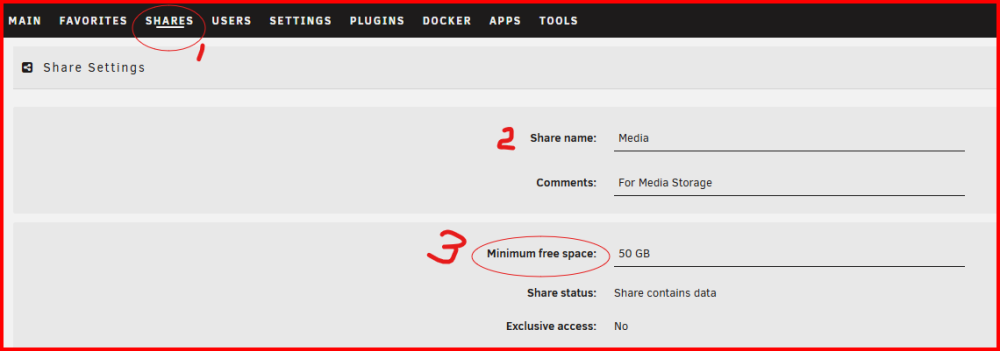
    Check this setting:

     
    It should larger than the largest file, you expect to wrote to this disk.  (If you had secondary storage assigned, Unraid would would bypass the cache drive and write the file directly to that disk.)
     
    Sometimes the default setting for this variable is unreasonably large...
  14. Frank1940's post in Unraid 7.0.1 keeps writing to array indefinitely after file transfer completes was marked as the answer   
    Unraid does use free RAM to buffer writes to disks to speed up data transfers.  If you have abundant RAM available on your system, it can take a long time to actually finish transferring all the data to the hard disks after your PC's file manager has transfer the last byte to your Unraid server.  (Write speeds to a parity protected array are generally no faster than about 50% of the transfer rate of the slowest hard disk in the current operation.  If you are writing lots of small files, (I have seen) the hard disk write speed drop into the 5-10MB/s range due the file processing overhead!) 
  15. Frank1940's post in Validate my Cache setup for max MariaDB performance was marked as the answer   
    As I understand, your appdata share will remain on the cache drive unless there is not room for it there.  You have a 1TB cache drive. 
     
    How much space is now free on it?
     
    You have three shares (appdata, isos, and domains) assigned to the cache drive as their preferred store location.  How much bigger do you expect those shares to get?  If you feel that the appdata share must absolutely always be on the share for performance reasons, then set the secondary storage location to 'None'.  But be aware that if it should grow to the point where it does not fit on that cache drive, something is going to fail due to a lack of space. 
     
    With your present configuration setup if you run out for space on the cache drive, this share could be moved to the array.  If you increase the size of the cache drive so that all of the shares marked 'Array to cache' would fit. Then the shares be moved back to the cache drive. 
  16. One thing you can always try in this type of situation, is to do a quick push of the power switch (about one second).  That is suppose to start a normal shutdown of any OS.  If the system is unresponsive to that action, then push the power switch for five-to-ten seconds.  That will force a poweroff condition in much the same manner as pulling the power cord. (But avoids breaking the earth ground to the system which might cause other problems in a certain sets of unusual circumstances!)
  17. Frank1940's post in Unraid server not reachable from ethernet port of client was marked as the answer   
    Screenshot from your screeshot:

     
    From the 'help' in  SETTINGS   >>>  Management Access:

     
    If this does not help, you will probably need to find the support group for pihole..
  18. Frank1940's post in Reallocated sector count was marked as the answer   
    Personally, with over 180 reallocated sectors and 7 years of power-on time on that drive, I would replace it ASAP.  A quick glance at the SMART report showed that errors are fairly recent.  Not a good sign for the health of this drive...
  19. Frank1940's post in Problems after power outage was marked as the answer   
    Do this or replace the CPU cooler.  Any fan  used in a computer will eventually fail.  Usually, they fail to start spinning as the starting torque on that type of motor is very low. 
  20. Frank1940's post in Is it safe to turn off unraid via the power button? was marked as the answer   
    Yes.  However, this is only true if the normal shutdown button on the GUI will shutdown the server cleanly.  (That are conditions where the Dock containers, VMs and plugins will prevent the array from being stopped.  The shutdown procedure, after a preset time delay, will than force a shutdown which will result in unclean shutdown.)  A power button short push is simply an alternative method to starting up the GUI and initiating the shutdown from there. 
     
    Also, if you can't access the GUI because the server has stopped responding, there is a good possibility that a quick push will not shut it down.  At that point, only a long push will shut the server down.
  21. Frank1940's post in New Permission FaiL was marked as the answer   
    Each listing that begins with    -rw    is a file and they are in English.  The Linux/UNIX command   cat  will list the contents of each file. 
    cat /var/log/docker.log  
    Any of these files can be open in a Linux text editor
     
     
    vi  and nano are two such editors that are a part of Unraid.  (Not sure what editors are available in Docker Containers. 
     
    But I would not be that worried at this point about the permissions being wrong.  Most of the time, the Docker won't work (or work correctly) if the permissions are wrong and the failure will be be obvious.  (The permission errors are usually for the configuration files that the container app needs to run.)   For example, in the case shown, if the user  'root' is always accessing these files, even if the user is changed,  root will still have access to them!  The new permissions will change the permissions to rw-rw-rw- which is less restrictive than the current permissions. 
  22. Frank1940's post in Can't connect to unRaid share from Windows 11 was marked as the answer   
    Also this one if you are using ver 24H2...
     

  23. Frank1940's post in Using rsync to copy folders to an array share: parity was marked as the answer   
    Yes!!!
  24. Frank1940's post in Assistance needed: Unable to access file shares from Windows 11 device was marked as the answer   
    See the December 4, 2025 EDIT in the first post of this thread:
     
         https://forums.unraid.net/topic/110580-security-is-not-a-dirty-word-unraid-windows-1011-smb-setup/#findComment-1009109
     
    You probably need to make sure that Unraid will use SMB signing if required by the client by adding the code required to the Samba Extras. 
     
    EDIT:  Sorry, I thought you were on 24H2 rather than 23H2...
     
  25. Frank1940's post in 3 Hardcrashes in the last week, RAM issue? was marked as the answer   
    Try setting up the syslog server (I would set it to "Mirror syslog to flash").

Account

Navigation

Search

Search

Configure browser push notifications

Chrome (Android)
  1. Tap the lock icon next to the address bar.
  2. Tap Permissions → Notifications.
  3. Adjust your preference.
Chrome (Desktop)
  1. Click the padlock icon in the address bar.
  2. Select Site settings.
  3. Find Notifications and adjust your preference.