





Frank1940
Members
-
Joined
-
Last visited
-
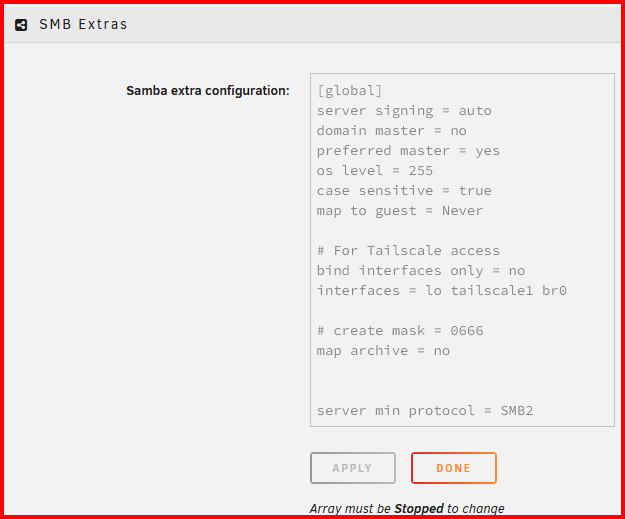
Sorry. I assumed you knew about Samba settings and the smb-extra.conf file (which is where the user generated Samba parameters go). Unraid provides the user with a tool for generating and maintaining this file. This file is stored in /config folder/directory of the boot drive. It is automatically loaded each time Samba starts. You can find this tool as follows: SETTINGS >>> SMB >>> SMB Extras Thjs is what mine currently looks like: (Please don't use this as a example of what should be in your Samba Extra configuration. There is a lot of stuff in there is that is obsolete in my current setup and should have been removed years ago. Those entries were not removed because they don't cause any problems...) PS--- I learned a lot about Samba when twenty-some years ago, I setup a Linux computer to be a server for two Windows XP computers. Back in those days, you had to first in stalled Samba (It was a part of the default install) and completely configure it to be either a client or a server. It was a learning experience!!!!
-
Try the suggestion in the first post of this thread: https://forums.unraid.net/topic/192582-minor-smb-security-issue/
-
You might want to post a bug report about this issue. I believe that it is generally the responsibility of the underlying OS system maintainers to update the clock routines to control this type of time shifts. (When did Canada change to permanent daylight saving time scheme? If real recently, it may not have made it into the update schedule yet,)
-
There is a major problem with Amazon that most of us never recognize. They market their warehousing/shipping services to other sellers/merchants/vendors. When the inventory arrives from these vendors, it put into the same bin as every other part with the same UPC code. So when you think you are buying from vendor ABC, you may be getting product from vendor XYZ. You can't completely avoid this problem if you buy from them. You can only look carefully at the description and see if they are offering the same product from multiple vendors. IF they are, be careful...
-
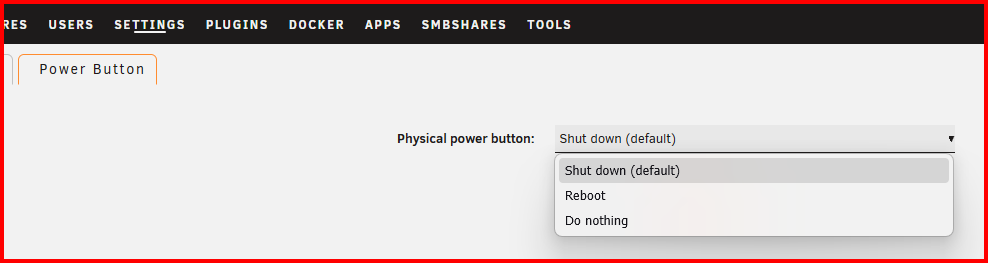
Look here: Settings >>> System Settings >>> Power Options >>> Power Button
-
I would also think that stopping and restarting the array would fix the problem as well. (That action forces Samba to stop and restart which forces all SMB connections to be reestablished.)
-
Version 7.3.4 is now out. In the description is this: "This release includes WebGUI security fixes, updates the Linux kernel to 6.18.58, and fixes Docker icon handling and File Manager operations. It also includes PHP 8.4.27,"
-
Many of us find ourselves in that same/similiar situation. The cost of HDD's is roughly twice what it was a year ago. I try to keep a cold spare on the shelf for replacement/expansion as circumstances dictate. I know that I will being needing a drive for expansion by about the middle of 2027. I refuse to even consider purchasing a 'refurnished' drive. The user reviews indicate that they are not satisfactory from a reliability standpoint. I also suspect that HDD's will remain in short supply until 2030 as the earliest unless the projected AI build-outs collapse. (Since they are being funded by venture capital money, I don't see that happening as venture capitalists are not concerned with profitability (current or future) in the same way that 'normal' business people are! I haven't heard of any companies using AI making statements that AI is making significant contributions to their bottom line. And how much are you willing to pay for tokens to use AI in your life? Building and operating these AI centers is very expensive! Someone is going to have to pay to cover these costs!!!) I will be looking to see what happens to HDD's prices during the 'Black Friday' sales this year. There might be few bargains available in that window...
-
I upgraded yesterday from 7.3.2 to 7.2.3 and I just checked a minute ago. I clicked on 'Network' in the split preview pane and both servers popped up after about ten seconds. (I almost never use the this feature as I have shortcuts to both servers pinned in the 'Quick Access' portion of that same split preview pane. That way, I never have to wait for Windows to populate 'Network'.)
-
First, you are using Windows or a MacOS? If Windows try typing \\{server_name} or \\{server_IP_ address} on the 'URL' box in Windows Explorer. If Windows Explorer finds the server that way, it will generally populate the Network browser section of Windows Explorer. There are some other work-arounds that can be used. Ask and I will work with you.
-
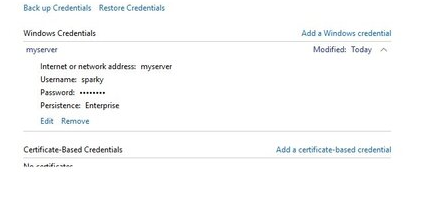
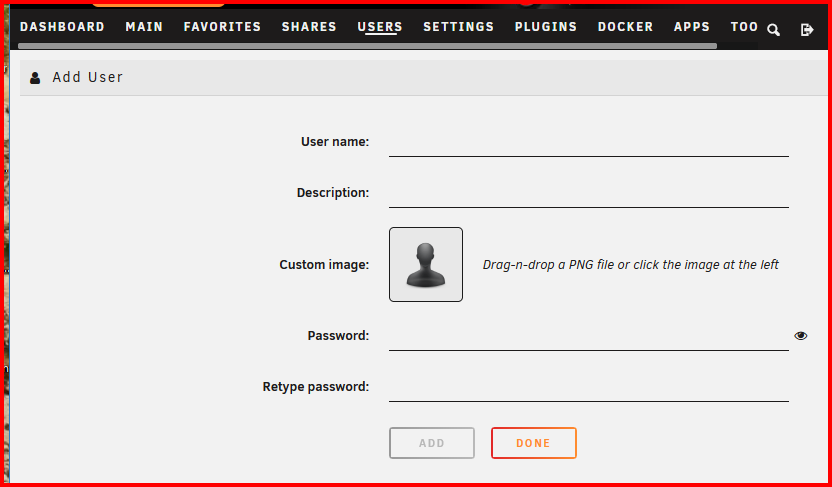
I see you are using the user name of 'sparky' This means that you need to add on Unraid a Shares Access user with a 'User name' of– sparky –with the same password as on your Windows computer. (Note the the capitalization must match on both sides for both the User name and the password!) Entry Box on Unraid shown below: Then reboot both the Windows computer and your server. (Note that you can not see/view the password that you enter in the Windows Credential Manager so make double sure that you type very carefully when you enter it as Windows does not even require that you reenter to verify no typos were made.!!!) Personally, I recommend that you write the password on paper until everything is setup and working. Make your password only as long and complex as required by your tolerance level of how much risk to your data is permissible. Burn the paper if you want after everything is working. (MS only insists that you have to use a login to a server before it will allow a connection to that server. It does not say that the login credentials have to be super secure.) EDIT: Don't use a null password. IF nothing else, use 1234 as the password!
-
Yes And you can google tmux cheat sheet and get a cheat sheet that will got you using it efficiently
-
There is a procedure for doing a manual upgrade (or downgrade): https://docs.unraid.net/unraid-os/updating-unraid/#manual-downgrade-or-upgrade
-
Personally, I would do the upgrade in two separate steps. Either upgrade the hardware and get it running on the latest release. Then upgrade the software. OR upgrade the software and get everything working (If you have any problem). Then do the hardware upgrade. The reason for this is to make one change at a time, so, if you have any problems with either upgrade, you are only looking at one change as the cause of the problem.
-
One of the most basic rules for using AI responses is to determine if they actually contain the proper answer. AI is new enough that users should recognize that "garbage in, garbage out" rule still applies. Google without AI often gives a wide selections of 'answers' and some of them are completely wrong. AI does not always fix that problem as AI will give us only one of those 'answers' and you can only hope that it selects the right one. (My experience is that AI responses are 98% right 90% of the time.)

