Skip to content
View in the app

A better way to browse. Learn more.

Unraid

A full-screen app on your home screen with push notifications, badges and more.

To install this app on iOS and iPadOS
  1. Tap the Share icon in Safari
  2. Scroll the menu and tap Add to Home Screen.
  3. Tap Add in the top-right corner.
To install this app on Android
  1. Tap the 3-dot menu (⋮) in the top-right corner of the browser.
  2. Tap Add to Home screen or Install app.
  3. Confirm by tapping Install.

Frank1940

Members
  • Joined

  • Last visited

Solutions

  1. Frank1940's post in You require permission from \nobody to make these changes was marked as the answer   
    Try setting the UMASK to 000 rather than 022
     
    EDIT:  And you will probably have to run the    New Permissions    Tools on the share(s) to which this Docker writes. 
  2. Frank1940's post in /MNT USER IS GONE was marked as the answer   
    Post up screenshots of these two commands run in the GUI Terminal:
    ls -al /mnt ls -al /mnt/user  
    If you are concerned about privacy, you can crop the directory names off of the second one when you do the screenshot. 
     
  3. Frank1940's post in Update UnRAID OS version? Advice needed! was marked as the answer   
    These devices can be messy to use depending on how old they are.  If they are old enough that they only support SMBv1, they are basically EOL devices and recent Samba versions often have to be browbeaten to get them to work.  As I recall, if they work now on your current version of Unraid and you do a upgrade to the latest Unraid version, SMBv1 will still be 'active' ('Grandfathered' in) on your Unraid server.  (If you do a new install, SMBv1 will be turned off (if I understand it correctly) and you will have to turn it on.
     
     
    With WIN10, it is best to establish a Windows Credential using Credential Manager.  Of course, you will have setup a 'Share Access' user on Unraid.  Doing this generally eliminates problems on both the Unraid side and the Windows client side.   If you should run into a problem, read through the PDF in the first post of this thread:
     
                https://forums.unraid.net/topic/110580-security-is-not-a-dirty-word-unraid-windows-10-smb-setup/
     
  4. Frank1940's post in Question about swapping a parity drive and pre-clearing was marked as the answer   
    I just did this and this was my procedure:
     
    1.  Preclear the new 16TB drive.  (I don't want an 'infant mortality' failure in the subsequent operations! But this is optional depending on your tolerance for problems...) Make note of the last four digits of the 16TB drive.  Make note of the serial number of the present 8TB parity drive.
     
    2.  If you haven't done a parity check recently, do one now!  (You don't want to be dealing with a undetected disk problem in the following steps...
     
    3.  Shut the server down.  Remove the present Parity Drive. Verify serial number on this drive and set aside.  Install new 16TB drive.  (VERIFY that all SATA DATA and Power connectors are firmly seated!!!!)
     
    4.  Power up server.  Unraid will detect that the Parity Drive is missing.  Assign the 16TB as Parity.  (Use the dropdown box...) 
     
    5.  Start the array and rebuilt parity.
     
    6.  Get the last four digits of serial number of the 4TB data drive you want to replace.  Shut the server down again. Pull that drive and verify its serial number.  Install the old Parity drive in its place.   (VERIFY that all SATA DATA and Power connectors are firmly seated!!!!)   Start up server.  Again, it will detect the missing drive.  Assign the old Parity Drive as its replacement. 
     
    7. Start the array and rebuild the that disk.
     
    All of this will take a few days, so be prepared.   Notice that you will not be losing any data using this procedure and the server will be available throughout the procedure while it is up.  (But using it will impact its performance and extend the time required to complete each step. So a bit of planning may be required to minimize the impact on users.) 
     
    It appears that available storage is not currently a problem as you said you have a 4TB drive that is "basically empty".  So you can do steps 6 & 7 at a later date and still have the server running normally until you have a clear window of time to finish the job with minimal disruption.  Remember that you should now be prepared to always buy 16TB drives from this point on.  (Otherwise, you may find yourself removing a perfectly good drive to gain more storage space.  (I know this as I now find myself in this situation...) 
     
  5. Frank1940's post in poweroff vs. powerdown was marked as the answer   
    On the MAIN tab of the GUI as shown in the following screenshot:

     
    You do the timing manually with a stopwatch (or its equivalent).  Great accuracy is not required as the time may vary several seconds from measurement to measurement.  You are after a good approximation of the time required.  Remember if the array can not be stopped within that time setting on the Disk Setting tab, Unraid will force an unclean shutdown!  As I understand it, Unraid will do a clean shutdown as soon as it has detected that the array has been stopped so having a shutdown time that is on the high side has no real penalty if things are working correctly. (The sole exception being if your UPS runs out of battery power as a result of waiting...) 
  6. Frank1940's post in Can't copy certain files to unRAID was marked as the answer   
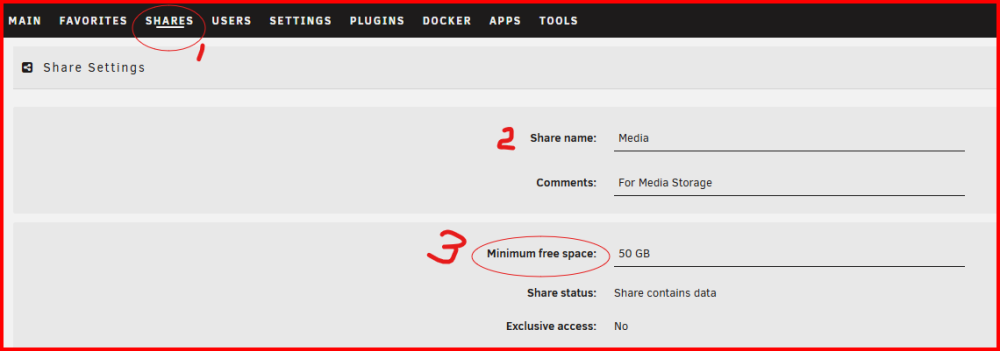
    So you are bypassing the cache entirely for these copies and they are still failing.   I seem to recall that you should make a similar min free space setting on the cache from the  Main   tab.)
     
    It might be that there is a  permissions on your Unraid sever.  Let's try this to try to fix them:.
     
    1 -- Open up the   Tools    tab. 
     
    2--  Find the    New Permissions   tool and open it:
     
    3-- Look at the screenshot below.  Select   Shares   from the left dropdown box and the Share with the issue ( Projekte ) from the right dropdown box.  Click  START.

     
    It will take some time as it is Bash script and will set the owner/group names and the permissions on each file and directory in the entire share.  
     
     
  7. Frank1940's post in Device is disabled, contents emulated was marked as the answer   
    Is disk6 (serial number     WSD7RWRQ  ) the disk that is missing?    It looks good from the SMART report.  (But it does have some CRC errors but that is not normally a disk problem but a SATA cable or connection problem. So check all SATA cables to be sure they are firmly seated!) 
     
     
    Do you have a replacement disk on hand?  If you do, that is what I, personally, would do.   If you don't have a cold spare rebuilt on the current disk.   (That way most of the contents of the disk removed are valid.)   Be sure to double-check that all drive connectors are seated firmly before you power the server back up!   (You have several disks with CRC errors and loose connectors will cause that problem.  (As will 'bad' cables.)
     
    No, it will not rebuild by its self!  You have to follow these steps:
     
            https://docs.unraid.net/unraid-os/manual/storage-management/#rebuilding-a-drive-onto-itself
     
    If you replace the disk rather than rebuild, I would run a preclear cycle on that removed disk to make sure there is not a problem with it.  If it checks out OK (which I suspect it will), keep as a cold spare.
     
  8. Frank1940's post in Tutorial For Fast Data Migration From FreeNAS to Unraid? was marked as the answer   
    I used rsync and the Unassigned Devices plugin.
     
    Basically, you mount the FreeNAS server using the Unassigned Devices plugin.  
     
    Then use rysnc from the Command line in the GUI terminal.
     
    My rsync command looked like this: 
     
    rsync -avhPX /mnt/remotes/192.168.1.245_Media/All\ Movies/ /mnt/user/BackupMedia/All\ Movies/  
    Now, before you use rsync, googling it finding lots and lots of pages that will explain how to use it.  There are some gotchas in its use but any good online tutorial will help you avoid them.  The switches that I use (and in the command line above) are not the only ones that you can use and they will do the same job. (Mine is set up so that it gives lots of information as it does its job.  A different combination of switches would run it silently and you will not know what is happening until the command prompt returns after it has finished.  Probably a bad idea as copying 10TB of data will take several days!)   Rsync was written in 1995, in the public domain, and has been ported to virtually every OS in existence.  (As I seem to recall, it does have to be available on both the source and destination devices.  But FreeNAS will either have it installed or it should be available for installation.)
     
    One more thing.  Go to    Settings   >>>   Disk Settings  and set the following variable in the Disk Setting section/tab as shown:

    The setting will double the write speed to the Unraid array.  (If you have a cache drive for the Unraid, disable it for that share until the initial data from the other server is complete.) 
  9. Frank1940's post in Remote File Access was marked as the answer   
    You should be looking and posting in the support forum thread for Tailscale.   You can find this by going to   PLUGINS    tab, find the plugin in the list and click on the 'Support Thread' link.  If it is a Docker, go to the   DOCKER   tab and left-click on the icon for the Tailscale Docker and select 'Support' from the dropdown list. 
  10. Frank1940's post in How do I swap a parity drive while array is missing one drive? was marked as the answer   
    From the manual:
     
         https://docs.unraid.net/unraid-os/manual/storage-management/#parity-swap
     
    You can find the manual by clicking on the DOCS Link in header for the Forum or on Manual in the right side of the Taskbar in the GUI. 
  11. Frank1940's post in Questionable network activities was marked as the answer   
    The GUI generates network activity updating the GUI screen in your browser on your PC...
  12. Frank1940's post in Haven't received new key when changing USB key. was marked as the answer   
    Contact support:
     
          https://unraid.net/contact
  13. Frank1940's post in Downsizing a 5-drive setup with 4 SATA ports was marked as the answer   
    Oh, one more thing.  Before you start make a backup of your Unraid boot drive.  You might never need it but there could be situations where it could be a valuable resource!
  14. Frank1940's post in SMB Shares / Docker Permissions Advice was marked as the answer   
    Try making the UMASK   000  
     
    You will probably have run the TOOL     New Permissions    on the   TV   share to fix the current permission issue. 
  15. Frank1940's post in LSISAS2308 SAS Card not recognizing a drive in slot one was marked as the answer   
    If appears that one of two components is the cause your problem.  1) the cable  or 2) the LSI card. 
     
    Now you have to troubleshot the problem.  First thing, move the card side connector of the the cable to the other connector on the LSI card.  If the drive is on P1 cable is recognized, the port on the card is most likely defective.  If the drive is not recognized, the cable is most likely defective. 
     
    EDIT: if you are using both connectors on the LSI card.  Swap the connectors.  If not recognized changes, it is the card.  If it doesn't, it is the cable.
     
     
  16. Frank1940's post in Unraid will not replace key. was marked as the answer   
    Try asking for assistance here:
     
        https://unraid.net/contact
  17. Frank1940's post in Can you back up one zfs pool with another zfs pool on the same unraid server? was marked as the answer   
    You can use rsync to do the actual backup of new and changed files.  Google rsync linux to determine what switches are necessary to do the backup exactly the way you need.
     
    If you can write a bash script, you can use the User Scripts plugin to schedule the backups.
     
    However understand that this is not an optimal backup solution.  You have too many common hardware pieces and only one physical device containing both databases.  (Think fire, floods, theft, lightning, hackers....)
  18. Frank1940's post in Install keeps hanging was marked as the answer   
    Rather than try to boot to the GUI mode, do a standard boot and see if it ends up in a command line login prompt. 
     
    The reason for this is that this screenshot is the last video that is displayed.

     
    And it looks like it Unraid has successfully booted up!  With a default boot boot option, you should see a command line login prompt.  (I suspect that there is some problem in setting up a Video driver.) You should be able to set up Unraid using the Web (or browser) GUI.  See here for instructions:
     
        https://docs.unraid.net/unraid-os/getting-started/quick-install-guide/#connecting-to-the-unraid-webgui
     
    You can also use the IP address (from above that address is 192.168.1.123) using  http://192.168.1.123     Your browser may complain about a security issue but you can ignore that since you know where you are attempting to connect-- your Unraid server.
  19. Frank1940's post in Can't acces unraid from LAN was marked as the answer   
    You might also want to check/swap Cat5 cable, swap ports on the Switch, and reboot the switch.  These are quick and free options...
  20. Frank1940's post in 90 TB of Data Missing was marked as the answer   
    I looked through your shares configuration files and everyone of them was set to 'Public'.  That means that anyone who gained (or had) access to your LAN could have deleted those files.    This could be any smart device including a cell phone or an IOT.  Below is a table with the permission for all three Unraid share security settings:
     
    Summary of security modes:
    Public-      All users including guests have full read/write access.
    Secure-    All users including guests have read access, you select which of your users have write access.
    Private-    No guest access at all, you select which of your users have read/write, read-only access or no access.
     
    Read through the PDF file in the first post in this thread:
     
             https://forums.unraid.net/topic/110580-security-is-not-a-dirty-word-unraid-windows-10-smb-setup/

    IF it is a necessary for some reason for a 'guest' to have access to certain share, set that share to 'Secure' and they will have 'read-only' access.  (In fact, I restrict the users for all of my shares--- which are all set to 'Private' --on my server to 'read-only' access for everyday usage.  When 'read-write' is required, I turn it on (by modifying the permissions for that user) for only that session.  This prevents Malware running on a client from modifying any data on the server.) 
  21. Frank1940's post in USB Key Failure was marked as the answer   
    Look here fro help:
     
           https://docs.unraid.net/unraid-os/manual/troubleshooting/#lost-boot-drive-and-do-not-know-which-are-the-parity-drives
  22. Frank1940's post in First-time Unraid setup on an all-flash system was marked as the answer   
    This is from the Manual which you can get to by clicking on the 'DOCS' tab at the top of this page or the 'manual' link on the right side of the Taskbar at the botton of the GUI page.
     
             https://docs.unraid.net/unraid-os/manual/what-is-unraid/
     
    It will get you started on understanding Unraid.  Other sections in the manual cover things is much more detail. 
  23. Frank1940's post in you need permission to perform this action was marked as the answer   
    You need to go to the 'qbit' Docker, left click on its icon, select 'Edit', and look for the keys with 'PARADYNE' and 'nobody' as the editable variables.  Change them to 'nobody' and 'users'.
     
    If this does not work, go to the support thread for this Docker and ask there.  
     
     
  24. Frank1940's post in Final migration from old server to new server(s) with HDD/SSD upgrade - proper process? was marked as the answer   
    I have just completed moving 19TB of data from my Media Server to the my recently expanded Test Bed server as a backup for my Media files.  I move the data in small chunks (sub directories) to allow unrestricted use of the Media Server.   It took about sixty hours of actual data-moving time on about  four days. 
     
    First, I mounted the Media directory on the Media Server on my Test bed server as a remote share using the Unassigned devices plugin.  I didn't have any problems getting the remote share set up.  (There is a manual in the support thread for the Unassigned Devices plugin if you have problems.)
     
    Second, I started a session of   tmux   in the GUI terminal so that I did not have to have a Terminal screen always running.  (Google for    Linux tmux   to find all the information you could ever want on tmux!)  (You could also install and use   screen    but if you have the Unassigned Devices plugin installed, you already  have tmux!)
     
    Third, I used   rsync  to do the actual copy operation.  (I know. I know!    rsync looks scary at first galance but a lot of the 'switches' are never needed and many actually perform the same task.)  Here is the basic command that I used:
     
    rsync -avhPX  source_directory/  destination_directory/
     
    Notice the trialing slash---   '/'   ---on the source_directory.   That slash does different things if it is present or not present.  Let me explain with a couple of examples:
    ----------
    rsync -avhPX /mnt/remotes/192.168.1.245_Media/All\ Movies/0-9 /mnt/user/BackupMedia/All\ Movies/ In this case (no trailing slash on the source directory), a directory named  0-9  will be created in the All Movies directory on the destination server and all of the contents of 0-9 directory will be copied into it. 
     
    This was the basic command that I used to copy over the 19 directories of media from my Media server.  It created each of the these directories in the All Movies share on my Test bed server and copied everything in each directory.
     
    Copying the smallest sub-directory first (which only took about an hour) allowed me to verify that I had all of the switches and parameters correct before I started on the larger ones.
    ------------------
    rsync -avhPX /mnt/remotes/192.168.1.245_Media/All\ Movies/ /mnt/user/BackupMedia/All\ Movies/ Notice the trailing slash in this case on the source directory.  In this case, only the contents of the source directory will be copied over.  So all of the sub-directories will be copied over including the 0-9 one that I used in the first command.  (IF I were to 'forget' that final 'slash' on the source directory, a sub-directory named All Movies would be created with the  All Movies sub-directory on my Test Bed server and all of the sub-directory and all files would be copied also!!)
     
    One thing to realize is that rsync is designed as a backup program.  What the above command does is to update the files on the destination to match those on the source.  I added three new movies just today and ran the above command.  It transferred only those three movies to the Test Bed server in about fifteen minutes. 
    ----------------
     
    Another comment, The shell program used in the GUI terminal (named 'bash') has an editor built into it.  So do some playing around with it using the 'normal' navigation keys on your keyboard.   bash remembers previous commands and you can recall them with the <up-arrow> and <down-arrow>.  You can move back and forth within the command with the <left-arrow> and <right-arrow> keys.  You could also google bash...


  25. Frank1940's post in Confused about file system (newbie) was marked as the answer   
    Point of disclosure:  I have used Bixbin-Krusader in the past but I have now uninstalled it because I find that the Dynamix File Manager does a better job handling user data files!
     
    Take a deep breath at this point.  It is not the best idea to use Krusader containers to manage files in the Unraid system file structure.  It is intended to manage user data files.  You will be doing a lot more editing of the Container proprieties then just changing or adding Host Paths before you will be able to do that!  (The container is deliberately set up by the Author to prevent the user from being able to do what you want to do!)
     
    If you are looking for a GUI type interface use the   mc     (Midnight Commander) program that is a part of the standard Unraid OS.  You can run it with the following command in a GUI terminal window:
    mc If you want help with using it, just Google---   mc file manager   ---and you will find all types of assistance--- videos, tutorials, manuals.
     
    Also this type of question should be asked in the support forum for the Docker container that you are using.  For the Binhex -Krusader container, that forum link is:
     
           https://forums.unraid.net/topic/71764-support-binhex-krusader/
     
    If you go to the above support forum, you will probably find the answer to your questions in getting things set up to use it as a general file manager for the entire Unraid file system.  But be careful if you are not reasonably knowledgeable about Linux and its file system, how Unraid installs itself, and that many edits that you can make in the Unraid OS file system are not permanent! 

Account

Navigation

Search

Search

Configure browser push notifications

Chrome (Android)
  1. Tap the lock icon next to the address bar.
  2. Tap Permissions → Notifications.
  3. Adjust your preference.
Chrome (Desktop)
  1. Click the padlock icon in the address bar.
  2. Select Site settings.
  3. Find Notifications and adjust your preference.