





Frank1940
Members
-
Joined
-
Last visited
-
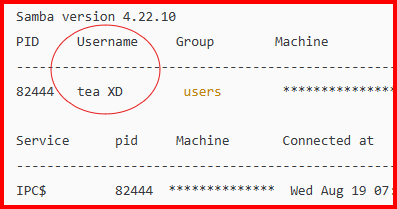
Just noticed this— you have a user name that does not meet Unraid requirements (space in the user name and upper case letters) for creating user names: Here is the help from the "Add user" page: I am not completely sure why a space and upper case letters after the initial starting lower case letter are not permitted but I want to alert you to it.

-
The server min protocol = SMB2 is a leftover from many years when I was blocking SMBv1 from running. As I recall, Windows will now block any connection that does not use SMB3_11 protocol. I can' understand why anyone who has the least possible interest in security would even consider using null passwords = Yes The default has been null passwords = No for years! Server signing– the Samba documentation on this topic has this: The 'if required' is not even an option in the description. MS has made changes in the Windows SMB client recently to require signing and I suspect that Samba has had some changes in way this parameter works but those changes apparently have not made it into the docs. But if you think about it, 'if required' is quite similar to what would be expected with 'auto'.

-
The default testparm shows only that Samba parameters which have been changed from the SMB defaults. You run it with the -v switch, it will show all of the samba parameters and their settings. testparm -v Be prepared as it will hundreds of lines long. Here is the configuration information webpage for smb.conf: https://www.samba.org/samba/docs/current/man-html/smb.conf.5.html
-
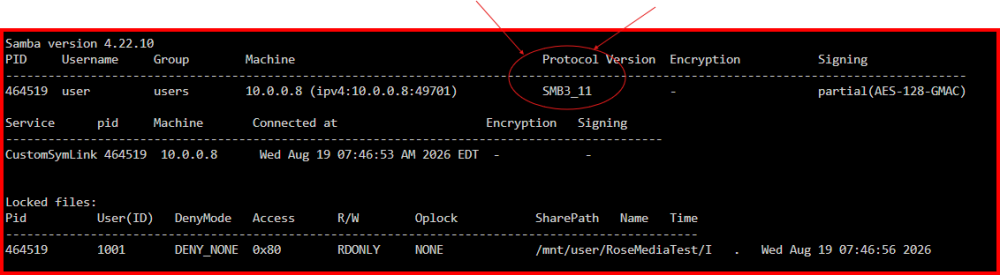
One more post for you: https://forums.unraid.net/topic/170027-smb-windows-settings-available-through-power-shell-and-linux-samba-tools-informational-posting/#findComment-1545332 Note the smbstatus command. It will show the actual protocol being used. See below: EDIT: Here is my Samba extras configuration. Note that I have set the min protocol to SMB2 but the client/server negotiation has set it to SMB3_11 # max protocol = SMB2_02 [global] server signing = auto case sensitive = true map to guest = Never # acl allow execute always = no # create mask = 0666 map archive = no # store dos attributes = no # server min protocol = NT1 server min protocol = SMB2 Note that I have set the min protocol to SMB2 but the client/server negotiation has set it to SMB3_11 Remember that not everything is dependent of the server side settings. (In fact, more thing fail for the Windows side to prevent connections than on the Unraid side.)
-
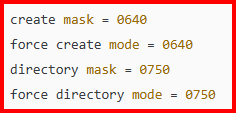
I think you might have a problem with these settings: The explanation is below: https://forums.unraid.net/topic/191221-some-musings-on-smb-and-samba-and-unraid-and-windows/#findComment-1561580 These permissions may work depending your user setup for file access. However the default settings of 777 and 666 will work if you set the Unraid SMB file sharing to 'Private' and setup the permissions fos all of the Share Access users to restrict them as required by your security requirements. (The problem with the default permissions is if you permit NFS access via networking or a VM. Or Docker Container access via Linux. But the Unraid Linux default permissions are not controlled by the SMB settings...)
-
Don't these two point to the same directory on the cache drive????????? Yes one is a share but the other is top level directory on a disk which could be a part of the share depending on the share setting. You can write to a share by using the /mnt/user/share_name or mnt/disk#/share_name. disk# can be cache if the share_name's primary storage location is cache. See here for a way to use this situation: https://forums.unraid.net/topic/58374-secure-writing-strategy-for-unraid-server-using-write-once-read-many-mode
-
Absolutely, this is the first thing that I would do. (Understand that there are 'reserved' words that should never be used for file names, directory/folder names or variables at the OS level for EVERY OS in existence. For examples, Google reserved words for Windows)
-
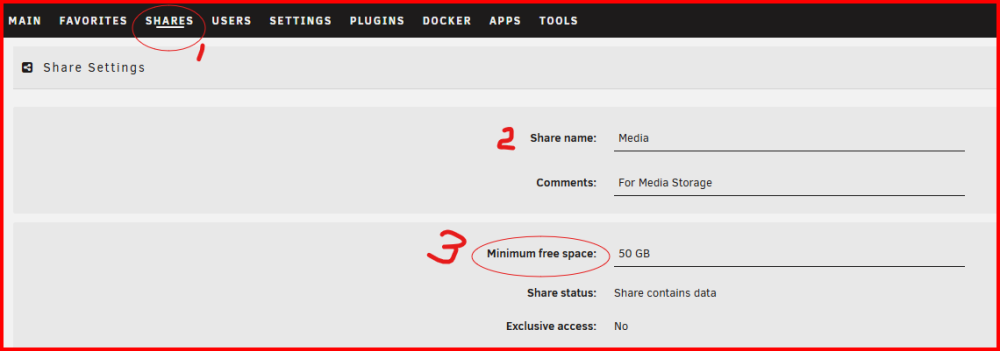
Got to the SHARES tab (#1). Click on the share name in that tab (#2) and that will take to this screen: Then set #3 to a value large than the largest file you will be copying to that share. Here is the 'Help' for that setting:

-
Yes, I do. When we get down to these type of problems, we are reduced to witchcraft when attempting to fix them. 👽 (Fifteen years ago, I often said that solving SMB/Samba issues was more witch than science. While today, that is not quite accurate, there are still instances where things are wrong buried down deep in some obscure setting where one would never think to look. That is way Small Businesses pay an qualified expert in Active Directory big dollars money each month to provide them support. )
-
If you have Windows 10 Pro license you should be able to upgrade to Windows 11 Pro...
-
One more thing. Don't use your Windows login name as a login name for Unraid. Any special permission setup for that user might carry forward and be applied to the Server. It is always a good idea to reboot the Window's Client anytime time you make a change. I don't even have a Windows Home computer. There are just too many nice features that it is missing. Proper Networking tools being one of them. When purchasing a computer, you can often find a PRO machine for just a bit extra. The difference in cost between a Home and Pro license is minimal for an OEM builder!
-
I have very mixed emotions about Google AI 'help'. Sometimes it is right and sometimes it is wrong. I suspect that deleting the present Windows Credentials and setting up new ones is required. (Remember to create a new credential Share Access user on the Unraid side.) This might fix the issue depending on how the extra will applied on the Windows side. If they were applied to the user or to the class/group that the user belonged to. If you have mapped a Unraid Share to a drive letter, I might suggest deleting that mapping and setting up a new mapping and don't touch the settings on the Windows side.
-
https://forums.unraid.net/topic/116389-access-denied-printer-unraid-share/#findComment-1058963 It is a problem which crops up from time to time. I have always suspected that it is cause because someone has attempted to control security by using Windows permissions (under the Security Tab on the Properties for the folder/file). The New Permissions utility is suppose to fix but it does not prevent it from happening in the future. I understand that the extended attributes was added for the folks who use Samba in an Active Directory environment. I will be honest at this point. I am not any type of an expert on setting Security in the Windows Environment. I open up that Window's Security tab and dread the thought that I might have to make a change! ☠️ I have put together a thread about peer-to-peer Networking and it is found here: https://forums.unraid.net/topic/191221-some-musings-on-smb-and-samba-and-unraid-and-windows The first few posts are background information. The real substance starts with this post: https://forums.unraid.net/topic/191221-some-musings-on-smb-and-samba-and-unraid-and-windows/#findComment-1561580 and continues for the next several posts.
-
Use this command: ls -al /mnt/user/Torrents/path-to-directory-with-problem Grab two screenshots. First of the command line itself and the next three lines. like this: Second of a file with access problems. This is all, we need to see this much of it:


-
What Edition and Version of Windows 11 are you running? (Windows 11 Pro 25H2 would be a typical answer. Settings >>> Systems >>> About will get to the spot on your Windows computer where you can find this info. ) Are you using Windows Credential Manager to access your Unraid Server? Why are you using Unraid's 'Secure' security setting rather than 'Private'? (Default Windows 11 Installs normally prevent connecting to a server using 'Guest' credentials but many people have turned off this setting.) Since the issue appears to be related to the Share where you store your Plex data, how familiar and comfortable are you with the Linux command line? (Don't worry, I am not going to have you run a command that would make any change to any Unraid disk. Anything that I suggest will only be to look at the file parameters!)



