xlucero1
Members
-
Joined
-
Last visited
-
Something that might help with troubleshootings: after putting to sleep & attempting to 'Resume', Windows just spinning trying to wake, but unable to -> i 'Force Stop' the VM -> then i Start the VM again, but the screen does not come on, even after multiple attempts. I modify the VM GPU to: - VF (created by sr-iov plugin) = i am able to see the virtual monitor via Splashtop and also - Virtual & add 2nd GPU as the NVDA card = no virtual monitor. I had to reboot the server in order to boot the VM with the NVDA gpu properly again.
-
so as far as you have see, this is not a common problem at all? maybe i will have to make a new vm. i would hate to reinstall everything again, but it seems like i might have to - as i have already recreated a new vm with this vdisk and it doesn’t seem to be resolved… sounds like i maybe on the right track? any advice? thank you Jorge.
-
im unable to wake my win 10vm after putting it to sleep. i have a toddler & as you can imagine i leeave and come back very often to do work - my only option is to just let the vm run all day and all night & my energy bill was through the roof last month. really hoping someone can lend a hand, im not sure what to do or any alternative options. tower-diagnostics-20251105-1957.zip vm log.txt
-
It seems that my VMs still aren’t Sleep/Waking properly. Do you have any other ideas of what it might be? Do you know if others have similar issues - i searched around and can’t find other threads to help.
-
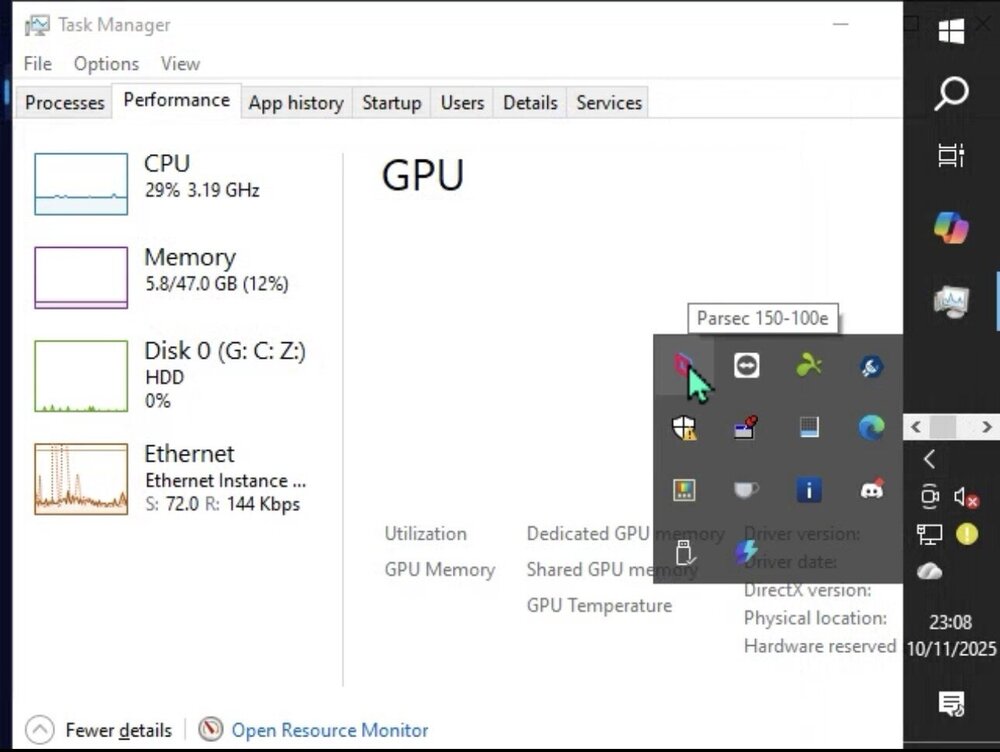
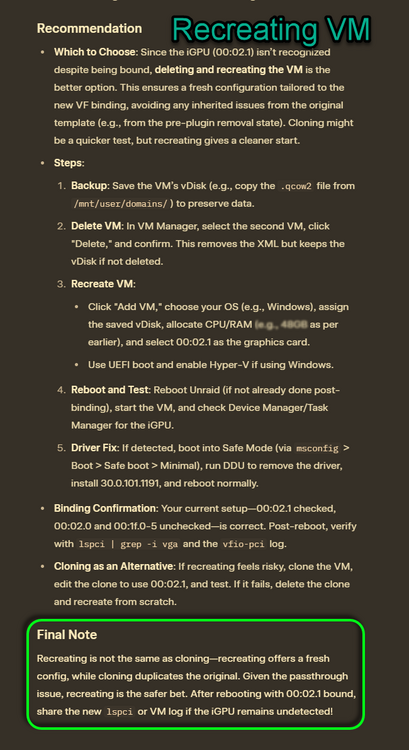
So if I somehow do not see the igpu in task manager, do you also believe the only way to recover it properly is to recreate the VM as I have mentioned there in image 2? I have tried a bunch of other stuff, including following your steps, but I cannot download the iGPU drivers, since the iGPU is not even being recognized. The only way it was recognized is when i recreated it again. Thank you very much for your awesome response earlier. that was helpful and helped clarify for the process for setting up VM!
-
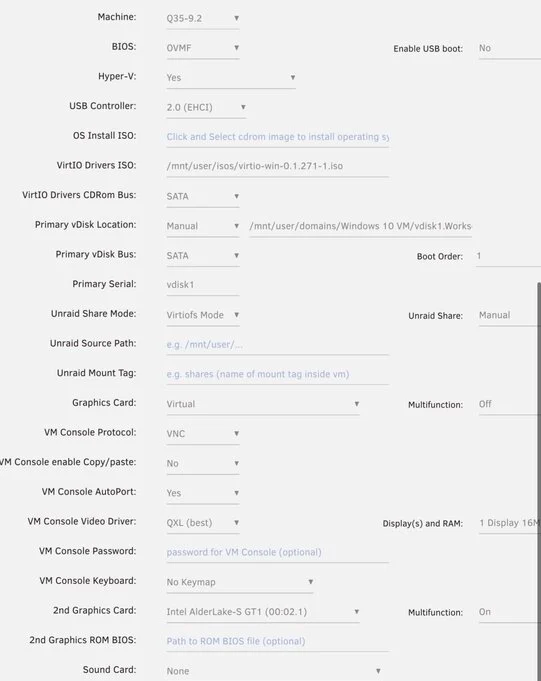
Whenever you have this issue -the VM does not see, or does not recognize the hardware in Task Manger (image 1) and you cannot hardware accelerate- the method that worked for me was recreating the VM (not cloning it)(image 2-if you need help doing this). I recreated the vm with this workaround: i pass through Virtual for graphics card, then pass through the VF in 2nd graphics card (see image 3) [I had some minor issues of it freezing up after a few minutes in Splashtop, or RDP from weak laptop - it doesn’t freeze when RDP from VM with 3080gpu passed through though.]. I seen @alturismo use Parsec but it’s hard to find info on how it works and the right way to use it and set it up - i install the parsec display drivers i can access from another computer via parsec remote? can i access via phone somehow? i’m on iphone i don’t see in store. i use Splashtop, but the vf isn’t passed though properly without also passing through virtual graphics first. i’m hoping someone can guide US ALL here on how to do this properly step by step. I’d be really grateful.
-
Do you think this was the issue? It does seem to wake properly now, I will post again if Instill have issues. thank you very much! Is there something similar to guest tools for the macinabox vms? or i shouldn’t need to do anything post install?
-
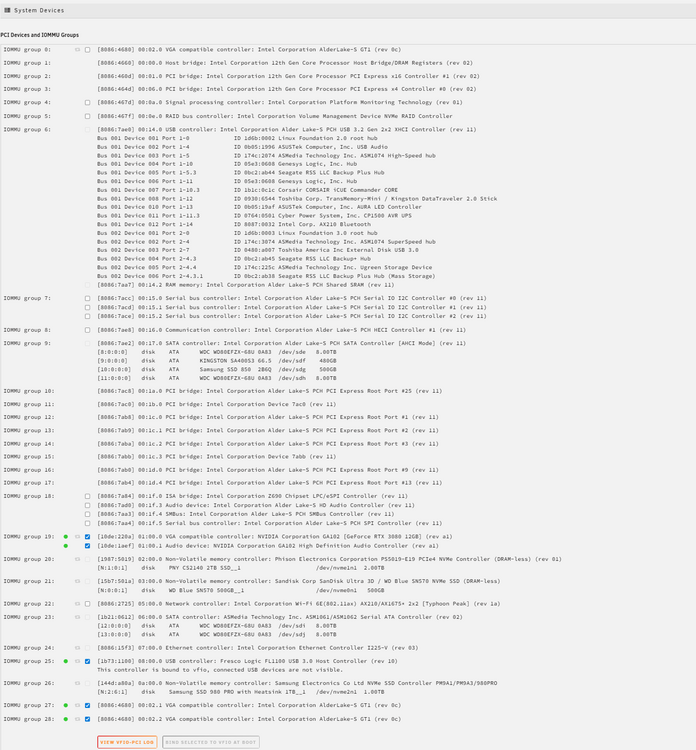
When i clicked the Windows button, there was no actual "Sleep" option, just Lock, Shut down, Restart; thus, i have no idea if the Sleep/Wake cycle works w/out passed through devices. I checked the Power Settings to see if i can enable advanced option to sleep or anything, but i found nothing. Pausing the VM through the Unraid GUI does not suffice since/when i pause the VM w/ passed through devices, it freezes functionality, but doesnt actually turn the screens off - so its not a proper sleep. I look forward to your further help. Thank you very much for everything as always! PS: I do not have the NVDA community apps installed. And here is my System Devices.
-
I can try to make a clone and try it? What you think it might be if it does work? Thanks for your help btw Do most people's sleep & wake function work fine?
-
Ya its the same VM. The Diagnostics and Windows VM Log (attached) are what i get after i try to wake it up. Interesting because i get these errors even when the VM is running. Like now, I have 2 Win VMs running (1=NVDA GPU passthrough & 1= iGPU Intel Passthrough SR-IOV Giganode) , and i am looking at the logs, and it shows these in both Windows VMs NVDA GPU: 2025-10-07T13:12:17.034310Z qemu-system-x86_64: VFIO_MAP_DMA failed: Invalid argument 2025-10-07T13:12:17.034317Z qemu-system-x86_64: vfio_container_dma_map(0x5632f2c69c70, 0x383010000000, 0x2000000, 0x146a86000000) = -22 (Invalid argument)Intel IGPU: 2025-10-07T13:25:41.651875Z qemu-system-x86_64: VFIO_MAP_DMA failed: Invalid argument 2025-10-07T13:25:41.651893Z qemu-system-x86_64: vfio_container_dma_map(0x55b8309c7240, 0x382800000000, 0x20000000, 0x14bf00000000) = -22 (Invalid argument)
-
Can someone please help or point me in the right direction here? Thanks
-
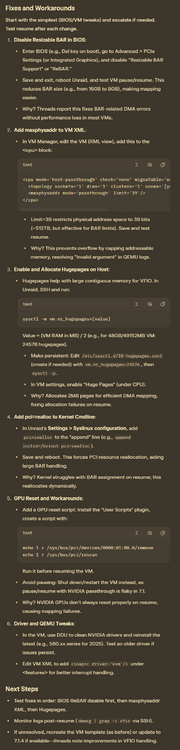
Upgraded from 6.12 to 7.1; with older version, I was able to sleep & wake my Windows VM, but now unable to do wake the VM. I have tried 1 & 2 here in this screenshot from AI, but these didnt work. Before proceeding, I am wondering if someone might be able to spot something and help me out here. Thank you for any & all help. tower-diagnostics-20250925-1526.zip Windows VM log.txt
-
Thanks for this. I upgraded to 7.1.4 and the original vm was booting as if were new. I “clined” it and it the clone booted up nicely.
-
Hey I’m playing COD BLACK OPS 6 and get extrapolation notifications and packet bursts all the time, but no packet loss. Did/do you have these issues? I cannot figure it out.
-
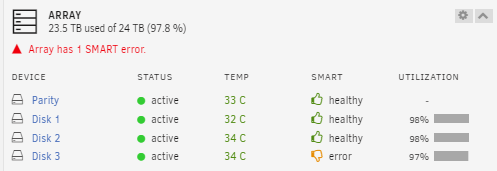
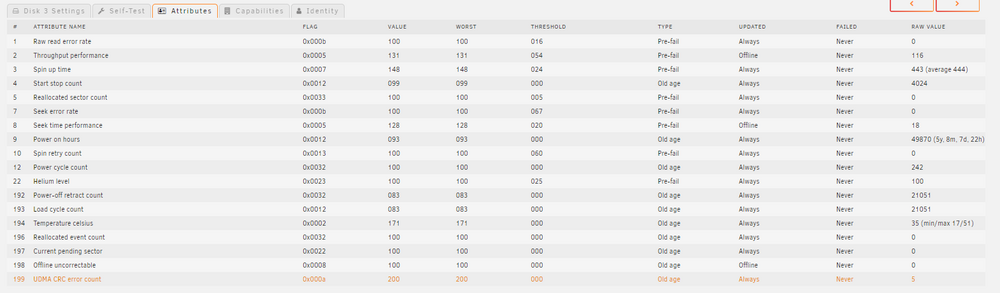
I have a SMART error on Disk 3. Not sure if that might cause something like this to occur? I cant really tell what the issue is, but it seems it is saying" Old..." Maybe I should replace if deleting Plex & rebuilding doesn't work? Thank you all again. To Do: - Mem test - SMART test - Remove docker. i suspect mem test would be easiest. Then removing and readding docker next, then smart test? tower-smart-20240906-2157.zip