Surgikill
Members
-
Joined
-
Last visited
-
That's the container I have been having issues with. I ended up performing a umount -l on my appdata disk, however now I cannot cleanly stop the array because the system is still trying to unmount my appdata disk. Jan 15 10:27:15 Cortana root: umount: /mnt/appdata-disk: not mounted. Jan 15 10:27:15 Cortana emhttpd: shcmd (4032739): exit status: 32 Jan 15 10:27:15 Cortana emhttpd: Retry unmounting disk share(s)... Any recommendations on how to proceed from here?
-
I'm having this issue on 6.12.3. losetup returns NAME SIZELIMIT OFFSET AUTOCLEAR RO BACK-FILE DIO LOG-SEC /dev/loop1 0 0 1 1 /boot/bzfirmware 0 512 /dev/loop2 0 0 1 0 /mnt/appdata-disk/system/docker/docker.img 0 512 /dev/loop0 0 0 1 1 /boot/bzmodules 0 512 /dev/loop3 0 0 1 0 /mnt/appdata-disk/system/libvirt/libvirt.img 0 512 I ran 'umount /dev/loop2 twice, on the second time it reported that /dev/loop2: not mounted. The array is still trying to unmount shares
-
Hi all, I have been having some stability issues with unraid. Mostly docker becoming unresponsive. This can be fixed by a restart, but sometimes I cannot restart the server. Currently I am trying to restart the server. I stopped the array first, but it is stuck on 'Retry unmounting disk share(s)'. I don't believe I have any ssh clients open anywhere, so I'm not sure what is holding up the array stopping. I tried disabling docker, but that did not help either. Here are the diagnostics, if that helps. I'm not sure where to start troubleshooting this. cortana-diagnostics-20240115-0949.zip
-
Thank you for this. This was a great help in setting up calibre to play nicely with readarr.
-
Just to chime in, I am also experiencing this issue and I am running plex as well.
-
I updated everything on proxmox and the issue seems resolved. I'm not sure why it would cause this issue, or why it just spontaneously popped up.
-
Maybe? The leading "/" is there where it is needed in the screenshots, I just forgot to type it in the post when I was explaining it.
-
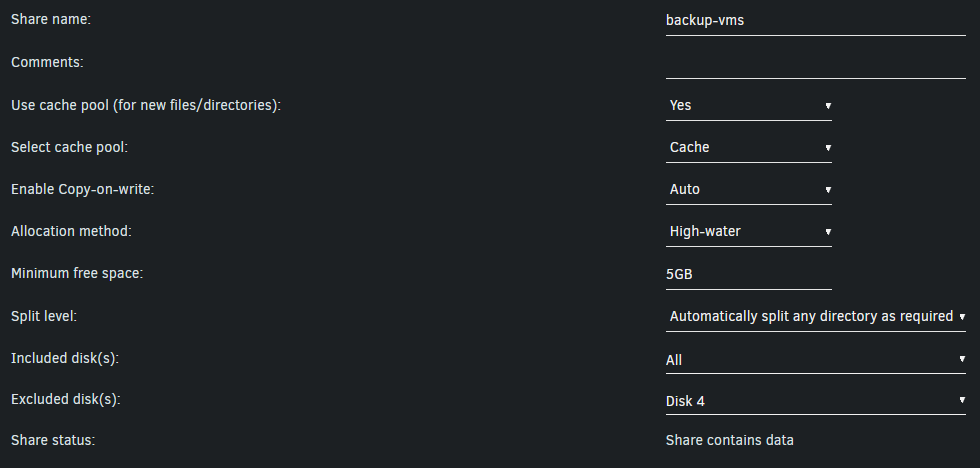
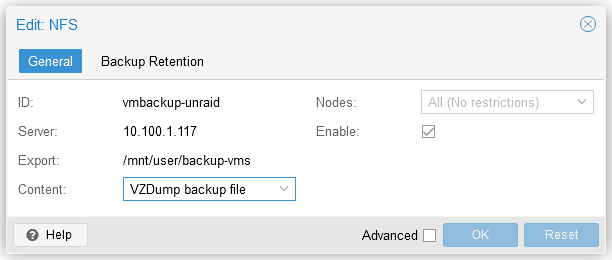
Hi all, I've been banging my head against the wall for with this one for a while. I'm not sure what I'm doing wrong, it may be that my paths are set up incorrectly, but I'm not sure because the problems seem to be intermittent so it becomes hard to track down. Anyway, I have found an issue I can replicate that should help shed some light on the information. I have a proxmox server, and an unraid server. The proxmox server makes nightly backups to the unraid server. It backs up to a share called "backup-vms". This share is set to "Yes:Cache" Now on the proxmox side of things, I have storage added called "vmbackup-unraid" which points to "/mnt/user/backup-vms" When I run the backup, it writes the backup files to my cache drive, as it should. However, it writes the files to a different share/directory than it should. It should be writing the files to "/mnt/user/backup-vms" however, it writes the files to "/mnt/user/appdata/'application'/". I'm not sure what is happening here. If I ssh into the proxmox server and go to "/mnt/pve/vmbackup-unraid" it points to that applications folder in my "appdata" share. I'm not sure if this is an issue with unraid. This setup that I had has worked fine for almost 2 years, so I'm not sure if something was updated without my knowledge, or if there are other issues. I also have other applications writing files they are not supposed to into my "appdata" share, so hopefully I can straighten those out if I can figure this out. Thank you

-
This only fixes the display in unraid. It does not change the value that gets sent to influx db. I would not expect the UPS to report a figure higher than the kill-a-watt. Currently, I have on-board power monitoring for all of my servers. The only non power monitored items in my rack are a non-poe switch, and a modem. If I am to take the power reported from each server and subtract it from the power reported by the UPS, I am left with around 100-150 watts of overhead, which is much more than my switch and modem pull. Power factor correction is also enabled on all of the machines.
-
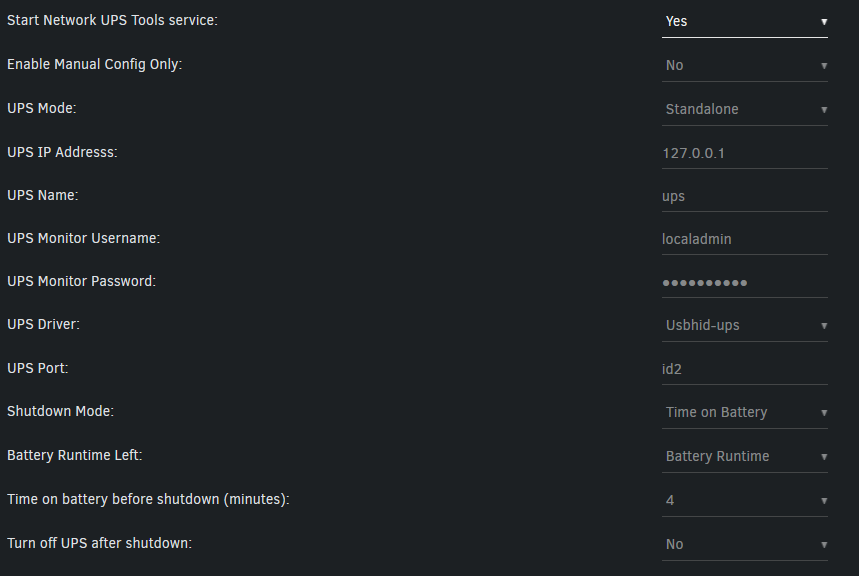
Hi all, I have a Tripp Lite SMART1500LCD UPS, and I'm having an issue getting the current wattage to show up correctly. I have a Kill-A-Watt connected between the UPS and the wall. It seems that no matter what I do, I cannot get an accurate reading. Currently, these are my settings for the UPS. The only driver that will work is usbhid, although I believe that the tripplite-usb driver should work. Currently, NUT is showing around 520 watts of power being consumed, while the kill-a-watt is only showing 350. This gets exacerbated when I try to import the data into grafana with nut-influxdb-exporter. The ups.power value shows nothing when selected, however when I select "watts" it shows the erroneously high value. Do I need to change username/password and select tripplite-usb to fix this? It's very frustrating.

-
I'm having an issue with this. I am using linuxserver plex and when I map it to /tmp it ends up occupying space in the plex container. Any ideas on this?
-
I'm having a slight issue. I was originally running elasticsearch 6.X. I got through to the webgui on Diskover and it told me to perform a crawl. Read through the documentation that said I need elasticsearch 5.6.x, so I installed 5.6.16. Deleted previous appdata, installed elasticsearch. Now it runs, I can access the webui of diskover and elasticsearch. No errors in elasticsearch logs, no errors in diskover logs. Warnings in redis about THP and overcommit_memory. Diskover still tells me to run a crawl from the webgui. Not sure where to go from here. Everything looks kosher. EDIT: Well, I got it running, and I was able to get all of 1 database. However now when I restart the container it doesn't initialize another crawl. I decided to uninstall it, remove everything in the appdata directory, reinstall it and set it all back up again, and now the crawlers end up hanging. Unless somebody can help me out with a way to get this running reliably and the way the documentation states it should run I'm done. I've spend all day trying to get this to actually do what it needs to do.
-
So I just randomly started having this issue. Neither Radarr nor Sonarr will copy movie files over to the directory they are supposed to be in after they have finished downloading. They were both working fine the other day, but as of last night they are both now borked. I have restarted the containers and the server. The next option is to reinstall both and start from scratch but I would rather not do that. I have checked settings and create hardlinks is set to no. Any ideas? What could I post to help diagnose this?
-
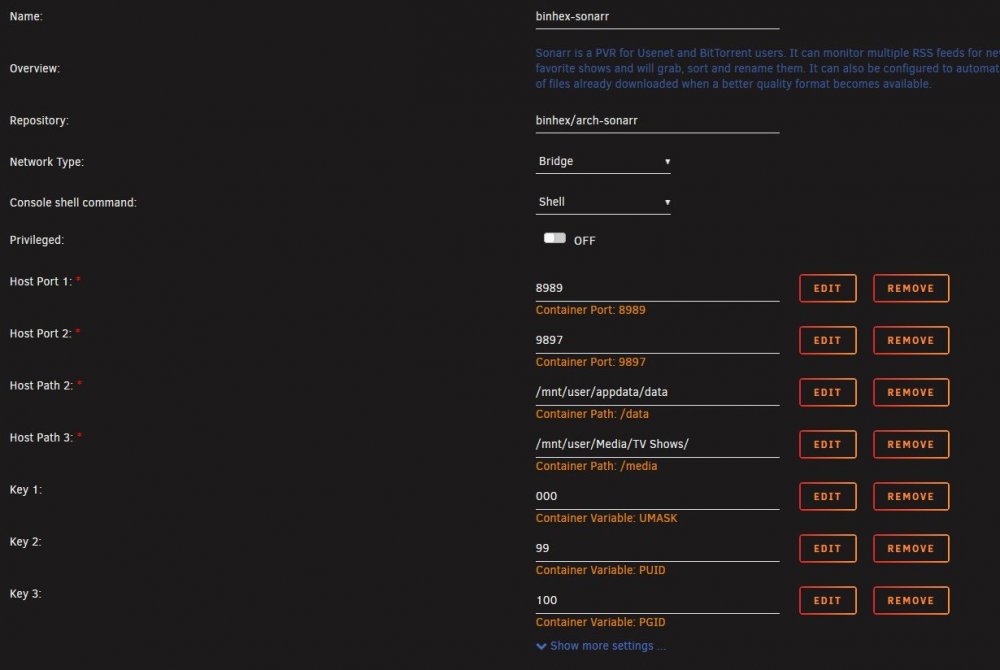
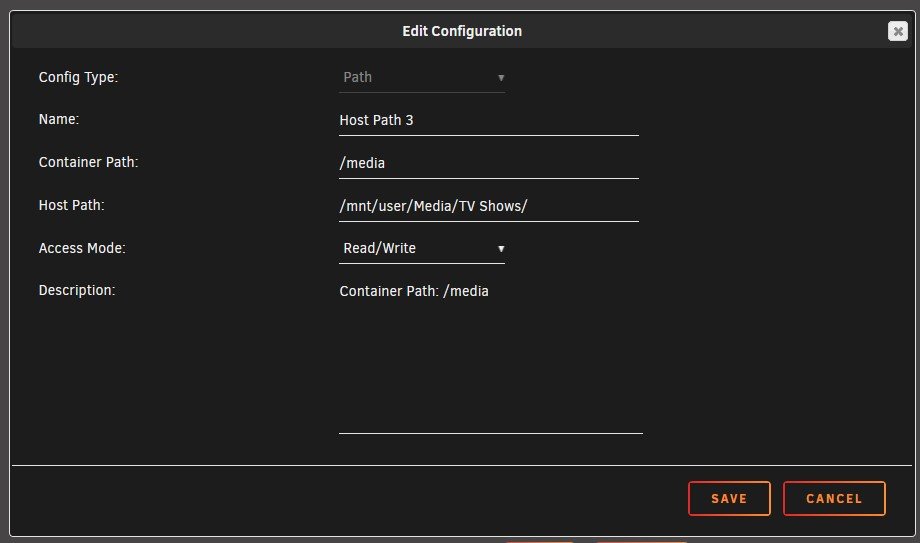
So I should replace it with container path as seen here? EDIT: I changed it and it worked, so it at least sees the files now, but for whatever reason I can't find any subtitles for anything. Is there a way I can fix that too?
-
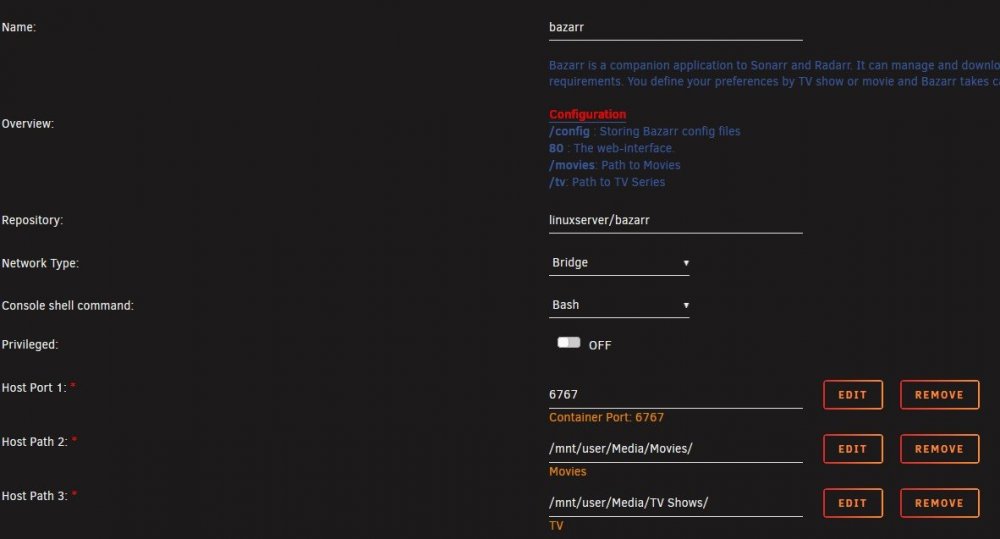
Hey guys. I'm trying to get Bazarr all set up but I'm pretty sure I FUBAR'd something. In the Bazarr webui it says that all of my paths are invalid for every file I have. It also will not find any subtitles for any of the content I have. I have made sure to set the Sonarr/Radarr paths and input my opensubtitles account info. You can see what is set up in my below screenshots.