




-
When it says processed: 0, I would think it didn't process any files. And another reason why I would think it didn't process any files is that it completed the scan for TV in 2 seconds. And the scan for Movies was finished in same second as the final summary. Is there a way for the script to output to a log file showing all the files it processed?
-
I'm trying out your Symlink Cleanup script and I'm having some issues. This is what I have for my library mappings: "/mnt/user/nzbdav/local/tv|TV [v2]|SONARR|LIVE|PLEX|15|7|8" "/mnt/user/nzbdav/local/movies|Movies [v2]|RADARR|LIVE|PLEX|14|6|7"I'm assuming the number after "Plex" is the LIbrary ID? And when I do a dry run to test, I get this: ------------------------------------------------------------ SENTINEL CONFIGURATION ------------------------------------------------------------ Deletes Per Run: 5 Circuit Breaker: 150 Rolling 24h Limit: 200 ------------------------------------------------------------ [2026-05-20 23:39:45] >> SCANNING: TV [v2] [LIVE] [2026-05-20 23:39:47] >> SCANNING: Movies [v2] [LIVE] ------------------------------------------------------------ [2026-05-20 23:39:47] SENTINEL SUMMARY: Processed: 0 | 24h Tally: 0 [2026-05-20 23:39:47] Detailed paths recorded in /mnt/user/appdata/other/scripts/nzbdav/sentinel_audit.log ------------------------------------------------------------ Script Finished May 20, 2026 23:39.47"Processed: 0" means that it couldn't see/read the folder? Or is this working as intended?
-
So a long --dir-cache-time is meant for saving resources, correct? I didn't fill out that tab, but I'll do it now.
-
I went over Nzbdav's readme and their comprehensive setup guide. I noticed that their --vfs-cache-time is set to 20 seconds, while the same flag in the mount script is set to 2000h (!). When I get a chance later, I'll adjust this and report back.
-
Yup I have those set. Still giving me the same error.
-
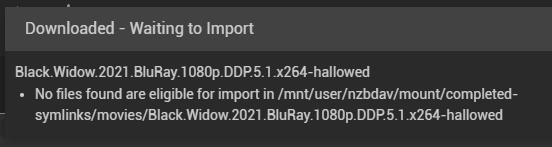
I have it on 5 minutes. My issue right now is that Radarr can't see the files in the completed-symlinks folder, so it can't import anything. The permissions for Radarr and Nzbdav are 99:100. This is the error in Radarr: No files found are eligible for import in /mnt/user/nzbdav/mount/completed-symlinks/movies/movienamehere
-
Have the rclone plug-in installed and an rclone.conf already set up. However, you don't need to have rclone drive already mounted before running the Mount Script. The Mount Script itself can start the rclone mount if it doesn't detect a mounted rclone drive. This is taken from the initial log when running the Mount Script: [2026-05-15 23:32:25] VERIFYING: System environment... [2026-05-15 23:32:25] Ensuring Core services are active... [2026-05-15 23:32:25] CHECKING: NzbDAV Mount integrity... [2026-05-15 23:32:25] [!] NzbDAV process/mount missing. Bypassing patience window... [2026-05-15 23:32:25] [!] Failed: NzbDAV is DOWN. [2026-05-15 23:32:25] REBUILD: Initiating In-Place Rclone recovery... [2026-05-15 23:32:27] Launching Rclone Mount... [2026-05-15 23:32:27] WAITING: Mount stabilizing (Attempt 1/5)... [2026-05-15 23:32:33] SUCCESS: Mount stabilized.
-
@DZMM It works! Thank you! I made a script via Gemini to do the initial mounting when the array starts, so I think I'm all set to start building my library again. Thanks again for these scripts!
-
Update: I've figured it out. Since I'm not using Decypharr, there was no point for the script to check if both mounts were running, and if they weren't, the script would fail. So I replaced line 433: if [[ "$NZB_MOUNT_ALIVE" == "true" ]] && [[ "$DEC_MOUNT_ALIVE" == "true" ]]; thenwith: if [[ "$NZB_MOUNT_ALIVE" == "true" ]] && [[ -z "$DECYPH_PATH" || "$DEC_MOUNT_ALIVE" == "true" ]]; thenNow the script would bypass the Decypharr requirement and considers this condition fulfilled. Original comment: I'm trying out your script and the mount script is giving me errors. [2026-05-10 02:50:59] VALIDATING: Script configuration and environment... --------------------------------------------------- [CONFIG SUMMARY] Script Version: v1.0-RC1.6.4 Rclone Remote: nzbdav: State File: /mnt/user/appdata/other/scripts/nzbdav/prime_state.db Hard Reset Toggle: N [RCLONE PERFORMANCE] VFS Mode: full RAM Buffer: 256M Transfers: 8 Read Streams: 0 CHUNK START: 8M Chunk Limit: 512M [DOCKER SETTINGS] NzbDAV Container: NzbDAV Decypharr Container: Decypharr Enabler Containers: prowlarr postgresql16 Consumer Containers: sonarr-nzbdav radarr-nzbdav lidarr Sportarr bookshelf bazarr plex plex-auto-languages --------------------------------------------------- [2026-05-10 02:50:59] VERIFYING: System environment and load... [2026-05-10 02:50:59] [!] Decypharr is down. Starting... [2026-05-10 02:51:00] WAITING: Giving foundation containers 15s to initialize... [2026-05-10 02:51:15] CHECKING: NzbDAV Mount integrity... [2026-05-10 02:51:15] Passed: NzbDAV is UP. [2026-05-10 02:51:15] CHECKING: Decypharr Mount integrity... [2026-05-10 02:51:15] [!] Decypharr container is dead. Bypassing patience window... [2026-05-10 02:51:15] [!] Failed: Decypharr is DOWN. Entering Recovery... [2026-05-10 02:51:15] FIX: Restarting Decypharr... [2026-05-10 02:51:15] WAITING: Decypharr stabilizing (Attempt 1/5)... [2026-05-10 02:51:21] WAITING: Decypharr stabilizing (Attempt 2/5)... [2026-05-10 02:51:27] WAITING: Decypharr stabilizing (Attempt 3/5)... [2026-05-10 02:51:33] WAITING: Decypharr stabilizing (Attempt 4/5)... [2026-05-10 02:51:39] WAITING: Decypharr stabilizing (Attempt 5/5)... [2026-05-10 02:51:45] [!] CRITICAL: Decypharr recovery failed. [2026-05-10 02:51:45] INITIATING: Intelligent Priming (Library Only)... [2026-05-10 02:51:45] Checking /mnt/user/appdata/NzbDAV/remote/content for new files... [2026-05-10 02:51:45] 0 new files found ... 0 total files in the library. [2026-05-10 02:51:45] RESTORATION: Starting Consumers... [2026-05-10 02:51:45] [ABORT] Restoration skipped. One or more mounts are offline. [2026-05-10 02:51:45] FINALIZING: Generating environment report... Status Summary: NzbDAV UP (11m) : Decypharr DOWN (0m) | Primed 0 | VFS Cache 0 (0.0%) | Retention 0 days | Load 0.57 | RAM FREE: 95.6% -------------------------------------------------------------------------------------- [2026-05-10 02:51:45] STATUS: All Systems Operational. Script Finished May 10, 2026 02:51.45This is what I've set in the script. # --- SCRIPT SETTINGS --- SCRIPT_VERSION="v1.0-RC1.6.4" HARD_RESET="N" # Y/N. # A Hard reset stops rclone, wipes cache, stops dockers, and exits. MAX_LOAD="350" # Reporting threshold (Load-based kills removed in v1.6.1) MAX_FAILURES="5" # How many times to allow the mount check to fail before automatically applying a Hard Reset PRIME_MAX_TIME="60" # Time to spend priming the --dir-cache on each run. STATE_FILE="/mnt/user/appdata/other/scripts/nzbdav/prime_state.db" LOG_FILE="/mnt/user/appdata/other/scripts/nzbdav/rclone_mount.log" # --- REQUIRED SETTINGS --- REMOTE_NAME="nzbdav:" # Rclone remote name including colon RCLONE_CONF="/boot/config/plugins/rclone/.rclone.conf" MOUNT_PATH="/mnt/user/appdata/NzbDAV/remote" # full path to where remote should be mounted VFS_CACHE_DIR="/mnt/user/appdata/NzbDAV/cache/remote" # Path for rclone cache files VFS_CACHE_SIZE="300G" # Maximum size of the VFS cache LOCAL_MEDIA_PATH="/mnt/user/appdata/NzbDAV/remote/content" # Where your media is stored VFS_MODE="full" # --vfs-cache-mode mode. CHUNK_START="8M" # --vfs-read-chunk-size. CHUNK_LIMIT="512M" # --vfs-read-chunk-size-limit. STREAMS="0" # --vfs-read-chunk-streams. RAM_BUFFER="256M" # --buffer-size RAM buffer. TRANSFERS="8" # --transfers. CACHE_TIME="2000h" # --dir-cache-time. ATTR_TIME="2000h" # --attr-timeout. # --- OPTIONAL MOUNT SETTINGS --- DECYPH_PATH="/mnt/computers/streaming/decypharr" # Location of your Decypharr mount RC_IP="0.0.0.0" # RC_PORT="5572" # RC_USER="your_username" RC_PASS="your_password" CPU_PIN="8,9,10,11,12,13,24,25,26,27,28,29" # --- DOCKER SETTINGS --- NZBDAV_CONTAINER="NzbDAV" DECYPHAR_CONTAINER="Decypharr" ENABLERS="prowlarr postgresql16" # CONSUMERS="sonarr-nzbdav radarr-nzbdav lidarr Sportarr bookshelf bazarr plex plex-auto-languages"Is the error happening because I'm not using Decypharr?
-
I've figured out how to revert the CA back to a previous version. At first, I removed the CA plugin in the plugin tab. I tried reinstalling CA in the Apps tab and it didn't work. I was getting this error: plugin: run failed: 'upgradepkg --install-new' returned 127Then I found a fix for this in another thread (do this in terminal): cp /sbin/upgradepkg- /sbin/upgradepkgI went back to the Apps tab, clicked Install and it installed an older version of CA. (If it doesn't work, try updating your other plugins first, before installing CA) Hope this helps! Edit: The above might be an issue related to my own server and not yours. Here's a link to the CA plugin that you can try in the Install Plugin tab in Plugins: https://raw.githubusercontent.com/Squidly271/community.applications/master/plugins/community.applications.plgClicking into it shows: version "2024.12.14"
-
I'm also experiencing the same issue as the others have mentioned.
-
You never transcode 4k, regardless if it's by CPU or iGPU. It just uses way too much resources. Always Direct Play. If you need to transcode 4k to play it, maybe you shouldn't be collecting it in the first place.
-
What a coincidence, I have the exact same CPU! I guess I'll give it a shot. Thanks for putting this thread together btw!
-
For anyone running Don't Starve Together: How is the performance? What hardware are you running on? Do you have caves enabled? How is the CPU usage? The reason why I'm asking is because I had DST running on a bare Ubuntu 18.04 install with caves and some server side mods and the process is running at 20% CPU usage while the server was EMPTY. The usage jumps up by 20% every time a person joins. When I have 3 people in the server, the CPU usage spikes up 90%. Any more after that and the game becomes unplayable. My wife was hosting it on her Windows 10 PC with a Ryzen 5 3600 and with the same amount of people, and no issues. So right now, I'm just trying to see if it's worth running in a docker format.
-
I'm getting permission denied or the folder doesn't exist when I run the commands. How can I rectify this?

View in the app
A better way to browse. Learn more.
