





blaine07
Members
-
Joined
-
Last visited
Everything posted by blaine07
-
I hope this issue goes here since I am on 6.10.0-rc6, I *believe* this issue started on 6.10.0-rc1 but it's been happening so long I can not 100% remember; I have always just figured issue would work itself out. If this does NOT need to be in pre-release area please relocate my thread && I am sorry! My Issue is more annoyance than an actual Issue: When I update a container, a LOT of the time the update will start...and I will wait and wait and wait and it will never "finish" on it's own GRAPHICALLY. The container will often actually update without issue but the display of it's progress never changes from below. It used to always show the "download" for container update(s) live as it was happening. Now it'll just start and often "hang" looking like the pic below. Mostly, as long as I wait long enough, before refreshing the browser tab everything is fine. Are there any ideas as to why I can't see the true container update processes like I used to be able to? tower-diagnostics-20220506-0613.zip
-
So I will run “backup-now ALL”? How do I update template on my end?
-
Is their not a way to define "all"? (I don't even know names of all the DBs on the MariaDB server it's backing up LOL). I know before version 3.3.2 I was on V2.12.0. On 2.12.0 "backup-now" just grabbed them all. Not sure why that functionality would be depreciated? (thank you, for the reply!)
-
Running "backup-now" manually on Version 3.3.2 db-backup no longer works. It returns a error. Any idea how to manually run backup now?

-
I wish I understood exactly what was going on here and if adding these ARGS is going to cause more issues later.
-
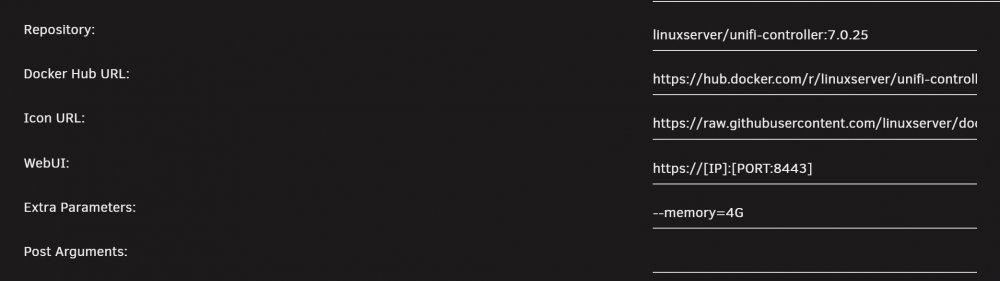
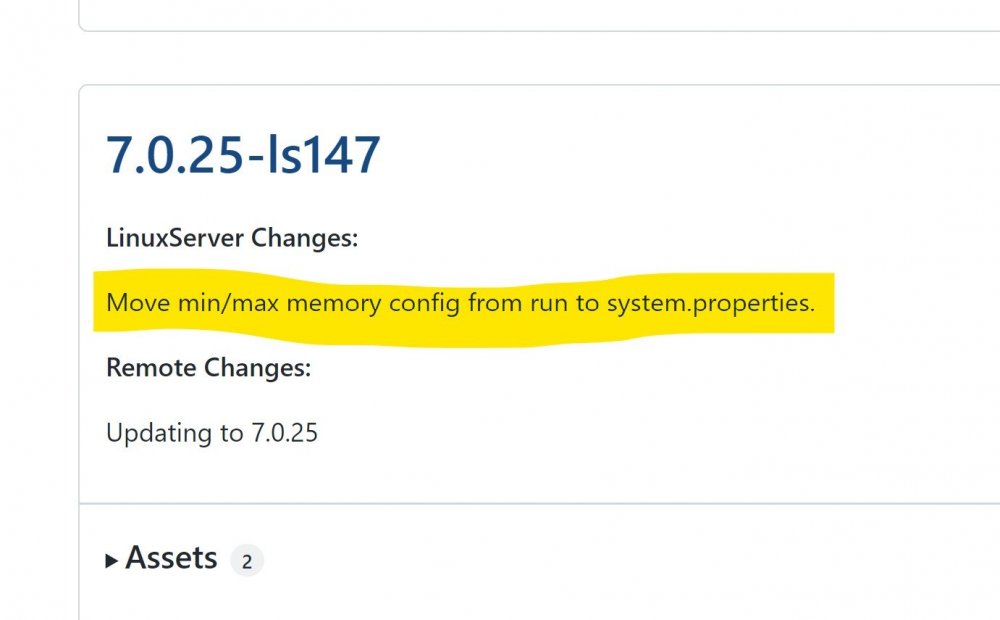
I have always had Max Memory defined as an Extra Parameter. On Github change long for 7.0.25 mentions: Move min/max memory config from run to system.properties.. Does that mean I need to move my memory out of Extra Parameters now?
-
Are you aware of any guides or tutorials to do this correctly with Unraid? All the thanks, as usual :-)
-
I realize that after container has been created this process may vary slightly but is there a way to connect this container to multiple networks? There’s a different version of NPM floating around and it supports such. Does this container support it too? If so, how does one set it up after container has already been created? Does the —net flag still need passed through? For reference, this is other container, but wondering if this is applicable to this container too:
-
Hey mate, all the thanks through making these changes! I truly appreciate it! 🙂
-
Is this new config supposed to make /admin not available outside LAN? I can't find any difference between what you initially posted for "Admin" and the new admin config? Also, on bottom of Edit Proxy Host on NPM it says: Please note, that any add_header or set_header directives added here will not be used by nginx. You will have to add a custom location '/' and add the header in the custom config there. The config you have shared includes proxy set header directives? It says they wont work?
-
Yeah I don’t see the _ anywhere defined. I’m super confused by all this lol
-
What version Collabora you using?
-
See my post above about admin panel. Does this: # Admin Console websocket location ^~ /lool/adminws { proxy_set_header Upgrade $http_upgrade; proxy_set_header Connection "upgrade"; proxy_http_version 1.1; proxy_pass $forward_scheme://$server:$port; proxy_set_header Host $http_host; proxy_read_timeout 36000s; } need to change because admin URL changed? EDIT: also, using above, is there a way to make the ADMIN page only accessible internally and not at all outside LAN?
-
Oh, admin portal can now be found at: https://[IP]:[PORT:9980]/browser/dist/admin/admin.html FOR REFENCE THE OLD ADMIN was: https://[IP]:[PORT:9980]/loleaflet/dist/admin/admin.html
-
I figured it out; had to enter alias like "https:/sub.domain.net:443" Any idea on where ADMIN page lies now? My repository: collabora/code:21.11.3.6.1
-
It didn't work for me with just one "l" but does with two? I dont understand lol
-
Also, does anyone know where admin resides now? Can't seem to find it? It used to be at "https://[IP]:[PORT:9980]/loleaflet/dist/admin/admin.html" Now that 404s?
-
Your pic shows “alliasgroup1” Should it be as shown or “aliasgroup1” with ONE “l”? edit: weird it only does work with TWO “l”. I don’t understand; I don’t see it expressed as anywhere with “alliasgroup” so don’t understand why that works. 🤦🏼♂️
-
Is that with “latest” version of Collabora? Thank you!
-
I don’t think I have this fully correct but if I’m reading right…it would look something like this. Take pictures of your current setup so you can roll back— I am NOT confident I have the “key” right in ENV VARIABLE. Domain variable isn’t used/goes away. You’d delete this variable: Then you would ADD this with the domain of your Nextcloud server: Then you’d be able to upgrade to new version of Collabora. I’m still on 21.11.2.4.1 here; if I get time later I’ll play with above.
-
What version of Nextcloud and Collabora are you all seeing this on? My Collabora is quite a few versions behind because every update had issues… Instructions you guys post say add ENV variable(to Collabora container) with host of where Nextcloud would live. Has anyone tried doing what it says?
-
I would recommend, in future, following the manual update instructions in OP. I’ve never had any success using Nextcloud’s updates. I don’t have recommendations on moving forward from your current state. If you have a functional backup I’d restore and manually upgrade.
-
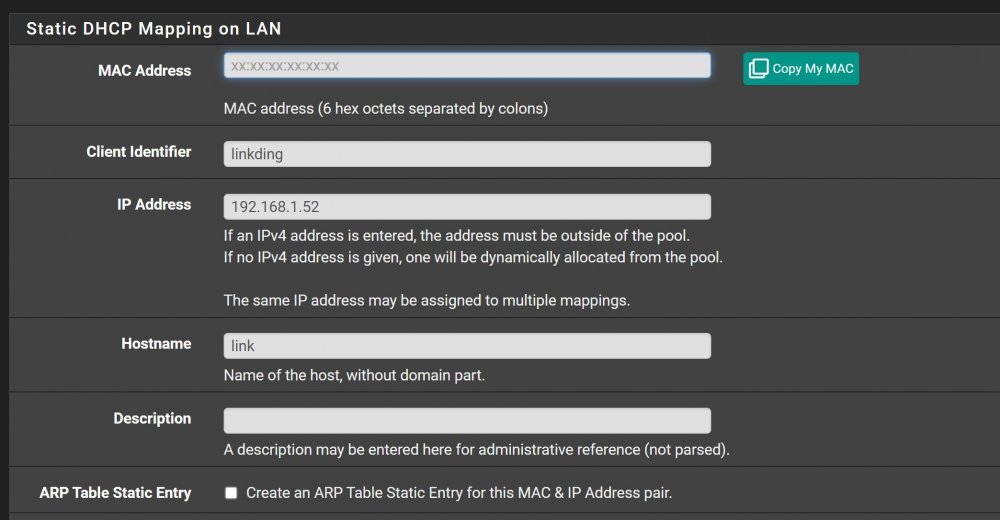
Sure. I used to have everything with STATIC IP in pfSense. When I converted to IPVLAN stuff was all borked. In DHCP Server>One of the listings for something on IPVLAN had to UNCHECK "Create an ARP Table Static Entry for this MAC & IP Address pair" AND remove the MAC ADDRESS for the items setup with IPVLAN. You can keep static entry; just have to uncheck THAT specific box. Here is a example for something I have a static IP on: Hopefully this makes some sense. 🙂
-
Speaking of upgrade… in Unraid I have been ignoring its beckons for me to update it for a few weeks. Anyone have any idea If update is solid and or what update addresses?
-
Thank you 😊 😀 Sorry for the disruption; just surprised I can do that with SWAG and NOT NPM.




