





blaine07
Members
-
Joined
-
Last visited
Everything posted by blaine07
-
Well I moved my PostgreSQL Nextcloud over; it works fine etc but can't seem to get the self hosted version of Collabora to work. It's configured just as it is , and works, on my NC 24.0.6. Only difference I see is on NC 25.0.1 the "Nextcloud Office" version is 7.0.1 and on my NC 24.0.6 the version is 6.3.1. Anyone have any ideas? Anyone else having Collarboar work correctly in NC 25? EDIT: I am dumb; had to add second instance to "aliasgroup2" in Collabora container. 🙂
-
I moved a test instance(w/ PostgreSQL) to 25.0.1 after you said this yesterday and it does indeed seem to be going fine! Thank you!
-
Sorry, I know this is a lot, but can you provide any instructions on how you're doing this exactly?
-
Thank you! Will upgrade one instance later and see what happens lol. All this database issues got me scared lol
-
Thank you
-
Can anyone confirm this is working fine on 6.11.2?
-
I am almost afraid to ask... Is there anyone on 25.0.1 without issue and doing good?
-
For what it's worth: My container is on Nextcloud 24.0.6 and I have been keeping the container updated as Linuxserver.io releases updates and haven't had ANY issues lately. Are all of you with issues on/trying to upgrade to 25?
-
Does this to me too but I wasn’t smart enough to fix it or work around it lol
-
No. Literally only that link above. Sadly I’m too stupid to get very far “out in the weeds” lol
-
OP has said over and over he won’t do “major update” but will wait for a .x release after major.
-
LITERALLY didn't have it installed until this guide sent me here a few days ago; I followed this guide: https://mfaz.dev/posts/immich-unraid/
-
Any other ideas on this error thing mate?
-
I have it working but it’s been a long time since I set it up. Need the gui and regular. How far have you gotten with it? I had a ton of 502 issues but don’t remember why? Maybe changing pier was breaking something or something been so long. If you have specific questions I can *try* to help.
-
I downloaded the Synapse Admin; I see that it lets me create registration tokens. How can I set this up to not allow any one to register but to require one of the tokens from Synapse Admin?
-
How can I get around that a Cname is forbidden with federation?
-
Everything I have is around NPM. I can’t justify changing direction now. I’ll play with it more this evening. thank you
-
Can you post your NPM setup with personal info redacted?
-
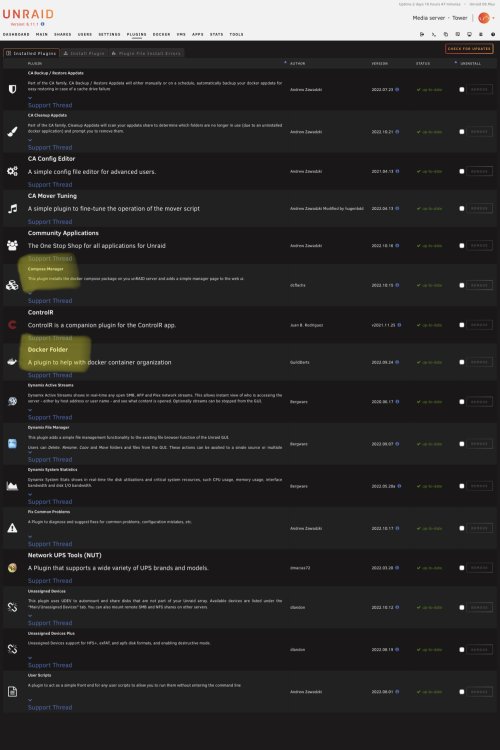
Ok on update. OS- 6.11.1 Plugin up to date and yes docker folder plug-in installed.
-
Alright, can't run that one portion of Immich because my T610 Server doesn't support AVX. All this was my own idiocracy; figured it out LOL.
-
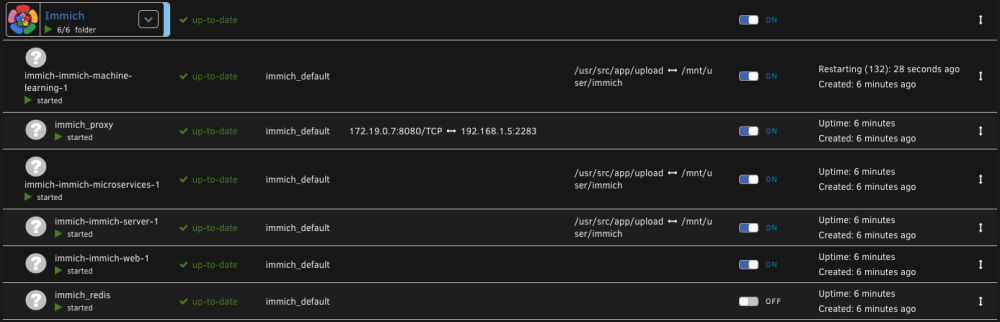
So, the network adapter mentioned is logs is definitely the "immich_default" network, and IP assigned to Immich is in the range for that network. Looking further I see this "immich-immich-machine-learning-1" as continuing to reboot/bootloop. I am guessing my spam in syslog is related to this. I stop the Immich Stack and issue stops. Any ideas on how I can get this to NOT spam syslog with network issues?
-
Could it possibly be something from Installing Immich following this guide? I stopped the stack and error stopped...: https://mfaz.dev/posts/immich-unraid/
-
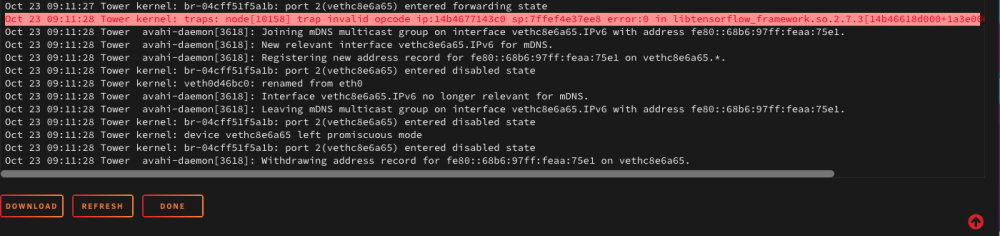
Anyone have any idea what this error would be in my syslog or how seriously I should take it? Diagnostics attached. If syslogs are required I snagged that too. This just spams logs over and over(These 14 lines or so): tower-diagnostics-20221023-0914.zip
-
How do I update docker images using this? also, on bottom of docker tab is normal for when this plug is installed to say this: Invalid argument supplied for foreach() in /usr/local/emhttp/plugins/compose.manager/php/compose_manager_main.php on line 32 at the bottom of the docker tab?
-
What version of Nextcloud are you using? 24.0.6 is latest I think?




