





blaine07
Members
-
Joined
-
Last visited
Everything posted by blaine07
-
Mine started unable to connect to reddis...then I mucked it all up l ol
-
This updated today and having issues logging in again; anyone else? Anyone find solution? Something I did her last time worked but...can't seem to figure it out this time: https://github.com/paperless-ngx/paperless-ngx/issues/817 EDIT:Yep I have completely broke it. Gonna backup the files and wipe it. I'm not sure what I have done to it entirely LOL but it's beyond broken. and keeps defaulting to admin:admin login so be careful if any of you folks have it exposed publically!
-
FWIW got my T610 upgraded from 6.10.0 to .2 without incident! Thank you; and good work folks as usual!!
-
Sorry, on the tg3 I didn’t really understand. Ultimately just trying to determine it is safe for me to upgrade. Can rollback if necessary so no harm no foul. Yes, the BZROOTIMG thing is related to older-ish Dells. First I’ve heard about not resetting virtualization correctly though so not sure there?? 🤔 Thank you for the insight; thank you for your time to help me understand a little bit here. Thanks!
-
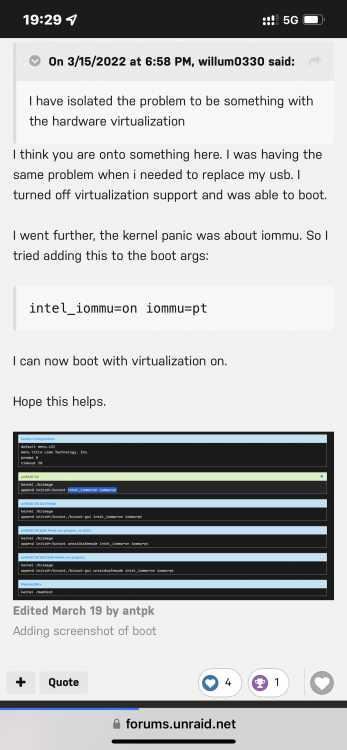
No, it appears not “lsmod | grep tg3” says no but having changed the IOMMU thing how do you recommend I proceed? Leave or remove that startup change? If it turns Intel IOMMU on but the changes turn it off will their be conflict? see attached pic
-
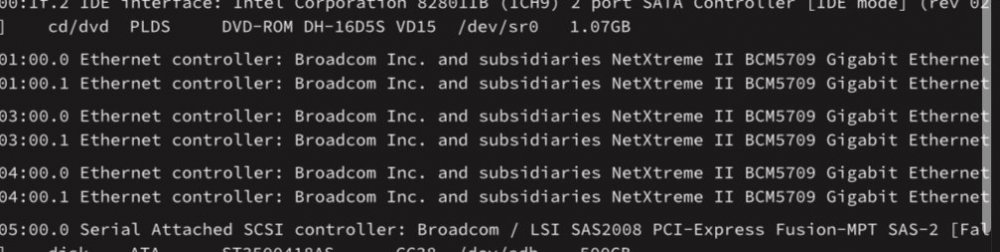
Post says “Broadcom NetXtreme Gigabit Ethernet NIC (note: there may be others).” are affected but what about “NetXtreme II”? Would they be affected? See attached pic.
-
How does this affect those of us with Dells turning iommu=on?
-
We have all been turning iommu on here. how are we all affected by the 6.10.2 upgrade released today? It mentions intel IOMMU stuff? I don’t understand if we need to worry or not? THIS
-
I have never had luck using the updater. I recommend following the manual update instructions in post 1; they’ve worked for me for… many iterations.
-
Any idea what 66 fixed per chance?
-
Sounds like HPs “version” of the same Dell issue; having to toy with virtualization stuff in bios.
-
Thank you! 🙂
-
I just need to confirm when I turn mine on/off that that location is same?
-
What exactly was your script? I mean, I know how to have a script run at start but etc not sure words/verbiage is used to tell it to edit that file every time.
-
I played with CrushFTP but it was just "way too much" for my VERY simple needs. Have you had better luck with ProFTPd mate?
-
Yeah, it's not sticking is what he's saying. Every single reboot it does NOT come back on without making change that you reference in settings. Is there a permanent "I agree to dangers" toggle so that with EVERY subsequent restart it is enabled on it's own?
-
Seems as their are a LOT of Dells affected by whatever that is...I just hope the "fix" doesn't have unintended consequences later. 😞
-
You might check this out. https://forums.unraid.net/topic/119502-bzimage-checksum-error/
-
Upgrade fine for me. I however don’t think I’ve ever seen so many “BZimage Checksum” errors on a upgrade cycle. Happened to me on my T610 when going into the RCs and had to turn off the setting in Dells that causes issue. BZimage thing is concerning.
-
Worked. Thank you mate!
-
Will try this in a bit. I don’t think error actually hurts anything… other than me because I know it’s there LOL Thank you!
-
I searched this thread first and no dice. In MySQL container trying to find a way to suppress "mbind: Operation not permitted." It appears it's possible to suppress the message? https://docs.docker.com/engine/security/seccomp/#run-without-the-default-seccomp-profile Anyone have any insight/help?
-
Either/any of yall using pfsense or something by chance? EDIT: with PfSense I had a bunch of issues after switching and my fix was Maybe something like this is breaking your setup?
-
Noticed anything new, shiny and cool? Seems a 24 changelog is MIA lol?
-
So… is it safe to move to 24 yet? [emoji848]



