





blaine07
Members
-
Joined
-
Last visited
Everything posted by blaine07
-
Is it possible to take contents of the update and paste them into install DIR on Unraid? Can't seem to figure out where the actual files it runs with are residing though...
-
Any of this helpful? https://help.nextcloud.com/t/unavoidable-security-setup-warnings-with-nc-21-update/108667/34
-
Deleted the default file and restarted container; still getting webfinger error here, too.
-
This post/thread...Yall gonna have to skim and read around but they solve your issue; despite that it's about RocketChat. I successfully upgraded to 4.4.4. I do have a error every hour about some time crap but the DB itself works and etc. 🙂 https://forums.unraid.net/topic/61337-support-rocketchat/?do=findComment&comment=816403 You all WILL HAVE TO READ around to find exact post with info but in this "area" of thread you'll find conversation about the RS junk.
-
Perfect makes sense. Have you played with PhotoPrism much? Got tons of pics... been looking for a gallery solution. Ignorance because with Unraid and Docker I sometimes think I know what I’m doing; and I’m often wrong lol Thank you for the reply! :-)
-
Pardon my ignorance...: with PhotoPrism is it possible to map a few different "Storage Paths" of pictures? If so how would I do that? Just add the same path below again and map to different folder on Unraid but point to same /photoprism/originials/ or??
-
For me this ended up being fix...
-
Appears RC still works but anyone have any ideas on what this is in log?
-
Same upgraded to 20.0.7 without incident. Thanks!
-
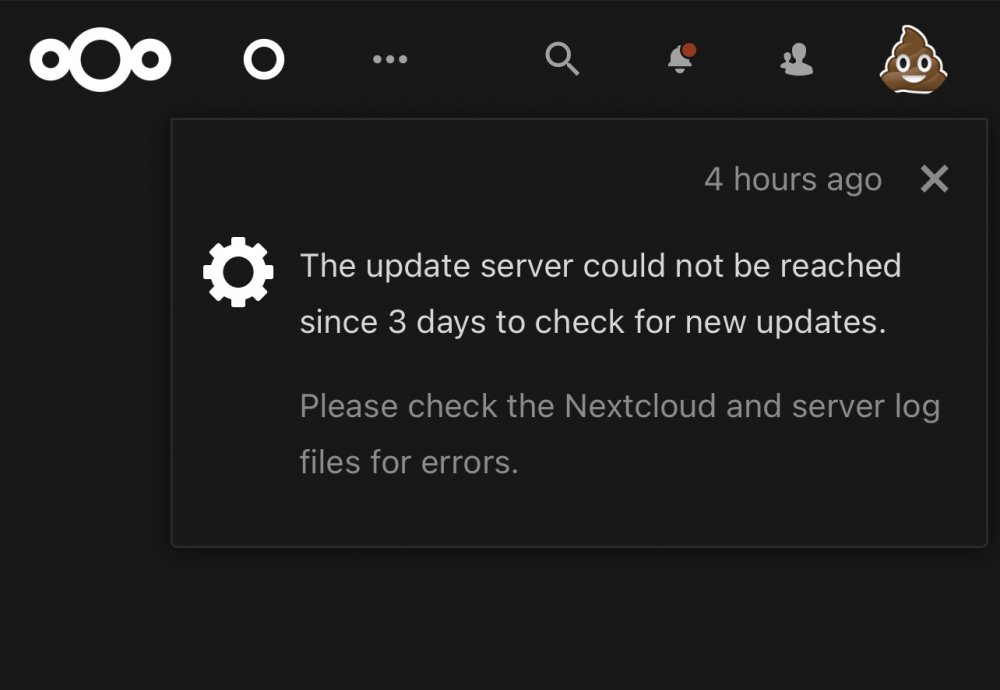
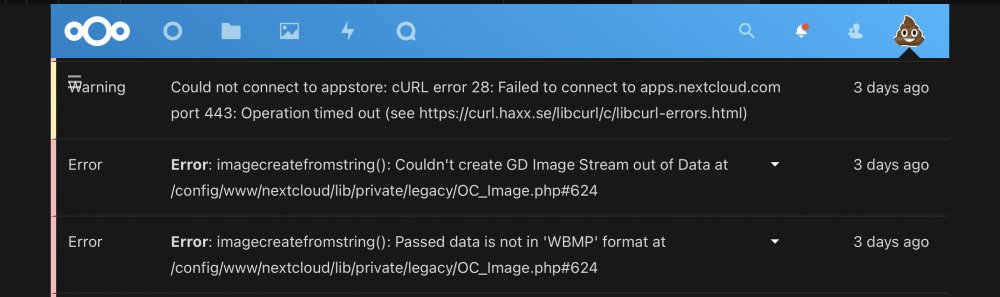
Would that be related to seeing this in my NC instance today? Looks like AppStore opens and such today though? Also seeing update to 20.0.7; maybe that fixes conundrum? Also, with apps server maybe being broke is it even safe to attempt to update to 20.0.7 today at all? [emoji848]
-
Any advice on how I could get this updated to newest version, r1295? Not trying to break all the things...
-
Is proxy.conf and nginx.conf are files that will regenerate with start up? I know some of the others will but...?
-
I probably knew that; sigh. Thank you LOL
-
Any idea when this will be updated to include their new features and such mate?
-
I’ll have to play with it later today. Makes sense I’m my head; what you’re saying.
-
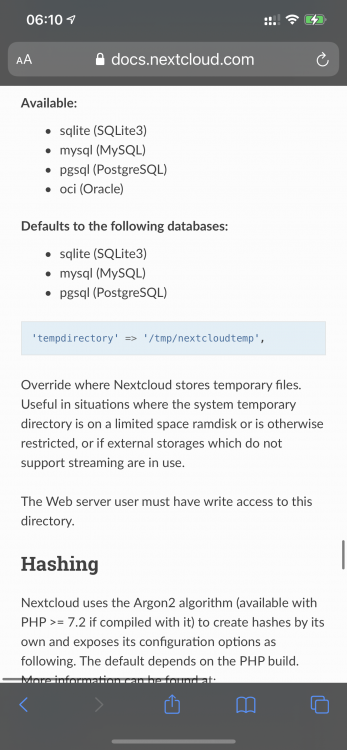
I feel like this temp directory must be set in Nextcloud config.php or none of this directory stuff above matters?
-
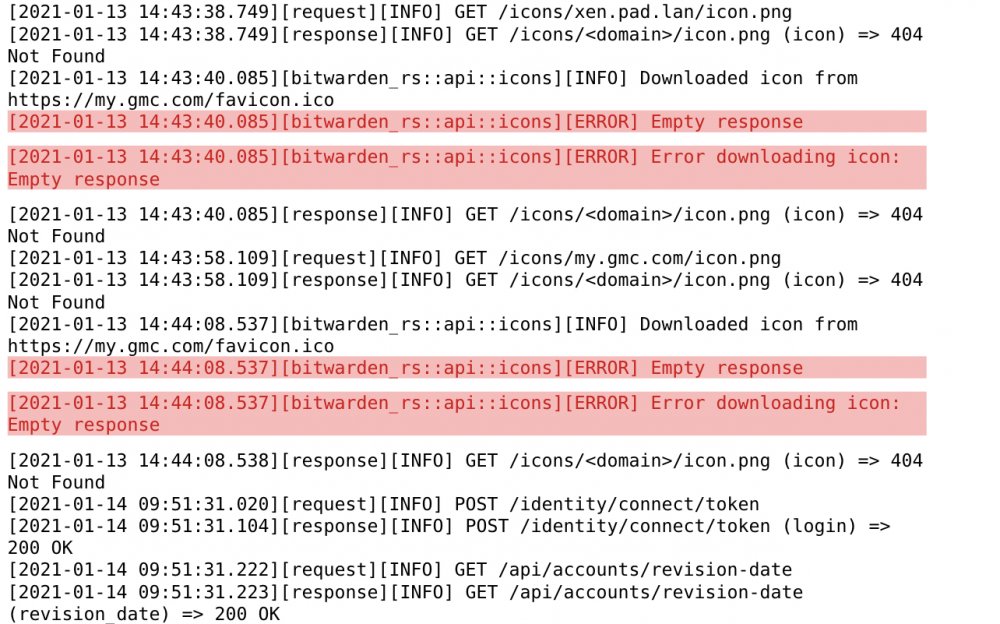
Posting a pic; evidently BW can’t get certain Favicons; is this stuff in life reason for alarm or?
-
Firmware updates are [emoji90] with Unifi lol. I’m in same boat; APs on super old version lol. Every time I think about updating j Google version and it’s Russian Roulette lol.
-
Im sorry mate; I hate to be that fkn tard LOL sigh. I got it booted and seemed to kind of work. Memory was 100% so going to have to tweak that a bit. Went to 10G and going from there. My apologies and thank you so much for all your hard work into this!
-
Did I miss a memo? Updated Zoneminder container today and it's ALL broke. Won't run at all? Well, it runs, but wont capture footage or playback etc. Jan 3 09:59:48 ced98c4eec49 web_php[1145]: ERR [getStreamCmdResponse stream error: Socket /run/zm/zms-533979s.sock does not exist. This file is created by zms, and since it does not exist, either zms did not run, or zms exited early. Please check your zms logs and ensure that CGI is enabled in apache and check that the PATH_ZMS is set correctly. Make sure that ZM is actually recording. If you are trying to view a live stream and the capture process (zmc) is not running then zms will exit. Please go to http://zoneminder.readthedocs.io/en/latest/faq.html#why-can-t-i-see-streamed-images-when-i-can-see-stills-in-the-zone-window-etc for more information. - checkStreamForErrors()] Jan 3 10:01:46 ced98c4eec49 zmdc[873]: INF ['zmc -m 1' starting at 21/01/03 10:01:46, pid = 1397] Jan 3 10:01:46 ced98c4eec49 zmdc[1397]: INF ['zmc -m 1' started at 21/01/03 10:01:46] Jan 3 10:01:46 ced98c4eec49 zmdc[873]: INF ['zmc -m 1' crashed, signal 6] Jan 3 10:01:47 ced98c4eec49 zmdc[873]: INF [Starting pending process, zma -m 1] Jan 3 10:01:47 ced98c4eec49 zmdc[873]: INF ['zma -m 1' starting at 21/01/03 10:01:47, pid = 1398] Jan 3 10:01:47 ced98c4eec49 zmdc[1398]: INF ['zma -m 1' started at 21/01/03 10:01:47] Jan 3 10:01:47 ced98c4eec49 zma_m1[1398]: ERR [zma_m1] [Shared data not initialised by capture daemon for monitor LIVING ROOM] Jan 3 10:01:47 ced98c4eec49 zmdc[873]: ERR ['zma -m 1' exited abnormally, exit status 255] Jan 3 10:01:56 ced98c4eec49 zmdc[873]: INF [Starting pending process, zmc -m 1] Jan 3 10:01:56 ced98c4eec49 zmdc[873]: INF ['zmc -m 1' starting at 21/01/03 10:01:56, pid = 1399] Jan 3 10:01:56 ced98c4eec49 zmdc[1399]: INF ['zmc -m 1' started at 21/01/03 10:01:56] Jan 3 10:01:57 ced98c4eec49 zmdc[873]: INF [Starting pending process, zma -m 1] Jan 3 10:01:57 ced98c4eec49 zmdc[873]: INF ['zma -m 1' starting at 21/01/03 10:01:57, pid = 1400] Jan 3 10:01:57 ced98c4eec49 zmdc[1400]: INF ['zma -m 1' started at 21/01/03 10:01:57] Jan 3 10:01:57 ced98c4eec49 zmdc[873]: INF ['zmc -m 1' crashed, signal 6] Jan 3 10:01:57 ced98c4eec49 zma_m1[1400]: ERR [zma_m1] [Shared data not initialised by capture daemon for monitor LIVING ROOM] Jan 3 10:01:57 ced98c4eec49 zmdc[873]: ERR ['zma -m 1' exited abnormally, exit status 255] Jan 3 10:02:17 ced98c4eec49 zmdc[873]: INF [Starting pending process, zmc -m 1] Jan 3 10:02:17 ced98c4eec49 zmdc[1403]: INF ['zmc -m 1' started at 21/01/03 10:02:17] Jan 3 10:02:17 ced98c4eec49 zmdc[873]: INF ['zmc -m 1' starting at 21/01/03 10:02:17, pid = 1403] Jan 3 10:02:17 ced98c4eec49 zmdc[873]: INF [Starting pending process, zma -m 1] Jan 3 10:02:17 ced98c4eec49 zmdc[873]: INF ['zma -m 1' starting at 21/01/03 10:02:17, pid = 1404] Jan 3 10:02:17 ced98c4eec49 zmdc[1404]: INF ['zma -m 1' started at 21/01/03 10:02:17] Jan 3 10:02:17 ced98c4eec49 zmdc[873]: INF ['zmc -m 1' crashed, signal 6] Jan 3 10:02:17 ced98c4eec49 zma_m1[1404]: ERR [zma_m1] [Shared data not initialised by capture daemon for monitor LIVING ROOM] Jan 3 10:02:17 ced98c4eec49 zmdc[873]: ERR ['zma -m 1' exited abnormally, exit status 255] Jan 3 10:02:57 ced98c4eec49 zmdc[873]: INF [Starting pending process, zmc -m 1] Jan 3 10:02:57 ced98c4eec49 zmdc[1407]: INF ['zmc -m 1' started at 21/01/03 10:02:57] Jan 3 10:02:57 ced98c4eec49 zmdc[873]: INF ['zmc -m 1' starting at 21/01/03 10:02:57, pid = 1407] Jan 3 10:02:57 ced98c4eec49 zmdc[873]: INF [Starting pending process, zma -m 1] Jan 3 10:02:57 ced98c4eec49 zmdc[873]: INF ['zma -m 1' starting at 21/01/03 10:02:57, pid = 1408] Jan 3 10:02:57 ced98c4eec49 zmdc[1408]: INF ['zma -m 1' started at 21/01/03 10:02:57] Jan 3 10:02:57 ced98c4eec49 zmdc[873]: INF ['zmc -m 1' crashed, signal 6] Jan 3 10:02:57 ced98c4eec49 zma_m1[1408]: ERR [zma_m1] [Shared data not initialised by capture daemon for monitor LIVING ROOM] Jan 3 10:02:57 ced98c4eec49 zmdc[873]: ERR ['zma -m 1' exited abnormally, exit status 255] dev/shm:100% Any ideas here? :scratches head:
-
Time stamp stuff been off; or sure anyone has found a fix yet. Have you all played with multiple users? I have a brother printer I upload docs to; can’t figure out how to specify using different upload folders for different users? [emoji848]
-
I’m guessing your right but not seeing it anywhere. Settings menu VERY limited. Not seeing a variable to set anywhere. Anyone else’s time grossly incorrect? [emoji848]
-
The terminal is reporting the correct time. "# date Mon Oct 12 18:36:08 CDT 2020 #" Papermerge however in the GUI shows my login time as "Oct. 12, 2020, 11:36 p.m." Something awry somewhere. DOH. It got the "36" part right. :scratches head:
-
Appears the TZ in run command is correct; Not sure how to run the date command inside container exactly? 😞

-
Anyone have any idea if their is a variable for the Clock or setting timezone? Looking at last user login, having just logged in the time is WAY off.


