





blaine07
Members
-
Joined
-
Last visited
Everything posted by blaine07
-
So, I’m guessing, when we get update to version 18 the OnlyOffice stuff won’t be already enabled and it won’t break my already existing Collabora integration [emoji848]
-
Thanks for all your hard work keeping this going for us mate! [emoji1305][emoji3]
-
What’s going to happen next time they push out a update though and you’ve pointed container to one specific release...?
-
Then everywhere in our reverse proxy Bitwarden.conf change Bitwarden to new container “name”? (bitwardenrs or whatever new container name is?) Or is it easier to change new container name to what previous container was called?
-
Poster above mentioned setting up Redis as well; appears he went at it a entirely different direction. Which way is right/ wrong here? Or is it both accomplishing same thing? One using app on CA and Nextcloud using something built in? https://forums.unraid.net/topic/48383-support-linuxserverio-nextcloud/?do=findComment&comment=807040
-
I can’t tell you what has went wrong but edit Letsencrypt, add a additional subdomain, save Letsencrypt config and then start Letsencrypt, let it boot. Stop Letsencrypt, remove subdomain, save and start it back up and they should renew. I’ve had issues occasionally with the certs not renewing, too, and this has 100% been the fix. :-)
-
Just wanted to say THANKS. Had to go into maintenance mode then "cd /config/www/nextcloud/" first then ran "sudo -u abc php7 occ db:convert-filecache-bigint" then come out of maintenance mode and reboot. Thanks a ton @saarg! Took literal seconds to "convert" whatever it converted. Shrug
-
Anyone have trips or tricks on backup Nextcloud and SQL DB or do you all just use the CA Baxkup/Restore plug-in solely?
-
Sometime it's the small things in life LOL; FINALLY got all this sorted out. Converted to SQL DB and got the silly security warnings ALL fixed. "All checks passed." Anyone else having Nextclouds Security check update the scan on their website? Says my scan was last done in October and I hit "trigger re-scan" hours ago and it still hasn't updated hmmm :shrug: oh well
-
Well, successfully got this accomplished. Now in security warnings I have: "MySQL is used as database but does not support 4-byte characters. To be able to handle 4-byte characters (like emojis) without issues in filenames or comments for example it is recommended to enable the 4-byte support in MySQL. For further details read the documentation page about this." Which leads me THIS. Going to try to go through those motions a bit later today. Appears I'll flip this: "[mysqld] innodb_file_per_table=1" ON and then proceed to follow the MySQL steps at step 2 and restart and repair NextCloud etc. Hopefully it goes easy 🙂
-
I’ll third this. Exactly why I gave up on it some months ago. Not sure what it’s issue is.
-
Google: https://help.ubnt.com/hc/en-us/articles/218506997-UniFi-Ports-Used
-
I am assuming I would run the appropriate command while NextCloud is running, right?
-
If it was posted my search skills didn’t turn it up... When I set NC up initially I was dumb and did SQLite3 DB. I’m wanting to convert to a MariaDB. I see this page has the docker command fo convert but if I recall running commands in the Nextcloud docker is slightly different. Could someone enlighten me as to the correct command to run to convert to a MariaDB? Nextcloud Article
-
Inside Letsencrypt their should be a ZoneMinder. Subdomain.conf that should work without many changes?
-
Well since I had had Piwigo on my reverse proxy, on “proxynet” I thought MariaDB had to be on “proxynet” too? So, for clarification, if something is on a UnraidIP:port it can be accessed by “proxynet” OR my subnet Unraid Server is on, defined as “br0”? Proxynet is 172.18.0.0/16 and Unraid Server is on 192.168.1.0/24? I didn’t know if I’d had MariaDB configured as “Host” it could’ve been on both networks? Is their a way to setup a route in my pfSense firewall so the proxynet 172 network can be accessed as a part of any of the rest of my network or is that just in general “bad practice” because in event someone “hacked” my reverse proxy they’d have a route into rest of network? [emoji848] Yeah super late my time, and I’m sure I got IPs straightened out and it *was* working so tomorrow I’ll try to sift in logs. I know both MariaDB and Piwigo will fully start as far as watching the startup logs. Saarg, thank you for your help, I do most certainly appreciate your help. Your always active and answering questions and such so folks like myself can learn, so thanks, thanks a ton! [emoji846]
-
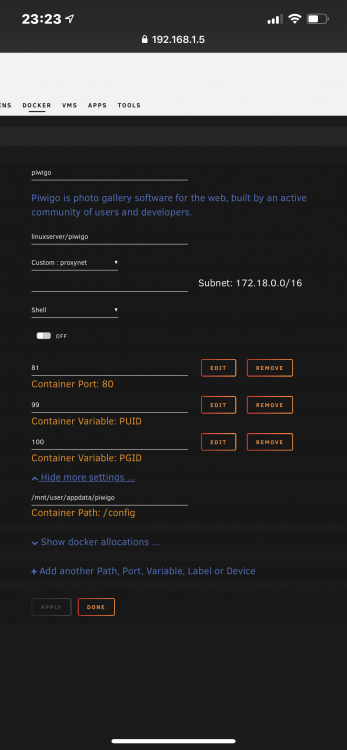
They’re stored in mnt/user/appdata/AppName So yeah, I’d suppose pics are being stored in appdata. I look at Nextcloud for example and all its files are stored in mnt/user/Nextcloud. How would I change piwigo from storing images uploaded outside of appdata? If I recall Nextcloud has a extra parameter when it’s setup to define its uploads to be not stored in appdata folder. How would I change piwigo? Never the less restarted Unraid Server, because Unassigned Drive plugin update required restart, now piwigo just loads to a white screen lol. I did figure out the MariaDB IP got changed when server got restarted and tried to get it back on correct IP by stopping it, stopping container that had the IP needed, statically assigning MariaDB it’s initial IP back and restarting MariaDB on the correct IP and restarting piwigo but now it’s just flat borked so [emoji848][emoji2361] I guess lesson learned is assign static IP to MariaDB/MySQL databases?
-
Excuse the newb here but... Installed piwigo and got DB working and reverse proxy etc... it appears it’s saving actual pics uploaded to appdata/piwigo/www/gallery/upload/2019/12/02 Is where this saving pics going to cause my docker.img to fill up? If it’s not saving pics in a good place now can I move just where it saves pics? Not sure if that directory is part of docked.img or not but I know I don’t want docker.img to fill up. Any advice would be awesome? Thanks!
-
Using Letsencrypt to reverse proxy?
-
Have certs being generated successfully in Letsencrypt(when I delete a subdomain, start/stop LE and add subdomain back it fully completes and no errors in LE log) but browser says my SSL is Cloudflare and doesn’t expire for 313 days? Any disadvantage to using CFs SSL? I think under security in CF I can change something to not use their SSL? Have SSL set to “Full” in CF. The way I read it if I were to switch to “Flexible” it would use my own SSL for sever to Cloudflare connection. Any advantage either way? Sorry for all the questions; I most certainly appreciate your continued guidance. Just not sure if “all SSLs are created equally..” or [emoji848]
-
Exactly why I wanted your insight! If I have issues in future it may be related to proxy being on; just disable CF Proxy and try again? My certs haven’t expired since change so it’s very possible come time to re-new they won’t... Very valuable point! Thank you! [emoji3060]
-
Random Q... could you be as kind to enlighten me when Cloudflare proxy should or shouldn’t be used? Made FULL jump to CF as we spoke about a few days ago(happy so far, too)... so far NextCloud, Guacamole, Emby, BitWarden and OnlyOffice are all working fine with the CF Proxy ON. Not having issues but for future reference does proxy being on just cause issues with some containers or? (Knock on wood, no issues here with it on yet). Any elaboration in case somehow I run into issues later would be awesome mate 😀
-
Yeah bought a domain to “test” with and was playing with forwarding and such(since server isn’t actually setup with test domain). I think it’s going to work nicely with server. I think this weekend going to pull plug and migrate main domain to over to Cloudflare. My main domain has 23 DNS records. When I start, but not change NS, all seems well. Any advice on that front as far as converting NS? Figured If I save a copy of what everything is now if I were to really Bork it I could just roll it back? Any other tips? (Oh yeah, figured out how to get PFSense to update A records with CF, too, since dynamic IPs. Easy like you said!) Thanks a ton for your advice@aptalca, I appreciate it [emoji2]
-
So hypothetically if I were to switch to CloudFlare I could remove all the crap with DuckDNS in middle(because dynamic IP) and go straight to Unraid Reverse proxy from the domain name && all the controls and benefits of CF. At moment not sure I’ll ever use “domain.co”; am going to use “cloud.domain.co” and etc though.
-
Using PFsense. Would that update the Cnames IP even as dynamic changed?


