





Martintheshred
Members
-
Joined
-
Last visited
Everything posted by Martintheshred
-
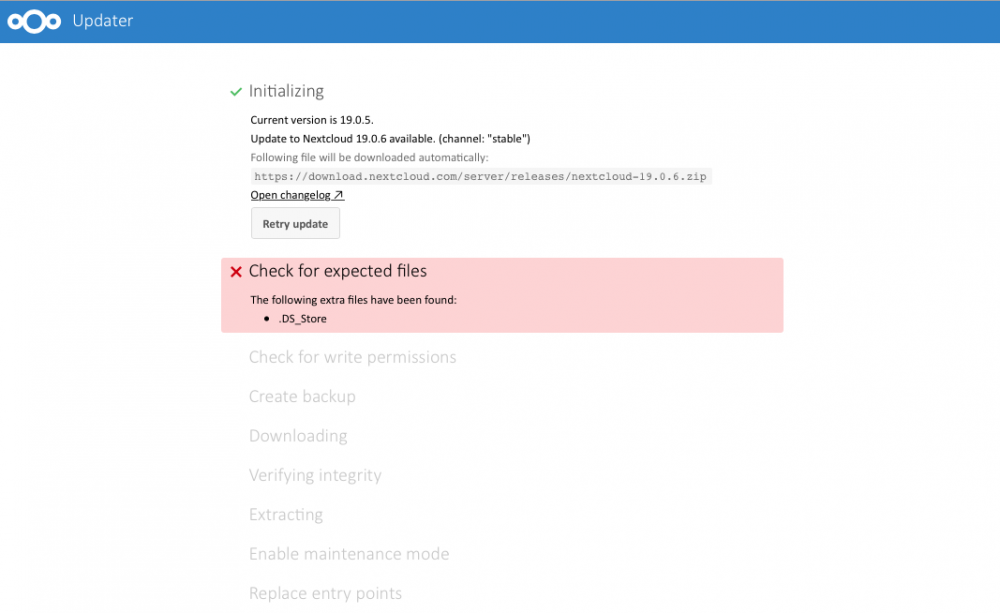
Hi There thank you for all the work you have done with this Nextcloud Docker. I am trying to do the update like I have done previously through the updater and I keep running into this issue can anybody help and advise what I am doing wrong. Cheers Martin
-
Hi Kru-x I am fairly new to this so please bear with me i have MariaDB docker running already that my next cloud docker connects to so how do i down load a new MariaDB or do i just add a new path or variable? as when i click on the MariaDB is says reinstall or edit? sorry if this sounds like a stupid question. Cheers Martin
-
Cheers I will check this out
-
Hi Guys hopefully you can help with this i am getting a couple of security and set up warnings in my Nextcloudsee below: The "X-Frame-Options" HTTP header is not set to "SAMEORIGIN". This is a potential security or privacy risk, as it is recommended to adjust this setting accordingly. The "Strict-Transport-Security" HTTP header is not set to at least "15552000" seconds. For enhanced security, it is recommended to enable HSTS as described in the security tips ↗. how do I resolve these? Thank you in Advance Martin
-
Hi Guys Can you please help i have followed Spaceinvaderone video on how to set up Shinobi pro at home. I have a pair of Anran 1080p Wifi enabled cameras on my house which I can view using Ispy connect running in a windows 10 vm however I would like to use them directly through Shinobi Pro for the reasons described in Spaceinvaderonevideo. The problem I have is I can view both cameras with a thumb nail however when when i have clicked on the thumbnail all i get is a blank screen (see attached) has any one got any ideas?
.thumb.png.eef534f282257ab7c816bf2b7f6c1af5.png)
-
Hi Thank you for your help the update has worked. Martin
-
Hi Guys hopefully somebody can help i am running on the latest version of Unraid 6.8.2 and have a Nextcloud docker running. Had a message saying a that a new update was ready so I did what i normally open up Nextcloud web page clicked on the updater to update to Nextcloud 17.0.3 and as normal let it run however now it appears to be stuck in Maintenance mode see attached. has anybody got any ideas. I have looked on the Nextcloud forums and all it say is use sudo -u www php occ maintenance:mode --off. Not being that used to command line code i will need a bit of hand holding. I did originally put this I general support by mistake and was advised to place it here by a moderator (oops) hopefully someone can help me
.thumb.png.945082937e1ef24ec7ab4cbe1d85fed6.png.1306cc08970409ffdeff5b022aca327a.png)
-
Thanks sorry I thought you had designed and made the whole thing not just the docker / container
-
Hi Djoss firstly thanks for setting this container up and getting back to me on this I apologise for not getting to you sooner I have been out all day the GUI I was asking about was for your Great NginxProxyManager cheers Martinteshred (newbi numpty)
-
Sorry I don’t know what else to suggest as I said I am fairly new to this as well. This worked for me.
-
Hi I cannot help you about the Catalina issue as I am still new at the whole Unraid / Docker Etc.. However I might be able to help with your mouse not showing up. I was able to sort my issue out by clicking on the VNC tab on the left of you screen. Then Click on the button A and then the crt.alt.del button and your mouse should appear (see below) hope this helps
.thumb.png.0aebd4b004815e6dd93d6aa9695b2591.png)
-
Hi All Sorry to sound like complete numpty however there are a couple of things I need to ask. Firstly I clicked on the Docker kindly created and put in Community Apps it down loaded. However every guide I read appears to say I have to create a MySQL database but when check I checked my app data folder it appears to have created one Secondly is there a numpty guide to how to use GUI in Unraid . I would like to use this to run a reverse proxy for my Nextcloud setup. Sorry for stupid sounding questions Martintheshred
-
Hi Ghost82 thanks for your help High Sierra downloaded and appears to be running really well. first ime i have attempted anything like this and very new to this as a whole so i think i will stick with this as my Macbook Runs on High Sierra so any programs I run will work fine on both systems. Thanks again from a Newbie for al your help Martintheshred
-
Hi Ghost 82 thanks for your help got the High Sierra down loading. Although I had to click on the Crtl/AltDel button on the VNC viewer screen arrowed. The main thing is though its uploading. hopefully I will not run into any more snags. One quick question after i have installed High Sierra can i then go back to the docker container and apart from changing the OS can i the ngo and down load Mojave OS and have then both available to use if i want? Martin
-
Hi Sorry i thought i had done it now
-
Hi Ghost82 thanks for this I will try this when i get back in and let you know.
-
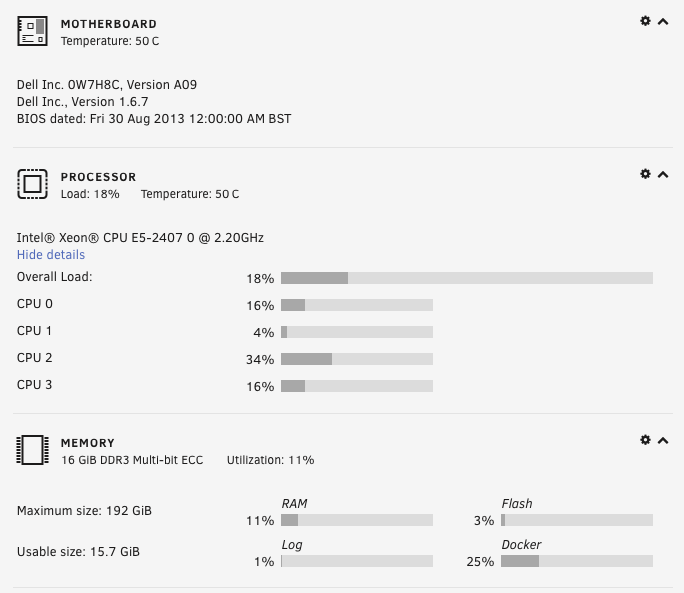
Hi Guys sorry to bother you however i am a bit of a newbie what am i doing wrong? i did the install restarted my server and allI get is this and when I drag the mouse over the vnc screen it disappears so i can not go any further. I have tried to open it with my windows laptop in Chrome and Firefox and also any my Macbook in both Chrome and Firefox the mouse just disappears from the screen. after reading some of the post's about mouse lag I reinserted the line's about the xml lines to do with the mouse but that still did not work that you took out of the code from a previous post on this. can any one suggest a solution? MY unraid server is running on a stock DEL Poweredge T320 i have attached screen shots if this helps Macinabox_High_xml.pdf
.thumb.png.df1cdfe5f99d123f2aa341e9f5e74dd5.png)

.png.4515149e1f3299c1586308fed3f04487.png)
.thumb.png.945082937e1ef24ec7ab4cbe1d85fed6.png.1306cc08970409ffdeff5b022aca327a.png)
.png.a4ef629243f1d73a68d1fef612f13e9a.png)

.png.a6113ca44d7a0cbbb3e36f6414a26379.png)
