





MorgothCreator
Members
-
Joined
-
Last visited
-
I moved the Zoneminder from Unraid to Synology DSM on a DS1815+ box, I believe that is the best package, I see that you stop the support to 1.34, anyway, thank you for the work you put in to create the package, is working fine with 3.5GB of total RAM used and nine 1080p pass through cameras I will always be afraid to upgrade it, due to database corruption, but don't care, never upgrade , has all I need. Excellent work.
-
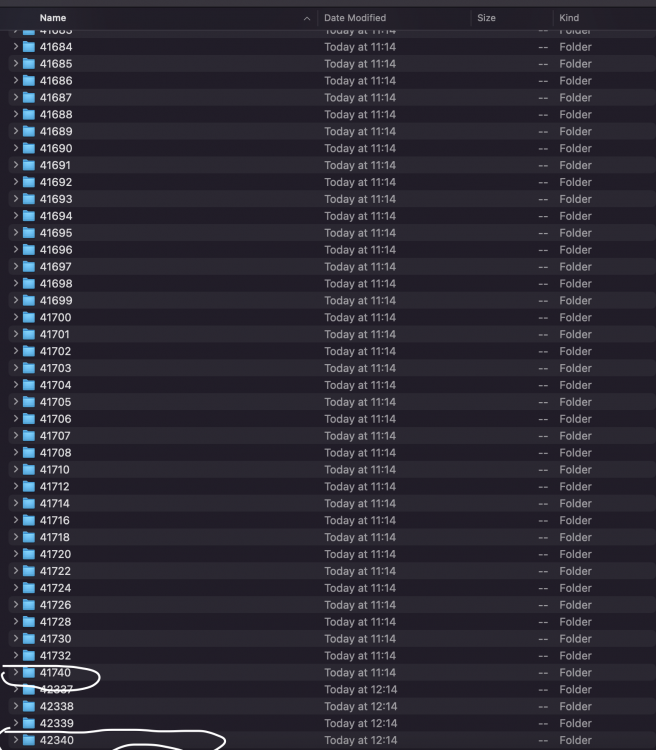
Someone know why zoneminder create several event directory when begin a new video all under 1MB with the timesize from 2 seconds to sometime 2 hours that is a still image with up to 2 seconds moving image at the end, only the marked directory from the below print screen have the one hour length as I set it, but sometime the video is only 15 minutes, other times is 2 hour, the rest have the same 2 seconds to 2 hour video for each hour under 1MB in size, sometime only artefacts, the directory for that date is full of such kind of event folders, at each good video 10-20 event directory's are under 1MB video. I disabled detection on Mocord, I enable it and the same result, on other modes is more than a mess, no one can distinguish what is doing The machine is an Intel 7700 with 16GB RAM, storing on a 3TB WD HDD total RAM usage about 31%, the setup is No encoding/pass thru, minimum buffer 3 maximum 20, with decoding for monitoring, cameras setup to output 10FPS's at 1080p h264, 8 cameras + one that is h265AI because has no h264 option pass thru as well. This issue appeared in about last two updates, I used the same cameras in older versions and no issue like that encountered, only that last several releases after each update the database is corrupted and need a fresh reinstall. The Unraid version is: 6.9.2 stable
-
With fresh install (appdata deleted, image deleted and data deleted ) still the same issue, But still need to update the database from a version to another, and that seem that need some time or corrupt the database: Get:29 http://ppa.launchpad.net/iconnor/zoneminder-1.36/ubuntu focal/main amd64 zoneminder-doc all 1.36.10-focal1 [4957 kB] Preconfiguring packages ... Fetched 40.0 MB in 14s (2773 kB/s) Preparing to unpack .../00-distro-info-data_0.43ubuntu1.9_all.deb ... Unpacking distro-info-data (0.43ubuntu1.9) over (0.43ubuntu1.8) ... Preparing to unpack .../01-tzdata_2021e-0ubuntu0.20.04_all.deb ... Unpacking tzdata (2021e-0ubuntu0.20.04) over (2021a-2ubuntu0.20.04) ... Preparing to unpack .../02-alsa-ucm-conf_1.2.2-1ubuntu0.11_all.deb ... Unpacking alsa-ucm-conf (1.2.2-1ubuntu0.11) over (1.2.2-1ubuntu0.10) ... Preparing to unpack .../03-php7.4-readline_7.4.25-1+ubuntu20.04.1+deb.sury.org+1_amd64.deb ... Unpacking php7.4-readline (7.4.25-1+ubuntu20.04.1+deb.sury.org+1) over (7.4.24-1+ubuntu20.04.1+deb.sury.org+1) ... Preparing to unpack .../04-php7.4-opcache_7.4.25-1+ubuntu20.04.1+deb.sury.org+1_amd64.deb ... Unpacking php7.4-opcache (7.4.25-1+ubuntu20.04.1+deb.sury.org+1) over (7.4.24-1+ubuntu20.04.1+deb.sury.org+1) ... Preparing to unpack .../05-php7.4-mysql_7.4.25-1+ubuntu20.04.1+deb.sury.org+1_amd64.deb ... Unpacking php7.4-mysql (7.4.25-1+ubuntu20.04.1+deb.sury.org+1) over (7.4.24-1+ubuntu20.04.1+deb.sury.org+1) ... Preparing to unpack .../06-php7.4-json_7.4.25-1+ubuntu20.04.1+deb.sury.org+1_amd64.deb ... Unpacking php7.4-json (7.4.25-1+ubuntu20.04.1+deb.sury.org+1) over (7.4.24-1+ubuntu20.04.1+deb.sury.org+1) ... Preparing to unpack .../07-php7.4-gd_7.4.25-1+ubuntu20.04.1+deb.sury.org+1_amd64.deb ... Unpacking php7.4-gd (7.4.25-1+ubuntu20.04.1+deb.sury.org+1) over (7.4.24-1+ubuntu20.04.1+deb.sury.org+1) ... Preparing to unpack .../08-php7.4-fpm_7.4.25-1+ubuntu20.04.1+deb.sury.org+1_amd64.deb ... Unpacking php7.4-fpm (7.4.25-1+ubuntu20.04.1+deb.sury.org+1) over (7.4.24-1+ubuntu20.04.1+deb.sury.org+1) ... Preparing to unpack .../09-libapache2-mod-php7.4_7.4.25-1+ubuntu20.04.1+deb.sury.org+1_amd64.deb ... Unpacking libapache2-mod-php7.4 (7.4.25-1+ubuntu20.04.1+deb.sury.org+1) over (7.4.24-1+ubuntu20.04.1+deb.sury.org+1) ... Preparing to unpack .../10-php7.4-cli_7.4.25-1+ubuntu20.04.1+deb.sury.org+1_amd64.deb ... Unpacking php7.4-cli (7.4.25-1+ubuntu20.04.1+deb.sury.org+1) over (7.4.24-1+ubuntu20.04.1+deb.sury.org+1) ... Preparing to unpack .../11-php7.4-common_7.4.25-1+ubuntu20.04.1+deb.sury.org+1_amd64.deb ... Unpacking php7.4-common (7.4.25-1+ubuntu20.04.1+deb.sury.org+1) over (7.4.24-1+ubuntu20.04.1+deb.sury.org+1) ... Preparing to unpack .../12-libcaca0_0.99.beta19-2.1ubuntu1.20.04.2_amd64.deb ... Unpacking libcaca0:amd64 (0.99.beta19-2.1ubuntu1.20.04.2) over (0.99.beta19-2.1ubuntu1.20.04.1) ... Preparing to unpack .../13-libegl-mesa0_21.0.3-0ubuntu0.3~20.04.3_amd64.deb ... Unpacking libegl-mesa0:amd64 (21.0.3-0ubuntu0.3~20.04.3) over (21.0.3-0ubuntu0.3~20.04.2) ... Preparing to unpack .../14-libgbm1_21.0.3-0ubuntu0.3~20.04.3_amd64.deb ... Unpacking libgbm1:amd64 (21.0.3-0ubuntu0.3~20.04.3) over (21.0.3-0ubuntu0.3~20.04.2) ... Preparing to unpack .../15-libgl1-mesa-dri_21.0.3-0ubuntu0.3~20.04.3_amd64.deb ... Unpacking libgl1-mesa-dri:amd64 (21.0.3-0ubuntu0.3~20.04.3) over (21.0.3-0ubuntu0.3~20.04.2) ... Preparing to unpack .../16-libglx-mesa0_21.0.3-0ubuntu0.3~20.04.3_amd64.deb ... Unpacking libglx-mesa0:amd64 (21.0.3-0ubuntu0.3~20.04.3) over (21.0.3-0ubuntu0.3~20.04.2) ... Preparing to unpack .../17-libglapi-mesa_21.0.3-0ubuntu0.3~20.04.3_amd64.deb ... Unpacking libglapi-mesa:amd64 (21.0.3-0ubuntu0.3~20.04.3) over (21.0.3-0ubuntu0.3~20.04.2) ... Preparing to unpack .../18-libmysqlclient21_8.0.27-0ubuntu0.20.04.1_amd64.deb ... Unpacking libmysqlclient21:amd64 (8.0.27-0ubuntu0.20.04.1) over (8.0.26-0ubuntu0.20.04.3) ... Preparing to unpack .../19-libntlm0_1.5-2ubuntu0.1_amd64.deb ... Unpacking libntlm0:amd64 (1.5-2ubuntu0.1) over (1.5-2) ... Preparing to unpack .../20-libpulse0_1%3a13.99.1-1ubuntu3.12_amd64.deb ... Unpacking libpulse0:amd64 (1:13.99.1-1ubuntu3.12) over (1:13.99.1-1ubuntu3.11) ... Preparing to unpack .../21-mesa-va-drivers_21.0.3-0ubuntu0.3~20.04.3_amd64.deb ... Unpacking mesa-va-drivers:amd64 (21.0.3-0ubuntu0.3~20.04.3) over (21.0.3-0ubuntu0.3~20.04.2) ... Preparing to unpack .../22-mesa-vdpau-drivers_21.0.3-0ubuntu0.3~20.04.3_amd64.deb ... Unpacking mesa-vdpau-drivers:amd64 (21.0.3-0ubuntu0.3~20.04.3) over (21.0.3-0ubuntu0.3~20.04.2) ... Preparing to unpack .../23-mesa-vulkan-drivers_21.0.3-0ubuntu0.3~20.04.3_amd64.deb ... Unpacking mesa-vulkan-drivers:amd64 (21.0.3-0ubuntu0.3~20.04.3) over (21.0.3-0ubuntu0.3~20.04.2) ... Preparing to unpack .../24-php7.4_7.4.25-1+ubuntu20.04.1+deb.sury.org+1_all.deb ... Unpacking php7.4 (7.4.25-1+ubuntu20.04.1+deb.sury.org+1) over (7.4.24-1+ubuntu20.04.1+deb.sury.org+1) ... Preparing to unpack .../25-php8.0-mysql_8.0.12-1+ubuntu20.04.1+deb.sury.org+1_amd64.deb ... Unpacking php8.0-mysql (8.0.12-1+ubuntu20.04.1+deb.sury.org+1) over (8.0.11-1+ubuntu20.04.1+deb.sury.org+1) ... Preparing to unpack .../26-php8.0-common_8.0.12-1+ubuntu20.04.1+deb.sury.org+1_amd64.deb ... Unpacking php8.0-common (8.0.12-1+ubuntu20.04.1+deb.sury.org+1) over (8.0.11-1+ubuntu20.04.1+deb.sury.org+1) ... Preparing to unpack .../27-zoneminder_1.36.10-focal1_amd64.deb ... Unpacking zoneminder (1.36.10-focal1) over (1.36.8-focal2) ... Preparing to unpack .../28-zoneminder-doc_1.36.10-focal1_all.deb ... Unpacking zoneminder-doc (1.36.10-focal1) over (1.36.8-focal2) ... Setting up mesa-vulkan-drivers:amd64 (21.0.3-0ubuntu0.3~20.04.3) ... Setting up mesa-vdpau-drivers:amd64 (21.0.3-0ubuntu0.3~20.04.3) ... Setting up libmysqlclient21:amd64 (8.0.27-0ubuntu0.20.04.1) ... Setting up php7.4-common (7.4.25-1+ubuntu20.04.1+deb.sury.org+1) ... Setting up libcaca0:amd64 (0.99.beta19-2.1ubuntu1.20.04.2) ... Setting up php7.4-mysql (7.4.25-1+ubuntu20.04.1+deb.sury.org+1) ... Setting up libgbm1:amd64 (21.0.3-0ubuntu0.3~20.04.3) ... Setting up alsa-ucm-conf (1.2.2-1ubuntu0.11) ... Setting up libpulse0:amd64 (1:13.99.1-1ubuntu3.12) ... Setting up distro-info-data (0.43ubuntu1.9) ... Setting up php7.4-readline (7.4.25-1+ubuntu20.04.1+deb.sury.org+1) ... Setting up tzdata (2021e-0ubuntu0.20.04) ... Current default time zone: 'Europe/Athens' Local time is now: Fri Oct 29 12:34:06 EEST 2021. Universal Time is now: Fri Oct 29 09:34:06 UTC 2021. Run 'dpkg-reconfigure tzdata' if you wish to change it. Setting up libntlm0:amd64 (1.5-2ubuntu0.1) ... Setting up libglapi-mesa:amd64 (21.0.3-0ubuntu0.3~20.04.3) ... Setting up php8.0-common (8.0.12-1+ubuntu20.04.1+deb.sury.org+1) ... Setting up zoneminder-doc (1.36.10-focal1) ... Setting up php7.4-opcache (7.4.25-1+ubuntu20.04.1+deb.sury.org+1) ... Setting up mesa-va-drivers:amd64 (21.0.3-0ubuntu0.3~20.04.3) ... Setting up php7.4-gd (7.4.25-1+ubuntu20.04.1+deb.sury.org+1) ... Setting up php7.4-json (7.4.25-1+ubuntu20.04.1+deb.sury.org+1) ... Setting up php8.0-mysql (8.0.12-1+ubuntu20.04.1+deb.sury.org+1) ... Setting up libgl1-mesa-dri:amd64 (21.0.3-0ubuntu0.3~20.04.3) ... Setting up php7.4-cli (7.4.25-1+ubuntu20.04.1+deb.sury.org+1) ... Setting up libegl-mesa0:amd64 (21.0.3-0ubuntu0.3~20.04.3) ... Setting up zoneminder (1.36.10-focal1) ... invoke-rc.d: could not determine current runlevel invoke-rc.d: policy-rc.d denied execution of stop. Oct 29 12:34:12 b8458a0935fc /etc/mysql/debian-start[13528]: Upgrading MySQL tables if necessary. Oct 29 12:34:12 b8458a0935fc /etc/mysql/debian-start[13533]: Looking for 'mysql' as: /usr/bin/mysql Oct 29 12:34:12 b8458a0935fc /etc/mysql/debian-start[13533]: Looking for 'mysqlcheck' as: /usr/bin/mysqlcheck Oct 29 12:34:12 b8458a0935fc /etc/mysql/debian-start[13533]: This installation of MySQL is already upgraded to 10.3.31-MariaDB, use --force if you still need to run mysql_upgrade Oct 29 12:34:12 b8458a0935fc /etc/mysql/debian-start[13555]: Checking for insecure root accounts. Checking for db Oct 29 12:34:12 b8458a0935fc /etc/mysql/debian-start[13561]: Triggering myisam-recover for all MyISAM tables and aria-recover for all Aria tables Db exists. Updating permissions for user zmuser@localhost Initiating database upgrade to version 1.36.10 from version 1.36.8 Upgrading database to version 1.36.10 Loading config from DB 221 entries Saving config to DB 221 entries Upgrading DB to 1.36.9 from 1.36.8 Database successfully upgraded to version 1.36.9. Database upgrade to version 1.36.10 successful. Freshening configuration in database Migratings passwords, if any... Loading config from DB 221 entries Saving config to DB 221 entries Done Updating Setting up libapache2-mod-php7.4 (7.4.25-1+ubuntu20.04.1+deb.sury.org+1) ... libapache2-mod-php7.4: not switching MPM - already enabled Oct 29 12:34:14 b8458a0935fc libapache2-mod-php7.4: libapache2-mod-php7.4: not switching MPM - already enabled Setting up libglx-mesa0:amd64 (21.0.3-0ubuntu0.3~20.04.3) ... Setting up php7.4-fpm (7.4.25-1+ubuntu20.04.1+deb.sury.org+1) ... NOTICE: Not enabling PHP 7.4 FPM by default. NOTICE: To enable PHP 7.4 FPM in Apache2 do: Oct 29 12:34:15 b8458a0935fc php7.4-fpm: NOTICE: Not enabling PHP 7.4 FPM by default. Oct 29 12:34:15 b8458a0935fc php7.4-fpm: NOTICE: To enable PHP 7.4 FPM in Apache2 do: NOTICE: a2enmod proxy_fcgi setenvif Oct 29 12:34:15 b8458a0935fc php7.4-fpm: NOTICE: a2enmod proxy_fcgi setenvif NOTICE: a2enconf php7.4-fpm Oct 29 12:34:15 b8458a0935fc php7.4-fpm: NOTICE: a2enconf php7.4-fpm NOTICE: You are seeing this message because you have apache2 package installed. Oct 29 12:34:15 b8458a0935fc php7.4-fpm: NOTICE: You are seeing this message because you have apache2 package installed. invoke-rc.d: could not determine current runlevel invoke-rc.d: policy-rc.d denied execution of restart. Setting up php7.4 (7.4.25-1+ubuntu20.04.1+deb.sury.org+1) ... Processing triggers for libc-bin (2.31-0ubuntu9.2) ... Processing triggers for systemd (245.4-4ubuntu3.13) ... Processing triggers for mime-support (3.64ubuntu1) ... Processing triggers for php7.4-cli (7.4.25-1+ubuntu20.04.1+deb.sury.org+1) ... Processing triggers for libapache2-mod-php7.4 (7.4.25-1+ubuntu20.04.1+deb.sury.org+1) ... Processing triggers for php7.4-fpm (7.4.25-1+ubuntu20.04.1+deb.sury.org+1) ... invoke-rc.d: could not determine current runlevel invoke-rc.d: policy-rc.d denied execution of restart. NOTICE: Not enabling PHP 7.4 FPM by default. NOTICE: To enable PHP 7.4 FPM in Apache2 do: Oct 29 12:34:15 b8458a0935fc php7.4-fpm: NOTICE: Not enabling PHP 7.4 FPM by default. Oct 29 12:34:15 b8458a0935fc php7.4-fpm: NOTICE: To enable PHP 7.4 FPM in Apache2 do: NOTICE: a2enmod proxy_fcgi setenvif Oct 29 12:34:15 b8458a0935fc php7.4-fpm: NOTICE: a2enmod proxy_fcgi setenvif NOTICE: a2enconf php7.4-fpm Oct 29 12:34:15 b8458a0935fc php7.4-fpm: NOTICE: a2enconf php7.4-fpm NOTICE: You are seeing this message because you have apache2 package installed. Oct 29 12:34:15 b8458a0935fc php7.4-fpm: NOTICE: You are seeing this message because you have apache2 package installed. Reading package lists... Building dependency tree... Reading state information... 0 upgraded, 0 newly installed, 0 to remove and 0 not upgraded. *** Running /etc/my_init.d/30_gen_ssl_keys.sh... generating self-signed keys in /config/keys, you can replace these with your own keys if required Generating a RSA private key ..........................+++++ ........+++++ writing new private key to '/config/keys/cert.key' ----- *** Running /etc/my_init.d/40_firstrun.sh... Creating conf folder Copying zm.conf to config folder Moving zmeventnotification.ini Moving secrets.ini Moving the event notification server Moving the pushover api Moving ssmtp to config folder Moving mysql to config folder Creating control folder in config folder Copy /config/conf/ scripts to /etc/zm/conf.d/ Creating symbolink links Using existing data directory for events Correcting /var/cache/zoneminder/events permissions... Using existing data directory for images Correcting /var/cache/zoneminder/images permissions... Using existing data directory for temp Correcting /var/cache/zoneminder/temp permissions... Using existing data directory for cache Correcting /var/cache/zoneminder/cache permissions... no crontab for root Starting services... * Starting Apache httpd web server apache2 * * Starting MariaDB database server mysqld ...done. DBI connect('database=zm;host=localhost','zmuser',...) failed: Unknown database 'zm' at /usr/share/perl5/ZoneMinder/Database.pm line 110. DBI connect('database=zm;host=localhost','zmuser',...) failed: Unknown database 'zm' at /usr/share/perl5/ZoneMinder/Database.pm line 110. Oct 29 12:34:21 b8458a0935fc zmupdate[15744]: ERR [Error reconnecting to db: errstr:Unknown database 'zm' error val:] DBI connect('database=zm;host=localhost','zmuser',...) failed: Unknown database 'zm' at /usr/share/perl5/ZoneMinder/Database.pm line 110. Unable to connect to DB. ZM Cannot continue. BEGIN failed--compilation aborted at /usr/share/perl5/ZoneMinder/Config.pm line 150. Compilation failed in require at /usr/bin/zmupdate.pl line 74. BEGIN failed--compilation aborted at /usr/bin/zmupdate.pl line 74. Oct 29 12:34:21 b8458a0935fc zmupdate[15744]: ERR [Error reconnecting to db: errstr:Unknown database 'zm' error val:] DBI connect('database=zm;host=localhost','zmuser',...) failed: Unknown database 'zm' at /usr/share/perl5/ZoneMinder/Database.pm line 110. DBI connect('database=zm;host=localhost','zmuser',...) failed: Unknown database 'zm' at /usr/share/perl5/ZoneMinder/Database.pm line 110. Oct 29 12:34:21 b8458a0935fc zmupdate[15745]: ERR [Error reconnecting to db: errstr:Unknown database 'zm' error val:] DBI connect('database=zm;host=localhost','zmuser',...) failed: Unknown database 'zm' at /usr/share/perl5/ZoneMinder/Database.pm line 110. Unable to connect to DB. ZM Cannot continue. BEGIN failed--compilation aborted at /usr/share/perl5/ZoneMinder/Config.pm line 150. Compilation failed in require at /usr/bin/zmupdate.pl line 74. BEGIN failed--compilation aborted at /usr/bin/zmupdate.pl line 74. Oct 29 12:34:21 b8458a0935fc zmupdate[15745]: ERR [Error reconnecting to db: errstr:Unknown database 'zm' error val:] Starting ZoneMinder: DBI connect('database=zm;host=localhost','zmuser',...) failed: Unknown database 'zm' at /usr/share/perl5/ZoneMinder/Database.pm line 110. DBI connect('database=zm;host=localhost','zmuser',...) failed: Unknown database 'zm' at /usr/share/perl5/ZoneMinder/Database.pm line 110. Oct 29 12:34:31 b8458a0935fc zmpkg[15756]: ERR [Error reconnecting to db: errstr:Unknown database 'zm' error val:] DBI connect('database=zm;host=localhost','zmuser',...) failed: Unknown database 'zm' at /usr/share/perl5/ZoneMinder/Database.pm line 110. Unable to connect to DB. ZM Cannot continue. BEGIN failed--compilation aborted at /usr/share/perl5/ZoneMinder/Config.pm line 150. Compilation failed in require at /usr/share/perl5/ZoneMinder.pm line 33. BEGIN failed--compilation aborted at /usr/share/perl5/ZoneMinder.pm line 33. Compilation failed in require at /usr/bin/zmpkg.pl line 34. BEGIN failed--compilation aborted at /usr/bin/zmpkg.pl line 34. Oct 29 12:34:31 b8458a0935fc zmpkg[15756]: ERR [Error reconnecting to db: errstr:Unknown database 'zm' error val:] ZoneMinder failed to start *** /etc/my_init.d/40_firstrun.sh failed with status 255 *** Killing all processes... After that, I start it again and successfully started not needing to update the database, reporting that the database is has the desired version, so my conclusion is: Because on some updates the database need to be upgraded, the upgrade need some time and somehow ZM does not have access to the database in time even if MariaDB is successfully starting and the error kill all running processes, but the upgrade process have enough time to upgrade the database, if databse have other data than the default when you install ZM and you do an update that change the database version, will try to upgrade the database, but somehow the database is not upgraded, and every time you start the ZM will try to update the DB ending up in the same place where ZM can not access the database, the result being the killing of all processes including, maybe, the database upgrade process that end up in not having enough time to upgrade the database. Maybe that have some sense...
-
This is quit anoying, two updates in a road to redo everything gain, there is nothing to do to fix it automatically, or at last to retain the most important settings like camera settings and other manual settings and the database to be reset automatically? Or provide a script to reset only the database and let the manual settings untouched, most people don't want to have these issues, and mostly, more probably at every update 😔 Or at last to warning that the update can broke the database and everything will need to be setup again.
-
Second time when after update is broken, this time even after fresh install: Starting services... * Starting Apache httpd web server apache2 * * Starting MariaDB database server mysqld ...done. DBI connect('database=zm;host=localhost','zmuser',...) failed: Unknown database 'zm' at /usr/share/perl5/ZoneMinder/Database.pm line 110. DBI connect('database=zm;host=localhost','zmuser',...) failed: Unknown database 'zm' at /usr/share/perl5/ZoneMinder/Database.pm line 110. Oct 27 15:08:08 b40778ecb6fd zmupdate[15709]: ERR [Error reconnecting to db: errstr:Unknown database 'zm' error val:] DBI connect('database=zm;host=localhost','zmuser',...) failed: Unknown database 'zm' at /usr/share/perl5/ZoneMinder/Database.pm line 110. Unable to connect to DB. ZM Cannot continue. BEGIN failed--compilation aborted at /usr/share/perl5/ZoneMinder/Config.pm line 150. Compilation failed in require at /usr/bin/zmupdate.pl line 74. BEGIN failed--compilation aborted at /usr/bin/zmupdate.pl line 74. Oct 27 15:08:08 b40778ecb6fd zmupdate[15709]: ERR [Error reconnecting to db: errstr:Unknown database 'zm' error val:] DBI connect('database=zm;host=localhost','zmuser',...) failed: Unknown database 'zm' at /usr/share/perl5/ZoneMinder/Database.pm line 110. DBI connect('database=zm;host=localhost','zmuser',...) failed: Unknown database 'zm' at /usr/share/perl5/ZoneMinder/Database.pm line 110. Oct 27 15:08:08 b40778ecb6fd zmupdate[15710]: ERR [Error reconnecting to db: errstr:Unknown database 'zm' error val:] DBI connect('database=zm;host=localhost','zmuser',...) failed: Unknown database 'zm' at /usr/share/perl5/ZoneMinder/Database.pm line 110. Unable to connect to DB. ZM Cannot continue. BEGIN failed--compilation aborted at /usr/share/perl5/ZoneMinder/Config.pm line 150. Compilation failed in require at /usr/bin/zmupdate.pl line 74. BEGIN failed--compilation aborted at /usr/bin/zmupdate.pl line 74. Oct 27 15:08:08 b40778ecb6fd zmupdate[15710]: ERR [Error reconnecting to db: errstr:Unknown database 'zm' error val:] * Starting MariaDB database server mysqld ...done. DBI connect('database=zm;host=localhost','zmuser',...) failed: Unknown database 'zm' at /usr/share/perl5/ZoneMinder/Database.pm line 110. DBI connect('database=zm;host=localhost','zmuser',...) failed: Unknown database 'zm' at /usr/share/perl5/ZoneMinder/Database.pm line 110. Oct 27 15:08:08 b40778ecb6fd zmupdate[15709]: ERR [Error reconnecting to db: errstr:Unknown database 'zm' error val:] DBI connect('database=zm;host=localhost','zmuser',...) failed: Unknown database 'zm' at /usr/share/perl5/ZoneMinder/Database.pm line 110. Unable to connect to DB. ZM Cannot continue. BEGIN failed--compilation aborted at /usr/share/perl5/ZoneMinder/Config.pm line 150. Compilation failed in require at /usr/bin/zmupdate.pl line 74. BEGIN failed--compilation aborted at /usr/bin/zmupdate.pl line 74. Oct 27 15:08:08 b40778ecb6fd zmupdate[15709]: ERR [Error reconnecting to db: errstr:Unknown database 'zm' error val:] DBI connect('database=zm;host=localhost','zmuser',...) failed: Unknown database 'zm' at /usr/share/perl5/ZoneMinder/Database.pm line 110. DBI connect('database=zm;host=localhost','zmuser',...) failed: Unknown database 'zm' at /usr/share/perl5/ZoneMinder/Database.pm line 110. Oct 27 15:08:08 b40778ecb6fd zmupdate[15710]: ERR [Error reconnecting to db: errstr:Unknown database 'zm' error val:] DBI connect('database=zm;host=localhost','zmuser',...) failed: Unknown database 'zm' at /usr/share/perl5/ZoneMinder/Database.pm line 110. Unable to connect to DB. ZM Cannot continue. BEGIN failed--compilation aborted at /usr/share/perl5/ZoneMinder/Config.pm line 150. Compilation failed in require at /usr/bin/zmupdate.pl line 74. BEGIN failed--compilation aborted at /usr/bin/zmupdate.pl line 74. Oct 27 15:08:08 b40778ecb6fd zmupdate[15710]: ERR [Error reconnecting to db: errstr:Unknown database 'zm' error val:] Starting ZoneMinder: DBI connect('database=zm;host=localhost','zmuser',...) failed: Unknown database 'zm' at /usr/share/perl5/ZoneMinder/Database.pm line 110. DBI connect('database=zm;host=localhost','zmuser',...) failed: Unknown database 'zm' at /usr/share/perl5/ZoneMinder/Database.pm line 110. Oct 27 15:08:18 b40778ecb6fd zmpkg[15721]: ERR [Error reconnecting to db: errstr:Unknown database 'zm' error val:] DBI connect('database=zm;host=localhost','zmuser',...) failed: Unknown database 'zm' at /usr/share/perl5/ZoneMinder/Database.pm line 110. Unable to connect to DB. ZM Cannot continue. BEGIN failed--compilation aborted at /usr/share/perl5/ZoneMinder/Config.pm line 150. Compilation failed in require at /usr/share/perl5/ZoneMinder.pm line 33. BEGIN failed--compilation aborted at /usr/share/perl5/ZoneMinder.pm line 33. Compilation failed in require at /usr/bin/zmpkg.pl line 34. BEGIN failed--compilation aborted at /usr/bin/zmpkg.pl line 34. Oct 27 15:08:18 b40778ecb6fd zmpkg[15721]: ERR [Error reconnecting to db: errstr:Unknown database 'zm' error val:] ZoneMinder failed to start *** /etc/my_init.d/40_firstrun.sh failed with status 255 *** Killing all processes... Oct 27 15:08:18 b40778ecb6fd syslog-ng[39]: syslog-ng shutting down; version='3.25.1'
-
Wats happening, after the last update, UnRaid 1.9.1: Mar 26 18:00:00 ecaace443c98 zmdc[1516]: INF ['zma -m 6' started at 21/03/26 18:00:00] Mar 26 18:00:00 ecaace443c98 zmdc[850]: INF ['zma -m 6' crashed, signal 6] Mar 26 18:00:01 ecaace443c98 zmdc[850]: INF [Starting pending process, zmc -m 2] Mar 26 18:00:01 ecaace443c98 zmdc[850]: INF ['zmc -m 2' starting at 21/03/26 18:00:01, pid = 1517] Mar 26 18:00:01 ecaace443c98 zmdc[1517]: INF ['zmc -m 2' started at 21/03/26 18:00:01] Mar 26 18:00:01 ecaace443c98 zmdc[850]: INF [Starting pending process, zma -m 2] Mar 26 18:00:01 ecaace443c98 zmdc[850]: INF ['zma -m 2' starting at 21/03/26 18:00:01, pid = 1518] Mar 26 18:00:01 ecaace443c98 zmdc[1518]: INF ['zma -m 2' started at 21/03/26 18:00:01] Mar 26 18:00:01 ecaace443c98 zmdc[850]: INF [Starting pending process, zma -m 11] Mar 26 18:00:01 ecaace443c98 zmc_m2[1517]: INF [zmc_m2] [Not enabling ffmpeg logs, as LOG_FFMPEG and/or LOG_DEBUG is disabled in options, or this monitor is not part of your debug targets] Mar 26 18:00:01 ecaace443c98 zmdc[1519]: INF ['zma -m 11' started at 21/03/26 18:00:01] Mar 26 18:00:01 ecaace443c98 zmdc[850]: INF ['zma -m 11' starting at 21/03/26 18:00:01, pid = 1519] Mar 26 18:00:02 ecaace443c98 zmdc[850]: INF [Starting pending process, zma -m 9] Mar 26 18:00:02 ecaace443c98 zma_m2[1518]: ERR [zma_m2] [Shared data not initialised by capture daemon for monitor CAM6] Mar 26 18:00:02 ecaace443c98 zmdc[1520]: INF ['zma -m 9' started at 21/03/26 18:00:02] Mar 26 18:00:02 ecaace443c98 zmdc[850]: INF ['zma -m 9' starting at 21/03/26 18:00:02, pid = 1520] Mar 26 18:00:02 ecaace443c98 zmdc[850]: INF [Starting pending process, zma -m 8] Mar 26 18:00:02 ecaace443c98 zmdc[850]: INF ['zma -m 8' starting at 21/03/26 18:00:02, pid = 1521] Mar 26 18:00:02 ecaace443c98 zmdc[1521]: INF ['zma -m 8' started at 21/03/26 18:00:02] Mar 26 18:00:02 ecaace443c98 zmdc[850]: ERR ['zma -m 2' exited abnormally, exit status 255] Mar 26 18:00:02 ecaace443c98 zmdc[850]: INF ['zmc -m 2' crashed, signal 6] Mar 26 18:00:02 ecaace443c98 zmdc[850]: INF ['zma -m 11' crashed, signal 6] Mar 26 18:00:03 ecaace443c98 zmdc[850]: INF ['zma -m 8' crashed, signal 6] Mar 26 18:00:03 ecaace443c98 zmdc[850]: INF ['zma -m 9' crashed, signal 6] Mar 26 18:00:21 ecaace443c98 web_php[594]: ERR [Potentially invalid value for ZM_LOG_DATABASE_LIMIT: 30 day] Mar 26 18:01:22 ecaace443c98 web_php[1072]: ERR [Potentially invalid value for ZM_LOG_DATABASE_LIMIT: 30 day] Mar 26 18:01:23 ecaace443c98 zmdc[850]: INF [Starting pending process, zmc -m 2] Mar 26 18:01:23 ecaace443c98 zmdc[850]: INF ['zmc -m 2' starting at 21/03/26 18:01:23, pid = 1535] Mar 26 18:01:23 ecaace443c98 zmdc[1535]: INF ['zmc -m 2' started at 21/03/26 18:01:23] Mar 26 18:01:23 ecaace443c98 zmdc[850]: INF [Starting pending process, zma -m 2] Mar 26 18:01:23 ecaace443c98 zmdc[850]: INF ['zma -m 2' starting at 21/03/26 18:01:23, pid = 1536] Mar 26 18:01:23 ecaace443c98 zmdc[1536]: INF ['zma -m 2' started at 21/03/26 18:01:23] Mar 26 18:01:23 ecaace443c98 zmc_m2[1535]: INF [zmc_m2] [Not enabling ffmpeg logs, as LOG_FFMPEG and/or LOG_DEBUG is disabled in options, or this monitor is not part of your debug targets] Mar 26 18:01:23 ecaace443c98 zmdc[850]: INF ['zmc -m 2' crashed, signal 6] Mar 26 18:01:23 ecaace443c98 zma_m2[1536]: ERR [zma_m2] [Shared data not initialised by capture daemon for monitor CAM6] Mar 26 18:01:23 ecaace443c98 zmdc[850]: ERR ['zma -m 2' exited abnormally, exit status 255]
-
The more you fix things, the more broken they are 🤦♂️. Now Gitlab does not even start: Upgrading PostgreSQL to 11.7 cp /opt/gitlab/embedded/service/gitlab-rails/public/deploy.html /opt/gitlab/embedded/service/gitlab-rails/public/index.html ok: down: gitaly: 0s, normally up ok: down: logrotate: 1s, normally up ok: down: registry: 0s, normally up ok: down: sidekiq: 1s, normally up ok: down: sshd: 0s, normally up There was an error fetching locale and encoding information from the database Please ensure the database is running and functional before running pg-upgrade STDOUT: STDERR: psql: FATAL: the database system is starting up == Fatal error == Please check error logs == Reverting == ok: down: postgresql: 0s, normally up ok: run: postgresql: (pid 722) 0s == Reverted == == Reverted to 10.12. Please check output for what went wrong == rm -f /opt/gitlab/embedded/service/gitlab-rails/public/index.html ok: run: gitaly: (pid 744) 1s ok: run: logrotate: (pid 808) 0s ok: run: registry: (pid 821) 0s ok: run: sidekiq: (pid 832) 1s ok: run: sshd: (pid 838) 0s Upgrading the existing database failed and was reverted. Please check the output, and open an issue at: https://gitlab.com/gitlab-org/omnibus-gitlab/issues If you would like to restart the instance without attempting to upgrade, add the following to your docker command: -e GITLAB_SKIP_PG_UPGRADE=true
-
Hi, is the forth or fifth update and the issue was not fixed The issue is that when I click to a file link will go to "https://git.devboard.tech:9443/tips/linux/-/blob/master/crontab-check-start-app.md" instead of "https://git.devboard.tech/tips/linux/-/blob/master/crontab-check-start-app.md" for example. This behaviour is valid for all files on the gitlab. The git is up and running, you can check it. The rest if pages are OK. This issue has appeared about five updates ago, I do not changed any configuration file, I do not touch anything, after the update I see this behaviour.......
-
Hi what happened to the last update, After the update all work fine except when I want to access the individual file, the gitlab insert the internal port 9433 to the link and and the browser does not want to load the file, check it here for example: https://git.devboard.tech/boot-loaders/fpga-risc-v If you navigate the directories all OK, when you load file the issue appear.
-
Same here, What happen if I kill him or restart him from time to time? 😀
-
Same error here on a Threadripper 1950x a ASRock X399 Taichi board and Nvidia GTX1080TI and Unraid 6.7.2
-
This issue does not appear if the network is not stressed enought, but now I have 11 VM's running on this machine all with a preety large amount of traffic on the network and once at several hours this undefinitelly hang of the eth0 appear. Sometime the this issue can be fixet wit a network restart, but sometime only with restart. The kernel log is: Mar 31 06:24:59 Tower kernel: e1000e 0000:00:1f.6 eth0: Detected Hardware Unit Hang: Mar 31 06:24:59 Tower kernel: TDH <22> Mar 31 06:24:59 Tower kernel: TDT <78> Mar 31 06:24:59 Tower kernel: next_to_use <78> Mar 31 06:24:59 Tower kernel: next_to_clean <22> Mar 31 06:24:59 Tower kernel: buffer_info[next_to_clean]: Mar 31 06:24:59 Tower kernel: time_stamp <101b4a085> Mar 31 06:24:59 Tower kernel: next_to_watch <23> Mar 31 06:24:59 Tower kernel: jiffies <101b4a800> Mar 31 06:24:59 Tower kernel: next_to_watch.status <0> Mar 31 06:24:59 Tower kernel: MAC Status <40080083> Mar 31 06:24:59 Tower kernel: PHY Status <796d> Mar 31 06:24:59 Tower kernel: PHY 1000BASE-T Status <3800> Mar 31 06:24:59 Tower kernel: PHY Extended Status <3000> Mar 31 06:24:59 Tower kernel: PCI Status <10> Mar 31 06:25:01 Tower root: Checking network connection at 192.168.128.1 ... Mar 31 06:25:01 Tower kernel: e1000e 0000:00:1f.6 eth0: Detected Hardware Unit Hang: Mar 31 06:25:01 Tower kernel: TDH <22> Mar 31 06:25:01 Tower kernel: TDT <78> Mar 31 06:25:01 Tower kernel: next_to_use <78> Mar 31 06:25:01 Tower kernel: next_to_clean <22> Mar 31 06:25:01 Tower kernel: buffer_info[next_to_clean]: Mar 31 06:25:01 Tower kernel: time_stamp <101b4a085> Mar 31 06:25:01 Tower kernel: next_to_watch <23> Mar 31 06:25:01 Tower kernel: jiffies <101b4b000> Mar 31 06:25:01 Tower kernel: next_to_watch.status <0> Mar 31 06:25:01 Tower kernel: MAC Status <40080083> Mar 31 06:25:01 Tower kernel: PHY Status <796d> Mar 31 06:25:01 Tower kernel: PHY 1000BASE-T Status <3800> Mar 31 06:25:01 Tower kernel: PHY Extended Status <3000> Mar 31 06:25:01 Tower kernel: PCI Status <10> Mar 31 06:25:03 Tower kernel: e1000e 0000:00:1f.6 eth0: Detected Hardware Unit Hang: Mar 31 06:25:03 Tower kernel: TDH <22> Mar 31 06:25:03 Tower kernel: TDT <78> Mar 31 06:25:03 Tower kernel: next_to_use <78> Mar 31 06:25:03 Tower kernel: next_to_clean <22> Mar 31 06:25:03 Tower kernel: buffer_info[next_to_clean]: Mar 31 06:25:03 Tower kernel: time_stamp <101b4a085> Mar 31 06:25:03 Tower kernel: next_to_watch <23> Mar 31 06:25:03 Tower kernel: jiffies <101b4b7c0> Mar 31 06:25:03 Tower kernel: next_to_watch.status <0> Mar 31 06:25:03 Tower kernel: MAC Status <40080083> Mar 31 06:25:03 Tower kernel: PHY Status <796d> Mar 31 06:25:03 Tower kernel: PHY 1000BASE-T Status <3800> Mar 31 06:25:03 Tower kernel: PHY Extended Status <3000> Mar 31 06:25:03 Tower kernel: PCI Status <10> Mar 31 06:25:05 Tower kernel: e1000e 0000:00:1f.6 eth0: Detected Hardware Unit Hang: Mar 31 06:25:05 Tower kernel: TDH <22> Mar 31 06:25:05 Tower kernel: TDT <78> Mar 31 06:25:05 Tower kernel: next_to_use <78> Mar 31 06:25:05 Tower kernel: next_to_clean <22> Mar 31 06:25:05 Tower kernel: buffer_info[next_to_clean]: Mar 31 06:25:05 Tower kernel: time_stamp <101b4a085> Mar 31 06:25:05 Tower kernel: next_to_watch <23> Mar 31 06:25:05 Tower kernel: jiffies <101b4bf80> Mar 31 06:25:05 Tower kernel: next_to_watch.status <0> Mar 31 06:25:05 Tower kernel: MAC Status <40080083> Mar 31 06:25:05 Tower kernel: PHY Status <796d> Mar 31 06:25:05 Tower kernel: PHY 1000BASE-T Status <3800> Mar 31 06:25:05 Tower kernel: PHY Extended Status <3000> Mar 31 06:25:05 Tower kernel: PCI Status <10> Mar 31 06:25:05 Tower kernel: ------------[ cut here ]------------ Mar 31 06:25:05 Tower kernel: NETDEV WATCHDOG: eth0 (e1000e): transmit queue 0 timed out Mar 31 06:25:05 Tower kernel: WARNING: CPU: 3 PID: 0 at net/sched/sch_generic.c:461 dev_watchdog+0x150/0x1a8 Mar 31 06:25:05 Tower kernel: Modules linked in: xt_CHECKSUM iptable_mangle ipt_REJECT ebtable_filter ebtables ip6table_filter ip6_tables vhost_net tun vhost tap ipt_MASQUERADE iptable_nat nf_conntrack_ipv4 nf_defrag_ipv4 nf_nat_ipv4 iptable_filter ip_tables nf_nat nfsd lockd grace sunrpc md_mod bonding x86_pkg_temp_thermal intel_powerclamp coretemp kvm_intel kvm crct10dif_pclmul crc32_pclmul crc32c_intel ghash_clmulni_intel pcbc wmi_bmof mxm_wmi aesni_intel aes_x86_64 crypto_simd cryptd glue_helper intel_cstate intel_uncore intel_rapl_perf e1000e i2c_i801 ahci i2c_core libahci wmi video thermal fan backlight acpi_pad button pcc_cpufreq Mar 31 06:25:05 Tower kernel: CPU: 3 PID: 0 Comm: swapper/3 Not tainted 4.18.20-unRAID #1 Mar 31 06:25:05 Tower kernel: Hardware name: System manufacturer System Product Name/STRIX B250F GAMING, BIOS 1207 09/04/2018 Mar 31 06:25:05 Tower kernel: RIP: 0010:dev_watchdog+0x150/0x1a8 Mar 31 06:25:05 Tower kernel: Code: 15 fd 97 00 00 75 36 4c 89 ef c6 05 09 fd 97 00 01 e8 93 c5 fd ff 89 e9 4c 89 ee 48 c7 c7 ee 0f d9 81 48 89 c2 e8 53 c0 b2 ff <0f> 0b eb 0f ff c5 48 81 c2 40 01 00 00 39 cd 75 98 eb 13 48 8b 83 Mar 31 06:25:05 Tower kernel: RSP: 0018:ffff880636d83ea0 EFLAGS: 00010286 Mar 31 06:25:05 Tower kernel: RAX: 0000000000000000 RBX: ffff8806174bc3b0 RCX: 0000000000000007 Mar 31 06:25:05 Tower kernel: RDX: 0000000000000000 RSI: ffff880636d96470 RDI: ffff880636d96470 Mar 31 06:25:05 Tower kernel: RBP: 0000000000000000 R08: 0000000000000003 R09: 0000000000020400 Mar 31 06:25:05 Tower kernel: R10: 00000000000003da R11: 0000000000012ce0 R12: ffff8806174bc39c Mar 31 06:25:05 Tower kernel: R13: ffff8806174bc000 R14: ffff880616616280 R15: 0000000000000003 Mar 31 06:25:05 Tower kernel: FS: 0000000000000000(0000) GS:ffff880636d80000(0000) knlGS:0000000000000000 Mar 31 06:25:05 Tower kernel: CS: 0010 DS: 0000 ES: 0000 CR0: 0000000080050033 Mar 31 06:25:05 Tower kernel: CR2: 000015418ae5bcb0 CR3: 0000000001e0a004 CR4: 00000000003626e0 Mar 31 06:25:05 Tower kernel: Call Trace: Mar 31 06:25:05 Tower kernel: <IRQ> Mar 31 06:25:05 Tower kernel: call_timer_fn+0x18/0x7b Mar 31 06:25:05 Tower kernel: ? qdisc_reset+0xc0/0xc0 Mar 31 06:25:05 Tower kernel: expire_timers+0x7f/0x8e Mar 31 06:25:05 Tower kernel: run_timer_softirq+0x72/0x120 Mar 31 06:25:05 Tower kernel: ? enqueue_hrtimer.isra.3+0x23/0x27 Mar 31 06:25:05 Tower kernel: ? __hrtimer_run_queues+0xd7/0x105 Mar 31 06:25:05 Tower kernel: ? recalibrate_cpu_khz+0x1/0x1 Mar 31 06:25:05 Tower kernel: ? ktime_get+0x3a/0x8d Mar 31 06:25:05 Tower kernel: __do_softirq+0xce/0x1e2 Mar 31 06:25:05 Tower kernel: irq_exit+0x5e/0x9d Mar 31 06:25:05 Tower kernel: smp_apic_timer_interrupt+0x7e/0x91 Mar 31 06:25:05 Tower kernel: apic_timer_interrupt+0xf/0x20 Mar 31 06:25:05 Tower kernel: </IRQ> Mar 31 06:25:05 Tower kernel: RIP: 0010:cpuidle_enter_state+0xe8/0x141 Mar 31 06:25:05 Tower kernel: Code: ff 45 84 ff 74 1d 9c 58 0f 1f 44 00 00 0f ba e0 09 73 09 0f 0b fa 66 0f 1f 44 00 00 31 ff e8 73 af be ff fb 66 0f 1f 44 00 00 <48> 2b 1c 24 b8 ff ff ff 7f 48 b9 ff ff ff ff f3 01 00 00 48 39 cb Mar 31 06:25:05 Tower kernel: RSP: 0018:ffffc900031e3ea0 EFLAGS: 00000246 ORIG_RAX: ffffffffffffff13 Mar 31 06:25:05 Tower kernel: RAX: ffff880636da0c00 RBX: 00001a4e35e90c1c RCX: 000000000000001f Mar 31 06:25:05 Tower kernel: RDX: 00001a4e35e90c1c RSI: 0000000020b84733 RDI: 0000000000000000 Mar 31 06:25:05 Tower kernel: RBP: ffff880636da8d00 R08: 0000000000000002 R09: 0000000000020480 Mar 31 06:25:05 Tower kernel: R10: 00000000009c38a0 R11: 0000671842b060fd R12: 0000000000000004 Mar 31 06:25:05 Tower kernel: R13: 0000000000000004 R14: ffffffff81e589b8 R15: 0000000000000000 Mar 31 06:25:05 Tower kernel: do_idle+0x192/0x20e Mar 31 06:25:05 Tower kernel: cpu_startup_entry+0x6a/0x6c Mar 31 06:25:05 Tower kernel: start_secondary+0x197/0x1b2 Mar 31 06:25:05 Tower kernel: secondary_startup_64+0xa5/0xb0 Mar 31 06:25:05 Tower kernel: ---[ end trace 4bc8f5a4b3412996 ]--- Mar 31 06:25:05 Tower kernel: e1000e 0000:00:1f.6 eth0: Reset adapter unexpectedly Mar 31 06:25:05 Tower kernel: bond0: link status definitely down for interface eth0, disabling it Mar 31 06:25:05 Tower kernel: device eth0 left promiscuous mode Mar 31 06:25:05 Tower kernel: bond0: now running without any active interface! Mar 31 06:25:05 Tower kernel: br0: port 1(bond0) entered disabled state Mar 31 06:25:09 Tower kernel: e1000e: eth0 NIC Link is Up 1000 Mbps Full Duplex, Flow Control: Rx/Tx Mar 31 06:25:09 Tower kernel: bond0: link status definitely up for interface eth0, 1000 Mbps full duplex Mar 31 06:25:09 Tower kernel: bond0: making interface eth0 the new active one Mar 31 06:25:09 Tower kernel: device eth0 entered promiscuous mode Mar 31 06:25:09 Tower kernel: bond0: first active interface up! Mar 31 06:25:09 Tower kernel: br0: port 1(bond0) entered blocking state Mar 31 06:25:09 Tower kernel: br0: port 1(bond0) entered forwarding state Mar 31 06:25:11 Tower root: wap_check: Network connection is down, restarting network ... Last line and "Tower root: Checking network connection at 192.168.128.1 ..." is my script that ping the router every two minutes, without this script to restart the machine remain down indefinitelly. The script to check the network is: #!/bin/bash logger "Checking network connection at 192.168.128.1 ..." x=`ping -c1 192.168.128.1 2>&1 | grep 100%` if [ ! "$x" = "" ]; then logger "wap_check: Network connection is down, restarting network ..." reboot exit fi System information: Model: Custom M/B: ASUSTeK COMPUTER INC. - STRIX B250F GAMING CPU: Intel® Core™ i3-7100 CPU @ 3.90GHz HVM: Enabled IOMMU: Enabled Cache: 128 kB, 512 kB, 3072 kB Memory: 24 GB (max. installable capacity 64 GB) Network: bond0: fault-tolerance (active-backup), mtu 1500 eth0: 1000 Mb/s, full duplex, mtu 1500 Kernel: Linux 4.18.20-unRAID x86_64 OpenSSL: 1.1.1a Uptime: 0 days, 13:39:28
