





Karatekid
Members
-
Joined
-
Habe es mit dem i5 getestet und oben die Ergebnisse eingeschrieben. Werde diesen Post mit neuen Informationen ergänzen.
-
Da ich ja sagte, ich teste auch noch weitere Systeme. Hier ein kleiner Überblick der weiteren Systeme. Das i5-12400 System find ich irgendwie verrückt vor allem wenn man sich die Leistungsreserven ansieht. Zusammenfassung aller Tests ################################################################## N100M Crucial 32GB Ram 1x 3TB WD RED (SpinDown) Kein Docker und keine VM Ohne ASM1166 PCIe Karte —> Bis in C8 ~50-60% PicoPSU-160-XT + LEICKE 120W ULL —> 5,2W - 7W CM 400 MWE —> 14,1W- 17W ####### Mit ASM1166 PCIe Karte 4x im 16x Slot (im 1x Slot selbe Ergebnisse / Egal wo Festplatte angeschlossen ist) —> Bis in C8 bis 75% PicoPSU-160-XT + LEICKE 120W ULL —> 6W - 9W ################################################################## ASRock IMB-181-L i7-4770S 16 GB DDR3 1x 128GB mSata 1x 3TB WD RED (SpinDown) Kein Docker und keine VM 94% C7 PicoPSU-160-XT + LEICKE 120W ULL —> 14W ################################################################## Gigabyte B660M DS3H DDR4 i5-12400 16GB DDR4 (2x8GB) 1x 3TB WD RED (SpinDown) Kein Docker und keine VM 83% C10 PicoPSU-160-XT + LEICKE 120W ULL —> 6,5W PicoPSU-160-XT + Billig China Netzteil —> 7,1W Inter-tech China + Billig China Netzteil —> 8,4W Inter-tech China + LEICKE 120W ULL —> 8,1W ####### PicoPSU-160-XT + LEICKE 120W ULL - Keine Docker Container - Windows 11 VM (ohne Optimierung) -—> 40W
-
Erst einmal Danke für euer ganzes Feedback! Ich hätte tatsächlich nicht gedacht, dass die Ergebnisse so einen krassen Unterschied haben. Dies bestätigt deine Aussage @MPC561 das die Liste nicht für das N100M taugt. Ich habe jetzt mal ein paar Test gemacht und hier die Ergebnisse. Ich werde sobald die Aliexpress PicoPSU und Netzteil da ist, damit auch nochmal ein Test machen. Die Spikes finde ich sehr komisch aber ist wahrscheinlich Unraid. Das System ist ja neu aufgesetzt und hat damit auch kein Cache Addon oder sonstiges. N100M Crucial 32GB Ram 1x 3TB WD RED (SpinDown) Kein Docker und keine VM Ohne ASM1166 PCIe Karte —> Bis in C8 ~50-60% PicoPSU-160-XT + LEICKE 120W ULL —> 5,2W - 7W CM 400 MWE —> 14,1W- 17W ################################## Mit ASM1166 PCIe Karte 4x im 16x Slot (im 1x Slot selbe Ergebnisse) —> Bis in C8 bis 75% PicoPSU-160-XT + LEICKE 120W ULL —> 6W - 9W Alternative Feststellungen GUI offen —> 2W
-
Du ich versteh dich und deine Argumentation alles. Kann mich aber nur auf die Quellen beziehen die ich kenne. (Sheet / Gutt Artikel / Forum) Verifiziert war scheinbar hier das falsche Wort. Nennen wir es bestätigt die gute Einstufung des Netzteils RM550x. Ich wiederhole gern meine Annahme: Die Google Sheet Liste listet Netzteile aufgrund von Tests von "Cybenetics" auf. Wolfgang hat hier nur die Page von Cybenetics geparst und in eine Sheet gehauen. Meine Aussage war nur, dass der andere Artikel von gutt.it die scheinbar guten Messwerte bestätigt. Ebenso lese ich in allen Foren, dass dies das beste Netzteil wäre. (Wir reden hier nicht von PicoPSU welcher sicher besser sind und auch einen höheren Wirkungsgrad haben) Wenn ich also diese Fakten zusammen nehme, gehe ich davon aus, dass Cybenetics richtig und wiederholbar testet. --> Meine persönliche Annahme. Das würde bedeuten, dass das CM 400 nur einen Platz dahinter liegt. Du kannst aber auch nicht das Messprotokoll vom SF450 rausnehmen, das liegt auf Platz 117 du musst schon das vom RM550x (2021) hernehmen. Ich gebe dir recht die Werte dort sind bei 5W auch nur bei ~62%. Dann nehmen wir eben mal einen Arbeitspunkt von 5W an. PicoPSU+Netzteil (Wirkungsgrad ~ 86%*90% = 77,4%) RM550x 62% Bedeutet um 5W zu liefern, müssen PicoPSU --> 5W/0,774 = 6,46W RM550x --> 5W/0,62 = 8W ziehen. Eine Differenz von 1,54W und nicht wie oben beschrieben von 8W. Vllt liege ich mit meinen Behauptung völlig falsch! Völlig ok und freue mich wenn ich die Werte von euch mit dem PicoPSU erreichen kann. Ich gehe davon aus, dass irgendeine Einstellung bei meinem N100M von mir nicht richtig gesetzt ist. Und ja PicoPSU sollte morgen oder spätestens am Wochenende kommen dann kann mach ich sehr gern eine Messung zwischen PicoPSU und CM 400 NWE
-
Ich kann das sehr gut nachvollziehen und sehe das auch wie du, jedoch frage ich mich dann wie dieser Artikel dann auf die Ergebnisse kommt, welche auch die Firma Cybenetics verifiziert. https://gutt.it/corsair-rm550x-550w-netzteil-vs-picopsu-90/ Bedeutet eigentlich für mich es gibt keinen Grund an dem Ergebnis von Cybenetics zu zweifeln. Nichtsdestotrotz kann ich deine Argumentation nachvollziehen und werde es ja die Tage selbst herausfinden. Dann kann ich einen vergleich zwischen dem PicoPSU und dem CM 400 beisteuern können. Ich baue zudem nebenbei noch ein i5-12400 mit einem GIGABYTE B660M DS3H DDR4 und 32GB RAM auf. Ähnlich dem Setup von hier https://www.hardwareluxx.de/community/threads/sparsamer-nas-mediaserver-neuling.1329924/ Schauen wir mal
-
Zur Vergleichbarkeit habe ich jetzt das selbe Netzteil Setup wie du gekauft. kommt morgen per Amazon und dann schauen wir weiter. China PicoPsu wird noch paar Tage länger dauern.
-
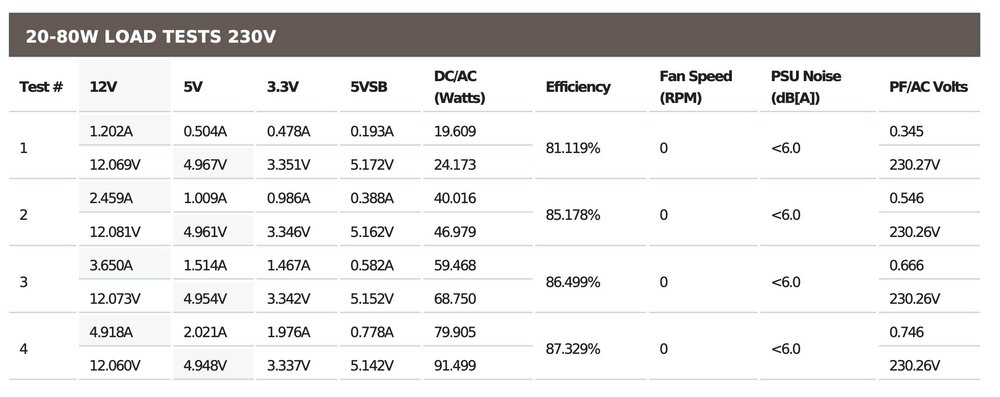
Stimmt leider nicht. Die Spalten stimmen! https://www.cybenetics.com/d/cybenetics_H7o.pdf Und das Cool Master 400 ist nur ein Platz hinter dem RM550x
-
Das ist bestellt und kommt die Tage aus China. Nach der Liste der Netzteile ist es eines der besseren. https://docs.google.com/spreadsheets/d/1TnPx1h-nUKgq3MFzwl-OOIsuX_JSIurIq3JkFZVMUas/edit?gid=110239702#gid=110239702 Kann mir schwer vorstellen, dass 8W allein das Netzteil schlucken soll.
-
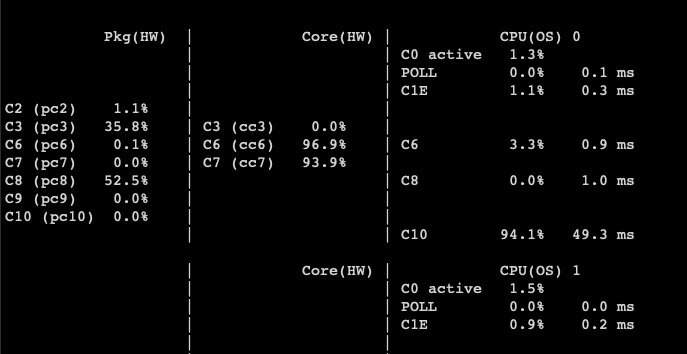
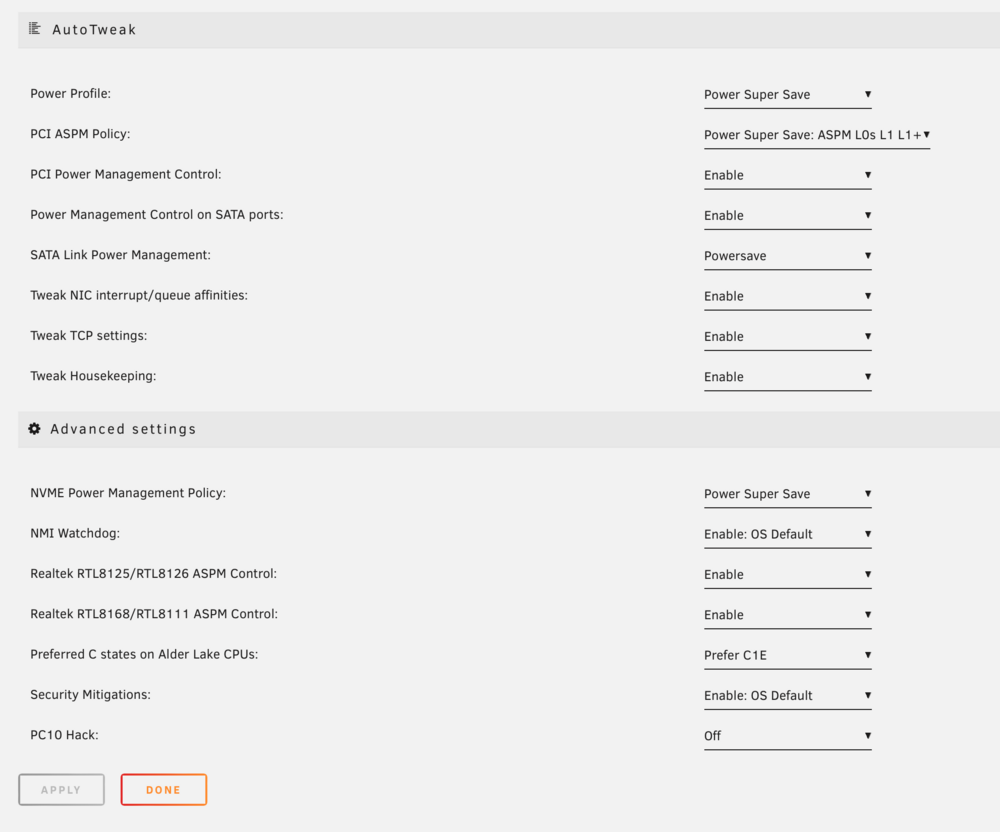
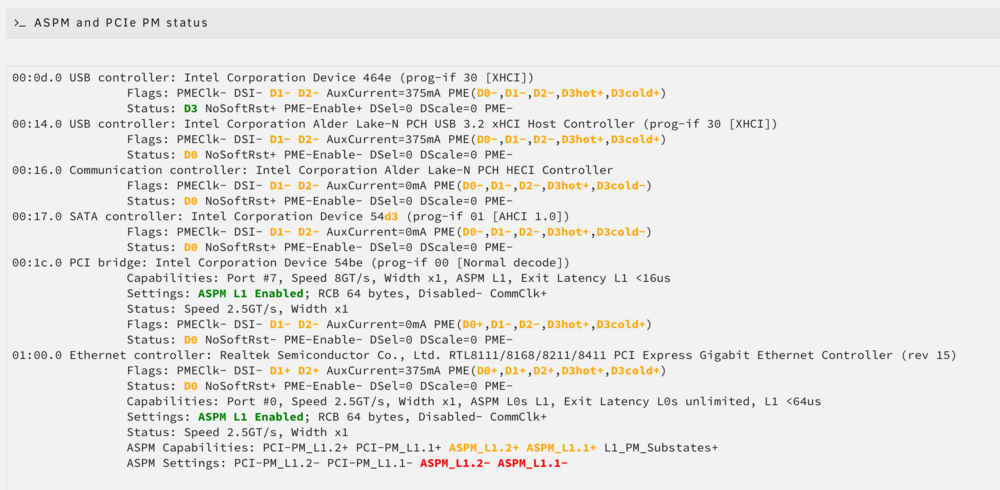
Sehr interessant das alles zu lesen, ich komme zumindest vom Stromverbrauch nicht so weit runter. Habe aktuell Testweise folgendes Setup aufgebaut N100M 32GB Crucial RAM Cooler Master 400 MWE Netzteil 1x HDD 3TB WD Red Unraid in Version 6.12.10 (Docker und VM deaktiviert) Alle Hacks mit sudo setpci -s 00:1c.0 0x50.B=0x42 sudo setpci -s 01:00.0 0x80.B=0x42 sudo powertop --auto-tune gemacht, Bios wie gepostet eingestellt und auch das Intel GPU Top Addon installiert. Die Festplatte befindet sich im SpinDown und gemessen mit einem Brennstuhl Zwischenstecker komme ich auf 14W, welcher ab und an auf 17W springt.

-
I having issues to connect with duplicati to proftpd. The answer is 451 Transfer aborted. Broken pipe. Filezilla is working fine and als a script made in python is working fine. Only dupliacti is making trouble. Do you have any idea?
-
Can you look in the nextcloud nginx config if the following file looks like mine? I know that there is a ticket in the nextcloud docker image related to this. nextcloud/nginx/site-confs/default default
-
Found the failure in the nextcloud config. Thank you very much for your help!! Have a happy new year.
-
Funny... https://securityheaders.com/ says: X-Frame-Options = SAMEORIGIN (green) but Warning: X-Frame-Options --> There was a duplicate X-Frame-Options header. https://scan.nextcloud.com/ says: X-Frame-Options is red Will the X-Frame-Option not set by the last webservice in the row or how does it work? Maybe its a poblem by Nextcloud directly.
-
Hey, sorry I also forget that you made awesome work!! I would like to have the ability to do something like it. The UI just shows some dockers and not all of them. MQTT is now working, was because of my network structure. I need to made that all containers are able to speak to each other and also to unraid. I thought on a structure like that, where all points have a single message. Json is fine but I think at smarthome systems its better to have single messages for every status. That makes it easy to put it as a new json together for the display. I checked my adapters at iobroker and see that for example kodi does put every channel or switch in a single message/object. servername systeminfo arrayStatus arrayProtection ... vm vm1 switch_1 id status usb name attached ... docker container1 switch_1 imageUrl name status ...
-
Not working for all of my docker containers at my side. Log says: There was a problem retrieving a field for a docker image Cannot read property 'contents' of undefined Docker images will be build on my side over docker-compose and not over the app center. what do you need for analysis? Question by the way. Why did you not build a general unraid-mqtt-interface? I'm using iobroker and nodered and this has not the format of Home Assistant. I must no badly change this to my needs. So the idea could be a general unraid-mqtt-interface and adapter for every smarthome-system if needed.



