





joshbgosh10592
Members
-
Joined
-
Last visited
Everything posted by joshbgosh10592
-
I'm still having this issue on 6.9.1. I have to purge /var/log/syslog (.1 and .2 as well) and then /etc/rc.d/rc.nginx restart in order for the pages to start responding again....
-
Same issue here... Still on 6.8.3 and don't want to upgrade to an -rc branch as I don't have enough time to provide feedback on it. /etc/rc.d/rc.nginx restart temporarily solved it, but we'll see for how long.
-
There's gotta be something we can do, as now that my transcode cache is set to /tmp, the size hasn't changed at all, not even during even bigger batches. I just don't know enough to look at... Thank you though! Hopefully someone else will come across this thread and help us out.
-
Yup! Name Container Writable Log --------------------------------------------------------------------- tdarr_aio 7.68 GB 395 kB 5.24 MB binhex-krusader 1.92 GB 35.1 MB 13.0 kB Shinobi 1.05 GB 93.2 MB 540 kB unmanic 567 MB 304 kB 5.72 kB HandBrake 424 MB 0 B 23.4 MB QDirStat 251 MB 0 B 23.4 MB OpenSpeedTest 54.1 MB 2 B 928 B mergerfs-static-build 5.58 MB 0 B 23.4 MB I knew tdarr_aio was the issue, I just don't know how to clean it up. Thank you!
-
Thank you for those steps! Any idea how to shrink the docker.img file though?
-
I did not specify a directory, I'm assuming that's part of my issue, and why the file size shrunk a little bit after the batch was completed. Where should that be pointed to? I'd love to have cache just go to RAM, as I have PLENTY of RAM, but am strapped for storage on my cache drive pool (for now). I've read increasing the docker size is against best practices, is that correct? I can do it for now, but I'd rather figure out why this docker container keeps going crazy. That explanation makes sense though, as I'm actually a VM admin for the company I work for. So that setting just sets the largest amount the dynamically expanding "disk" can grow to. So thank you for explaining and making a comparison!
-
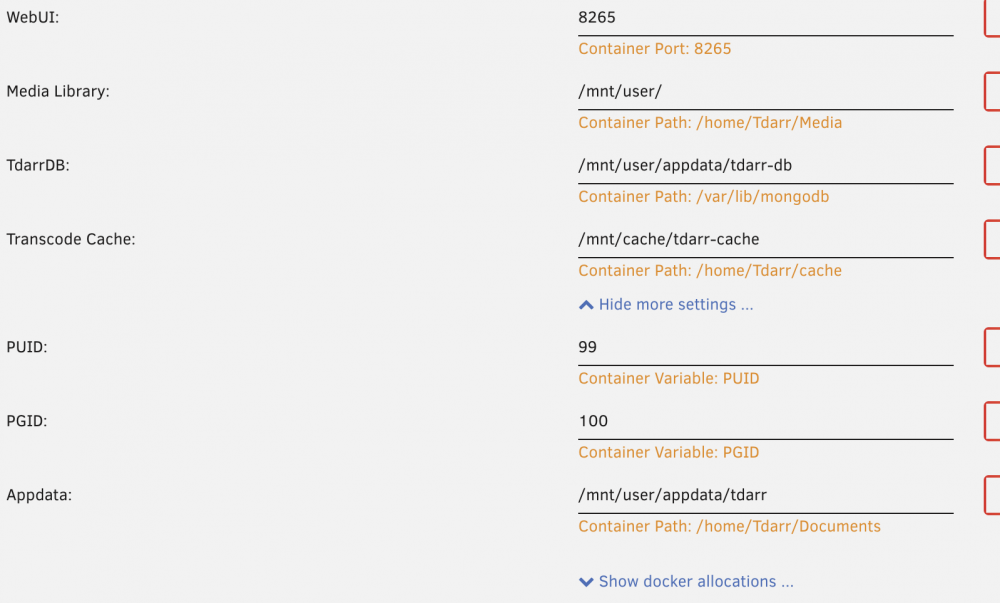
I started a rather large batch of transcodes, and unRAID is now complaining about 98% usage of Docker. I'm VERY new to Docker so I barely know where to start. But, reading other posts on here, I know at least to run these commands. And below is my Docker config screen. It looks like everything is mounted to the array, so I'm confused. I did hop into the command line of the docker and found ~/Tdarr/bundle/programs/server had cache transcodes inside it. After the batch completed and those files were gone, the docker.img file did not shrink by much (99% to 86%) Not sure where to go from here... du -h -d 1 /var/lib/docker/ 160K /var/lib/docker/containerd 3.5M /var/lib/docker/containers 0 /var/lib/docker/plugins 222G /var/lib/docker/btrfs 31M /var/lib/docker/image 44K /var/lib/docker/volumes 0 /var/lib/docker/trust 56K /var/lib/docker/network 0 /var/lib/docker/swarm 16K /var/lib/docker/builder 56K /var/lib/docker/buildkit 100K /var/lib/docker/unraid 0 /var/lib/docker/tmp 0 /var/lib/docker/runtimes 222G /var/lib/docker/ docker ps -s CONTAINER ID IMAGE COMMAND CREATED STATUS PORTS NAMES SIZE 8ecb4d32c731 haveagitgat/tdarr_aio "/bin/sh -c 'sudo se…" 3 days ago Up 3 days 0.0.0.0:8265->8265/tcp tdarr_aio 2.49GB (virtual 10.2GB) 6a79c033ca82 openspeedtest/latest "/docker-entrypoint.…" 3 days ago Up 3 days 3000/tcp, 0.0.0.0:3001->8080/tcp OpenSpeedTest 2B (virtual 54.1MB) b31f010c9faf binhex/arch-krusader "/usr/bin/tini -- /b…" 2 weeks ago Up 2 weeks 5900/tcp, 0.0.0.0:6080->6080/tcp binhex-krusader 35.1MB (virtual 1.92GB) du -sh /mnt/user/system/docker/ 20G /mnt/user/system/docker/
-
Did you ever figure this out? I have my IoT devices on one subnet while computers are on another. It's great for security, but I can't AirPlay because of it..
-
Any idea how to make the mergerFS file to stay persistently in /bin/ after a reboot? I make the file in /mnt/user/share/name and copy it to /bin, but after a reboot, it's gone from /bin, but survived inside /mnt/user/share/name... Also, anyone have any idea on how to make it readable from an NFS Client (Proxmox)? noforget and use_ino doesn't allow it..
-
As per the thread below, I'm submitting a bug report for the inability to host nested VMs. In my case, I have a Proxmox VM (PVE-Witness) running on unRAID. It's the third node of my Proxmox cluster. When I try to fire up a VM on PVE-Witness that was just running on PVE-1, I'm met with the error: TASK ERROR: KVM virtualisation configured, but not available. Either disable in VM configuration or enable in BIOS. As requested, I attempted a similar task on a newly created Ubuntu 18.4 VM (Ubuntu). When creating the VM in Ubuntu, I'm met with: "Warning: KVM is not available." nas-diagnostics-20191021-0320.zip
-
I just looked at the logging for the first time in quite a while and I'm being flooded by errors, about 3 every second: Aug 27 23:31:24 NAS root: error: /plugins/unassigned.devices/UnassignedDevices.php: wrong csrf_token I've seen in this thread that it was a security increase within unRAID's webUI, but that was resolved on 6.3 I believe. Unassigned Devices is fully updated. Any ideas?
