






TDA
Members
-
Joined
-
Last visited
Everything posted by TDA
-
Hello0, I'm having something like you (it's called bond because in the beginning it was a bounded network) Under docker it's indeed MACVLAN:
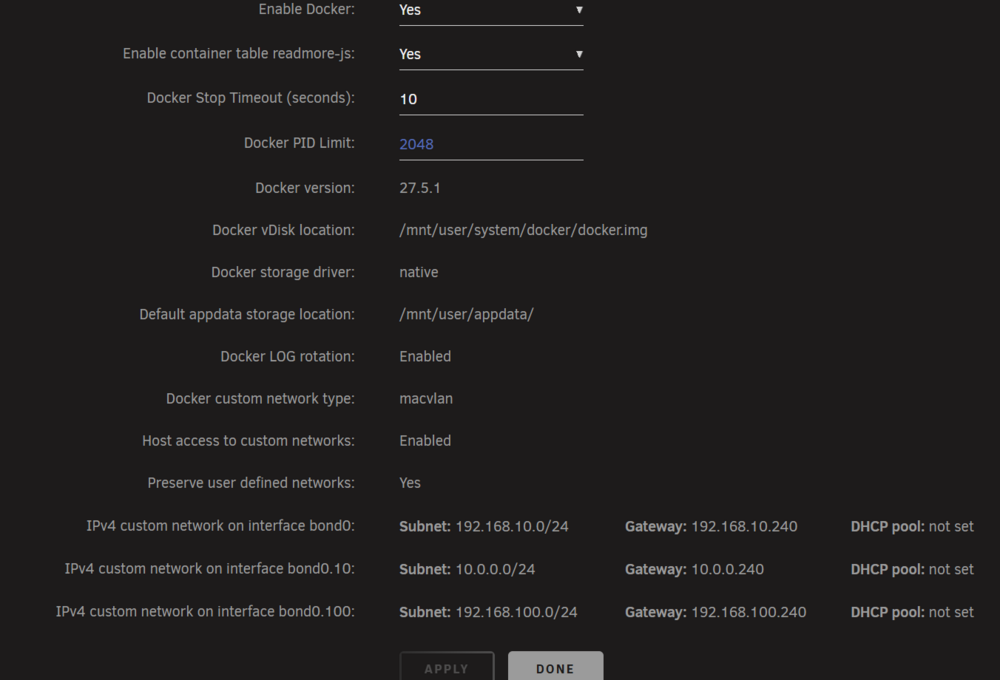
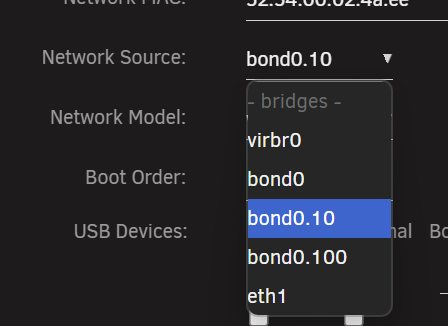
-
Sorry I don't understand what exactly you want to know. The HyperVisor itself is on the VLAN (before setting a fixed IP it was using a DHCP lease), so all VM inside it should already be on the VLAN 10 - and it's able to communicate with the DHCP/Router of the VLAN. So theoretically also it's VMs should be able to do it - but they don't (even though MAC Spoofing, which seems to be necessary according to MS). sekiro-diagnostics-20250512-2227.zip
-
Hello, The XML is as following: <?xml version='1.0' encoding='UTF-8'?> <domain type='kvm'> <name>SCCM Workbench</name> <uuid>671cce78-fe00-8f39-b3f1-f93f0b97614c</uuid> <description>Windows Server 2025 HyperV</description> <metadata> <vmtemplate xmlns="unraid" name="Windows 11" icon="windows11.png" os="windowstpm" webui="" storage="default" iconold="windows11.png"/> </metadata> <memory unit='KiB'>33554432</memory> <currentMemory unit='KiB'>33554432</currentMemory> <memoryBacking> <nosharepages/> </memoryBacking> <vcpu placement='static'>8</vcpu> <cputune> <vcpupin vcpu='0' cpuset='1'/> <vcpupin vcpu='1' cpuset='17'/> <vcpupin vcpu='2' cpuset='3'/> <vcpupin vcpu='3' cpuset='19'/> <vcpupin vcpu='4' cpuset='5'/> <vcpupin vcpu='5' cpuset='21'/> <vcpupin vcpu='6' cpuset='7'/> <vcpupin vcpu='7' cpuset='23'/> </cputune> <os> <type arch='x86_64' machine='pc-i440fx-9.2'>hvm</type> <loader readonly='yes' type='pflash' format='raw'>/usr/share/qemu/ovmf-x64/OVMF_CODE-pure-efi-tpm.fd</loader> <nvram format='raw'>/etc/libvirt/qemu/nvram/671cce78-fe00-8f39-b3f1-f93f0b97614c_VARS-pure-efi-tpm.fd</nvram> <boot dev='hd'/> </os> <features> <acpi/> <apic/> <hyperv mode='custom'> <relaxed state='on'/> <vapic state='on'/> <spinlocks state='on' retries='8191'/> <vpindex state='on'/> <synic state='on'/> <stimer state='on'/> <vendor_id state='on' value='none'/> </hyperv> </features> <cpu mode='host-passthrough' check='none' migratable='on'> <topology sockets='1' dies='1' clusters='1' cores='4' threads='2'/> <cache mode='passthrough'/> </cpu> <clock offset='localtime'> <timer name='hpet' present='no'/> <timer name='hypervclock' present='yes'/> </clock> <on_poweroff>destroy</on_poweroff> <on_reboot>restart</on_reboot> <on_crash>restart</on_crash> <devices> <emulator>/usr/local/sbin/qemu</emulator> <controller type='pci' index='0' model='pci-root'/> <controller type='virtio-serial' index='0'> <address type='pci' domain='0x0000' bus='0x00' slot='0x03' function='0x0'/> </controller> <controller type='usb' index='0' model='ich9-ehci1'> <address type='pci' domain='0x0000' bus='0x00' slot='0x07' function='0x7'/> </controller> <controller type='usb' index='0' model='ich9-uhci1'> <master startport='0'/> <address type='pci' domain='0x0000' bus='0x00' slot='0x07' function='0x0' multifunction='on'/> </controller> <controller type='usb' index='0' model='ich9-uhci2'> <master startport='2'/> <address type='pci' domain='0x0000' bus='0x00' slot='0x07' function='0x1'/> </controller> <controller type='usb' index='0' model='ich9-uhci3'> <master startport='4'/> <address type='pci' domain='0x0000' bus='0x00' slot='0x07' function='0x2'/> </controller> <interface type='direct' trustGuestRxFilters='yes'> <mac address='52:54:00:02:4a:ee'/> <source dev='bond0.10' mode='bridge'/> <model type='virtio-net'/> <address type='pci' domain='0x0000' bus='0x00' slot='0x02' function='0x0'/> </interface> <serial type='pty'> <target type='isa-serial' port='0'> <model name='isa-serial'/> </target> </serial> <console type='pty'> <target type='serial' port='0'/> </console> <channel type='unix'> <target type='virtio' name='org.qemu.guest_agent.0'/> <address type='virtio-serial' controller='0' bus='0' port='1'/> </channel> <input type='tablet' bus='usb'> <address type='usb' bus='0' port='1'/> </input> <input type='mouse' bus='ps2'/> <input type='keyboard' bus='ps2'/> <tpm model='tpm-tis'> <backend type='emulator' version='2.0' persistent_state='yes'/> </tpm> <graphics type='vnc' port='-1' autoport='yes' websocket='-1' listen='0.0.0.0' keymap='fr-ch' sharePolicy='ignore'> <listen type='address' address='0.0.0.0'/> </graphics> <audio id='1' type='none'/> <video> <model type='qxl' ram='65536' vram='16384' vgamem='16384' heads='1' primary='yes'/> <address type='pci' domain='0x0000' bus='0x00' slot='0x1e' function='0x0'/> </video> <hostdev mode='subsystem' type='pci' managed='yes'> <driver name='vfio'/> <source> <address domain='0x0000' bus='0x04' slot='0x00' function='0x0'/> </source> <address type='pci' domain='0x0000' bus='0x00' slot='0x04' function='0x0'/> </hostdev> <memballoon model='none'/> </devices> </domain> I don't know if the problem could be related to the "custom network" and that it's on MACVLAN.
-
Hello Everyone, I'm trying to install a Hyper-V Server VM which should host other VMs. My Hyper-V Server is working (network access), but underlying VMs aren't. I saw that for a nested Hyper-V you should enable MAC Address Spoofing for the VMs, but unfortunately isn't working. To be noticed that the Hyper-V VM is using a custom network which is on a VLAN, and I'm using MACVLAN (because I need that my Docker have a fixed reacheable IP Address). Any advice or help is gladly welcome 🙂 Thanks in advance.
-
So - the Hypervisor itself "seems" to work. Unfortunately every VM which is inside doesn't have access to the network (strangely enough). They receive an IP over DHCP, but aren't able to reach the internet. Anyone has experience whit such a construct (hyper-V VM with VM inside)
-
I tried to disable Disabling Large Send Offload (LSO), and I was able to do so (kind of) and now it *seems* to work - for the moment. I'll have to do extensive tests
-
Hello, I know that "nested virtualisation" is not the brightest idea - but I have to do a labor and I want to use my passthrough Nvme drive. The thing that's a little bit strange is following is that as soon as I enable Hyper-V on the VM I'm not able to reach my Unraid SMB anymore. The Network Model is: virtio-net. What's happening is: Fresh install of W2022 (I wanted to use 2025, but it peaks in CPU usage as soon as I enable Hyper-V role, so I reverted to 2022): I can connect via RDP to my VM I can ping my Unraid Server (segmented network 10.x.x.x/24) and try to connect to the SMB share, I'm asked to put the username and password and I can connect Enabling Hyper-V role and rebooting the server I can connect via RDP to my VM I can ping my Unraid Server, but when I try to reach the share I get : "Windows cannot find \\ip\share" Created the virtual switch: I can connect via RDP to my VM I can ping my Unraid Server, but when I try to reach the share I get : "Windows cannot find \\ip\share" So I'm a little confused what's preventing the connection to the SMB as soon as I enable Hyper-V. Thanks in advance
-
So in the end I bought a Samsung 990Pro Nvme disk. With this one the VM works like expected - so I will use the other drive as an extension of my PC and I close this thread. Thanks a lot for your support and effort.
-
Hello everyone, Since a couple of time strangely enough my server accept again passwords through password. I want to start the whole procedure again from scratch (following this post) - what have I to delete to disallow the old keys? Thanks in advance
-
Ok found the problem... my mate installed a VPN on my computer - which apparently isn't so great with handling split-tunneling... that's the reason why I wasn't able to reach the server anymore... Simple problem - simple solution 😅 Sorry for bothering with a such "stupid" issue.
-
No it's not working anymore, and that's what triggered the problem in the first place. Since the server and all other members have static IPs (and the server is in the same environment since 5years) I don't get what happened all of the sudden. I'm now trying to revert it to a downgraded version to see if the problem is fixed....
-
Hello Everyone, I'm encountering a very strange issue since today. The server GUI is not accessible anymore (till yesterday it was working without problems). I rebooted the server and attached a monitor and started the server with the GUI - and after it should start the GUI it stay on a black screen. I then booted it with the GUI in SAFE MODE (no plugins), it starts and I'm able to login through the GUI. I haven't installed any new plugin since a week - so I don't really get what could produce the issue. What steps could I do to try to fix this issue?
-
After a good while, the loading wheel disappeared, but instead of showing the "Windows Installation Setup" its only shows a black screen: I'm really tempted to get another nvme drive (samsung) - but I'm not sure if I will not encounter the same issue... 😐

-
Just tried, after the start of the VM (which took exactly the same time), I checked the .xml and <driver name='vfio'/> Was there again.
-
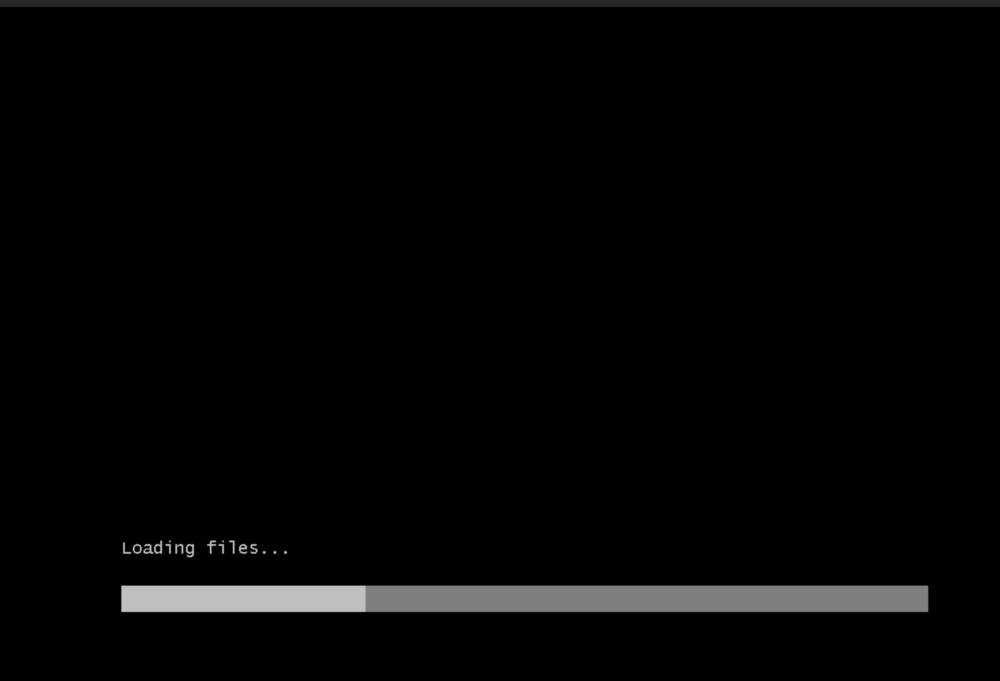
Ah understood. I've tried to remove the BOOT ORDER = 1 from the XML, and now I was able to start the ISO: But after 5min is still on the "loading wheel" - instead of showing the "Windows Setup" which should appear after 5-10sec after Loading Files is finished. i'll try now removing the driver string you mentioned.
-
This is slightly different from what I made: <hostdev mode='subsystem' type='pci' managed='yes'> <driver name='vfio'/> <source> <address domain='0x0000' bus='0x04' slot='0x00' function='0x0'/> </source> <boot order='1'/> <alias name='ua-test'/> <address type='pci' domain='0x0000' bus='0x00' slot='0x04' function='0x0'/> </hostdev> <memballoon model='none'/> </devices> <seclabel type='dynamic' model='dac' relabel='yes'> <label>+0:+100</label> <imagelabel>+0:+100</imagelabel> </seclabel> <qemu:override> <qemu:device alias='ua-test'> <qemu:frontend> <qemu:property name='x-msix-relocation' type='string' value='bar2'/> </qemu:frontend> </qemu:device> </qemu:override> In the code you posted, the driver name was removed, it's on purpose?
-
Update: After waiting long enough the VM starts indeed (strange it need so much time though... like 1/2mins) And I'm not able to start VM with VNC which prevents me to start the ISO - so either the performance are killed for a reason, or something is still missing.
-
I've tried to do something like described here: Which states that you have to call the alias like ua-xxxx So I removed the qemu commandline (removed it), and added directly following in the .xml But it doesn't work - the Vm starts (sort of... it freeze the GUI for 1min or so.. and then you cannot connect to VNC... so probably something is still wrong - or wronger 😞 ) <?xml version='1.0' encoding='UTF-8'?> <domain type='kvm' xmlns:qemu='http://libvirt.org/schemas/domain/qemu/1.0'> <name>test</name> <uuid>c60d6936-9b00-8cdc-788e-e9afe3a7da34</uuid> <metadata> <vmtemplate xmlns="unraid" name="Windows 11" icon="windows11.png" os="windowstpm" webui="" storage="default"/> </metadata> <memory unit='KiB'>57147392</memory> <currentMemory unit='KiB'>57147392</currentMemory> <memoryBacking> <nosharepages/> </memoryBacking> <vcpu placement='static'>8</vcpu> <cputune> <vcpupin vcpu='0' cpuset='9'/> <vcpupin vcpu='1' cpuset='25'/> <vcpupin vcpu='2' cpuset='11'/> <vcpupin vcpu='3' cpuset='27'/> <vcpupin vcpu='4' cpuset='13'/> <vcpupin vcpu='5' cpuset='29'/> <vcpupin vcpu='6' cpuset='15'/> <vcpupin vcpu='7' cpuset='31'/> </cputune> <os> <type arch='x86_64' machine='pc-i440fx-9.2'>hvm</type> <loader readonly='yes' type='pflash' format='raw'>/usr/share/qemu/ovmf-x64/OVMF_CODE-pure-efi-tpm.fd</loader> <nvram format='raw'>/etc/libvirt/qemu/nvram/c60d6936-9b00-8cdc-788e-e9afe3a7da34_VARS-pure-efi-tpm.fd</nvram> </os> <features> <acpi/> <apic/> <hyperv mode='custom'> <relaxed state='on'/> <vapic state='on'/> <spinlocks state='on' retries='8191'/> <vpindex state='on'/> <synic state='on'/> <stimer state='on'/> <vendor_id state='on' value='none'/> </hyperv> </features> <cpu mode='host-passthrough' check='none' migratable='on'> <topology sockets='1' dies='1' clusters='1' cores='4' threads='2'/> <cache mode='passthrough'/> </cpu> <clock offset='localtime'> <timer name='hpet' present='no'/> <timer name='hypervclock' present='yes'/> </clock> <on_poweroff>destroy</on_poweroff> <on_reboot>restart</on_reboot> <on_crash>restart</on_crash> <devices> <emulator>/usr/local/sbin/qemu</emulator> <disk type='file' device='cdrom'> <driver name='qemu' type='raw'/> <source file='/mnt/user/isos/SVR/2025/SW_DVD9_Win_Server_STD_CORE_2025_24H2_64Bit_English_DC_STD_MLF_X23-81891.ISO'/> <target dev='hda' bus='ide'/> <readonly/> <boot order='2'/> <address type='drive' controller='0' bus='0' target='0' unit='0'/> </disk> <disk type='file' device='cdrom'> <driver name='qemu' type='raw'/> <source file='/mnt/user/isos/virtio-win-0.1.266-1.iso'/> <target dev='hdb' bus='ide'/> <readonly/> <address type='drive' controller='0' bus='0' target='0' unit='1'/> </disk> <controller type='pci' index='0' model='pci-root'/> <controller type='ide' index='0'> <address type='pci' domain='0x0000' bus='0x00' slot='0x01' function='0x1'/> </controller> <controller type='virtio-serial' index='0'> <address type='pci' domain='0x0000' bus='0x00' slot='0x03' function='0x0'/> </controller> <controller type='usb' index='0' model='ich9-ehci1'> <address type='pci' domain='0x0000' bus='0x00' slot='0x07' function='0x7'/> </controller> <controller type='usb' index='0' model='ich9-uhci1'> <master startport='0'/> <address type='pci' domain='0x0000' bus='0x00' slot='0x07' function='0x0' multifunction='on'/> </controller> <controller type='usb' index='0' model='ich9-uhci2'> <master startport='2'/> <address type='pci' domain='0x0000' bus='0x00' slot='0x07' function='0x1'/> </controller> <controller type='usb' index='0' model='ich9-uhci3'> <master startport='4'/> <address type='pci' domain='0x0000' bus='0x00' slot='0x07' function='0x2'/> </controller> <interface type='direct' trustGuestRxFilters='yes'> <mac address='52:54:00:41:9c:69'/> <source dev='bond0.10' mode='bridge'/> <model type='virtio-net'/> <address type='pci' domain='0x0000' bus='0x00' slot='0x02' function='0x0'/> </interface> <serial type='pty'> <target type='isa-serial' port='0'> <model name='isa-serial'/> </target> </serial> <console type='pty'> <target type='serial' port='0'/> </console> <channel type='unix'> <target type='virtio' name='org.qemu.guest_agent.0'/> <address type='virtio-serial' controller='0' bus='0' port='1'/> </channel> <input type='tablet' bus='usb'> <address type='usb' bus='0' port='1'/> </input> <input type='mouse' bus='ps2'/> <input type='keyboard' bus='ps2'/> <tpm model='tpm-tis'> <backend type='emulator' version='2.0' persistent_state='yes'/> </tpm> <graphics type='vnc' port='-1' autoport='yes' websocket='-1' listen='0.0.0.0' keymap='fr-ch' sharePolicy='ignore'> <listen type='address' address='0.0.0.0'/> </graphics> <audio id='1' type='none'/> <video> <model type='qxl' ram='65536' vram='16384' vgamem='16384' heads='1' primary='yes'/> <address type='pci' domain='0x0000' bus='0x00' slot='0x1e' function='0x0'/> </video> <hostdev mode='subsystem' type='pci' managed='yes'> <driver name='vfio'/> <source> <address domain='0x0000' bus='0x04' slot='0x00' function='0x0'/> </source> <alias name='ua-test'/> <address type='pci' domain='0x0000' bus='0x00' slot='0x04' function='0x0'/> </hostdev> <memballoon model='none'/> </devices> <qemu:override> <qemu:device alias='ua-test'> <qemu:frontend> <qemu:property name='x-msix-relocation' type='string' value='bar2'/> </qemu:frontend> </qemu:device> </qemu:override> </domain>
-
Saved from the xml view, but still get's overwritten.
-
Thanks SimonF; So I've found in the end where the <hostdev mode='subsystem' type='pci' managed='yes'> is (near the end of the XML), I've tried to add the: <alias name='nvmetest0'/> , (line 129) so my .XML is like that: <?xml version='1.0' encoding='UTF-8'?> <domain type='kvm' xmlns:qemu='http://libvirt.org/schemas/domain/qemu/1.0'> <name>SCCM Workbench</name> <uuid>dcbf45bc-c685-7500-6c4d-7ac79f373e2c</uuid> <description>Windows Server 2025 HyperV</description> <metadata> <vmtemplate xmlns="unraid" name="Windows 11" icon="windows11.png" os="windowstpm" webui="" storage="default"/> </metadata> <memory unit='KiB'>33554432</memory> <currentMemory unit='KiB'>33554432</currentMemory> <memoryBacking> <nosharepages/> </memoryBacking> <vcpu placement='static'>8</vcpu> <cputune> <vcpupin vcpu='0' cpuset='9'/> <vcpupin vcpu='1' cpuset='25'/> <vcpupin vcpu='2' cpuset='11'/> <vcpupin vcpu='3' cpuset='27'/> <vcpupin vcpu='4' cpuset='13'/> <vcpupin vcpu='5' cpuset='29'/> <vcpupin vcpu='6' cpuset='15'/> <vcpupin vcpu='7' cpuset='31'/> </cputune> <os> <type arch='x86_64' machine='pc-i440fx-9.2'>hvm</type> <loader readonly='yes' type='pflash' format='raw'>/usr/share/qemu/ovmf-x64/OVMF_CODE-pure-efi-tpm.fd</loader> <nvram format='raw'>/etc/libvirt/qemu/nvram/dcbf45bc-c685-7500-6c4d-7ac79f373e2c_VARS-pure-efi-tpm.fd</nvram> </os> <features> <acpi/> <apic/> <hyperv mode='custom'> <relaxed state='on'/> <vapic state='on'/> <spinlocks state='on' retries='8191'/> <vpindex state='on'/> <synic state='on'/> <stimer state='on'/> <vendor_id state='on' value='none'/> </hyperv> </features> <cpu mode='host-passthrough' check='none' migratable='on'> <topology sockets='1' dies='1' clusters='1' cores='4' threads='2'/> <cache mode='passthrough'/> </cpu> <clock offset='localtime'> <timer name='hpet' present='no'/> <timer name='hypervclock' present='yes'/> </clock> <on_poweroff>destroy</on_poweroff> <on_reboot>restart</on_reboot> <on_crash>restart</on_crash> <devices> <emulator>/usr/local/sbin/qemu</emulator> <disk type='file' device='cdrom'> <driver name='qemu' type='raw'/> <source file='/mnt/user/isos/SVR/2025/SW_DVD9_Win_Server_STD_CORE_2025_24H2_64Bit_English_DC_STD_MLF_X23-81891.ISO'/> <target dev='hda' bus='ide'/> <readonly/> <boot order='2'/> <address type='drive' controller='0' bus='0' target='0' unit='0'/> </disk> <disk type='file' device='cdrom'> <driver name='qemu' type='raw'/> <source file='/mnt/user/isos/virtio-win-0.1.266-1.iso'/> <target dev='hdb' bus='ide'/> <readonly/> <address type='drive' controller='0' bus='0' target='0' unit='1'/> </disk> <controller type='pci' index='0' model='pci-root'/> <controller type='ide' index='0'> <address type='pci' domain='0x0000' bus='0x00' slot='0x01' function='0x1'/> </controller> <controller type='virtio-serial' index='0'> <address type='pci' domain='0x0000' bus='0x00' slot='0x03' function='0x0'/> </controller> <controller type='usb' index='0' model='ich9-ehci1'> <address type='pci' domain='0x0000' bus='0x00' slot='0x07' function='0x7'/> </controller> <controller type='usb' index='0' model='ich9-uhci1'> <master startport='0'/> <address type='pci' domain='0x0000' bus='0x00' slot='0x07' function='0x0' multifunction='on'/> </controller> <controller type='usb' index='0' model='ich9-uhci2'> <master startport='2'/> <address type='pci' domain='0x0000' bus='0x00' slot='0x07' function='0x1'/> </controller> <controller type='usb' index='0' model='ich9-uhci3'> <master startport='4'/> <address type='pci' domain='0x0000' bus='0x00' slot='0x07' function='0x2'/> </controller> <interface type='direct' trustGuestRxFilters='yes'> <mac address='52:54:00:18:ae:d4'/> <source dev='bond0.10' mode='bridge'/> <model type='virtio-net'/> <address type='pci' domain='0x0000' bus='0x00' slot='0x02' function='0x0'/> </interface> <serial type='pty'> <target type='isa-serial' port='0'> <model name='isa-serial'/> </target> </serial> <console type='pty'> <target type='serial' port='0'/> </console> <channel type='unix'> <target type='virtio' name='org.qemu.guest_agent.0'/> <address type='virtio-serial' controller='0' bus='0' port='1'/> </channel> <input type='tablet' bus='usb'> <address type='usb' bus='0' port='1'/> </input> <input type='mouse' bus='ps2'/> <input type='keyboard' bus='ps2'/> <tpm model='tpm-tis'> <backend type='emulator' version='2.0' persistent_state='yes'/> </tpm> <graphics type='vnc' port='-1' autoport='yes' websocket='-1' listen='0.0.0.0' keymap='fr-ch' sharePolicy='ignore'> <listen type='address' address='0.0.0.0'/> </graphics> <audio id='1' type='none'/> <video> <model type='qxl' ram='65536' vram='16384' vgamem='16384' heads='1' primary='yes'/> <address type='pci' domain='0x0000' bus='0x00' slot='0x1e' function='0x0'/> </video> <hostdev mode='subsystem' type='pci' managed='yes'> <driver name='vfio'/> <alias name='nvmetest0'/> <source> <address domain='0x0000' bus='0x04' slot='0x00' function='0x0'/> </source> <boot order='1'/> <address type='pci' domain='0x0000' bus='0x00' slot='0x04' function='0x0'/> </hostdev> <memballoon model='none'/> </devices> <qemu:commandline> <qemu:arg value='-set'/> <qemu:arg value='device.nvmetest0.x-msix-relocation=bar2'/> </qemu:commandline> </domain> But when I save it, it's reverted without the <alias name='nvmetest0' />
-
Did you had any chance to dig it through? Is there a way I can help you to help me find a solution? 🙂 Thanks in advance for your effort!
-
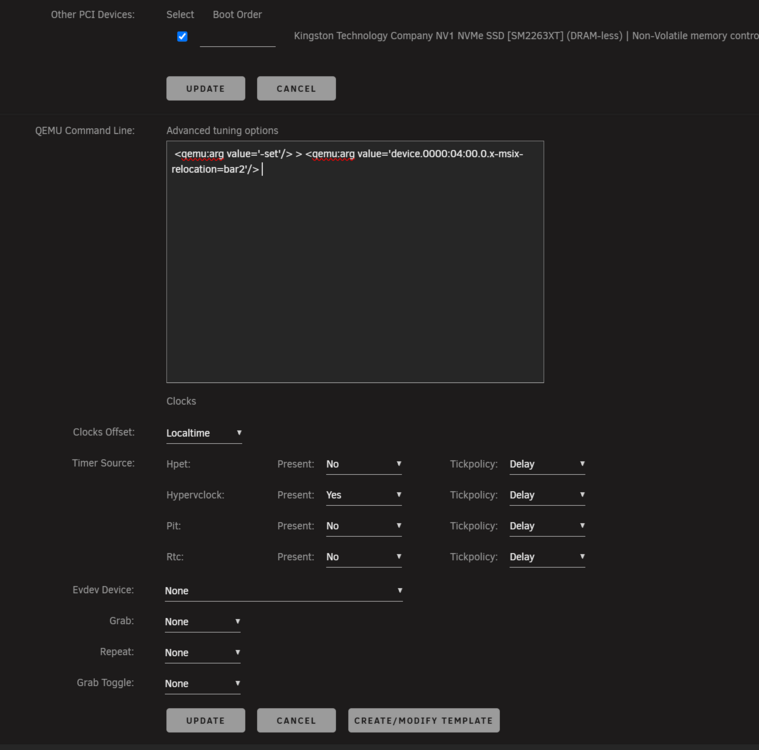
Hello, I've tried what you suggested: I then clicked "update", but it seems not to work. Then I wrote it like this: <qemu:commandline> <qemu:arg value='-set'/> <qemu:arg value='device.0000:04:00.0.x-msix-relocation=bar2'/> </qemu:commandline> And this time the code is kept in the GUI. Unfortunately it tells me: internal error: process exited while connecting to monitor: qemu-system-x86_64: -set device.0000:04:00.0.x-msix-relocation=bar2: there is no device "0000:04:00" defined
-
So I have to retry with the VFIO, and then add the line you wrote in the QEMU Command Line?
-
Thanks for the clarification. Still a little bit odd that it wasn't working as a VFIO though, since it's usable mapping the device path directly, do you think I made something wrong with the VFIO mapping? Or maybe I'm missing something there? The NVME is on it's own group: Mapped, I was able to install Windows SVR2025 on this disk (I've cleared it first). What's a little bit odd is that, when I stopped the VM it's shown as follow in the UD : Two partitions are shown as XFS - which is a little bit unclear to me. EDIT: I saw a threat with issue with passthrough, it seems related to the SM2263XT, and there is a possible workaround, but I dont quite know how to edit the xml in the correct way - and it seems not to be "so stable". So I will try to use the "normal mapping", without VFIO with this drive for the moment, and eventually use another NVME drive. Still wondering on the partitioning FILESYSTEM of the NVME when windows was installed. EDIT2: After redoing the whole thing with Mapped drive at the end it seems to show the right FS:



-
My bad, was a misstip, now with: Is working. But still confused if it the bus has to be SCSI or SATA for a PCI NVME.. EDIT: if bus = scsi, disk is not detected by Windows installer if bus = sata, disk is detected It should be correct with the bus = sata right?



