





hmoney007
Members
-
Joined
-
Last visited
-
Yes I am using the default webui but I do have "dark reader" in firefox installed (but disabled for qbit).
-
so we still have no fix for the qbit torrents all just disappearing? it only happens for me in firefox and not in edge, which makes me think it's a browser specific issue. I see all of these errors in the networking tab in firefox after the page initially loads and i see all torrents then they disappear after a few seconds and i see a stream of these errors shown in the image below. I'm happy to provide any other information that would help solve this. I do not have any other issues with any other containers in unraid nor have i added any new extensions to firefox.
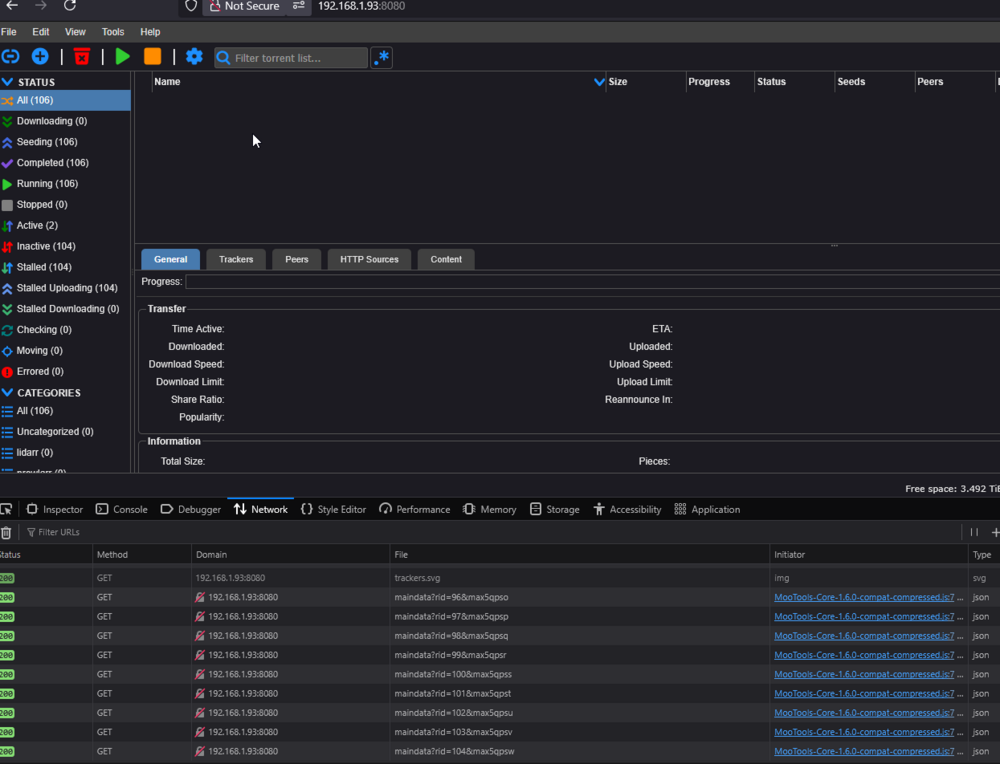
-
Just wanted to follow up - I am still getting 100% cpu usage on lidarr for any cores i give it after somewhere between 1-24 hours of uptime on the container with no errors in logs. Any suggestions?
-
yea this puts any cores i give it at 100%...
-
Hey I am unable to figure out where shipped.json should be moved to. I found it in the "nextcloud/update_somerandomstring/downloads/nextcloud/core" folder but dont know where it needs to be copied to. Appreciate any help. edit: i figured it out. you make a new folder called core and move the shipped.json file into it at appdata/nextcloud/www/nextcloud
-
Same issue here
-
This worked perfectly using the adminer container to drop the two tables. Thanks I still think a monolithic container including mariaDB would be nifty for ghost
-
Nginx is erroring out with this repeated in logs: nginx: [emerg] cannot load certificate "/etc/letsencrypt/live/npm-26/fullchain.pem": BIO_new_file() failed (SSL: error:02001002:system library:fopen:No such file or directory:fopen('/etc/letsencrypt/live/npm-26/fullchain.pem','r') error:2006D080:BIO routines:BIO_new_file:no such file) I woke up to backup/restore v2 completed and no containers/vms exposed. Figured out it was nginx which shit the bed and didnt come back up after backup. Backup simply kills all containers then backs them up then starts again, therefore no changes to my config took place. I tried rolling back to v 1.16.0 with no luck. There is no npm-26 anymore.. that was an old proxy host which is not used anymore. Please let me know what I should do to get this up again *EDIT* - I just went to the "live" folder and copied/pasted another proxy host folder and renamed as npm-26 and now it works. Seems like something is broken on the code side but this is a quick and dirty workaround.
-
Thanks for the detailed response. Yes I did attempt forcing the 4.0 branch but the errors from db were still present. I will do as you suggested and take a fresh backup of the db prior to attempting the fix and report back. I'll also take a look at your suggested replacements for mysql-workbench. On another note i am curious if there would be a major downside to baking mariadb into the container. I noticed my mariadb container uses like 30mb of ram and cpu sits at 0% usage with multiple containers writing to it. Either way, thanks again for the response!
-
I am not sure how to do that. I installed mysql-workbench but it doesnt seem to play nicely with mariadb. Also per the same suggesiton you are mentioning above, the revert to 4.0 was suggested *instead of* touching the database. It would be greatly appreciated if you would provide the command(s) needed to remove the index. edit: when i asked a friend to take a look he wondered if there was an issue with the container provided by you since it "upgrades the base image when pulling a new version". Is this something of concern?
-
I am having the same issues as others above with the lock file. Forcing it to use the 4.0 branch does not bring joy
-
That's awesome! I'll give it a whirl
-
Ah ok, I don't use irc that often and only on freenode. I just figured this would be better than using a bouncer.
-
Can I request that you add VPN functionality similar to your deluge and other baked-in vpn containers?
-
3 years later, are there any changes and/or additions to the VM settings available in unRAID's vm creation template that you'd suggest?
