





iarp
Members
-
Joined
-
Last visited
-
Host machine's 443 is in use so i stick with the default 51820 for the local endpoint. Externally though I want 443 as 51820 is blocked on many of the wifi's i've connected to in the past and 443 works. When you generate a configuration file for a client it uses the Local Endpoint values which don't match the external values and require manual editing. I ended up running into this issue 3 times with TVs where you can't edit the tunnel on the TV, you have to edit the file before getting it onto the TV which was problematic when trying to use my phone for that purpose as well. It would be nice to have an aliased port that is used just in the generation of the peer configuration.
-
I followed the instructions to zero out a data drive for removal while keeping parity ( https://docs.unraid.net/unraid-os/manual/storage-management/#notes-1 ). It just finished the zeroing process and the next instruction is to stop the array and all I got was: Nov 11 21:32:07 storage emhttpd: Unmounting disks... Nov 11 21:32:07 storage emhttpd: shcmd (602): umount /mnt/disk1 Nov 11 21:32:07 storage root: umount: /mnt/disk1: not mounted. Nov 11 21:32:07 storage emhttpd: shcmd (602): exit status: 32 Nov 11 21:32:07 storage emhttpd: Retry unmounting disk share(s)... Nov 11 21:32:12 storage emhttpd: Unmounting disks... Nov 11 21:32:12 storage emhttpd: shcmd (603): umount /mnt/disk1 Nov 11 21:32:12 storage root: umount: /mnt/disk1: not mounted. Nov 11 21:32:12 storage emhttpd: shcmd (603): exit status: 32 Nov 11 21:32:12 storage emhttpd: Retry unmounting disk share(s)... Nov 11 21:32:17 storage emhttpd: Unmounting disks... Nov 11 21:32:17 storage emhttpd: shcmd (604): umount /mnt/disk1 Nov 11 21:32:17 storage root: umount: /mnt/disk1: not mounted. Thankfully my array is not set to auto start so i issued the reboot command which after a couple minutes forced it to stop its endless looping and restarted the server. I completed the following instructions and removed the drive without issue. ** I attempted to umount it myself and it did confirm it wasn't mounted. I had thought about mounting something fake in its place just to get the script to move along but i worried that might do something unintended. Also I'll add that the command given in the manual and the user script had dd targeting /dev/md1 but i had to target /dev/md1p1 in order to get it to actually run. I have it running a correcting parity check right now, 200GB into 4TB and 0 errors thus far, I'll report in the morning if it finds anything wrong.
-
Re-reading the quickstart, Remote Access to LAN is just server and LAN. I want server, lan, wan.
-
Before reading below: I wrote the below information before coming to a realization just now. Re-reading the quickstart, Remote tunneled access does NOT seem to be granting LAN access. I'm wanting my clients access to LAN and internet tunneling, but none of the dropdown selections seem to offer this. If that is the case then I'll drop this post and the issue because then nothing is wrong by unraids standards. ---- After a bit more testing I've come to realize I cannot access the LAN using Remote Tunneled Access. The reason I couldn't access websites is because DNS wasn't passing through to 192.168.2.1. When i updated the client to 8.8.8.8 it worked for domain names. Still unable to access LAN. As per MainFreezer's recommendation, adding the vhost0 to PostUp and PostDown allows LAN access. PostUp=iptables -t nat -A POSTROUTING -s 10.253.2.0/24 -o vhost0 -j MASQUERADE PostDown=iptables -t nat -D POSTROUTING -s 10.253.2.0/24 -o vhost0 -j MASQUERADE This fixed everything previously because I was still using my routers dns which running the above allowed access to the LAN. Aside from those two entries, I have not modified anything else.
-
You're just modifying the iptables, which I can do in console.
-
I ran the following, no luck. iptables -t nat -A POSTROUTING -s 10.253.0.0/24 -o eth0 -j MASQUERADE Just tried wg0 instead of eth0 as well.
-
I've been banging my head against a wall here for days now only to figure this out just now. If I disable docker from starting and restart my machine, wireguard clients set to Remote tunneled access can connect and the connection goes through the server just fine. However once i enable docker, the connection dies. We can still access the internal server itself but no LAN or WAN access. Unraid 6.12.4 eth0 bonding/bridging = No. There is an eth1 but its unused. storage-diagnostics-20230927-1014.zip
-
Excessive reading and writing of a usb stick isn't an issue?
-
I upgraded about a week ago, I'm already setup with dual nic and docker is on its own so I wasn't worried about the macvlan issue. I decided to redo my cache drive as zfs and lost my docker in doing so. Reconfigured and reinstalled everything and I'm back in business. That was two days ago now. I've just noticed that the reads on flash are super high, like in the millions and almost a constant 1.5MB/s with jumps to 5MB/s. I went into terminal and started inotifywait --timefmt %c --format '%T %_e %w %f' -mr /boot and the following is the output Sun Aug 20 13:23:01 2023 ACCESS /boot/ bzfirmware Sun Aug 20 13:23:01 2023 ACCESS /boot/ bzfirmware Above repeats 80 more times... Sun Aug 20 13:23:01 2023 ACCESS /boot/ bzfirmware Sun Aug 20 13:23:01 2023 ACCESS /boot/ bzfirmware Sun Aug 20 13:23:01 2023 ACCESS /boot/ bzfirmware Sun Aug 20 13:23:01 2023 ACCESS /boot/config/plugins/dynamix/ dynamix.cfg Sun Aug 20 13:23:01 2023 ACCESS /boot/config/ docker.cfg Sun Aug 20 13:23:01 2023 ACCESS /boot/config/plugins/dynamix/ monitor.ini Sun Aug 20 13:23:02 2023 ACCESS /boot/config/plugins/dynamix.my.servers/ myservers.cfg Sun Aug 20 13:23:02 2023 ACCESS_ISDIR /boot/ config Sun Aug 20 13:23:02 2023 ACCESS_ISDIR /boot/config/ Sun Aug 20 13:23:02 2023 ACCESS /boot/config/ Pro.key Sun Aug 20 13:23:02 2023 ACCESS /boot/config/ Pro1.key Sun Aug 20 13:23:02 2023 ACCESS_ISDIR /boot/ config Sun Aug 20 13:23:02 2023 ACCESS_ISDIR /boot/config/ Sun Aug 20 13:23:02 2023 ACCESS /boot/config/shares/ CommunityApplicationsAppdataBackup.cfg Sun Aug 20 13:23:02 2023 ACCESS /boot/config/shares/ FRS.cfg Sun Aug 20 13:23:02 2023 ACCESS /boot/config/shares/ appdata.cfg Sun Aug 20 13:23:02 2023 ACCESS /boot/config/shares/ archived.cfg Sun Aug 20 13:23:02 2023 ACCESS /boot/config/shares/ backup.cfg Sun Aug 20 13:23:02 2023 ACCESS /boot/config/shares/ clonezilla.cfg Sun Aug 20 13:23:02 2023 ACCESS /boot/config/shares/ development.cfg Sun Aug 20 13:23:02 2023 ACCESS /boot/config/shares/ docker.cfg Sun Aug 20 13:23:02 2023 ACCESS /boot/config/shares/ documents.cfg Sun Aug 20 13:23:02 2023 ACCESS /boot/config/shares/ downloads.cfg Sun Aug 20 13:23:02 2023 ACCESS /boot/config/shares/ family.cfg Sun Aug 20 13:23:02 2023 ACCESS /boot/config/shares/ games.cfg Sun Aug 20 13:23:02 2023 ACCESS /boot/config/shares/ gitea.cfg Sun Aug 20 13:23:02 2023 ACCESS /boot/config/shares/ iansdocs.cfg Sun Aug 20 13:23:02 2023 ACCESS /boot/config/shares/ music.cfg Sun Aug 20 13:23:02 2023 ACCESS /boot/config/shares/ recordings.cfg Sun Aug 20 13:23:02 2023 ACCESS /boot/config/shares/ system.cfg Sun Aug 20 13:23:02 2023 ACCESS /boot/config/shares/ temp_data.cfg Sun Aug 20 13:23:02 2023 ACCESS /boot/config/shares/ tvshows.cfg Sun Aug 20 13:23:02 2023 ACCESS /boot/config/shares/ veeam.cfg Sun Aug 20 13:23:02 2023 ACCESS /boot/config/shares/ video.cfg Sun Aug 20 13:23:02 2023 ACCESS /boot/config/shares/ webserver_media.cfg Sun Aug 20 13:23:02 2023 ACCESS /boot/config/shares/ youtube.cfg ^C That bzfirmware followed by reading of the share config files is over and over and over again every two seconds. I stopped docker, still happening. I uninstalled all my plugins and restarted, still happening. The Open Files plugin shows nothing using any of the files listed above. I stopped docker again and stopped the array, its still reading from flash constantly. So i decided to just start killing processes within htop that could've been related to anything to do with the boot drive. Killing emhttpd stopped the excessive readings. On a fresh boot or restart, the ACCESS /boot/config/shares/* and ACCESS config/pro.key are checked every second. But the bzfirmware is not constantly read. It's usually a few hours after startup that this issue starts.
-
I'm just curious about the dashboard display of System Memory stats. I have 16 GiB installed, 15.5 GiB Usable. The RAM tends to sit around 80% (12.4 GiB) and ZFS is almost always at 100% (2 GiB). Does the RAM bar include the 2 GIB used by ZFS, or is the RAM bar always going to show 2 GiB free but its actually used by ZFS?
-
I'm unsure where else to put this post as no other forums seem to fit the bill. https://unraid.net/product/gamers https://unraid.net/product/data-storage-users https://unraid.net/product/multi-os-users https://unraid.net/product/digital-media-mavericks On those 4 pages you have links to lime-technology.com/forums/ which redirects to unraid.net/forums/ which breaks at this point with no redirection to forums.unraid.net. It will work as long as the person knows to replace unraid.net/forums/ with forums.unraid.net.
-
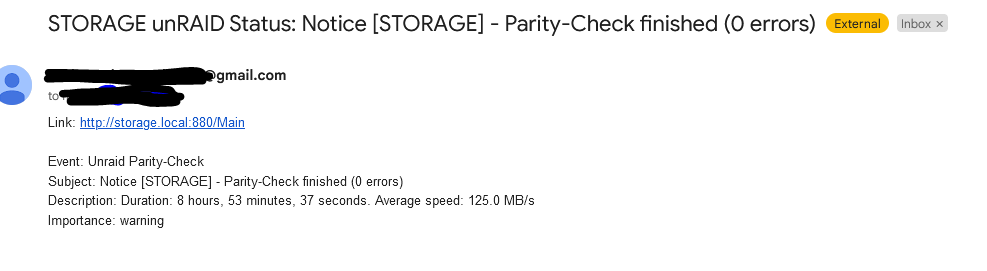
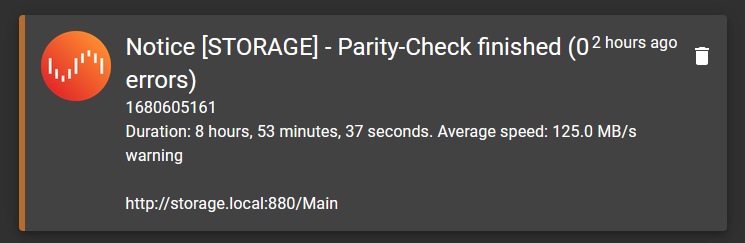
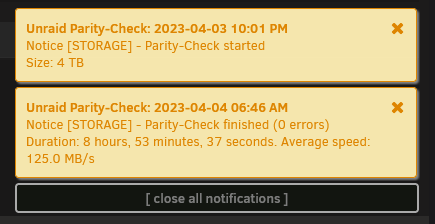
Parity check happened last night, I'm setup to get email, gotify, and browser based notifications. I noticed today that the email, gotify, and browser messages all state 0 errors. The Main tab and the History modal both states 2 errors. I'm more inclined to believe the Main and History over the notifications. storage-diagnostics-20230404-0908.zip


-
Setting disable_xconfig=true within /boot/config/plugins/nvidia-driver/settings.cfg solved this.
-
Unraid 6.11.5 Motherboard: ASUS P8Z68-V PRO GEN3 - Initial graphics adapter is set to iGPU - Legacy boot mode PCI GPU: NVIDIA Quadro P400 - installing driver latest: v525.78.01 with nvidia-driver plugin - intel_gpu_top is not installed. - /boot/config/modprobe.d/i915.conf exists as an empty file to enable intel drivers as per these instructions - I tried adding nomodeset to the boot append options I've tried a number of other settings that I've now forgotten. All I'm getting is a black screen with a solid, not blinking, cursor in the top left corner. I'm wanting unRAID on igpu leaving the p400 for jellyfin. What else can I do? It works if I remove nvidia-plugin and prevent the driver from installing.
-
It won't. The move script that mover uses is not standard, its custom written and seems to copy to .partial, deletes the original and then renames the partial to the real name. That renaming does not trigger inotifywait.


